
![[XFA] Exclude Subcategory resources from list - XF2](/community/data/resource_icons/6/6830.jpg?1792353717)
- Compatible XF 2.x versions
- 2.0
- 2.1
- 2.2
- 2.3
- Additional requirements
- XenForo Resource Manager 2.0.1+
Keep every resource category tidy. On a category page, your members now see only the resources that belong to that category, instead of a long list mixed with everything from its subcategories. You choose where it applies, and visitors can bring the subcategory resources back with one click if you let them.
Perfect for resource sites with deep category trees, download libraries and marketplaces where each category deserves its own clear list.
 What's new in 2.1.0
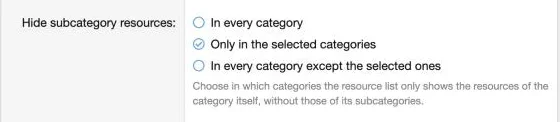
 Choose where it applies: hide subcategory resources in every category, only in the categories you select, or in every category except the ones you select.
 "Include subcategories" checkbox: visitors can tick it in the category filters menu to see subcategory resources again, and their choice stays active when they change page or sort order. You can switch this checkbox off if you prefer a fixed list.
 Filters that match the list: the prefix and type filters now show only what applies to the category itself, so visitors are never offered a filter that returns nothing.
 Features
Cleaner category pages
 Only the category's own resources: each category list shows just the resources posted in that category.
 Easier browsing: members move down into subcategories on purpose, instead of scrolling through a mixed list.
 Works right away: install it and your category pages are updated, with no template editing needed.
Control for admins
 Every category: apply the clean list to your whole resource section.
 Selected categories only: keep core behavior everywhere else.
 Everything except selected categories: exclude just the few categories where you still want the combined list.
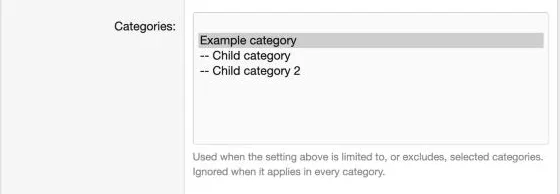
 Simple settings: pick the mode and your categories from one options page, in the Resource Manager group.
Freedom for your visitors
 Include subcategories on demand: a checkbox in the filters menu brings back the subcategory resources.
 Choice is remembered while browsing: it carries through pagination and sorting.
 Optional: turn the checkbox off to keep the list the same for everyone.
Filters that make sense
- Category prefixes only: the filters panel lists just the prefixes available in the category you are viewing.
 Type filter when it applies: the type filter appears only in categories where it is relevant.
 XenForo integration
 Resource Manager: works with your existing categories, prefixes, sorting and pagination.
 RM Multiple Categories Resources: compatible.
 Quick facts
- Requires: XenForo Resource Manager. No other add-on is needed.
 Install: step by step instructions are in the readme.
 Support: visit the support forum.
 Ready to clean up your categories?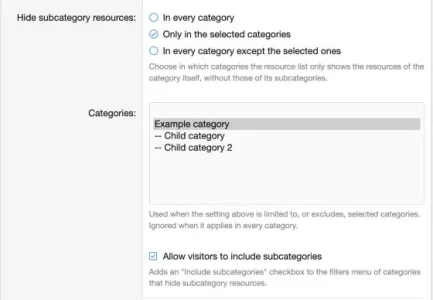


![[XFA] RM Marketplace/Shop - XF2](/community/data/resource_icons/6/6064.jpg?1791757902)
![[XFA] RM Marketplace/Shop - XF2 - Cart plugin](/community/data/resource_icons/9/9784.jpg?1745174668)
![[XFA] RM Marketplace/Shop - XF2 - Affiliate system plugin](/community/data/resource_icons/9/9866.jpg?1743350593)
![[XFA] RM Donations - XF2](/community/data/resource_icons/7/7072.jpg?1792622301)
![[XFA] RM Multiple Categories Resources - XF2](/community/data/resource_icons/7/7863.jpg?1792619019)