- Compatible XF 2.x versions
- 2.0
- 2.1
- 2.2
- 2.3
- License
- MIT License
 XenForo XML Global Translator & Cleaner
A powerful, multi-threaded GUI desktop application designed specifically to translate XenForo language XML files without breaking internal variables, HTML tags, or placeholders.
 Features
 Beautiful GUI Interface: Easy to use, no command-line knowledge needed.
 Multi-Engine Support: Choose between Google Translate (100% Free), DeepL API, and Gemini 2.5 Flash API.
 Smart Placeholder Protection: Automatically acts as an "X-Ray" to shield XenForo variables (e.g., {name}, {title}) and HTML tags (, ) from being corrupted by the translation API.
 Scope Filtering: Choose to translate only Front-end phrases, Admin Panel phrases, or the entire file.
 Multi-Threading: Adjustable speeds (1 to 20 threads) to balance speed and API rate limits.
 Auto-Resume: Progress is saved in real-time. If the API hits a rate limit or disconnects, simply run the tool again to resume exactly where it left off.
 Auto RTL Support: Automatically sets text_direction="RTL" for Right-to-Left languages.
 Supported Languages
This tool is pre-configured with optimized prompts and routing for the following languages:
Language
Code
RTL/LTR
Recommended Engine
Urdu
ur
RTL
Google Free / Gemini
Arabic
ar
RTL
Google Free / Gemini
Persian
fa
RTL
Google Free / Gemini
Pashto
ps
RTL
Google Free / Gemini
Sindhi
sd
RTL
Google Free / Gemini
Punjabi (Gurmukhi)
pa
LTR
Google Free / Gemini
French
fr
LTR
DeepL / Google Free
German
de
LTR
DeepL / Google Free
Spanish
es
LTR
DeepL / Google Free
Italian
it
LTR
DeepL / Google Free
Russian
ru
LTR
DeepL / Google Free
Step-by-Step Usage GuideStep 1 — Export your XenForo language file (CRUCIAL)
Log in to your XenForo Admin Panel.
Navigate to Appearance → Languages.
Click the Export button on your base language (e.g., English).
 IMPORTANT: You must check the box that says "Include unmodified" (or Untranslated). If you skip this, the tool will say "0 phrases found" because XenForo won't export the English words.
Save the downloaded .xml file to your computer.
Step 2 — Run the Translator
For Windows Users:
Simply double-click the run.bat file.
It will automatically check for Python, install the required libraries (PyQt6, requests), and launch the graphical interface.
For Mac/Linux Users:
Open your terminal in the extracted folder.
Run: pip install PyQt6 requests
Run: python cleaner.py
Step 3 — Configure and Translate
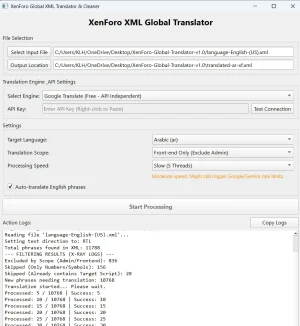
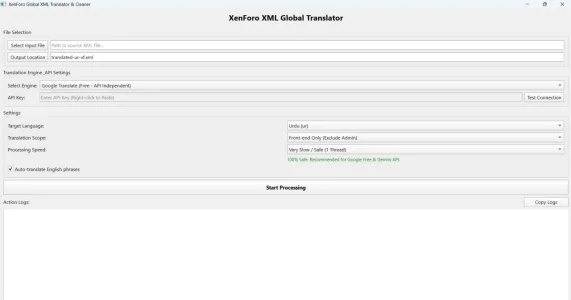
Once the application opens, follow these settings:
File Selection:
Click Select Input File and choose the XML file you downloaded in Step 1.
The Output Location will be generated automatically (you can change it if you want).
Translation Engine & API:
Google Translate: 100% Free, no API key required.
DeepL: Best for European languages (Requires a DeepL Auth Key).
Gemini API: Best for Eastern/RTL languages context (Requires a free Google Studio Gemini Key).
Enter your API Key if you chose DeepL or Gemini. You can click "Test Connection" to verify it.
Settings:
Target Language: Select the language you want to translate to.
Translation Scope: Choose if you want to translate the "Whole File", just the "Front-end" (what users see), or just the "Admin Panel".
Processing Speed:
Free APIs (Google/Gemini): Set this to 1 Thread (Very Slow) or 5 Threads to avoid being temporarily banned (Rate Limit 429).
Paid APIs: You can safely use 10 to 20 threads for massive speed.
Click Start Processing and watch the Action Logs!
Step 4 — Import back into XenForo
Once the software says "TRANSLATION COMPLETE", go back to your XenForo Admin Panel (Appearance → Languages).
Click Import (top right corner).
Choose the newly generated output .xml file (e.g., translated-ur-xf.xml).
Click Import.
(Optional) Click the pencil icon next to your new language and check "Set as default".
 Troubleshooting
Problem
Solution
"0 phrases found in the XML file!"
You didn't check the "Include unmodified" box when exporting from XenForo. Go back to Step 1.
"API Error 429: Too Many Requests"
You are translating too fast. The free Gemini/Google APIs have strict rate limits. Lower the 'Processing Speed' in the app to "1 Thread" and try again.
App stops translating midway?
Don't panic. The tool saves progress locally. Just click "Start Processing" again and it will skip the already translated phrases and resume where it left off.
XenForo: "The uploaded file is not a valid language XML"
The output file might be incomplete if you force-closed the app. Re-run the translation to let it finish properly.
 Resetting Progress
If you want to start a translation completely from zero and clear the auto-save cache, simply double-click the api-reset.bat file.
 License
This project is licensed under the MIT License.