
![[XenCustomize] Reminders Made Simple](/community/data/resource_icons/10/10632.jpg?1785372250)
- Compatible XF 2.x versions
- 2.3
- Additional requirements
- XenCustomize Core Library 1.0.2+
- License
- Single Use License (1 License, 1 website), https://xencustomize.com/about/license-agreement/
- Updates duration
- 6 Months / $22.75 Renewal / $0 Branding Removal
- Visible branding
- Yes, but removable without payment
 XenCustomize Reminders Made Simple for XenForo 2.3
Bring a polished reminder app experience directly into XenForo, with personal reminders, content-linked reminders, labels, recurring schedules, snooze, alerts, emails, automatic thread follow-ups, and wide content type support.Reminders Made Simple adds a complete XenForo-native reminder system for members who want to remember important content, tasks, follow-ups, conversations, resources, events, media, projects, and personal notes without leaving your community.
Instead of relying on bookmarks, browser notes, mobile apps, or memory, users can create real scheduled reminders inside XenForo. A reminder can be a simple personal note, or it can be attached directly to supported XenForo content so the user can return to the right thread, post, profile post, conversation message, resource, media item, event, holiday, news item, or project at the right time.
This add-on was built with the same care, passion, and attention to detail that XenCustomize has been known for since launching in 2023. Reminders Made Simple was developed with that same long-term mindset: native XenForo behavior, thoughtful UX, flexible architecture, and practical features that are useful from the first release.
 Key Benefits
Give members a real reminder system inside XenForo instead of only saved bookmarks Attach reminders to content so users can return to exactly what matters
 Create standalone personal reminders for tasks that are not tied to any content
 Support recurring reminders with daily, weekly, monthly, and yearly repeat options
 Let users snooze reminders and come back to them later
 Notify users with XenForo alerts when reminders are due
 Send email reminders when users want off-site delivery
 Organize reminders with bookmark-style labels
 Provide fast access from the account page and visitor menu
 Optionally create automatic thread follow-up reminders for selected forums
 Feels native to XenForo with permissions, options, phrases, templates, content handlers, cron jobs, alerts, emails, and standard UI behavior
 Why Reminders Made Simple?
Bookmarks are useful for saving content, but they are not reminders.A bookmark says, "I may want to find this later."
A reminder says, "Bring this back to me at the right time."
That difference matters for support forums, product communities, client portals, resource sites, media communities, event communities, private staff areas, project boards, and busy member accounts where people constantly need to follow up on something.
Reminders Made Simple turns XenForo into a more useful daily workspace by helping users remember what they planned to do next.
 Features
Personal reminder systemMembers get a dedicated reminder system inside their XenForo account. They can create reminders with a title, due date and time, notes, labels, delivery preferences, repeat settings, status, and snooze state.
Reminders can be used for:
- Following up on a support thread
- Replying to a post later
- Checking a resource update
- Returning to a conversation message
- Remembering an event, holiday, project, or news item
- Tracking a personal task that is not connected to content
Standalone and content-linked remindersUsers can create reminders without linking them to anything, or create reminders directly from supported content pages.
Standalone reminders open the reminder editor directly. Content-linked reminders open the linked content in a new tab from the reminder list, making it clear when a reminder points to real content.
 One active reminder per user per content item
The system avoids confusing duplicate active reminders for the same user and content. If a user already has an active reminder for a supported content item, the existing reminder is edited instead of creating another duplicate.
After a reminder is completed, expired, or deleted, the user may create a new reminder for that content again.
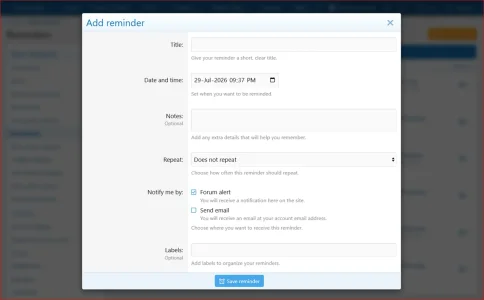
Clean add/edit reminder formThe reminder form is designed to feel native to XenForo while still behaving like a proper reminder app.
Users can configure:
- Title
- Date and time
- Notes
- Repeat behavior
- Alert delivery
- Email delivery
- Labels
Recurring Reminders
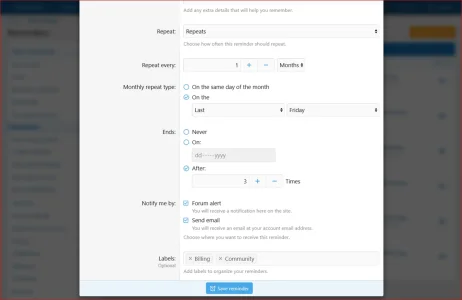
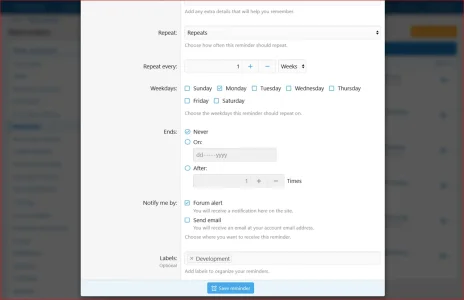
Repeat remindersUsers can create one-time reminders or recurring reminders.
Recurring reminders can repeat every:
- X days
- X weeks
- X months
- X years
 Weekly repeat options
Weekly reminders can be limited to selected weekdays. For example, a user can create a reminder every Monday, Wednesday, and Friday.
 Monthly repeat options
Monthly reminders can repeat:
- On the same day of the month
- On a relative day such as the first Monday or last Friday
 Repeat duration controls
Recurring reminders can:
- Continue forever
- End on a selected date
- End after a set number of occurrences
 Automatic recurring processing
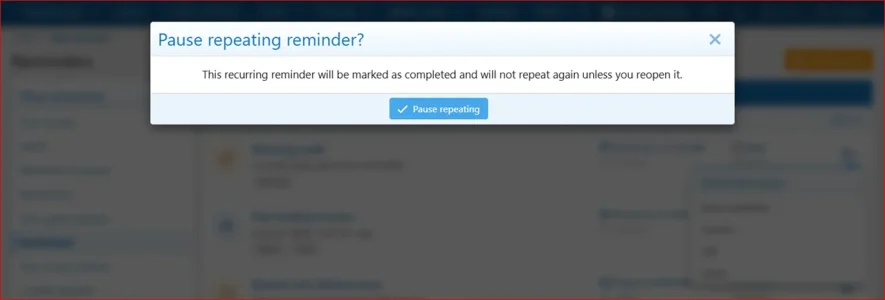
When a recurring reminder is due, the system can notify the user and then schedule the next occurrence automatically.
Snooze Workflow
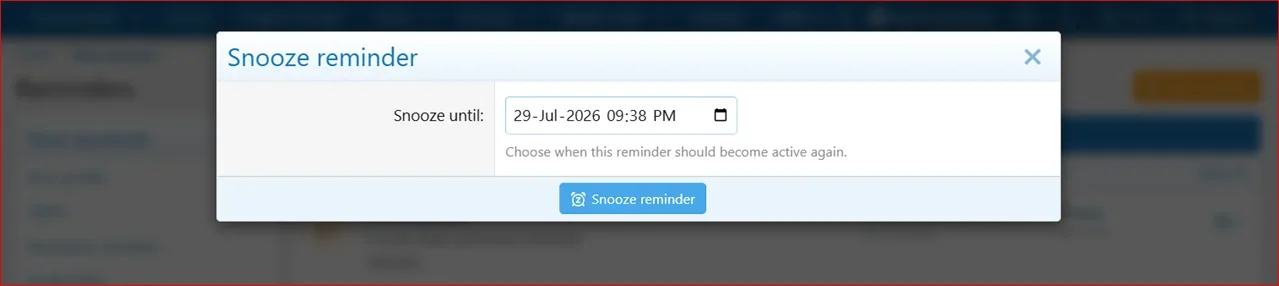
Snooze remindersUsers can snooze active reminders to a future date and time when they are not ready to act yet.
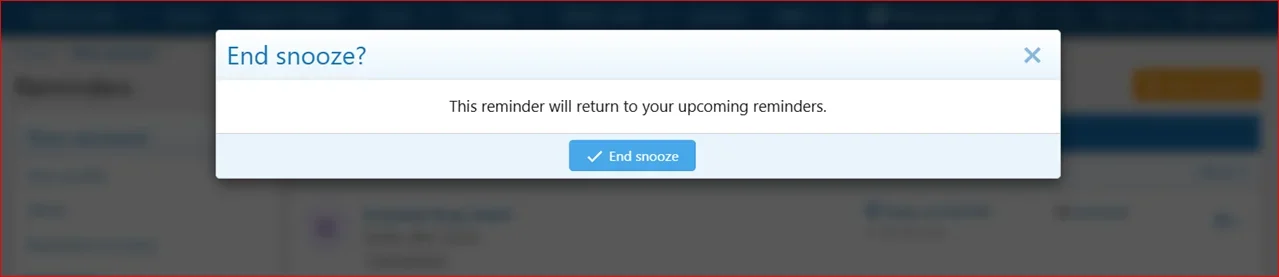
 End snooze
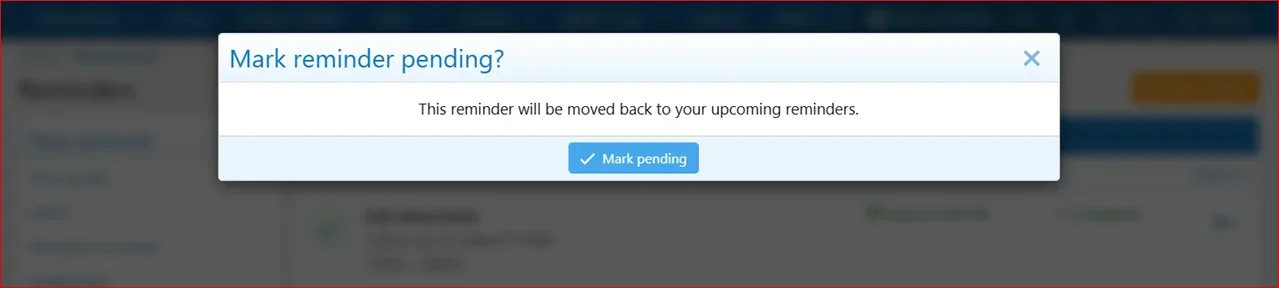
Snoozed reminders can be manually moved back to pending when the user wants to bring them back into the normal upcoming list.
Clear snoozed stateSnoozed reminders have their own visual state and dedicated Snoozed tab, so users can easily see what has been pushed forward.
Alerts and Emails
XenForo alertsReminders can create XenForo alerts when they become due. Alert text is clean and user-focused, such as "Your reminder is due".
Reminder alerts use a custom reminder icon and open the most useful target:
- Content reminders open the linked content when available
- Standalone personal reminders open the account reminder list and highlight the correct reminder
Email remindersUsers can choose to receive reminder emails in addition to, or instead of, XenForo alerts.
 User-controlled delivery per reminder
Each reminder can send:
- Forum alert only
- Email only
- Both forum alert and email
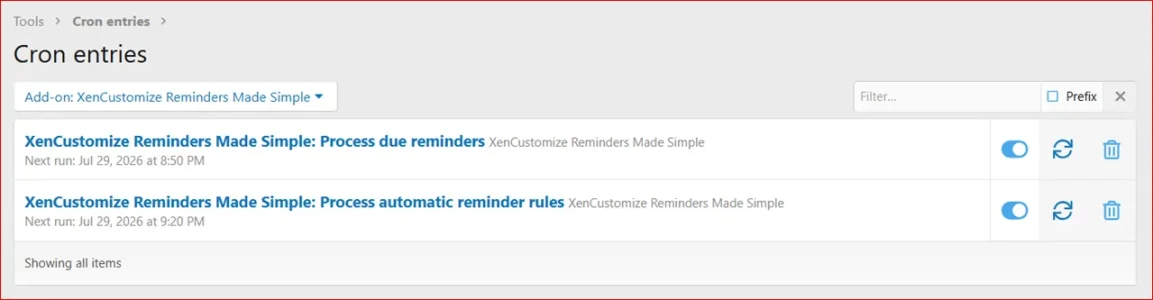
 Cron-powered due reminder processing
Due reminders are processed automatically through XenForo's cron system.
Labels and Filtering
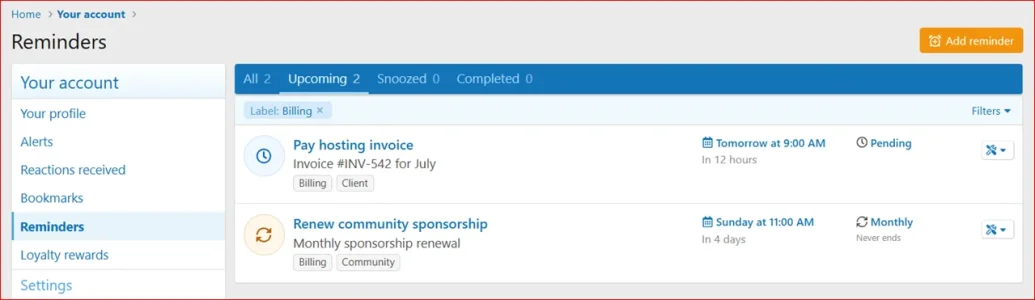
Bookmark-style labelsReminders include bookmark-style labels, so users can organize reminders naturally without needing a heavy category system.
Users can add labels such as:
- Billing
- Client
- Support
- Development
- Personal
- Urgent
 Label filtering
The account reminders page and visitor menu reminders tab both support label filtering.
 Status tabs
The reminders page includes clear tabs:
- All
- Upcoming
- Snoozed
- Completed
 Reminder-App Style User Experience
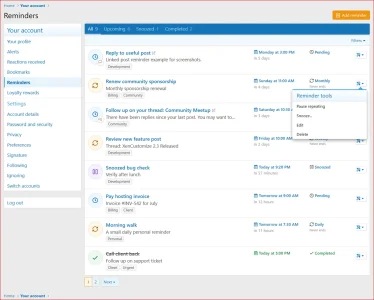
 Modern reminder list
The account reminders list is designed to feel closer to a reminder app than a bookmark list.
Reminder rows show:
- Reminder title
- Notes or linked-content snippet
- Labels
- Due date and time
- Relative timing such as "In 2 days"
- Status or repeat summary
- Quick tools menu
- Content type indicator where applicable
 Visual reminder states
Reminders have distinct visual states for:
- Pending
- Recurring
- Snoozed
- Overdue
- Completed
Mobile-friendly layoutThe reminder list adapts for mobile screens with compact rows, readable due dates, inline timing text, and accessible tools.
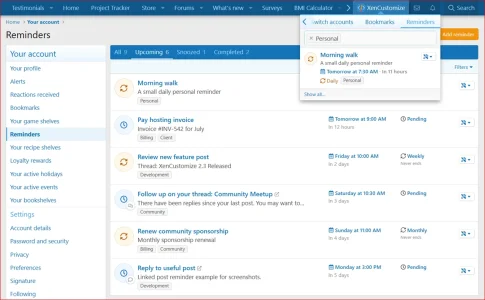
Visitor menu reminders tabA dedicated Reminders tab is added to the visitor menu beside Bookmarks. This gives users quick daily access without always visiting the full account reminders page.
The visitor menu tab includes a compact reminder list, label filtering, reminder status, due time, repeat summary, and quick actions where appropriate.
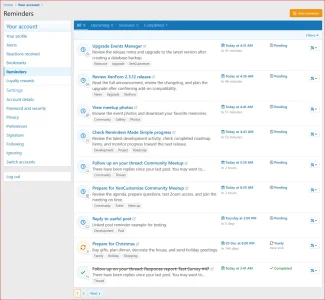
Supported Content Types
Reminders Made Simple includes broad first-release content support.Core XenForo support:
- Threads
- Posts
- Profile posts
- Profile post comments
- Conversation messages
- XenForo Resource Manager resources
- XenForo Resource Manager resource updates
- XenForo Media Gallery media items
- XenForo Media Gallery albums
- Events Manager events
- Holidays Manager holidays
- News Publisher news items
- Project Tracker projects
 Native Content Integration
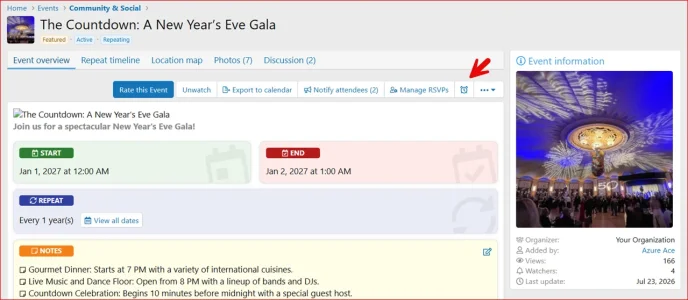
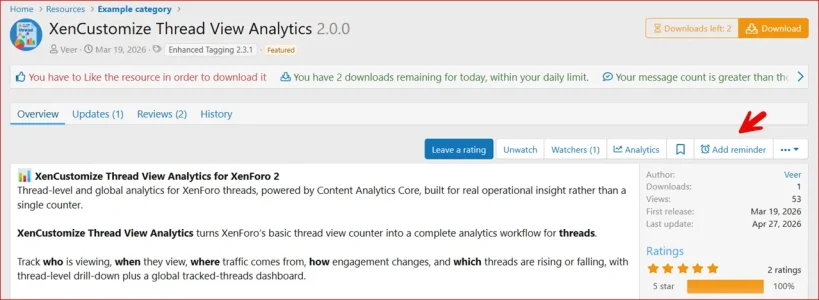
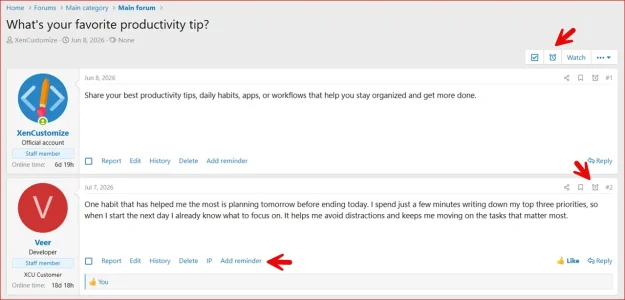
Reminder buttons and links where users need themReminder actions appear in natural XenForo locations near existing content tools.
Depending on the content type, users may see:
- A text action link near Report, Edit, Delete, IP, and other content actions
- An icon-only reminder button near Watch, Bookmark, Share, and other content buttons
Linked content opens clearlyContent-linked reminders open the linked content in a new tab from the reminder list and show an external-link indicator, so users understand they are leaving the reminder list.
 Safe unavailable-content behavior
If linked content is no longer available to the user, the reminder no longer exposes unavailable content links or titles.
Automatic Thread Follow-Up Reminders
Optional automatic follow-up remindersAdmins can enable automatic thread follow-up reminders for selected forums.
This is useful for communities where thread starters should be reminded when people reply after they have been inactive.
Example:
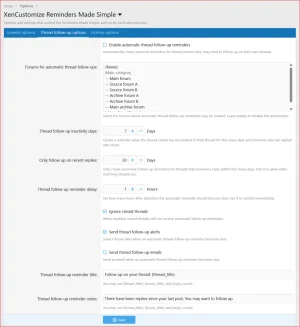
Admin-controlled automationAdmins can configure:
- Whether automatic thread follow-up reminders are enabled
- Which forums are eligible
- How many days the thread starter may be inactive before a reminder is created
- How recent replies must be before a reminder is created
- Whether closed threads are ignored
- Whether automatic reminders send alerts
- Whether automatic reminders send emails
- Automatic reminder title and note wording
 Duplicate protection
The automation is designed to avoid creating repeated duplicate reminders for the same situation.
Separate automation foundationAutomatic reminders are handled separately from normal manual reminder management, keeping the user-created reminder system clean while giving admins a powerful optional workflow.
 Admin Controls
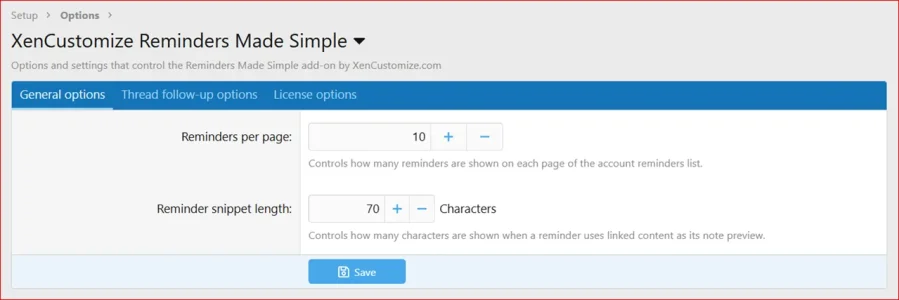
Admins can configure important behavior from the XenForo Admin CP.Included options:
- Reminder list items per page
- Linked-content snippet length
- Automatic thread follow-up settings
- Automatic follow-up delivery settings
- License options
 Simple user permission
A single user permission controls whether members can use the reminder system. This keeps permission management simple and realistic because reminders are personal to each user.
Style and Theme Support
Style properties includedReminder icons use style properties for pending, completed, snoozed, overdue, and recurring states.
This helps style owners tune the reminder list for light styles, dark styles, and custom themes.
XenForo-native stylingThe add-on follows XenForo UI patterns for buttons, menus, tabs, filters, overlays, alerts, account pages, visitor menu tabs, and responsive behavior.
Specifications
- Supported XenForo version: XenForo 2.3.0+
- Standalone personal reminders: Yes
- Content-linked reminders: Yes
- One active reminder per user/content item: Yes
- Reminder labels: Yes
- Label filtering: Yes
- Account reminders page: Yes
- Visitor menu Reminders tab: Yes
- AJAX account tabs: Yes
- Tabs with counts: All, Upcoming, Snoozed, Completed
- Reminder states: Pending, recurring, snoozed, overdue, completed
- One-time reminders: Yes
- Recurring reminders: Daily, weekly, monthly, yearly
- Weekly weekday selection: Yes
- Monthly relative repeat support: Yes
- Repeat end controls: Never, on date, after occurrences
- Snooze workflow: Yes
- Forum alerts: Yes
- Email reminders: Yes
- Due reminder cron: Yes
- Automatic thread follow-up reminders: Yes
- Core XenForo content support: Threads, posts, profile posts, profile post comments, conversation messages
- XFRM support: Resources and resource updates
- XFMG support: Media items and albums
- XenCustomize Events Manager support: Events
- XenCustomize Holidays Manager support: Holidays
- XenCustomize News Publisher support: News items
- XenCustomize Project Tracker support: Projects
- User group permission: Yes
- Style properties: Yes
- Translation-ready phrases: Yes
 Use Cases
- Support forums where users need to follow up on threads later
- Product communities where customers want to remember resources, updates, or support posts
- Private communities where members need personal task reminders
- Staff or team forums where conversation follow-up matters
- Project communities using XenCustomize Project Tracker
- Event communities using XenCustomize Events Manager
- News communities using XenCustomize News Publisher
- Media communities using XenForo Media Gallery
- Resource sites using XenForo Resource Manager
- Forums that want a useful alternative to relying only on bookmarks
- Communities that want reminders without connecting external reminder apps
Privacy and Control
- Reminders are personal to the user who creates them.
- Users manage their own reminders from the account area.
- Content-linked reminders still respect normal XenForo content access.
- Unavailable content is handled safely.
- Admins can control who can use reminders with a permission.
- Admins can enable or disable automatic thread follow-up behavior.
- Email delivery is controlled per reminder by the user.
- The system does not require an external reminder service.
Good To Know
- Reminders Made Simple is not just a bookmark replacement. It is a scheduled reminder system.
- The first release focuses on personal reminders and content-linked reminders for individual users.
- Bulk reminder moderation tools are not part of the initial release because reminders are personal user data.
- Official XenForo add-on integrations only require the related official add-on when you want that content type support.
- XenCustomize add-on integrations only appear when the related XenCustomize add-on is installed.
- We are happy to consider useful customer suggestions for future reminder workflows and additional content integrations.
Compatibility & Requirements
- XenForo 2.3.0+
- XenCustomize Core Library 1.0.2+ (free for customers).
- XenForo Resource Manager is only required for resource and resource update reminders.
- XenForo Media Gallery is only required for media item and album reminders.
- XenCustomize Events Manager is only required for event reminders.
- XenCustomize Holidays Manager is only required for holiday reminders.
- XenCustomize News Publisher is only required for news item reminders.
- XenCustomize Project Tracker is only required for project reminders.
 License Setup
After installation, go to the add-on options and open the License options tab to enter your license key. If you have a branding-free license key, you may enter it there as well to remove branding.License verification may use XenCustomize.com with local caching. Normal installation and uninstallation do not depend on our server being available. An expired license does not disable normal use of the add-on, but an active valid license is required for official support and access to new downloads or updates released after the license expires.
 A professional reminder system built for XenForo
Built by the same XenCustomize team behind large-scale add-ons such as Events Manager, News Publisher, Survey Manager, Project Tracker, and many more, with the same focus on detail, long-term support, stability, and XenForo-native quality.If you want your members to remember important content, follow up at the right time, manage personal tasks, return to conversations, track resources, and stay connected to the things that matter inside your community, XenCustomize Reminders Made Simple brings that workflow directly into XenForo.
This is only the beginning. We built the first release to cover a wide audience with a serious, polished, practical reminder system, and we remain open to customer feedback and suggestions for future updates.
- Related resources
XenCustomize Core Library 1.0.2+ (free for customers)
-
 XenCustomize-Reminders-Made-Simple-230-Account-Reminders.webp
 -
 XenCustomize-Reminders-Made-Simple-230-Account-Reminders-Content-Types.webp
 -
 XenCustomize-Reminders-Made-Simple-230-Account-Reminders-Label-Filter.webp
 -
 XenCustomize-Reminders-Made-Simple-230-Visitor-Menu-Reminders-Tab.webp
 -
 XenCustomize-Reminders-Made-Simple-230-Admin-Options-General.webp
 -
 XenCustomize-Reminders-Made-Simple-230-Admin-Options-Thread-Followup.webp
 -
 XenCustomize-Reminders-Made-Simple-230-User-group-permissions.webp
 -
 XenCustomize-Reminders-Made-Simple-230-Cron-Entries.webp
 -
 XenCustomize-Reminders-Made-Simple-230-Add-Reminder.webp
 -
 XenCustomize-Reminders-Made-Simple-230-Add-Reminder-Repeat-Months.webp
 -
 XenCustomize-Reminders-Made-Simple-230-Add-Reminder-Repeat-Weeks.webp
 -
 XenCustomize-Reminders-Made-Simple-230-Account-Reminders-Complete-Reminder.webp
 -
 XenCustomize-Reminders-Made-Simple-230-Account-Reminders-End-Snooze.webp
 -
 XenCustomize-Reminders-Made-Simple-230-Account-Reminders-Mark-Reminder-Pending.webp
 -
 XenCustomize-Reminders-Made-Simple-230-Account-Reminders-Pause-Repeating-Reminder.webp
 -
 XenCustomize-Reminders-Made-Simple-230-Account-Reminders-Snooze-Reminder.webp
 -
 XenCustomize-Reminders-Made-Simple-230-Event.webp
 -
 XenCustomize-Reminders-Made-Simple-230-Resource.webp
 -
 XenCustomize-Reminders-Made-Simple-230-Thread-Post.webp

![[XenCustomize] Thread Visitors](/community/data/resource_icons/9/9833.jpg?1793298609)
![[XenCustomize] Forum Visitors](/community/data/resource_icons/9/9832.jpg?1793294306)
![[XenCustomize] User Content Export](/community/data/resource_icons/10/10960.jpg?1793245399)
![[XenCustomize] This or That: Voting Games, Streaks & Leaderboards](/community/data/resource_icons/10/10954.jpg?1793050205)
![[XenCustomize] Member Mood Tracker](/community/data/resource_icons/10/10731.jpg?1788574285)