
![[XenCustomize] Member Gifts: Classic Forum Gifts Reimagined](/community/data/resource_icons/10/10588.jpg?1783011359)
- Compatible XF 2.x versions
- 2.2
- 2.3
- Additional requirements
- XenCustomize Core Library 1.0.2+ (Free)
- License
- Single Use License (1 License, 1 website), https://xencustomize.com/about/license-agreement/
- Updates duration
- 6 Months / $29.25 Renewal
- Visible branding
- Yes, but removable without payment
 XenCustomize Member Gifts for XenForo 2
Let members send beautiful gifts to each other, display gifts on profiles and posts, spend trophy points or supported credit currencies, and bring a more personal reward system into your XenForo community.Member Gifts adds a complete XenForo-native gift system for communities that want more interaction, recognition, celebration, and member-to-member engagement.
Members can browse a polished Gift Store, filter gifts by category, send gifts with an optional message, choose public or private visibility, send anonymously when allowed, and show received gifts on their profile and message user info area.
It is designed to feel like part of XenForo instead of a disconnected shop script. Gifts use XenForo permissions, options, phrases, templates, alerts, news feed entries, profile tabs, message user info elements, and Admin CP management.
 Key Benefits
Give members a fun way to interact by sending gifts for birthdays, thanks, jokes, achievements, friendship, holidays, or community events Add a Gift Store with grid cards, category filters, featured gifts, rarity badges, gift visuals, prices, and availability dates
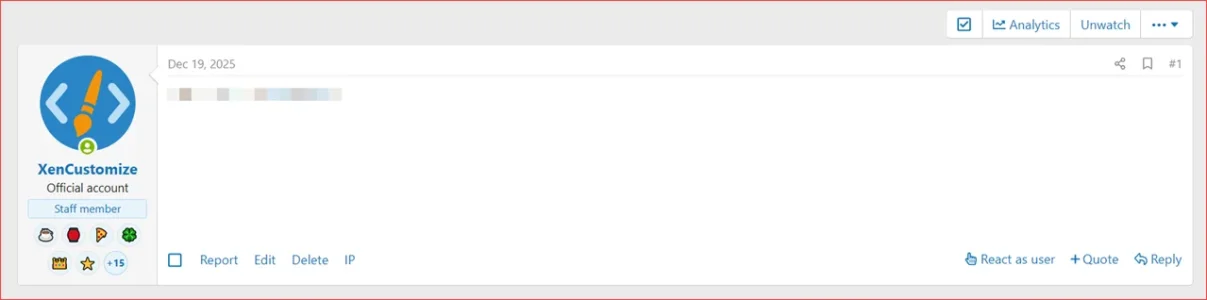
 Show gifts where members actually look with profile tabs and compact postbit/message user info previews
 Use real community currency with XenForo trophy points by default, plus built-in DBTech Credits support and custom column support
 Respect privacy with public/private gifts, anonymous sending, and recipient hide/unhide controls
 Stay in control with permissions, anti-spam limits, message limits, per-page settings, and Admin CP options
 Feels native to XenForo with alerts, news feed items, style property integration, phrases, templates, and standard XF UI behavior
 Features
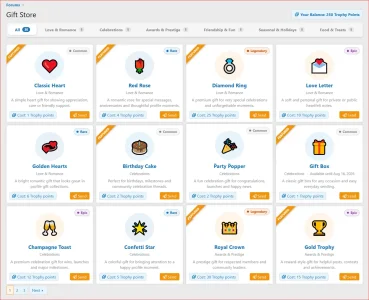
Public Gift StoreMember Gifts includes a public Gift Store where members can browse available gifts in a clean, responsive card grid. Gift cards can show the gift visual, title, rarity, category, availability date, description, cost, and Send button.
 Interactive category filtering
Gift categories appear as a polished horizontal filter bar. Members can switch between All, Birthday, Love, Funny, Awards, Holidays, or any categories you create without a full page reload when JavaScript is available.
 Responsive and mobile friendly
The Gift Store is designed for desktop and mobile. Category tabs use XenForo's native horizontal scroller behavior, active categories are brought into view automatically, and gift cards adapt cleanly to smaller screens.
 Emoji and image gifts
Create gifts using emoji, image replacement URLs, or uploaded image assets. Uploaded gift images are stored in the add-on's own asset area and are used across the Gift Store, send overlay, member profiles, and postbit previews.
 Per-gift visual styling
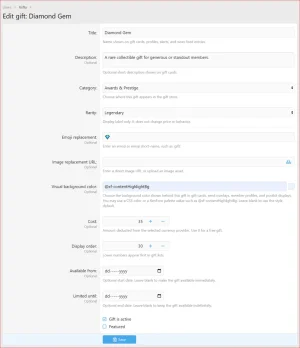
Each gift can have its own visual background color. The color field supports normal CSS colors and XenForo color palette values such as @xf-contentHighlightBg, making it flexible for custom styles.
 Gift rarity system
Mark gifts as Common, Rare, Epic, Legendary, or Custom. Rarity badges are shown in the Gift Store and member profile gift cards so special gifts stand out immediately.
 Featured gifts
Highlight selected gifts with a featured ribbon in the Gift Store. This is useful for seasonal promotions, staff picks, event rewards, or limited-time community gifts.
 Availability dates
Create gifts that only become available after a start date or disappear after an end date. This is ideal for seasonal gifts, birthday campaigns, holiday gifts, event prizes, or limited-time collectibles.
 Gift descriptions
Add short gift descriptions for context. Store cards clamp descriptions to keep the grid clean and consistent.
 Gift costs
Assign a cost to each gift. The active currency provider controls how balances are read and deducted when a member sends a gift.
 Gift popularity counters
The system tracks how many times each gift has been sent and the total quantity sent. This gives a clean foundation for future popular gifts, trending gifts, admin stats, and leaderboard-style features.
 Sending Gifts
 Polished send overlay
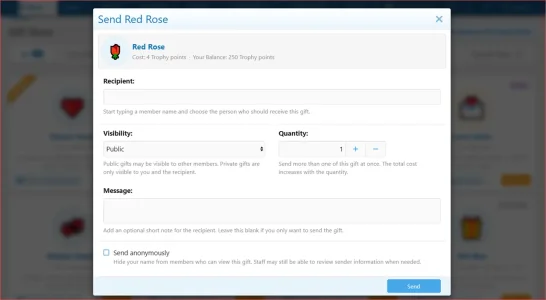
Members send gifts from a clean overlay with the selected gift preview, cost, current balance, recipient field, visibility choice, quantity, optional message, anonymous option, and helpful explain text.
 Recipient selection
The recipient field uses XenForo-style member selection so users can start typing a member name and choose who should receive the gift.
 Quantity support
Members can send more than one of the same gift at once, up to the admin-configured limit. The total cost scales with quantity.
 Optional messages
Senders can include a short note with the gift. Admins can control the maximum message length.
 Public and private gifts
Public gifts can appear on member profiles and, when enabled, in the news feed. Private gifts are only visible to the sender, recipient, and permitted staff contexts.
 Anonymous sending
If admins allow it, members can send gifts anonymously. Anonymous gifts hide the sender from public display while still preserving the needed system record.
Anti-spam controlsAdmins can control gift sending with daily limits, cooldowns, recipient-per-day limits, and max quantity per send.
 Gift snapshots
Sent gifts keep snapshot data for title, rarity, visual, emoji/image, and background color. If an admin later edits or disables a gift, existing sent gifts still preserve their original display.
Member Profiles
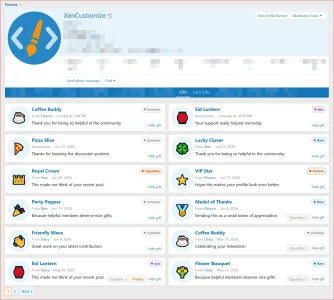
Received Gifts tabMember profiles get a Gifts tab where visitors can view public received gifts. Gift cards show the gift visual, title, sender information where visible, send date, message, quantity, and rarity.
 Sent Gifts tab
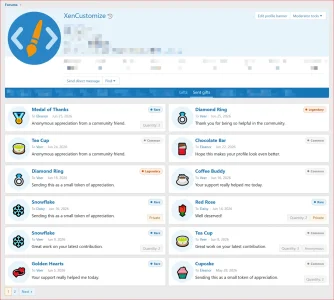
Members also get a Sent gifts tab for their own profile, giving them a history of gifts they have sent. This tab is only viewable by the profile owner.
 Hide or unhide received gifts
Recipients with permission can hide gifts from their public profile display and unhide them later. Hide/unhide actions refresh the card in place for a smoother experience.
 Profile pagination
Received and sent gift lists use pagination so large gift histories remain easy to browse.
 Quick navigation
The add-on includes public navigation links for My received gifts and My sent gifts, linking directly to the member's profile tabs.
Postbit / Message User Info Display
 Compact gift previews in posts
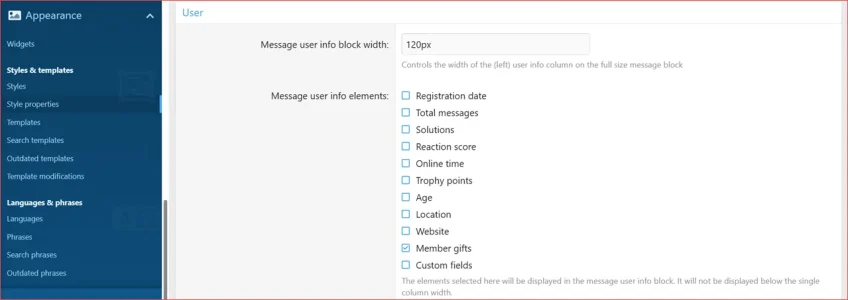
Admins can show a compact row of member gifts in the message user info area, the place where other members will see them most often.
 Native style property control
Member gifts are added to XenForo's existing Message user info elements style property, alongside options such as registration date, total messages, reaction score, trophy points, location, website, and custom fields.
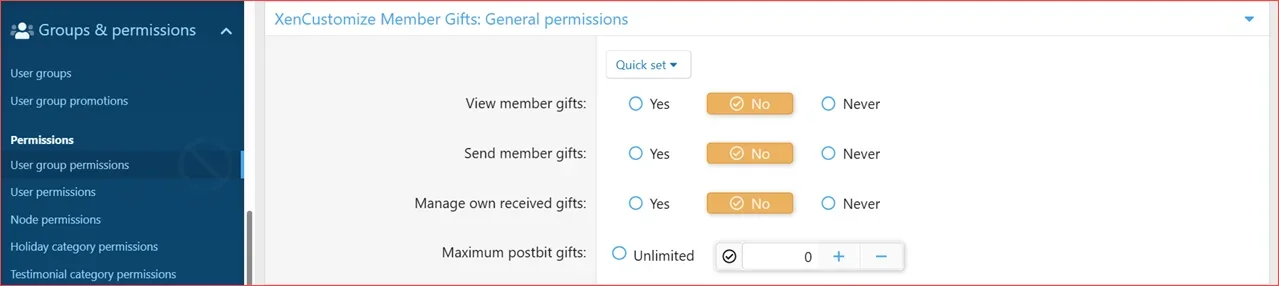
Permission-based display limitAdmins can control how many gifts may appear in postbit using a dedicated permission. The display is capped to keep the narrow message user block clean.
 Overflow indicator
If a member has more gifts than the postbit display limit, the final circle shows a +count indicator so visitors know there are more gifts to view.
 Links back to member gifts
Postbit gift previews link to the member's Gifts tab so visitors can view the full gift history.
Currency Support
 XenForo trophy points by default
Out of the box, Member Gifts can use XenForo trophy points as the purchase currency. When a member sends a gift, the actual trophy points balance is deducted.
 DBTech Credits support
Member Gifts includes built-in support for DBTech Credits. When configured, gift purchases use DBTech's credit system and create visible DBTech transaction history instead of silently changing balances.
 Custom user table/column support
Advanced admins can configure a custom table, user ID column, and balance column for another points/credits system that stores a numeric balance in the database.
 Admin-controlled provider selection
The active currency provider, currency title, DBTech currency ID, and custom column settings are controlled from the add-on options.
 No separate manual gift balance
Member Gifts does not create a confusing second balance ledger. It spends from the selected real currency source so members cannot keep spending from an unchanged balance.
 Alerts and News Feed
Gift alertsRecipients receive XenForo alerts when a gift is sent to them.
Alert opt-out supportGift alerts integrate with XenForo's alert preference behavior where applicable.
 Optional news feed entries
Admins can enable news feed entries for public gifts, helping gift activity create more life across the community.
Private gifts stay privatePrivate gifts are never published to the news feed.
Anonymous gifts remain anonymousAnonymous gifts do not expose the sender as the alert or news feed actor.
 Admin CP Management
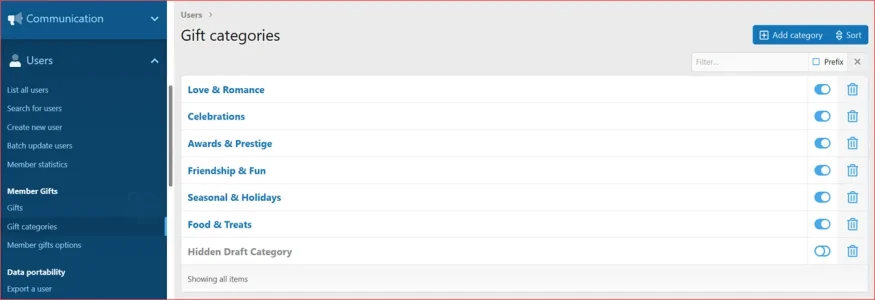
 Gift categories
Create and manage categories with title, description, display order, and active status. Category descriptions can be shown as tooltips on the public filter bar.
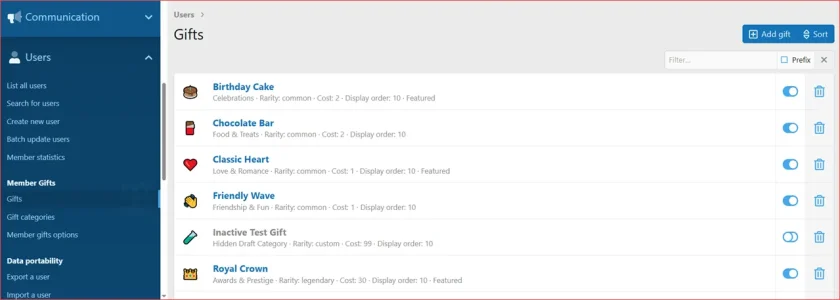
Gift managementCreate and manage gifts with title, description, category, rarity, price, display order, active status, featured status, availability window, emoji, image replacement, uploaded asset, and visual background color.
Visual previewsGift lists in the Admin CP show visual previews so admins can quickly see which emoji or image belongs to each gift.
 Native sorting
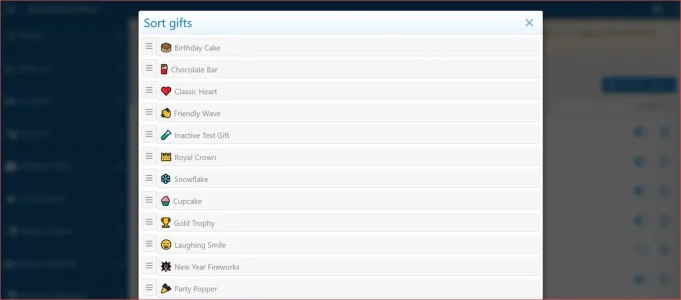
Categories and gifts support XenForo-style sorting controls for easy display-order management.
 Safe delete behavior
Categories and gifts are protected from unsafe deletion when they are already in use. This helps preserve sent gift history.
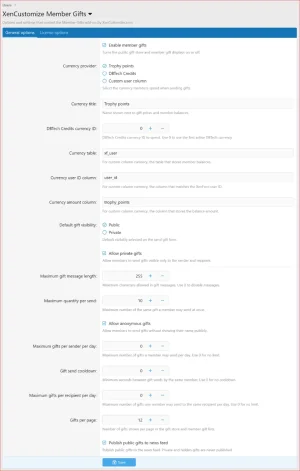
Options includedAdmins can configure:
- Enable/disable the gift system
- Default gift visibility
- Allow private gifts
- Allow anonymous gifts
- Maximum message length
- Maximum quantity per send
- Maximum gifts per day
- Send cooldown
- Maximum gifts per recipient per day
- Gift Store/member list pagination
- News feed publishing
- Currency provider and currency display title
- DBTech Credits currency selection
- Custom table/column currency settings
 Permissions
Member Gifts includes permissions for:- Viewing gifts
- Sending gifts
- Managing own received gifts
- Postbit gift display count
 Specifications
- Supported XenForo version: XenForo 2.2.x and XenForo 2.3.x
- Public Gift Store: Yes
- AJAX category filtering: Yes
- Gift categories: Yes
- Category descriptions/tooltips: Yes
- Emoji gifts: Yes
- Image/uploaded asset gifts: Yes
- Gift rarity: Common, Rare, Epic, Legendary, Custom
- Featured gifts: Yes
- Availability dates: Yes
- Quantity sending: Yes
- Gift messages: Yes
- Public/private gifts: Yes
- Anonymous gifts: Yes
- Profile received gifts tab: Yes
- Profile sent gifts tab: Yes
- Recipient hide/unhide controls: Yes
- Postbit gift previews: Yes
- Postbit overflow indicator: Yes
- Recipient alerts: Yes
- Optional news feed entries: Yes
- Default currency provider: XenForo trophy points
- DBTech Credits support: Yes
- Custom column currency support: Yes
- Admin CP gift/category management: Yes
- Permissions included: Yes
- Translation-ready phrases: Yes
Use Cases
- Birthday gifts between members
- Thank-you gifts for helpful replies
- Holiday and seasonal community gifts
- Funny gifts for casual communities
- Award-style gifts for contests and events
- VIP or supporter gift collections
- Staff-selected featured gifts
- Trophy-points spending sinks
- DBTech Credits spending options
- Member profile personalization
- Lightweight community recognition without building a full shop system
Privacy and Control
- Private gifts are only visible to the sender and recipient in normal public-facing views.
- Anonymous gifts hide the sender from public gift displays.
- Recipients can hide received gifts from their public profile display when they have permission.
- Hidden gifts remain manageable by the recipient and are not silently deleted.
- News feed entries are optional and only created for public gifts.
- Gift visibility still respects XenForo permissions and add-on permissions.
Good to Know
- Member Gifts is focused on member-to-member gift sending, profile display, and community engagement.
- It is not intended to replace a full eCommerce/shop system.
- Trophy points, DBTech Credits, and custom column balances are deducted from their real configured source.
- DBTech Credits support requires DBTech Credits to be installed and configured.
- Uploaded gift assets are stored in the add-on's own public asset folder.
- Postbit display is controlled by XenForo's Message user info elements style property and add-on permissions.
 Compatibility & Requirements
- XenForo 2.2.x
- XenForo 2.3.x
- XenCustomize Core Library 1.0.2+ (free for customers).
 License Setup
After installation, go to the add-on options and open the License options tab to enter your license key. If you have a branding-free license key, you may enter it there as well to remove branding.License verification may use XenCustomize.com with local caching. Normal installation and uninstallation do not depend on our server being available. An expired license does not disable normal use of the add-on, but an active valid license is required for official support and access to new downloads or updates released after the license expires.
 A complete gift system built for XenForo
Built by the same XenCustomize team behind complex large-scale addons such as Events Manager, News Publisher, and Survey Manager, with the same focus on detail, long-term support, and XenForo-native quality.If you want members to recognize each other, celebrate moments, spend community points, and show off collectible gifts on profiles and posts, XenCustomize Member Gifts brings that experience directly into XenForo in a polished, permission-controlled, and community-friendly way.
-
 XenCustomize-Member-Gifts-200-Post-gifts.webp
 -
 XenCustomize-Member-Gifts-200-ACP-Style-properties-Messages-Message-user-info-elements.webp
 -
 XenCustomize-Member-Gifts-200-Member-profile-tab-sent-gifts.webp
 -
 XenCustomize-Member-Gifts-200-Member-profile-tab-gifts.webp
 -
 XenCustomize-Member-Gifts-200-ACP-Gifts-sort.webp
 -
 XenCustomize-Member-Gifts-200-ACP-Gift-edit.webp
 -
 XenCustomize-Member-Gifts-200-ACP-User-group-permissions.webp
 -
 XenCustomize-Member-Gifts-200-ACP-Admin-Options.webp
 -
 XenCustomize-Member-Gifts-200-ACP-Gift-categories.webp
 -
 XenCustomize-Member-Gifts-200-ACP-Gifts.webp
 -
 XenCustomize-Member-Gifts-200-Gift-Store-Send.webp
 -
 XenCustomize-Member-Gifts-200-Gift-Store.webp

![[XenCustomize] Thread Visitors](/community/data/resource_icons/9/9833.jpg?1793298609)
![[XenCustomize] Forum Visitors](/community/data/resource_icons/9/9832.jpg?1793294306)
![[XenCustomize] User Content Export](/community/data/resource_icons/10/10960.jpg?1793245399)
![[XenCustomize] This or That: Voting Games, Streaks & Leaderboards](/community/data/resource_icons/10/10954.jpg?1793050205)
![[XenCustomize] Member Mood Tracker](/community/data/resource_icons/10/10731.jpg?1788574285)