
![[XenChef] Gear Locker: Member Gear Lists](/community/data/resource_icons/10/10558.jpg?1782119803)
- Compatible XF 2.x versions
- 2.3
- License
- Commercial XenChef Add-ons license. One active production XenForo installation per purchase, plus reasonable local/staging use for that same site. Redistribution, resale, sharing, leaking, sublicensing, or repackaging is not permitted.
- Updates duration
- 12 months of updates are included with the initial purchase. Renewal is $10/year for continued access to eligible updates and support.
- Visible branding
- No
What Gear Locker does
[XenChef] Gear Locker gives your members a clean, organized way to display the gear, tools, equipment, setups, rigs, kits, and collections they use.Instead of members repeatedly typing the same setup details in different threads, Gear Locker gives each member their own public Gear List. Other members can quickly see what someone uses, what they recommend, what they are building with, what they shoot with, what they record with, what they drive, what they carry, what they cook with, or whatever else fits your community.
Gear Locker is especially useful for forums where “what do you use?” comes up again and again.
For example, members might want to show:
- Camera bodies, lenses, lighting, tripods, bags, and photo/video gear
- Guitars, amps, pedals, recording interfaces, live sound gear, and accessories
- PC builds, gaming setups, monitors, keyboards, mice, desks, and streaming gear
- Automotive tools, garage equipment, detailing gear, parts, fluids, and project vehicles
- Fishing rods, reels, tackle, electronics, boats, kayaks, and outdoor gear
- Camping kits, hiking gear, packs, tents, cooking gear, and survival tools
- Fitness equipment, home gym setups, shoes, recovery tools, and training accessories
- Woodworking tools, shop equipment, clamps, benches, finishes, and safety gear
- BBQ grills, smokers, knives, cookware, fuel, thermometers, and kitchen tools
- Maker tools, electronics gear, soldering stations, 3D printers, and workshop equipment
Why forum owners may want it
Many forums have members who are known for their setups, tools, or recommendations. Gear Locker gives those members a proper place to show that information without burying it in random threads, signatures, profile posts, or long repeated replies.It can help with common community questions like:
- “What camera setup are you using?”
- “What pedals are on your board?”
- “What is in your PC build?”
- “What tools do you recommend?”
- “What fishing setup do you use?”
- “What is in your home gym?”
- “What gear did you use for that project?”
Member-facing features
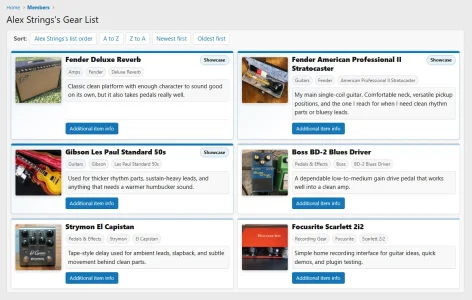
Gear Locker includes public member Gear Lists that are easy for other members to find and view.Member-facing features include:
- Public Gear Lists for members
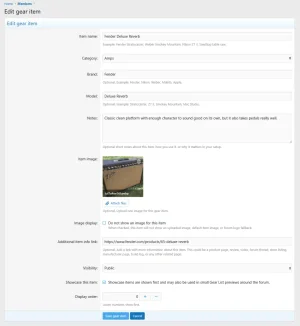
- Gear item name
- Category
- Brand
- Model
- Notes
- Optional item image
- Optional additional item info link
- Visibility setting
- Showcase setting
- Display order
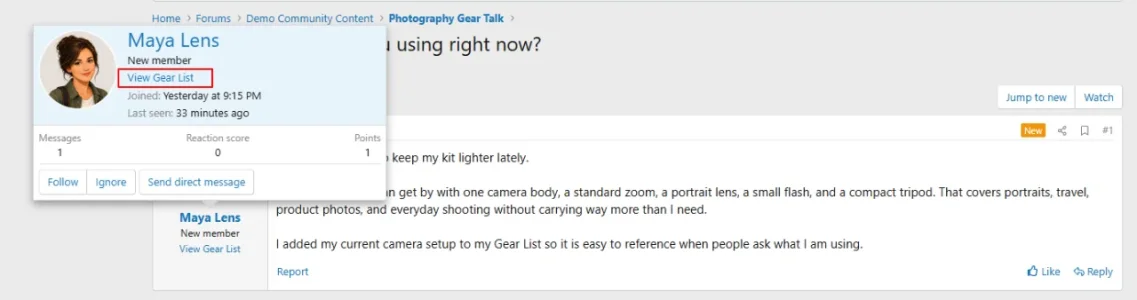
- Post author Gear List link
- Member card Gear List link
- Member profile Gear Locker area
- Logged-in user menu link
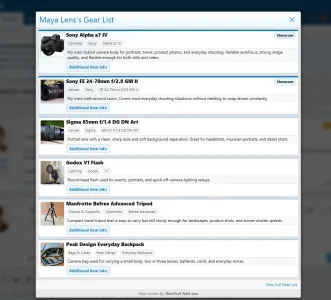
- Gear List overlay previews
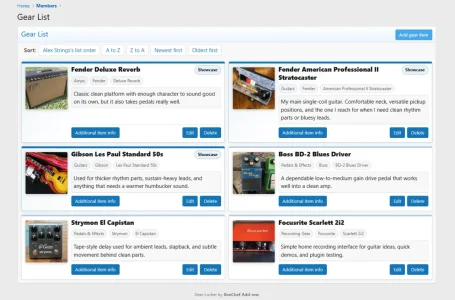
- Full Gear List page view
Each item can be simple or detailed depending on how your members want to use it. A member can create a short list of favorite items, a detailed setup, a full kit, a toolbox, a studio setup, a camera bag, a pedalboard, a gaming rig, a garage setup, or any other gear-focused list that fits your community.
Showcased items
Members can mark important items as showcased.Showcased items are shown first and may also be used in small Gear List previews around the forum. This lets members draw attention to the items that matter most without needing a separate featured-items system.
For example, a photographer may showcase their main camera body and favorite lens. A guitarist may showcase their main guitar, amp, and pedalboard. A PC builder may showcase their main tower, monitor, and keyboard. A fishing member may showcase their main rod and reel setup.
Optional item images
Gear Locker supports optional item images when enabled by the admin.This makes Gear Lists much more useful for visual communities. Members can show the actual guitar, camera, pedal, tool, reel, tripod, amp, backpack, knife, lens, PC setup, or other item they are talking about.
Admins can control image behavior from the Gear Locker options, including maximum file size, maximum width, maximum height, and whether members are allowed to hide images on individual items.
Optional additional item info links
Gear Locker can also allow members to add an optional additional item info link.This can be used for manufacturer pages, product pages, reviews, build logs, related forum threads, reference pages, or other useful links related to the item.
The goal is not to turn Gear Locker into a marketplace. The goal is to give members a clean way to add useful supporting information for the gear they are already showing.
Admin features
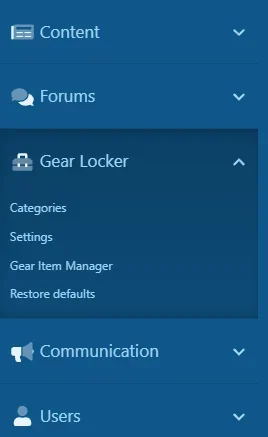
Gear Locker includes an Admin Control Panel section so site owners can configure and manage the add-on without editing XenForo core files.Admin features include:
- Gear Locker settings
- Public-facing label setting
- User menu label setting
- Member profile tab control
- User menu link control
- Post author link control
- Member card link control
- Optional item URL control
- Showcase item control
- Optional item image control
- Image size limits
- Default item image URL
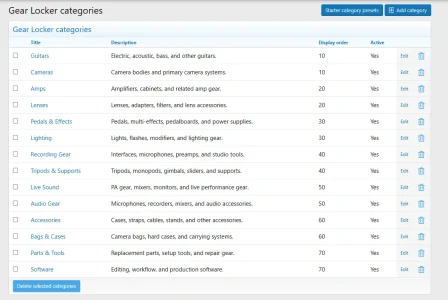
- Category management
- Starter category presets
- Gear Item Manager
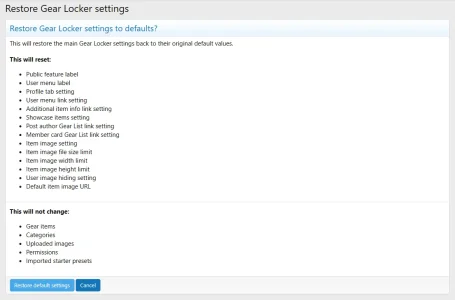
- Restore Defaults tool
- User group permissions
- Moderator permissions
Starter category presets
Gear Locker includes starter category presets to help admins launch faster.Instead of creating every category manually, an admin can import a preset that fits the general type of community they are running, then adjust the categories as needed. Presets are only a starting point. Admins can still add, remove, rename, disable, and reorder categories to fit their own forum.
Preset examples include:
- PC / Gaming Setup
- Automotive / Garage
- Photography / Video
- Guitar / Music
- Audio / Home Theater
- Camping / Outdoors
- Cycling
- Fishing
- Fitness / Home Gym
- Woodworking / Workshop
- BBQ / Cooking
- Maker / Electronics
ACP Gear Item Manager
Gear Locker includes an ACP Gear Item Manager so admins can review and manage member-created gear items from the admin side.This is useful for support, moderation, cleanup, and troubleshooting. Admins do not have to hunt through member profiles just to find an item that needs attention.
Permissions
Gear Locker includes user group permissions and moderator permissions.Permissions include controls for viewing Gear Lists, creating items, editing own items, deleting own items, viewing other members’ Gear Lists, editing any Gear Locker item, and deleting any Gear Locker item.
This lets admins open the feature to the right members while keeping management permissions limited to the appropriate staff.
What Gear Locker is not
Gear Locker is intentionally focused.It is not:
- A marketplace
- A classifieds system
- A payment system
- A private inventory manager
- A custom fields platform
- A replacement for XenForo Resource Manager
- A replacement for XenForo Media Gallery
- A major member profile rewrite
Demo
You can view the Gear Locker demo here: View the Gear Locker demo siteA limited demo login is available there so visitors can view the demo in a normal logged-in XenForo view.
Documentation and support
Documentation: Gear Locker documentationFAQ: Gear Locker FAQ
Changelog: Gear Locker changelog
Roadmap: Gear Locker roadmap
Support: Gear Locker support
Purchase: Purchase [XenChef] Gear Locker
-
 03-gear-locker-photography-postbit-link.webp
 -
 04-gear-locker-photography-overlay-view.webp
 -
 05-gear-locker-manage-items.webp
 -
 06-gear-locker-add-edit-item.webp
 -
 10-gear-locker-acp-nav.webp
 -
 12-gear-locker-acp-restore-defaults.webp
 -
 13-gear-locker-acp-categories.webp
 -
 1781850143040.webp
![[XenChef] Universal Translator - Automatic Post Translation](/community/data/resource_icons/10/10587.jpg?1782979096)
![[XenChef] Post Translator](/community/data/resource_icons/10/10570.jpg?1782246463)
![[XenChef] Reader Controls](/community/data/resource_icons/10/10553.jpg?1782114041)
![[XenChef] ACP Editor Resizer](/community/data/resource_icons/10/10561.jpg?1782098847)
![[XenChef] XFRM Download Button Styler](/community/data/resource_icons/10/10511.jpg?1782095218)