[XB] Zip Preview

[XB] Zip Preview 2.1.7

No permission to buy ($35.00)
Fixed potential XSS in archive preview folder names
Fixed empty archives being treated as corrupted when upload rejection is enabled
Fixed preview rendering for empty archives and archive open failures
Fixed temporary files not being deleted during attachment tree rebuild
Added default extensions for tar, cab, iso and 7z
Added upgrade step to update the default archive extension list for existing installations

Fixed PHP 8.4 deprecation errors
Added option to disallow corrupted/password protected archive upload
Fixed throwing of exception when uploading a corrupted or password-protected archive
Fixed the size of the window with a large list of files in the archive (now scrollable)
  • XF 2.3 support
  • Rewritten JS code to compliant with XF standards
  • Added file tree caching: no more redundant file reads, the archive structure is now cached in the database when the file is uploaded.
  • Added external filesystems support
  • Added permissions to control who can view archive attachment previews
Note: After installing the addon or upgrading from earlier versions, the process of rebuilding attachment caches will be started. This may take a while.
CHANGELOG:
2.1.4

  • Added zip, rar, tar, gz support (requires PHP extensions - zip, rar, gzip)
  • Fixed popup auto width
  • Fixed broken resource support
  • Fixed infinite loop on multiple download resource preview
  • Refactor & Code cleanup
Changed: Template modification for compatibility with the attachment enhancement addon.
XSS VULNERIBILITY FIX: File names were not escaped in zip preview which can cause XSS

Changed: Price from $35 to $25
Changed: Addon name to [OzzModz] Zip Preview
Changed: JavaScript files are now minified when running the add-on on production

Removed: Xen-Pro icon from the ACP addon page.

Added: Support for XF 2.1 and 2.2

Fixed: Compatibility with XenForo Resource Manager 2.1 and 2.2
  • Like
Reactions: TickTackk
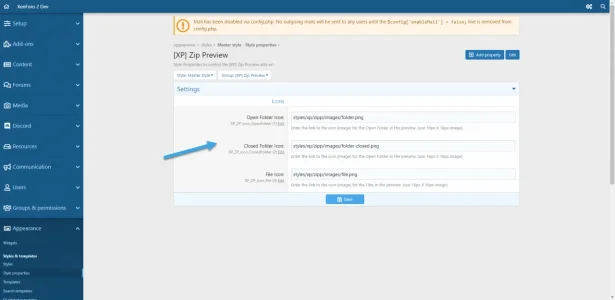
added 3 style properties to let you replace the images/icons of the Open Folder, Closed Folder, and File.

Attachments

  • 2020-07-28_22-14-23.webp
    2020-07-28_22-14-23.webp
    32 KB · Views: 114
Back
Top Bottom