

- Compatible XF 2.x versions
- 2.3
- Additional requirements
- PHP 8.1 or newer
- License
- Commercial licence: one licence per live forum.
- Updates duration
- 6 months of updates and support included. Then renews automatically at €10 + VAT every 6 months; cancel any time. Unseen Editor keeps working if you cancel.
- Visible branding
- No
Make your editor truly yours.
Your editor. Your style. Your experience.
- VIDEO-
Screenshots
Your editor. Your style. Your experience.
- VIDEO-
Screenshots
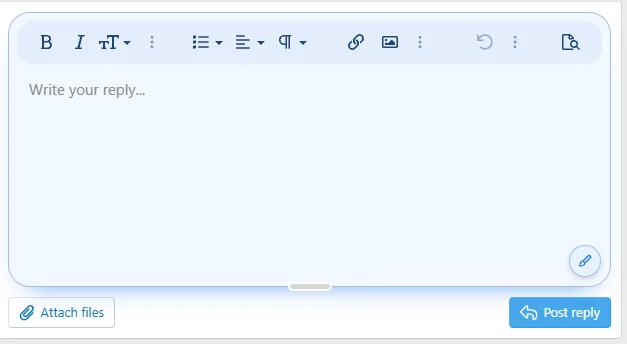
Unseen Editor lets each member give XenForo's own message editor a look and a size of their own, from a small brush in the corner of the editor. XenForo's editor stays in place: the same toolbar, the same BB code, the same posts. Only the person writing sees their choices; posts look the same to everyone.
Highlights
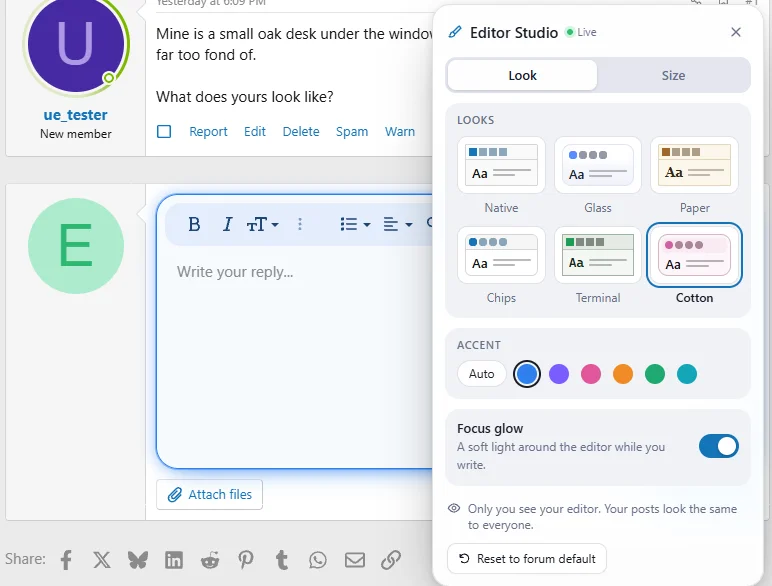
- Editor Studio. A brush in the corner of the editor opens a panel beside it, in the corner of the window; it can be dragged out of the way. On screens narrower than 760 pixels it opens as a sheet from the bottom. Every change shows on the editor straight away.
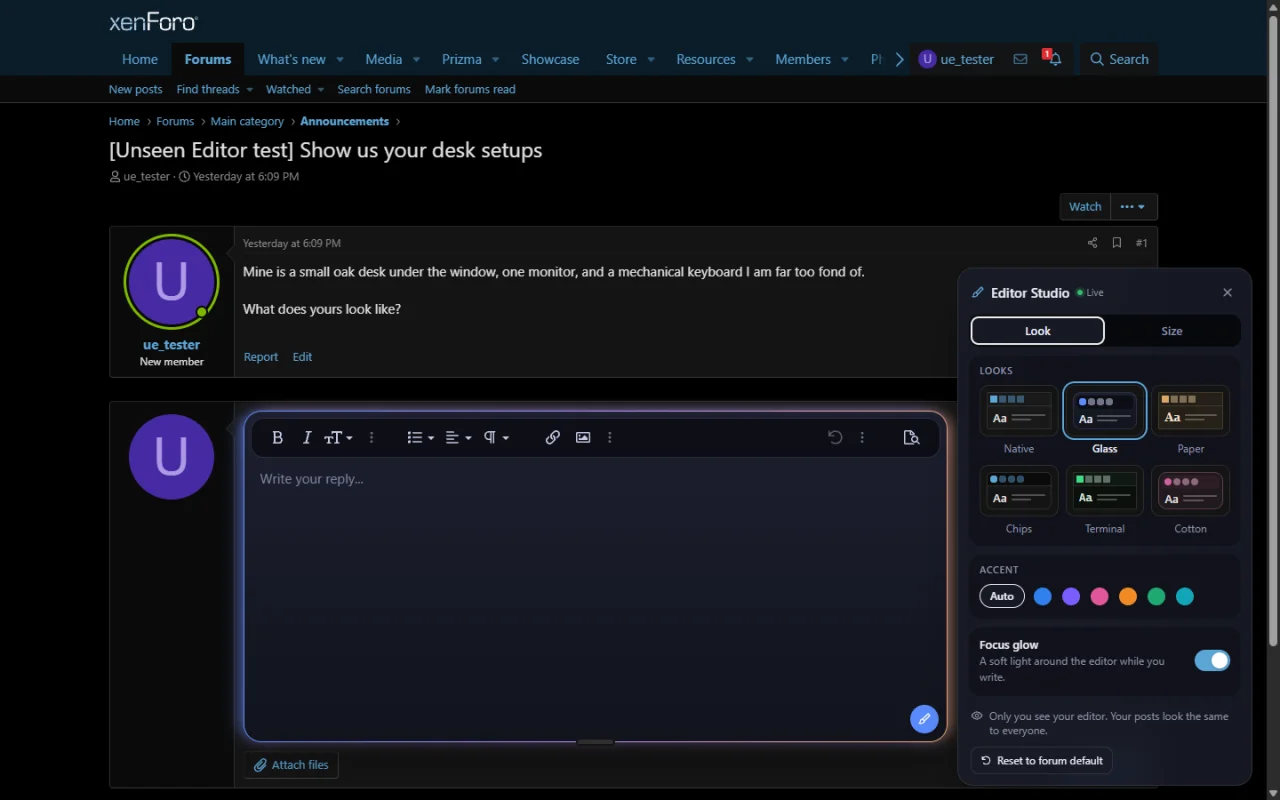
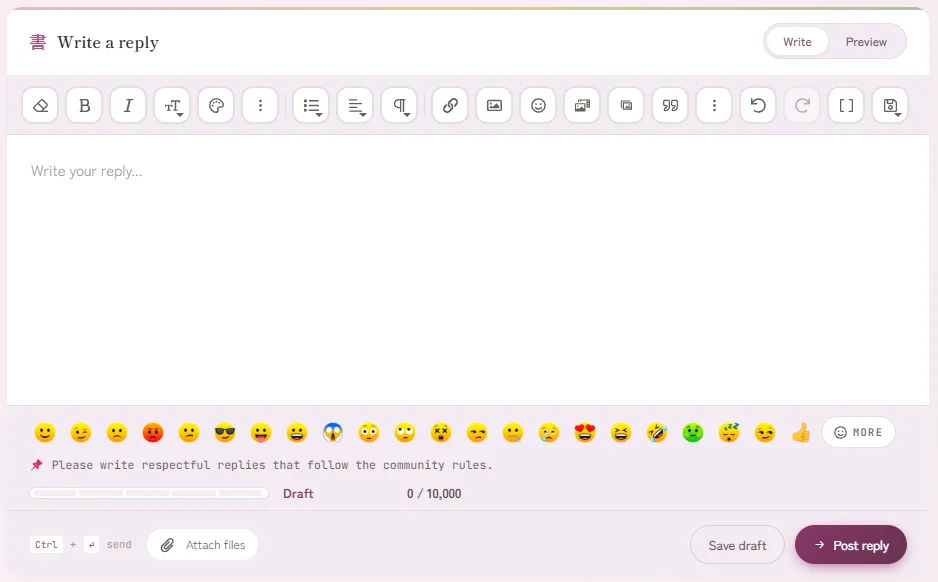
- Six looks to choose from. Native (your style's own editor) and five ready-made ones: Glass, Paper, Chips, Terminal and Cotton. Chips and Cotton are drawn from your style's colours. Glass, Paper and Terminal have their own palettes in a light and a dark version, chosen by the colour of the page behind the editor: they follow a light or dark style, its light and dark variations and the visitor's system setting.
- An accent colour. Auto, or one of six colours. It tints the text selection, the glow and the look's own details: the toolbar's buttons in most looks, the caret and the side line in Terminal.
- A focus glow. A soft light around the editor while you write. Each look starts with its own setting, and every member can switch it on or off.
- Height. Drag the bottom edge of the editor, or set the height in the panel with buttons, arrow keys or a slider. The editor still grows as you write, the way XenForo's does. Phones (screens up to 650 pixels wide) keep their own height, 100 to 260 pixels, separate from the desktop one.
- Width. Full, or Comfortable: a 720-pixel column in the middle, for shorter lines that are easier to read.
- Saved as you go. Choices are saved to the member's account as they make them, so they follow them to every device they sign in on. "Reset to forum default" puts everything back in one click.
- No jump when the page loads. The space the page keeps for the editor already has the member's height, on a desktop and on a phone.
- Wherever members write. It applies wherever your forum's pages use XenForo's editor. Tested in the reply box under a thread, when editing a post, when starting a thread and when starting a direct message.
Screenshots
Size — Height in the panel or by dragging the bottom edge; Comfortable keeps the lines short.
Terminal — Here in the dark variation of XenForo's default style.
On a phone — The panel opens as a sheet from the bottom, and the phone keeps its own height.
Settings — The default look everyone sees, the looks members may choose, and the height limits.
For administrators
- One settings page under Unseen Editor → Settings: switch it on or off, pick the default look everyone sees until they choose their own (shown as six small previews), choose which looks members may pick, let members personalise or not, and set the smallest and largest writing height for desktops (on phones the range is always 100 to 260 pixels).
- A default look other than Native changes the editor for everyone who has not chosen their own, guests included.
- Who may personalise is a user group permission, "Personalise the editor". A fresh installation gives it to every user group whose global permissions allow posting replies.
- Your style draws its own editor? Switch Unseen Editor off for that style with one style property, "Enable Unseen Editor in this style". The settings page lists the styles it is switched off in.
- Members keep their choices when you switch the add-on or personalisation off, and get them back when you switch it on again. A look you stop offering comes back for the members who had chosen it when you offer it again.
- The editors in your admin control panel are left alone.
Light by design
- No template modifications: Unseen Editor adds to the output of XenForo's own editor template as it is drawn.
- Drawing an editor adds no database queries: a member's choices are kept with their user options, which XenForo already loads.
- While the default look is Native, a visitor who cannot personalise, guests included, gets XenForo's editor exactly as before: no stylesheet and no script of the add-on.
- The panel's template, stylesheet and script load only when someone presses the brush.
- The transitions of the editor, the brush, the resize handle and the panel, and the brush's hint animation, stop for visitors who ask their system for reduced motion.
What you get
- Every feature above — there is no paid tier
- English plus eleven language packs: Chinese (Simplified), Dutch, French, German, Italian, Japanese, Korean, Portuguese (Brazil), Spanish, Swedish and Turkish. They hold Unseen Editor's own texts and do not install automatically: import each one over your existing language of that kind (Appearance → Languages → Import, overwrite or import as its child). The look names, "Editor Studio" and the Licence page's list of the fields it sends stay in English in every language.
Limits worth knowing
- Unseen Editor is in Alpha (1.0.0 Alpha 1). Features may still change in the next releases, which come as free updates while your update period runs.
- It was tested on XenForo's default style. A style that draws its own editor box can override parts of a look and the height; switch Unseen Editor off for that style if it does.
- An editor that opens inside a pop-up window takes the member's look, but has no brush or resize handle there.
- The looks use current browser features. Tested in Chrome, Firefox and Safari's engine (WebKit), on desktop and with an iPhone screen and touch (WebKit).
- Unseen Editor changes how the editor looks to the person writing. It does not add, remove or reorder toolbar buttons.
Requirements
- A XenForo licence for the board you install it on
- XenForo 2.3.0 or newer
- PHP 8.1 or newer


