

- Compatible XF 2.x versions
- 2.3
- Additional requirements
- XenForo 2.3.0+ and PHP 8.0+
- License
- Commercial proprietary licence. Redistribution, resale, repackaging and unauthorised sharing are prohibited.
- Updates duration
- 12 months
- Visible branding
- No
Eggy Ticket Support
A powerful, fully configurable support desk built directly into XenForo 2.3.
Eggy Ticket Support gives your community a complete private ticketing system without sending members to an external helpdesk.
Create separate support departments, give each one its own ticket references, prefix categories, prefixes, priorities, statuses, intake flows, custom fields and access rules, then manage everything through XenForo.
Different departments can run completely different support workflows while remaining part of the same integrated system.
Convert Forum Discussions Into Private Tickets
Support requests do not always begin in the right place.A member may post a technical problem, billing question or account issue directly into a forum even when it would be better handled privately.
Eggy Ticket Support allows authorised staff to convert that forum content directly into a proper private support ticket.
From an existing forum post, staff can select:
- Ticket requester
- Ticket subject
- Destination department
- Allowed ticket prefix
- Ticket priority
- Single post or complete visible thread
- What should happen to the original forum thread afterwards
Staff can import:
Selected post only
or:
Entire visible thread
When an entire discussion is converted, the individual messages are imported into the ticket in their original order while retaining their original authors and timestamps.
This means a discussion such as:
Customer: I have a problem with VaeloraStaff: What error are you getting?Customer: The import fails during installationcan be transferred into a private ticket without losing the conversation that already took place.
Post-Conversion Forum Actions
After creating the ticket, staff can choose to:
- Leave the original forum thread unchanged
- Lock the original forum thread
- Post a link to the newly created ticket
- Post the ticket link and lock the forum thread
When a ticket link is posted, the forum only exposes the ticket reference.
Private ticket contents remain protected by the normal Ticket Support permissions.
The original requester can follow the link into their ticket while unrelated members cannot access the private support conversation.
This allows a public support discussion to be cleanly moved into a private support workflow without starting the conversation again from scratch.
Native XenForo Alerts
Ticket Support uses XenForo's native alert system to keep customers and staff informed about important ticket activity.
Relevant users can receive familiar XenForo alerts when tickets are created and when important ticket activity occurs, keeping support notifications inside the same system members already use across the community.
There is no separate notification platform to monitor.
Ticket updates appear through XenForo's existing alert system alongside normal community activity.
Forum-to-Ticket Prompts
Ticket Support can also help direct members into the correct support workflow before they create a forum thread.Selected XenForo forum nodes can display a configurable support prompt when a member attempts to create a new discussion.
Administrators can configure:
- Prompt title
- Prompt message
- Primary button label
- Secondary button label
- Primary button URL
- Secondary button URL
Supported dynamic URL tokens include:
{create_ticket_url}{tickets_url}{post_thread_url}{forum_url}
Together with forum-to-ticket conversion, this creates a complete workflow:
Before posting — guide the member towards Ticket Support.
After posting — staff can convert the forum discussion into a private ticket.
Native XenForo Image & File Uploads
Ticket messages use XenForo's native attachment system.Customers and staff can upload images and files directly into ticket conversations instead of relying on externally hosted image URLs.
Uploaded images can be inserted into the editor using XenForo's normal attachment behaviour.
The same attachment workflow is available when:
- Opening a new ticket
- Replying as a customer
- Replying as staff
Attachment availability can still be controlled independently for each department.
- Whether attachments are allowed
- Maximum attachment count
- Maximum attachment size
Files remain handled through XenForo's existing attachment architecture rather than a separate Ticket Support storage system.
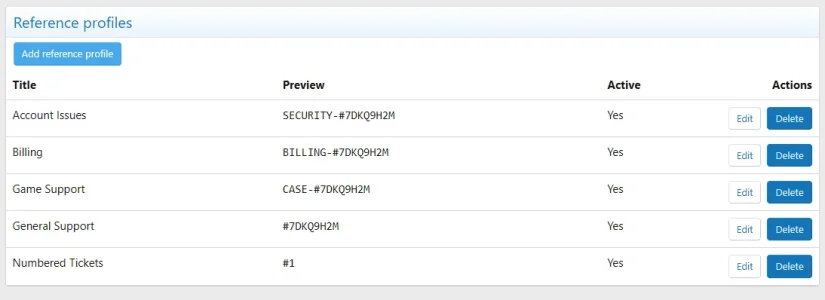
Custom Ticket References & Sequence Profiles
One of Eggy Ticket Support's standout features is its Ticket Reference Profile system.You are not limited to plain ticket numbers such as:
#1#2#3Reference profiles can generate tickets such as:
#1#7DKQ9H2MBILLING-#1CASE-#YH45E8DC
Profiles support:
- Sequential numbering
- Random references
- Prefix + sequential numbering
- Prefix + random references
Each profile has its own configuration and can be assigned to individual departments.
For example, Billing could generate:
BILLING-#1BILLING-#2BILLING-#3while General Support could independently use:
CASE-#YH45E8DCand another department could continue using:
#1Departments can share reference profiles or maintain completely separate sequences.
A global default profile is also available.
The internal XenForo ticket ID remains separate from the cleaner customer-facing ticket reference.
Changing a reference profile does not rename existing ticket references.
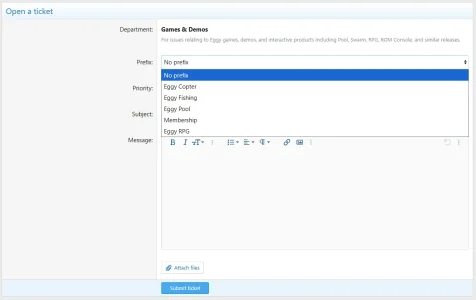
Powerful Ticket Prefixes
Prefixes make it immediately obvious what a ticket relates to before staff even open it.Use XenForo's existing label styles or assign a custom CSS class.
Prefixes can be:
- Customer selectable
- Staff only
- Active or inactive
- Restricted to selected departments
Staff can also change a ticket's prefix after submission.
Examples could include:
- Vaelora
- Eggy Fishing
- Refund Request
- Access Issues
- Cancel Renewal
Combined with custom ticket references, prefixes make busy support queues much easier to scan.
Prefix Categories
Large prefix collections can be organised into reusable categories.For example:
- Products
- Styles
- Billing
- Account Issues
A single prefix can belong to multiple categories without creating duplicate prefix records.
For example, the same
Refund Request prefix could appear under both Billing and Orders while remaining one underlying prefix.Categories can also be shared across multiple departments.
Department Prefix Controls
Departments independently control both:- Which prefix categories are available
- Which individual prefixes inside those categories may actually be selected
Category availability therefore acts as organisational structure while the existing department-prefix mapping remains the final whitelist.
This allows one department to expose only selected entries from a much larger shared prefix library.
Custom Prefix Labels
Each department can replace the generic wordPrefix with wording appropriate to that support area.Examples include:
- Product
- Style
- Issue type
- Request type
- Service
A Styles department could therefore display:
Select Style
while a Billing department could use:
Request type
Category-Grouped Prefix Selection
Customer and staff prefix selectors follow the configured category structure.Instead of one large flat list, prefixes can be organised into logical groups.
Uncategorised prefixes remain available under:
Other prefixes
Administrators can also independently decide whether the Other prefixes group should be available for each department.
This allows tightly controlled departments to use only explicitly categorised prefixes while other departments can continue accepting uncategorised entries.
Category-Based ACP Prefix Management
Prefix management in the Admin CP is organised around collapsible category sections rather than forcing administrators to manage one enormous flat table.A prefix belonging to multiple categories can appear in each appropriate section while still remaining one underlying prefix record.
A lightweight prefix search also helps administrators locate entries in larger installations.
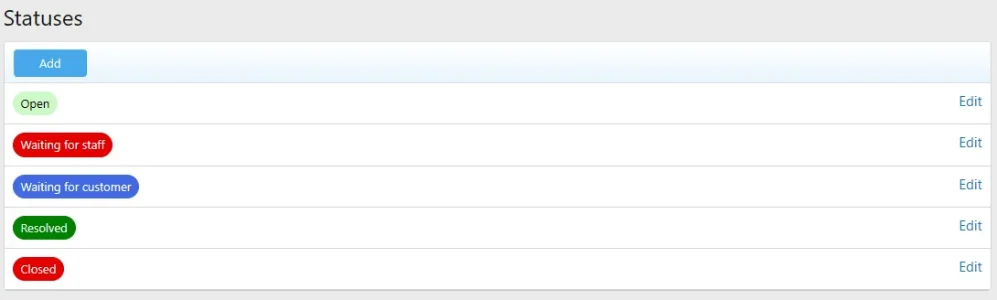
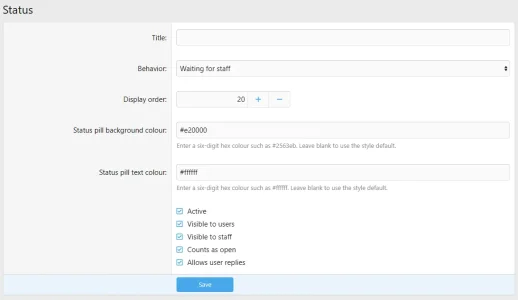
Fully Customisable Statuses
Ticket statuses control both how a ticket behaves and how it looks.Typical workflows can include:
- Open
- Waiting for staff
- Waiting for customer
- Resolved
- Closed
Each status can define:
- Display order
- User visibility
- Staff visibility
- Open-state behaviour
- Customer reply permissions
- Pill background colour
- Pill text colour
Important ticket states can therefore be recognised instantly from the queue.
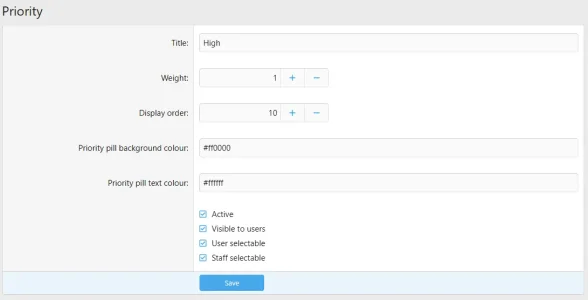
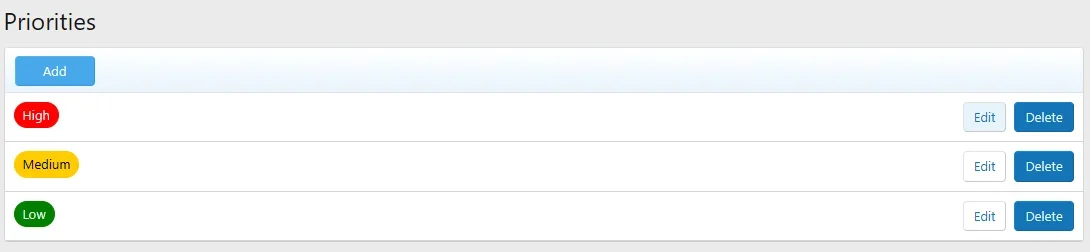
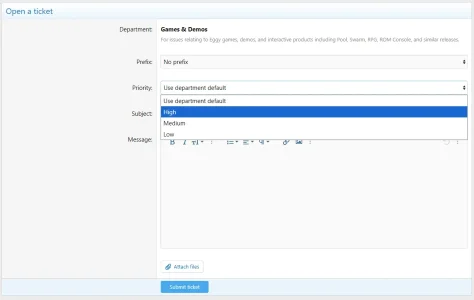
Custom Priorities
Priorities are fully configurable rather than being locked to fixed values.Create priorities such as:
- Low
- Medium
- High
- Urgent
Each priority can define:
- Weight
- Display order
- Active state
- Customer visibility
- Customer selectability
- Staff selectability
- Background colour
- Text colour
Customers can choose an allowed priority, departments can provide a default, intake flows can assign one automatically and staff can change it afterwards.
If no priority is assigned, unnecessary placeholder text is not shown.
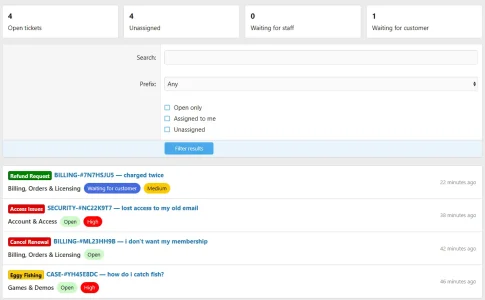
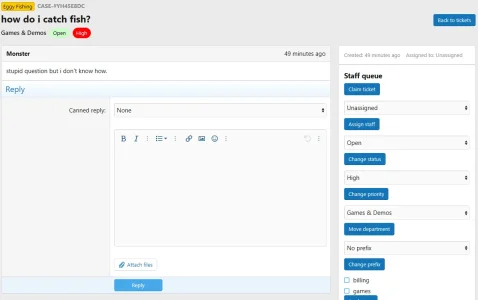
Clear Ticket Presentation
Ticket information is organised so staff can understand the important details quickly.A ticket can display:
Department · Status · Priority
alongside its prefix, customer-facing reference and subject.
For example:
[Eggy Fishing]
CASE-#YH45E8DChow do i catch fish?
with:
Games & Demos · Open · High
Long subjects are kept separate from the compact ticket identity information so the page stays clean and readable.
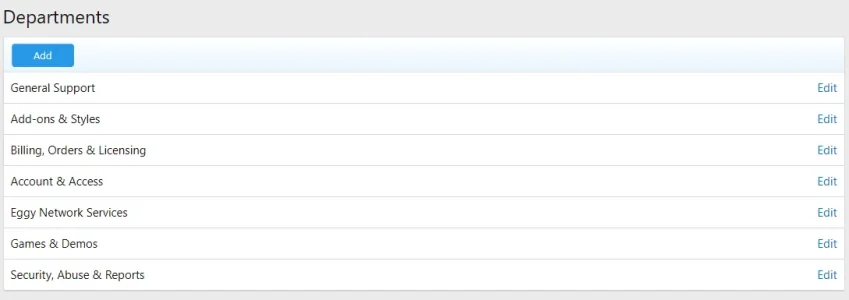
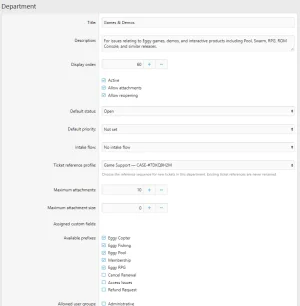
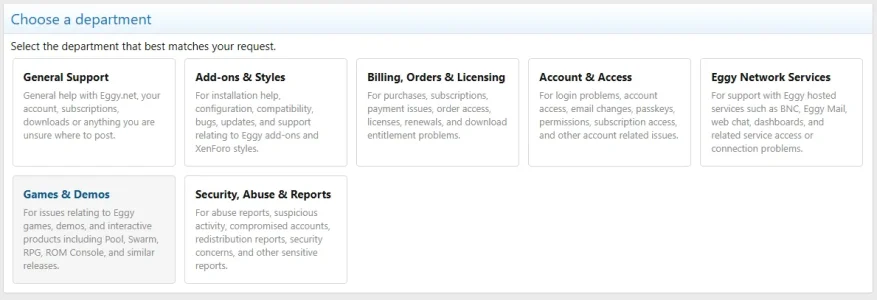
Configurable Support Departments
Create completely separate support areas within one Ticket Support installation.For example:
- Billing, Orders & Licensing
- Account & Access
- Games & Demos
- Bug Reports
- General Support
- Title and description
- Display order
- Active state
- Default status
- Default priority
- Ticket reference profile
- Intake flow
- Prefix label
- Prefix categories
- Available prefixes
- Custom fields
- Attachment settings
- Customer access
- Staff access
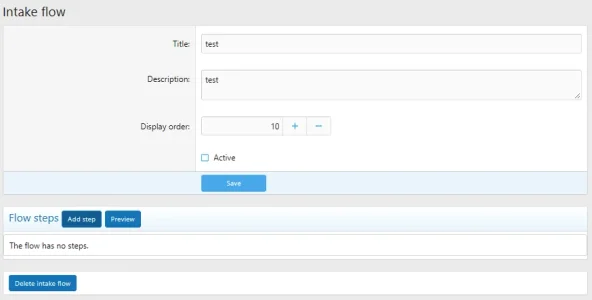
Guided Intake Flows
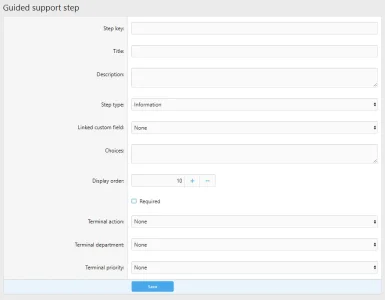
Intake Flows guide customers through questions before the final ticket is submitted.They can collect information, branch based on answers, route requests to another department, assign priorities or even resolve an enquiry before a ticket needs to be created.
Available step types include:
- Information
- Yes or No
- Single choice
- Multiple choice
- Text
- Textarea
- Number
- URL
- Custom field
- Confirmation
- Resolution
Steps can branch depending on the customer's answer.
For example:
Which game do you need help with?
followed by:
What type of problem are you having?
A purchase-related answer could route the request into Billing while gameplay support continues through the Games & Demos workflow.
Branches can continue to another step, submit the process, resolve the enquiry or move the request to another department.
Intake flows include preview functionality so administrators can test them before activation.
Statistics are recorded for started flows, tickets created and enquiries resolved during intake.
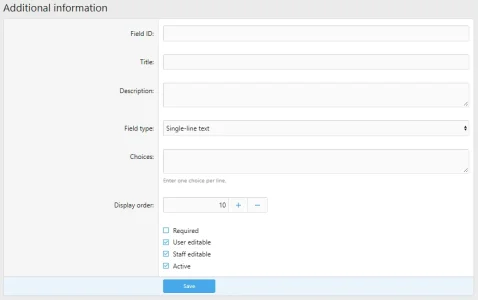
Custom Ticket Fields
Collect exactly the information your support staff require.Supported field types include:
- Single-line text
- Multi-line text
- Number
- Select
- Radio
- Checkbox
- Multi-select
- URL
Fields support:
- Titles and descriptions
- Required state
- User editability
- Staff editability
- Display order
- Active state
Custom fields can be assigned to individual departments so different support areas can collect completely different information.
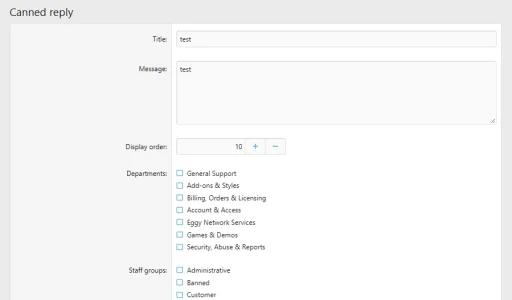
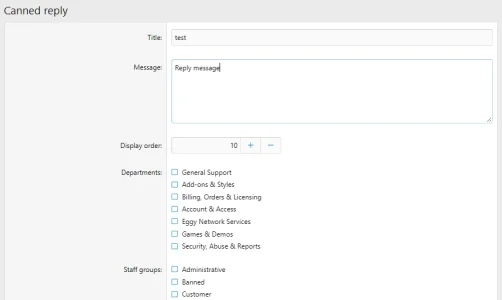
Canned Replies
Save common staff responses and reuse them whenever needed.Canned replies can contain a title and message and can be restricted to selected departments or staff groups.
They are useful for:
- Common troubleshooting steps
- Installation instructions
- Refund information
- Frequently repeated support responses
Ticket Tags
Create reusable tags for internal organisation.A ticket can have multiple tags such as:
- Billing
- Games
- Bug
- Needs follow-up
Tags are managed through the Admin CP and can be applied directly from staff ticket controls.
Complete Staff Ticket Management
Staff can manage tickets directly from the ticket page.Available controls include:
- Claim an unassigned ticket
- Assign another staff member
- Change status
- Change priority
- Move department
- Change prefix
- Apply tags
- Merge tickets
- Delete tickets where permitted
Tickets can be merged using either their numeric ticket ID or customer-facing ticket reference.
Internal Staff Notes
Add private notes that customers cannot see.Internal notes are useful when several staff members are working on the same issue and need to exchange information alongside the customer conversation.
Ticket History
Important activity is recorded throughout the life of the ticket.Tracked activity can include:
- Status changes
- Assignment changes
- Department changes
- Priority changes
- Prefix changes
- Tags
- Notes
- Ratings
- Merges
A Familiar XenForo Customer Experience
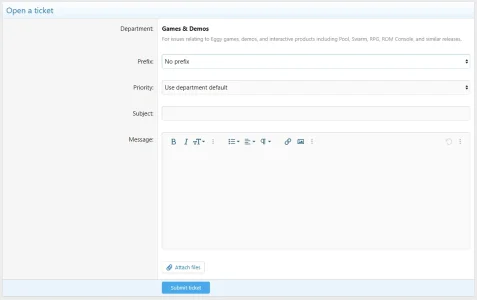
Customers receive a proper XenForo-based ticket experience rather than being sent to a disconnected third-party helpdesk.They can:
- Choose a support department
- Enter a subject and message
- Choose available prefixes
- Choose available priorities
- Complete department-specific fields
- Upload images and attachments
- Insert uploaded images using XenForo's editor workflow
- Reply using XenForo's familiar editor
- Close their own tickets where permitted
- Reopen tickets where permitted
Attachments
Attachments can be enabled or disabled independently for each department.Each department can also define its own maximum attachment count and maximum attachment size.
Customers and staff can upload files and images directly through XenForo's native attachment system.
Uploaded images can be inserted directly into ticket messages using XenForo's normal editor and attachment workflow.
This allows technical support areas to accept screenshots and supporting files while other departments use stricter limits.
Support Ratings
Customers can rate the support they receive from 1 to 5 and optionally leave a comment.Ratings provide a simple way to collect feedback directly against the support ticket.
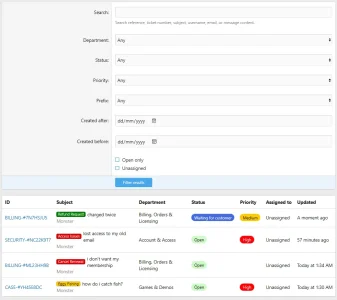
Search & Filtering
The support queue includes filters to help staff quickly find tickets requiring attention.Available filtering includes:
- Search
- Prefix
- Open tickets
- Assigned to me
- Unassigned
The Admin CP provides additional filtering by:
- Department
- Status
- Priority
- Prefix
- Ticket dates
Support Dashboard
The main support page gives staff an immediate overview of the current workload.Dashboard counters include:
- Open tickets
- Unassigned tickets
- Waiting for staff
- Waiting for customer
The Admin CP dashboard provides additional statistics including resolved tickets and response information.
Automated Ticket Maintenance
Ticket Support can automatically handle routine lifecycle tasks.Available automation includes:
- Reminders for tickets waiting on the customer
- Automatic resolution after a configured number of days
- Automatic closure of resolved tickets after a configured period
Granular XenForo Permissions
Ticket Support uses XenForo permissions to control what customers and staff can do.Permissions cover:
- Viewing tickets
- Creating tickets
- Uploading attachments
- Closing tickets
- Reopening tickets
- Rating support
- Staff ticket viewing
- Staff ticket management
- Assignment
- Internal notes
- Ticket deletion
- Ticket merging
Departments can additionally restrict access to selected customer and staff groups.
Customers remain limited to their own private tickets unless they have appropriate staff permissions.
Additional Configuration
Ticket Support also includes options for:- Maximum open tickets
- Ticket list page size
- Custom Ticket Support navigation title
- Enable or disable the navigation entry
- Custom public route
- Global Ticket Support enable or disable
- Customer ticket closing
- Customer ticket reopening
- Ratings
- Internal staff notes
Built for XenForo
Eggy Ticket Support keeps the entire support workflow inside XenForo and uses XenForo's existing accounts, permissions, editor, alerts, attachment system and styling.No separate helpdesk account. No disconnected support platform. One integrated support system for your community.
Requirement
- XenForo 2.3.0 or newer
- PHP 8.0 or newer
-
 1790212615115.webp
 -
 1790212653647.webp
 -
 1790212678815.webp
 -
 1790212703198.webp
 -
 1790212745619.webp
 -
 1790212758254.webp
 -
 1790212869078.webp
 -
 1790212910221.webp
 -
 1790212939587.webp
 -
 1790212998617.webp
 -
 1790213020452.webp
 -
 1790213034759.webp
 -
 1790213063292.webp
 -
 1790213093986.webp
 -
 1790213175282.webp
 -
 1790213268657.webp
 -
 1790213282926.webp
 -
 1790213302254.webp
 -
 1790213316233.webp
 -
 1790213802553.webp


