- Compatible XF 2.x versions
- 2.3
- Additional requirements
- XenForo 2.3+
XenForo Media Gallery required: No
YouTube Data API key required: No
- Updates duration
- $19.95 - 1 year ($9.95 yearly renewal)
- Visible branding
- No
Full feature list
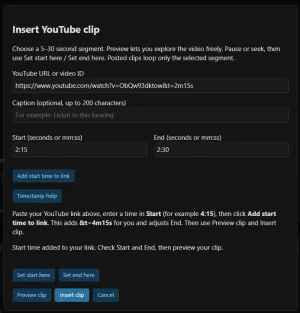
Create clips from the editor
- Dedicated YouTube clip toolbar button.
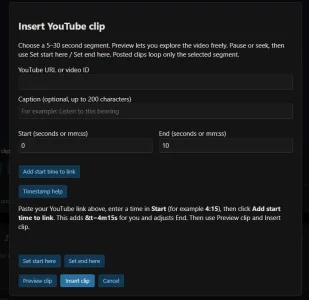
- Clip creation window with a YouTube URL or video ID field.
- Separate Start and End fields.
- Accepts whole seconds, mm:ss, or hh:mm:ss.
- Optional plain-text caption of up to 200 characters.
- Preview the video before inserting the clip.
- Explore the preview freely to find the right moment.
- Set start here and Set end here buttons capture the preview’s current position.
- Automatically inserts the clip’s BB code into the message.
Timestamped YouTube links
- Recognizes supported timestamps in pasted YouTube links.
- Supports formats such as t=255, t=255s, t=4m15s, t=1h2m3s, and start=255.
- Supports recognized timestamp fragments such as #t=255s.
- Automatically fills Start and adjusts End.
- Preserves the current valid clip length when moving to a new timestamp.
- Leaves both time fields editable.
- Includes an Add start time to link button that builds the timestamped link for you.
- Provides instructions explaining how to use the timestamp button.
Embedded playback
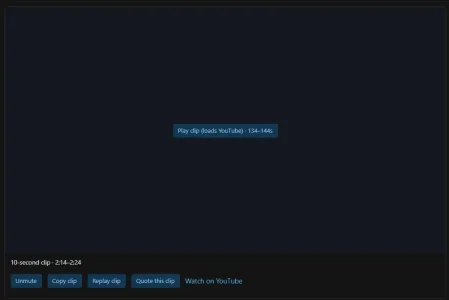
- Loads the YouTube player only after someone clicks Play clip.
- Starts playback muted.
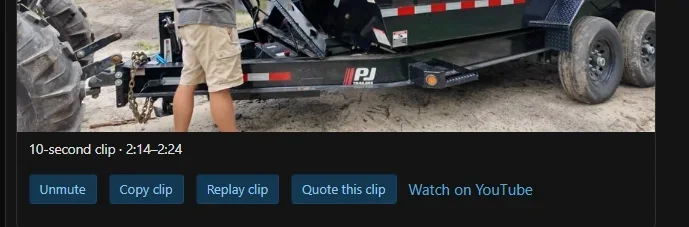
- Visible mute/unmute control.
- Repeats the selected segment when looping is enabled.
- Optional single-play mode stops at the selected end.
- Replay clip restarts the selected segment.
- Clear duration label, such as 10-second clip · 4:00–4:10.
- Optional caption displayed above the player.
- Direct Watch on YouTube link.
- Pauses playback when the browser tab is hidden or the player is mostly offscreen.
- Unmuting one Talmyric player pauses other Talmyric players on the page.
Edit existing clips
- Dedicated Edit YouTube clip toolbar button.
- Lists clips found in the message being edited.
- Opens the selected clip with its caption and times already filled in.
- Supports adjusting the video, caption, and selected segment.
- Replaces only the chosen occurrence, including when a message contains duplicate clips.
- Preserves surrounding message content.
- Cancel leaves the original clip unchanged.
Copy and quote clips
- Copy clip copies the video ID, caption, and selected times as BB code.
- Works without loading or playing the video.
- Manual-copy dialog is available when automatic clipboard access is blocked.
- Quote this clip inserts the selected clip into quick reply using XenForo’s normal author/post attribution.
- Appends the quote to the reply draft without clearing existing text.
- Leaves members free to add their comment and submit the reply themselves.
- Quote availability follows native quote/quick-reply controls and the add-on’s create permission.
Administrator options
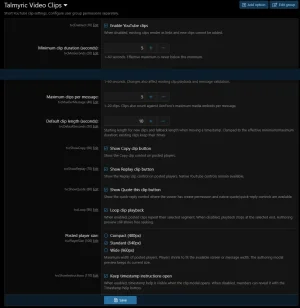
All settings are available under:ACP → Setup → Options → Talmyric Video Clips
- Enable or disable clip embedding.
- Configure minimum clip duration.
- Configure maximum clip duration.
- Configure maximum clips per message.
- Choose the default clip length.
- Show or hide the Copy clip button.
- Show or hide the Replay clip button.
- Show or hide the Quote this clip button.
- Enable or disable automatic looping.
- Choose Compact, Standard, or Wide player sizes.
- Keep timestamp instructions visible or place them behind a Help button.
Permissions and validation
- Separate user-group permissions for creating clips and playing embedded clips.
- Users without embedded-playback permission receive a timestamped YouTube link.
- Server-side validation of video IDs, supported URLs, timestamps, captions, and clip duration.
- Clip creation permission also applies to manually entered BB code.
- Clips count toward the add-on’s per-message limit and XenForo’s normal media limit.
- Captions display as escaped plain text.
- Clip BB code is disabled in signatures.
- No server-side downloading of user-supplied video URLs.
Lightweight integration
- Standalone core XenForo add-on.
- No XenForo Media Gallery dependency.
- No YouTube Data API key.
- No video uploads, transcoding, or locally hosted video files.
- No custom database tables.
- Uses YouTube’s official embedded player.
- Uses a privacy-enhanced YouTube embed host.
- Includes standard XenForo add-on metadata and XML exports.
- Includes installation, upgrade, and validation documentation.
- Developer link appears in the XenForo add-on list.