- Compatible XF 2.x versions
- 2.3
- Visible branding
- No
StreamWave Links Directory Pro – XenForo 2.3
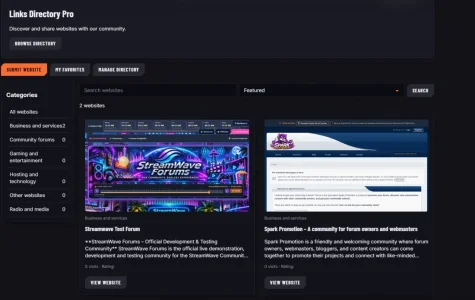
Transform your XenForo community into a powerful, interactive website directory.StreamWave Links Directory Pro is a comprehensive, native XenForo 2.3 add-on that allows community owners to create, manage and operate a professional website directory directly within their existing forum.
Whether you want to promote partner websites, showcase community projects, build a business directory, advertise online services or create a curated collection of useful internet resources, Links Directory Pro provides a centralized platform for website discovery, promotion and member engagement.
With automatic website screenshots, member reviews, star ratings, featured listings, favorites, visitor tracking and a dedicated administration center, Links Directory Pro goes far beyond a traditional collection of links.
Main Features
Professional Website Directory
- Dedicated directory homepage.
- Responsive website listing cards.
- Organized website categories.
- Individual website information pages.
- Website descriptions and external links.
- Website screenshot previews.
- Integrated search functionality.
- Featured website listings.
- Recently added websites.
- Most visited websites.
- Highest-rated websites.
- Theme-responsive interface.
- Mobile-friendly design.
Automatic Website Screenshots
Give your directory a professional appearance with automatic website screenshot generation.Links Directory Pro integrates with the Thum.io screenshot service, allowing administrators to generate visual previews of submitted websites without manually visiting and capturing each website.
- Automatic screenshot capture for approved submissions.
- Automatic capture when pending websites are approved.
- Manual screenshot capture from the Admin CP.
- Refresh existing website screenshots.
- Locally stored captured images.
- Protection against replacing existing screenshots when a capture fails.
- Configurable automatic capture settings.
Manual Screenshot Uploads
Members and administrators can upload their own website screenshots.- JPEG, PNG and WebP support.
- Maximum upload size of 3 MB.
- Automatic image resizing and compression.
- Replace or remove existing screenshots.
- Screenshot thumbnails on directory listings.
- Larger previews on individual website pages.
- Placeholder images for websites without screenshots.
Community Website Submissions
Allow your members to contribute to the directory by submitting their favorite websites, businesses, projects and online communities.Members can provide:
- Website name.
- Website URL.
- Website description.
- Directory category.
- Website screenshot.
Website Reviews and Ratings
Encourage community participation through an integrated website review and rating system.Members can share their experiences, recommend useful websites and help other community members discover trustworthy online resources.
- Five-star website ratings.
- Written member reviews.
- Average website ratings.
- Highest-rated website sorting.
- Administrative review management.
- Removal of inappropriate reviews.
Featured Websites
Highlight important websites, community partners, sponsors or recommended services using the featured listing system.Administrators can feature or unfeature websites directly from the administration center, giving selected listings greater visibility within the directory.
Member Favorites
Members can save their favorite websites for convenient future access.This feature encourages repeat visits and allows members to build a personalized collection of useful websites and services.
Website Visit Tracking
Track the popularity of directory listings through integrated visit counters.Administrators and members can identify popular websites, while visitors can browse listings based on recorded website visits.
Website Reporting System
Help maintain a high-quality directory by allowing members to report problematic listings.Reports can be used to identify:
- Broken website links.
- Inappropriate content.
- Misleading website descriptions.
- Spam submissions.
- Websites that are no longer operational.
- Other directory-related concerns.
Dedicated Administration Center
Links Directory Pro includes a dedicated administration center designed to simplify directory management.Administrators do not need to access the public-facing directory to perform routine management operations.
Administration Dashboard
Monitor directory activity from a centralized overview displaying information about:- Total website listings.
- Directory categories.
- Pending submissions.
- Website reviews.
- Member favorites.
- Website visits.
- Reported listings.
Category Management
Create and maintain an organized directory structure.Administrators can create new categories, edit existing categories and remove empty categories.
Example categories include:
- Community Forums
- Web Hosting
- Forum Software
- Software Development
- Internet Radio Stations
- Entertainment
- Gaming Communities
- Technology
- Business Services
- News and Media
- Shopping
- Education
- Sports
- Social Networking
- Personal Websites
- Community Partners
Website Management
Administrators have direct control over website listings, including:- Creating new website listings.
- Editing existing websites.
- Updating website URLs and descriptions.
- Assigning categories.
- Assigning website ownership by username.
- Approving pending submissions.
- Rejecting inappropriate submissions.
- Hiding listings.
- Featuring websites.
- Uploading website screenshots.
- Generating automatic website screenshots.
- Searching and filtering listings.
Review Management
Administrators can monitor member reviews and remove inappropriate content to maintain the quality and integrity of the directory.Report Management
Investigate reported websites, resolve issues and reopen reports when further investigation is required.Native XenForo Usergroup Permissions
Links Directory Pro integrates with XenForo's existing usergroup permission system, allowing administrators to control which members can access and participate in the directory.Permissions include:
- View the links directory.
- Submit and edit owned websites.
- Rate and review websites.
- Submit websites without moderation.
- Manage directory listings, categories and reports.
Installation Instructions
- Download the Links Directory Pro installation ZIP.
- Log in to your XenForo Admin Control Panel.
- Navigate to Add-ons.
- Select Install/upgrade from archive.
- Upload the supplied ZIP archive.
- Follow the XenForo installation prompts.
- Configure your usergroup permissions.
- Create your directory categories.
- Begin adding website listings.
Operational Instructions
1. Accessing the Administration Center
Navigate to:Admin CP → Setup → Links Directory Pro
The administration center can also be accessed directly using:
Replace yourdomain.com with your XenForo website address and include your forum installation subdirectory if applicable.
2. Configuring Usergroup Permissions
Navigate to:Admin CP → Groups & permissions → User group permissions
Select the usergroup you wish to configure and locate the Links Directory Pro permission section.
Recommended permission configurations:
| Permission | Registered | VIP | Moderators |
|---|---|---|---|
| View directory | Yes | Yes | Yes |
| Submit websites | Yes | Yes | Yes |
| Rate and review | Yes | Yes | Yes |
| Bypass moderation | No | Optional | Yes |
| Manage directory | No | No | Yes |
3. Creating Directory Categories
- Open the Links Directory administration center.
- Select Categories.
- Create a new category.
- Enter the required category information.
- Save the category.
4. Adding Websites Through the Admin CP
- Open the administration center.
- Select Website listings.
- Choose the option to add a new website.
- Enter the website title.
- Enter the complete website URL, including https://.
- Provide a detailed website description.
- Select the appropriate category.
- Assign the listing to an existing member using their username, where applicable.
- Upload a screenshot or use automatic screenshot capture.
- Select the appropriate publication status.
- Enable the featured option if desired.
- Save the listing.
5. Configuring Automatic Website Screenshots
Open the automatic screenshot settings from the Links Directory administration center.The settings page can also be accessed directly at:
Enable automatic screenshot capture and save your settings.
New approved website listings without screenshots will automatically attempt to obtain a website preview through the screenshot provider.
6. Capturing Screenshots for Existing Websites
- Open the ACP website manager.
- Locate the website you wish to update.
- Select Capture website screenshot.
- Allow the screenshot provider to process the request.
- Verify that the new screenshot appears on the listing.
You can alternatively upload a screenshot manually.
7. Featuring a Website
- Open the website manager.
- Edit the desired website.
- Enable Featured website.
- Save the listing.
8. Moderating Member Submissions
When a member submits a website that requires approval:- Open the Links Directory administration center.
- Locate pending website submissions.
- Review the website URL and description.
- Check that the website is appropriate for your community.
- Approve, reject or hide the listing as necessary.
9. Managing Website Reviews
Open the review management section of the administration center.Review member feedback and remove inappropriate reviews when necessary.
Administrators should encourage constructive and genuine reviews to maintain the credibility of the directory.
10. Managing Reported Websites
- Open the report management section.
- Select a reported website.
- Investigate the reason for the report.
- Update, hide or otherwise moderate the listing if necessary.
- Mark the report as resolved.
Member Operating Instructions
Members can access the directory through the website's main navigation menu, provided they have the required permissions.Depending on their permissions, members can:
- Browse website categories.
- Search for websites.
- Submit new website listings.
- Edit their own listings.
- Upload website screenshots.
- Visit listed websites.
- Leave ratings and reviews.
- Save favorite websites.
- Report problematic listings.
Theme Compatibility
Links Directory Pro is designed to integrate with your active XenForo style rather than forcing a separate color scheme.The directory uses theme-responsive styling for website cards, category navigation, buttons, forms, reviews and listing pages.
Responsive layouts provide support for desktop computers, tablets and mobile devices.
Technical Requirements
- XenForo 2.3.
- A compatible PHP and MySQL or MariaDB environment.
- PHP GD for screenshot processing.
- PHP cURL for automatic screenshot capture.
- Outbound HTTPS connectivity for the external screenshot provider.
- Appropriate XenForo administrative permissions for installation and configuration.
Ideal Uses
StreamWave Links Directory Pro is ideal for:- Online community directories.
- Forum promotion websites.
- Business and service directories.
- Web hosting directories.
- Internet radio station directories.
- Gaming community directories.
- Affiliate website collections.
- Community partner showcases.
- Software and resource directories.
- Developer communities.
- Local business listings.
- Educational resource collections.
- Entertainment website directories.
- Sponsor and advertiser showcases.
Why Choose StreamWave Links Directory Pro?
A successful online community is about more than discussions. It is also about discovery, networking, promotion and connecting members with valuable resources.StreamWave Links Directory Pro gives your community a dedicated platform where members can discover new websites, promote their projects, share recommendations and support other online communities.
With visual website previews, community reviews, native permissions and centralized administration, you can transform your XenForo installation into a valuable website discovery and promotional platform.
Discover. Connect. Promote. Grow.
Product Information
Product: StreamWave Links Directory ProCurrent Version: 1.3.2
Platform: XenForo 2.3
Developer: StreamWave Development
Installation: Standard XenForo add-on archive
Database: Native XenForo MySQL storage
Theme Responsive: Yes
Mobile Responsive: Yes
Automatic Website Screenshots: Yes
Manual Screenshot Uploads: Yes
Dedicated Administration Center: Yes
Native Usergroup Permissions: Yes
Developed by StreamWave Development as part of our growing collection of community enhancement products and services.
Visit us: https://streamwaveforums.net
Discover the StreamWave Community Suite: https://streamwaveforums.com