- Compatible XF 2.x versions
- 2.3
- Additional requirements
- PHP 8.0 or newer. XenForo Resource Manager 2.3 is optional.
- Visible branding
- No
Tabbed Latest Content
What it does
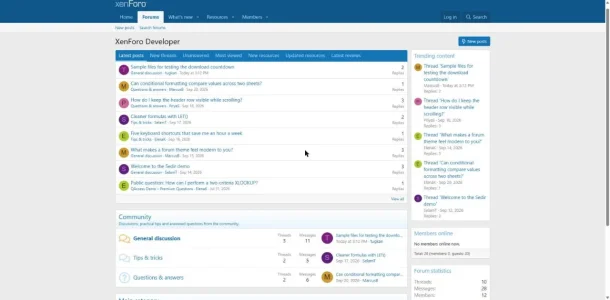
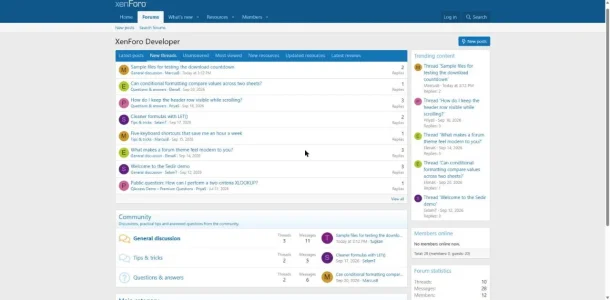
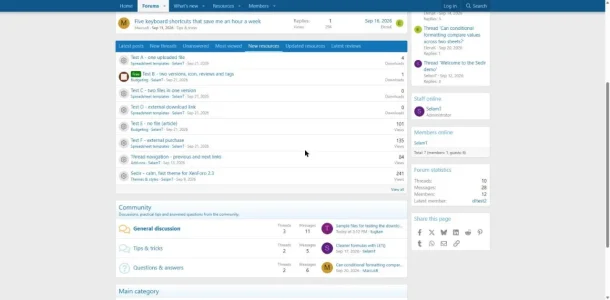
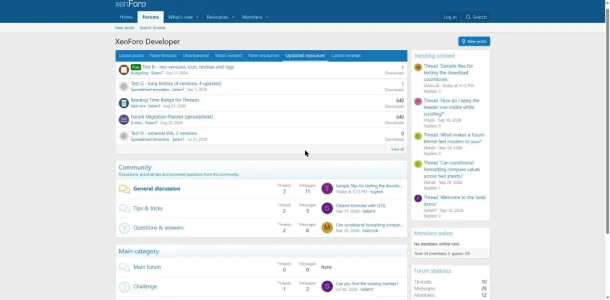
Tabbed Latest Content puts the newest activity of your board into one compact block with tabs: latest posts, new threads, unanswered threads, most viewed threads and, when XenForo Resource Manager is installed, new resources, updated resources and latest reviews. Visitors switch between the lists without leaving the page. XFRM is optional: without it, the block simply shows the forum tabs.
Seven tabs in one block
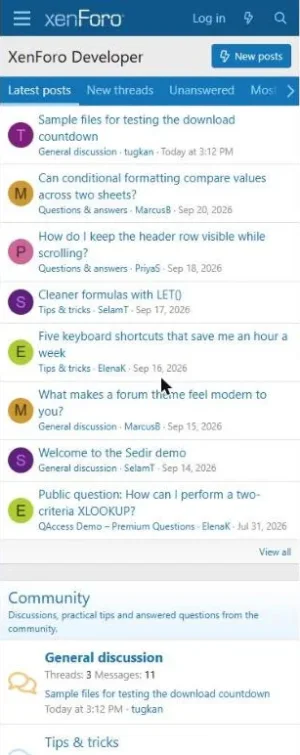
- Latest posts: threads ordered by their last reply, with the last poster and a link to the newest post.
- New threads: the most recently started threads.
- Unanswered: open threads that have no reply yet.
- Most viewed: the most viewed threads started within a period you choose (7, 30, 90 or 365 days, or all time).
- New resources: the most recently added resources.
- Updated resources: resources that received an update, newest update first.
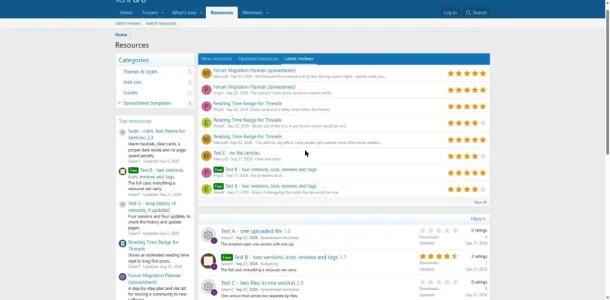
- Latest reviews: the newest resource reviews with their star rating and a short excerpt.
Each row shows the avatar or resource icon, the title with its prefix, the forum or category, the author, the date and one number (replies, views or downloads). Threads with unread posts are shown in bold for logged-in members.
Tabs load on demand
- Only the first tab is queried when the page loads. Every other tab is fetched the first time a visitor clicks it, so the block adds the cost of one list to your page, not seven.
- Loading uses XenForo's own tab system. The add-on ships no JavaScript file of its own.
- Each tab is also a normal link: without JavaScript it opens the same list as a plain page, which is marked noindex.
Options per widget
The block is a standard XenForo widget, so you can add it as many times as you like and give every copy its own settings:
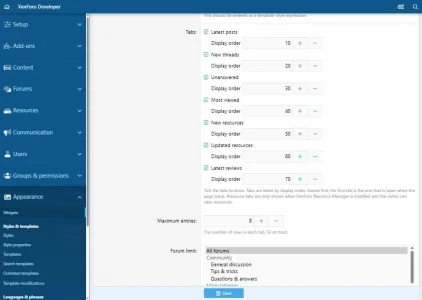
- Which tabs to show and in which order. The first tab is the one that is open when the page loads.
- Number of rows per tab (8 by default, up to 50).
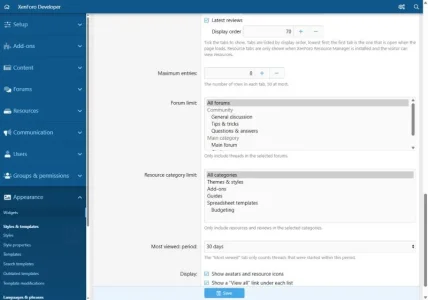
- Forum limit: only include threads from the forums you select.
- Resource category limit: only include resources and reviews from the categories you select.
- The period used by the Most viewed tab.
- Show or hide avatars and resource icons.
- Show or hide the "View all" link under each list.
Who sees the block and on which pages is controlled with the widget's own position and display condition settings.
Ready after installation
- Installing the add-on places one block above the node list on the forum list and, when XFRM is installed, one above the resource list on the resources page.
- Both are ordinary widgets: move them, edit them, add more or delete them under Appearance > Widgets.
- In sidebars and on narrow screens the number column is dropped and long titles wrap, so the block stays readable at any width.
Permissions are respected
- The add-on adds no permissions of its own. Every visitor only sees threads, resources and reviews they are allowed to view.
- Content from members a visitor ignores is left out.
- Resource tabs are hidden for visitors who cannot view resources.
Built the XenForo way
- No template edits and no template modifications: one widget definition, one route and its own templates.
- No database tables and no changes to existing tables.
- No inline CSS or JavaScript; styling uses your style's own colours and spacing, so it follows light and dark variations.
- No jQuery, no external requests, no licence checks, no call-home.
- Uninstalling removes the widgets, templates and phrases.
- English and Turkish included; all text is in phrases, so tab names can be changed like any other phrase.
Live demo
You can see the add-on on our demo board,
forumino.com, running the default XenForo style. No account is needed:
Requirements
- XenForo 2.3
- PHP 8.0 or newer
- XenForo Resource Manager 2.3 (optional)
Developed and tested on XenForo 2.3 with PHP 8.4, on the default style, with and without XFRM enabled.
Installation
- Upload the contents of the
upload folder to your XenForo root, or install the ZIP from the admin control panel.
- Install the add-on from Add-ons. The two default blocks appear right away.
- Adjust the tabs and limits under Appearance > Widgets.
-
01-latest-posts.webp
44.7 KB
· Views: 12
-
02-new-threads.webp
44.9 KB
· Views: 12
-
03-new-resources.webp
40.3 KB
· Views: 10
-
04-updated-resources.webp
41.9 KB
· Views: 10
-
05-resources-page-latest-reviews.webp
51 KB
· Views: 10
-
06-mobile.webp
35.9 KB
· Views: 8
-
07-acp-widget-tabs.webp
27.1 KB
· Views: 8
-
08-acp-widget-options.webp
27.4 KB
· Views: 7


