
You are using an out of date browser. It may not display this or other websites correctly.
You should upgrade or use an alternative browser.
You should upgrade or use an alternative browser.

New sources — media that lives somewhere else
- RUTUBE and VK Video. Paste a RUTUBE or VK Video link and it becomes a gallery item like any other, with its own player, categories, comments and ratings. RUTUBE also fills in the title, description and cover automatically (it publishes an oEmbed endpoint — no API key needed); VK serves no metadata to anonymous requests, so a VK item keeps the title the member types and the cover they choose. Link formats covered:
rutube.ru/video/…,/shorts/…and/play/embed/…;vk.com,vk.ru,vkvideo.ruandm.vkvideo.ruwithvideo…,clip…or a readyvideo_ext.phpaddress, community videos included. (requested by @club_home)- Direct image URLs — new option, off by default. With it on, a member can paste the direct link to a
.jpg,.jpeg,.png,.gifor.webpfile hosted anywhere — their own image host, an S3 bucket, a CDN — and it becomes a normal gallery item with the same zoom and lightbox as an uploaded photo. The full-size image is always served from that host, never from your server, in the viewer and behind the Download item; if Store embed covers on this server is also on, only a small thumbnail is cached locally so the gallery grid stays fast. Detection keys on the file extension rather than the host, so it works with any image host and any URL shape.http://links are stored ashttps://, because plain-http images are mixed content on an HTTPS board. (requested by @ForumPromotion.net)- XenForo's own BB code media sites — new option, off by default. When a link matches none of Prizma's own sources, Prizma now falls back to the media sites defined under Setup → Options → BB code media sites. That list is yours to extend, so this is how you add any platform Prizma does not ship with — Telegram, Pinterest, Instagram, a regional video host, anything: define the site once in XenForo and its links become gallery items, with categories, comments and ratings like everything else. Playback is XenForo's own embed for that site, so cookie consent and oEmbed behave exactly as they do in a post. Prizma's own sources are always tried first, so nothing changes for existing links. (requested by @club_home)
Smaller changes
- The supported sources hint on the add screen now lists the new sources, and — when the media-site bridge is on — the extra sites it makes available.
- A link that matches a video platform's domain but is not a video (a VK profile, the RUTUBE home page) is now rejected with "link not recognised" instead of creating an item that cannot play.
- All 9 bundled translations updated (100% coverage).
Things worth knowing before you switch the new options on
- A file behind a plain image URL cannot be permission-protected: anyone with the link can fetch it straight from the host, whatever the gallery permissions say. Anything that must stay behind permissions should be uploaded normally — both kinds of item can live side by side in the same gallery.
- An item that points at a remote file breaks if that host blocks hotlinking or disappears. EXIF and WebP derivatives apply to uploads only.
- VK publishes no metadata to servers, so titles and covers for VK items are the member's own work. This is a VK limitation, not a missing feature.
Upgrade notes
Compatibility: XenForo 2.3.0+ · PHP 8.0+
- No schema changes. The upgrade adds RUTUBE and VK Video to your saved Embed sources list so they are enabled straight away; the other two features stay off until you turn them on under ACP → Options → Prizma → Integration.
- Nothing changes for existing media or for links from sources you already use.
New feature
- YouTube channel and playlist feeds. Under ACP → Prizma → Media feeds you can now follow a YouTube channel or playlist: paste the channel/playlist URL (or a bare ID), preview what would come in, choose which member the videos are imported as, the category or album, the media type (automatic — videos as video, Shorts as Shorts — or forced), the publish state (by the member's permissions, always visible, or always into the approval queue) and how often to check. A background job then imports every new video: title, description, publish date and the best available cover. It uses YouTube's own RSS feed, so no API key is required. Each video is imported once across the whole gallery — a channel feed and one of its playlists never create duplicates, and a deleted item does not come back on the next run. Imported items pass through the same approval queue, permissions and code events as manual uploads. (requested by @Chris59)
Known limitation
- YouTube's RSS feed exposes only a channel's or playlist's ~15 most recent videos and cannot page further back, so a feed follows a channel from now on; it does not import the back catalogue. A YouTube-API-based back-fill is a possible later addition for sites that configure an API key.
Upgrade notes
Compatibility: XenForo 2.3.0+ · PHP 8.0+
- Two new tables (feed sources and their import log); no changes to existing data or permissions. The feed cron runs every 15 minutes and picks up feeds that are due.
- All 9 bundled translations updated (100% coverage).

New features
- Optional horizontal category bar. A new admin option (Category navigation) can replace the left sidebar with a scrollable category strip under the page title, giving the gallery the full width. Selecting a parent category reveals its sub-categories on a second strip; the Albums link moves to the gallery navigation. Existing installations keep the sidebar — nothing changes unless you switch it on. (requested by @🔥Iggy🔥)
- Bulk edit after upload. Select several of your own media items (or, as a moderator, anyone's) and edit them together: description, tags, sensitive flag, category and album in one form. Only the fields you tick are changed; tags are added to the existing ones. Bulk upload stays fast — you can tidy up afterwards instead of filling in details file by file. (requested by @🔥Iggy🔥 and @CedricV)
- Admin options are now organised into five groups — Appearance and layout, Viewer buttons, Uploads and files, Integrations and API keys, Playback and slideshow — instead of one long list, with API credentials in their own section. Your existing values are untouched. (requested by @🔥Iggy🔥)
Bug fixes
- Fixed the second file being silently dropped when adding files one at a time. Bulk mode only opened when several files were selected together; if you added a first file, moved on, then added a second, only the first was published. Adding a second file now switches to bulk mode. (reported by @CedricV)
Performance and scale
- Two new database indexes, measured on a 100,000-item library: the category counter rebuilt on every upload/delete/move dropped from 22 ms to 3 ms, and the "is this embed already imported" lookup — the hot path for the upcoming YouTube feed importer — from 53 ms (full scan) to 0.4 ms.
- New "Scale" section in the README with the measured cost of every listing shape at 100k items, how background jobs are batched, and how to serve thumbnails and media through a CDN or object storage.
Documentation
- WebP: XenForo's core Image optimization option already applies to Prizma uploads (measured: ~28 % smaller on a 4K JPEG). The README now explains how to enable it, how to convert existing images, and the two trade-offs: the original file is not kept, and EXIF/GPS cannot be extracted from new uploads because the conversion happens before Prizma sees the file. The EXIF option's description carries the same warning.
Upgrade notes
Compatibility: XenForo 2.3.0+ · PHP 8.0+
- Bulk edit for members requires the Edit own media permission, which Prizma does not grant by default — enable it for the groups that should be able to tidy up their own uploads.
- No changes to existing data; two indexes are added to the media table during the upgrade.
- All 9 bundled translations updated (100% coverage).
New features
- Tag people on photos. The media owner (and moderators with Edit any content) can tag members directly on an image: choose Tag people from the viewer's "⋯" menu, click a spot on the photo and pick the member. Tags show as dots that reveal the member's name on hover; positions are stored as ratios, so they stay in place at every screen size. Tagged members get a notification (with an opt-out in their alert preferences) and can remove their own tag at any time. (requested by @CrazyChef)
Moderation UI improvements
- The bulk-moderation button moved next to the sort buttons instead of sitting alone on its own row above the grid.
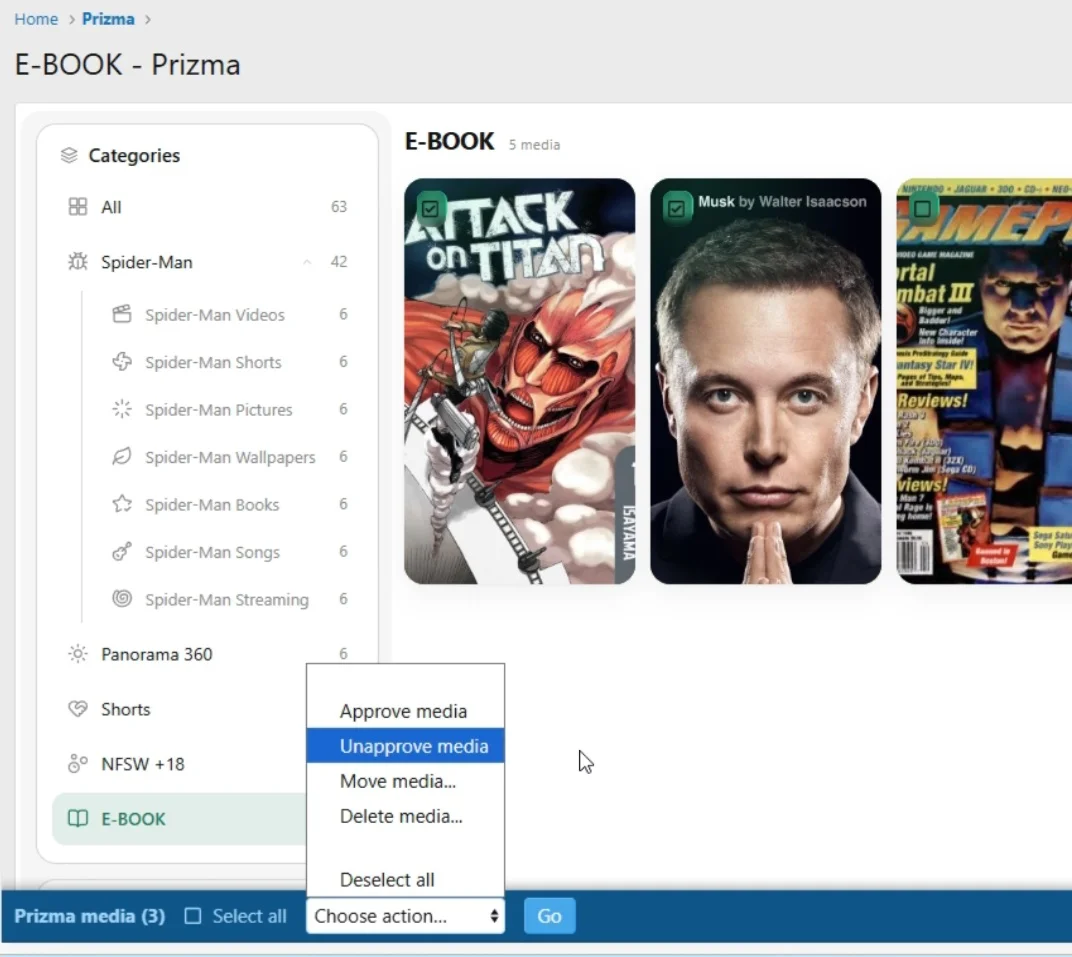
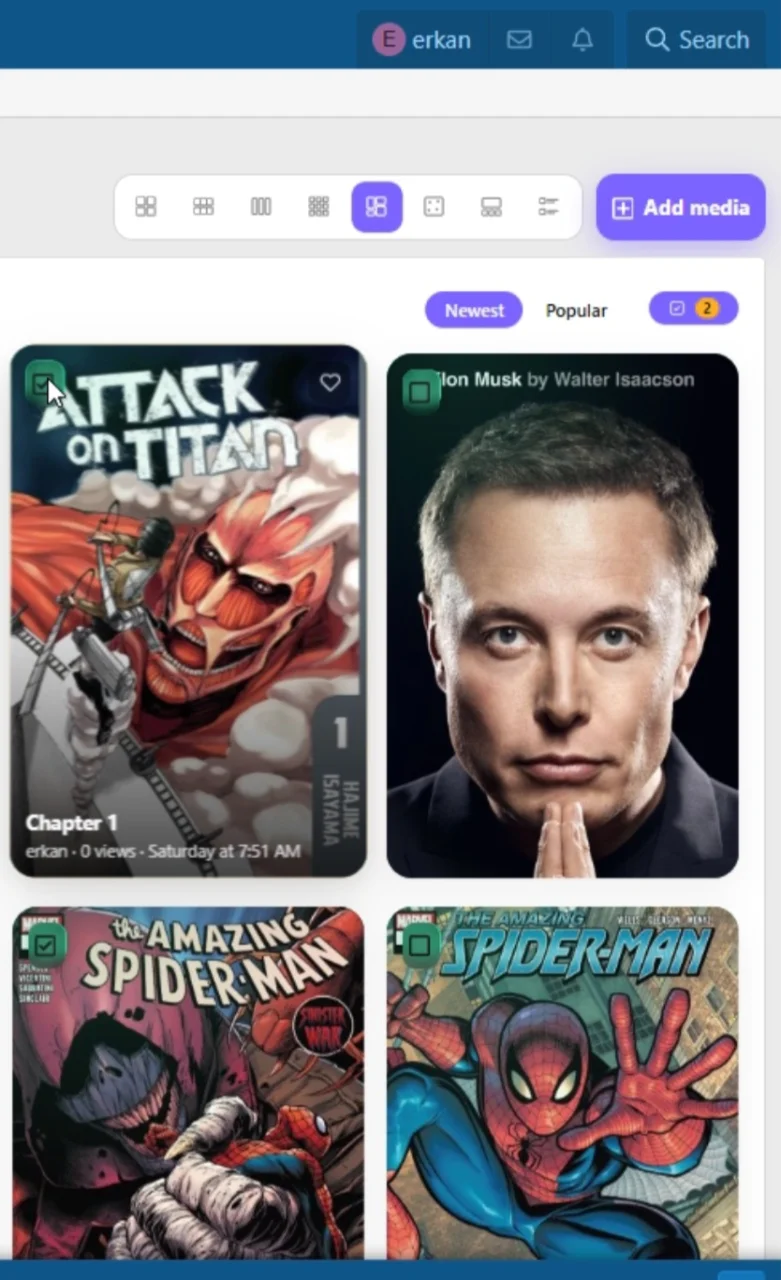
- Selection checkboxes on media cards are now hidden by default. Pressing the moderation button enables "moderation mode" and reveals them; pressing it again (with nothing selected) hides them.
- The bulk-moderation button has a proper icon and a selection-count badge, matching the gallery's visual language.
- Fixed the bottom selection bar overflowing on narrow screens (icons could overlap on some mobile browsers).
Upgrade notes
Compatibility: XenForo 2.3.0+ · PHP 8.0+
- One new table for person tags; no changes to existing data or permissions.
- All 9 bundled translations updated (100% coverage).
New features
- Approval queue for media and comments. Two new permissions control the flow: Submit media without approval decides whether new media and comments go live immediately or wait for review, and Approve / unapprove media and comments is the moderator side. Queued items appear in XenForo's standard approval queue with a preview; the author sees an "awaiting approval" notice on their own media and a clear message when submitting. Nothing leaks while moderated: no news feed entry, no notifications, no counters — everything fires at the moment of approval instead.
- Reporting. Media and comments now have Report buttons (in the viewer's "⋯" menu and on each comment row). Reports land in XenForo's report center with a content preview, and visibility follows your gallery permissions.
- Bulk moderation. Moderators with the new Use inline moderation on media permission get selection checkboxes on media cards — in the gallery, categories, albums, personal lists and What's New. Available actions: approve, unapprove, move to another category, and delete. Moving album media to a category removes it from the album (albums and categories are separate axes).
- Approve / Unapprove and Change owner in the viewer. The moderation section of the "⋯" menu can now flip a single media item's approval state and transfer ownership to another member.
- Moderator log. Moderation actions on media and comments (approve, unapprove, edit, move, change owner, delete) are now recorded in XenForo's moderator log.
- Developer API. Three code events —
erkan_prizma_media_pre_publish(can reject a submission),erkan_prizma_media_publishedanderkan_prizma_media_deleted— plus a newdocs/API.mddocumenting content types, services, repositories and the permission model. (requested by @CrazyChef)Upgrade notes
Coming next: member tagging on media with notifications (@CrazyChef's request) is scheduled for a 1.2.x update.
- Existing boards keep their current behaviour. The new permissions inherit sensible defaults from your core XenForo setup during the upgrade: Submit media without approval mirrors the core "Submit content without approval" permission, and the two moderator permissions mirror your forum moderators' approve/inline-moderation rights. Review them under Groups & permissions if you want a stricter gallery.
- No database schema changes.
- All 9 bundled translations updated (100% coverage).
Compatibility: XenForo 2.3.0+ · PHP 8.0+
New features
- Media types can now be disabled site-wide. A new admin option (Enabled media types) controls which types are offered anywhere in the gallery — the Add media wizard, the sidebar, type pages and the search filter. Media that already exists in a disabled type keeps working and stays visible: disabling a type stops new uploads, it does not hide content. (requested by @CrazyChef)
- Pasting a media link into the editor now shows the media as content, not as a raw link. Paste a Prizma media URL into any post and it is rendered as an embedded content block with cover, title, author and category. Permission-aware: members who cannot view the media see a plain link instead. (requested by @CrazyChef and @🔥Iggy🔥)
- Search now has a proper form for Prizma media, with filters for category (optionally including child categories) and media type.
- A visible share panel with "Copy link". The share button now opens the standard panel with a selectable URL box, a copy button and a "Link copied" confirmation, plus the social buttons enabled in your board options.
Bug fixes
- Fixed the gallery breaking after clicking "Load more". Newly loaded media was inserted as a single block instead of individual cards, which threw the Flow layout off and left large empty areas in one column. (reported by @CedricV)
- Fixed the left navigation disappearing on the Albums page. The sidebar now stays in place on the album list, album view and personal list pages (Favourites, My uploads, Watchlist), with the correct entry highlighted. (reported by @Binkaddas)
- Fixed the search tab throwing a template error. Opening the Prizma tab in search logged an "unknown template" error and showed an empty form.
- Flow view now packs cards more evenly, especially after loading more pages.
- Uninstalling now removes self-hosted embed covers. The data/prizma-cover/ directory was left behind on uninstall, leaving orphaned files on disk.
Other changes
Compatibility: XenForo 2.3.0+ · PHP 8.0+ · no schema changes, no configuration changes required.
- Albums moved to their own section in the sidebar, separate from Categories — they are a different axis, not a category.
- Added UNINSTALL.md, documenting exactly what uninstalling removes, what it deliberately leaves behind, and how to export your content beforehand. (requested by @CrazyChef)
- Share and sidebar behaviour now reuse XenForo's native components rather than custom code.
- All 9 bundled translations updated (100% coverage).