

- Compatible XF 2.x versions
- 2.3
- Additional requirements
- AC XenFrame
- Updates duration
- $15.00 / 12 mo. renewal
- Visible branding
- Yes, but removable without payment
Poké Haven is a theme for Pokémon communities, inspired by Pokémon Pokopia.
It's meant to feel like walking into a Pokémon Center. A red header with a striped awning, cream pages on soft grid paper, rounded lettering and chunky little shadows under every card, like they were built from blocks. It's warm and playful, and it makes a board feel like a place people want to hang out.
Demo
Underneath, it's still XenForo. Your forums, permissions, widgets, navigation and member tools all work exactly as you'd expect.
The forum index
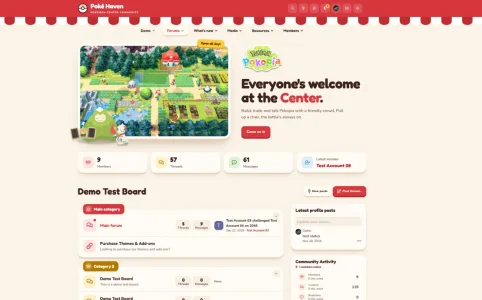
Your homepage opens with a framed picture of the Pokopia world, a yellow "Open all day!" sign, the Pokopia logo and a big welcome: "Everyone's welcome at the Center." Below it are four tiles showing your members, threads, messages and newest member. Each category gets its own coloured tab (red, yellow, green or blue), and its forum icons pick up the same colour. Forums with new posts show their title in red with a small dot on the icon.
Guests get a little extra
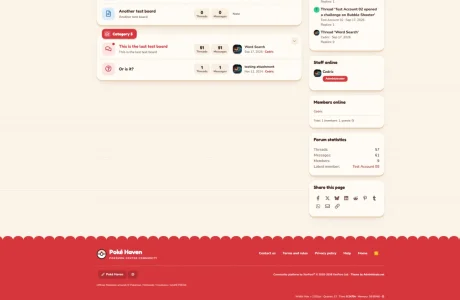
Visitors who aren't signed in see a red "Welcome, trainer!" card at the top of the forum index sidebar, with your newest member's name and a register button. Near the bottom of every page they also find a "There's a seat saved for you" card. Members don't see either, so the board stays clean once they're in.
Other pages
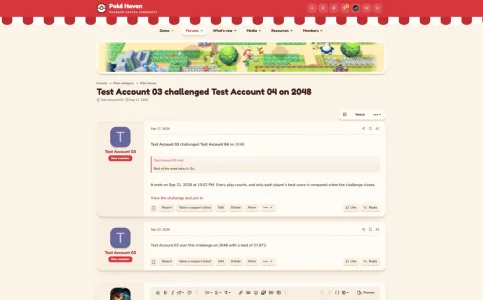
Forum, thread and member pages use a slim framed picture at the top instead of the full hero. Posts sit in rounded cream cards with a rounded avatar, a red rank badge and chunky action buttons.
Light, dark and your own accent
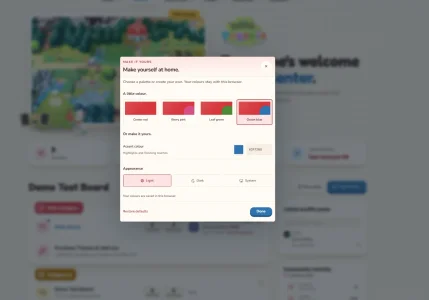
Poké Haven comes with a native light and dark version. Dark mode turns the cream into a warm cocoa brown while the red awning stays. Members can pick light, dark or follow their device from the sliders button in the header. The same panel lets them swap the Center red for Berry pink, Leaf green or Ocean blue, or choose any colour they like. Everything is remembered in their browser.
Make the words and artwork yours
The headline, introduction, button labels, sign, welcome card and join card are all style properties, so you can rewrite them in a minute. The artwork works the same way. Each image can be a file from the style, an image you uploaded to your board, or a full web address. Leave a field empty and that piece disappears. Your own logo goes in XenForo's normal logo settings and replaces the Poké Haven wordmark.
Small things that matter
Categories fold away with a toggle, and the board remembers which ones you closed. Thread and forum titles are never cut off: long titles wrap onto a new line instead of ending in "...". Moderators and admins get a single shield icon with the approval queue, reports and the Admin CP, with counts when something is waiting.
Fonts
Fredoka and Nunito come with the theme and load from your own server, so nothing is fetched from an outside font service. They're included under the SIL Open Font License.
Requirements and installation
XenForo 2.3.0 or newer
First install AC-XenFrame-1.1.0.zip through Admin CP > Add-ons > Install/upgrade from archive. Then import Haven-1.0.0-XenForo-2.3.zip through Admin CP > Appearance > Styles > Import, as a new style with no parent. The artwork and fonts come along with the import, so there's nothing to upload by hand. You'll find the text and artwork settings under Style properties > Pokémon world.
XenFrame is the small framework behind the appearance panel and the staff shield. It's shared with my other themes, so if you already have it installed, skip that step. The footer carries a small "Theme by Administrata.net" credit, which you can remove with a copyright removal code under Admin CP > Options > XenFrame.
A note on the artwork
Poké Haven is an unofficial fan theme. Pokémon and all related artwork are © Pokémon / Nintendo / Creatures / GAME FREAK. The theme isn't affiliated with or endorsed by them, and the footer credits the artwork for you.
It's meant to feel like walking into a Pokémon Center. A red header with a striped awning, cream pages on soft grid paper, rounded lettering and chunky little shadows under every card, like they were built from blocks. It's warm and playful, and it makes a board feel like a place people want to hang out.
Demo
Underneath, it's still XenForo. Your forums, permissions, widgets, navigation and member tools all work exactly as you'd expect.
The forum index
Your homepage opens with a framed picture of the Pokopia world, a yellow "Open all day!" sign, the Pokopia logo and a big welcome: "Everyone's welcome at the Center." Below it are four tiles showing your members, threads, messages and newest member. Each category gets its own coloured tab (red, yellow, green or blue), and its forum icons pick up the same colour. Forums with new posts show their title in red with a small dot on the icon.
Guests get a little extra
Visitors who aren't signed in see a red "Welcome, trainer!" card at the top of the forum index sidebar, with your newest member's name and a register button. Near the bottom of every page they also find a "There's a seat saved for you" card. Members don't see either, so the board stays clean once they're in.
Other pages
Forum, thread and member pages use a slim framed picture at the top instead of the full hero. Posts sit in rounded cream cards with a rounded avatar, a red rank badge and chunky action buttons.
Light, dark and your own accent
Poké Haven comes with a native light and dark version. Dark mode turns the cream into a warm cocoa brown while the red awning stays. Members can pick light, dark or follow their device from the sliders button in the header. The same panel lets them swap the Center red for Berry pink, Leaf green or Ocean blue, or choose any colour they like. Everything is remembered in their browser.
Make the words and artwork yours
The headline, introduction, button labels, sign, welcome card and join card are all style properties, so you can rewrite them in a minute. The artwork works the same way. Each image can be a file from the style, an image you uploaded to your board, or a full web address. Leave a field empty and that piece disappears. Your own logo goes in XenForo's normal logo settings and replaces the Poké Haven wordmark.
Small things that matter
Categories fold away with a toggle, and the board remembers which ones you closed. Thread and forum titles are never cut off: long titles wrap onto a new line instead of ending in "...". Moderators and admins get a single shield icon with the approval queue, reports and the Admin CP, with counts when something is waiting.
Fonts
Fredoka and Nunito come with the theme and load from your own server, so nothing is fetched from an outside font service. They're included under the SIL Open Font License.
Requirements and installation
XenForo 2.3.0 or newer
First install AC-XenFrame-1.1.0.zip through Admin CP > Add-ons > Install/upgrade from archive. Then import Haven-1.0.0-XenForo-2.3.zip through Admin CP > Appearance > Styles > Import, as a new style with no parent. The artwork and fonts come along with the import, so there's nothing to upload by hand. You'll find the text and artwork settings under Style properties > Pokémon world.
XenFrame is the small framework behind the appearance panel and the staff shield. It's shared with my other themes, so if you already have it installed, skip that step. The footer carries a small "Theme by Administrata.net" credit, which you can remove with a copyright removal code under Admin CP > Options > XenFrame.
A note on the artwork
Poké Haven is an unofficial fan theme. Pokémon and all related artwork are © Pokémon / Nintendo / Creatures / GAME FREAK. The theme isn't affiliated with or endorsed by them, and the footer credits the artwork for you.
-
 Schermafbeelding 2026-10-09 152224.webp
 -
 Schermafbeelding 2026-10-09 152237.webp
 -
 Schermafbeelding 2026-10-09 152246.webp
 -
 Schermafbeelding 2026-10-09 152513.webp
 -
 Schermafbeelding 2026-10-09 152522.webp


