

- Compatible XF 2.x versions
- 2.3
- Additional requirements
- XenForo 2.3.0+, PHP 7.2+ with OpenSSL, outbound HTTPS, and a Plaxswap merchant account with an integration API key and webhook signing secret: https://plaxswap.com/merchants/dashboard
- Visible branding
- Yes
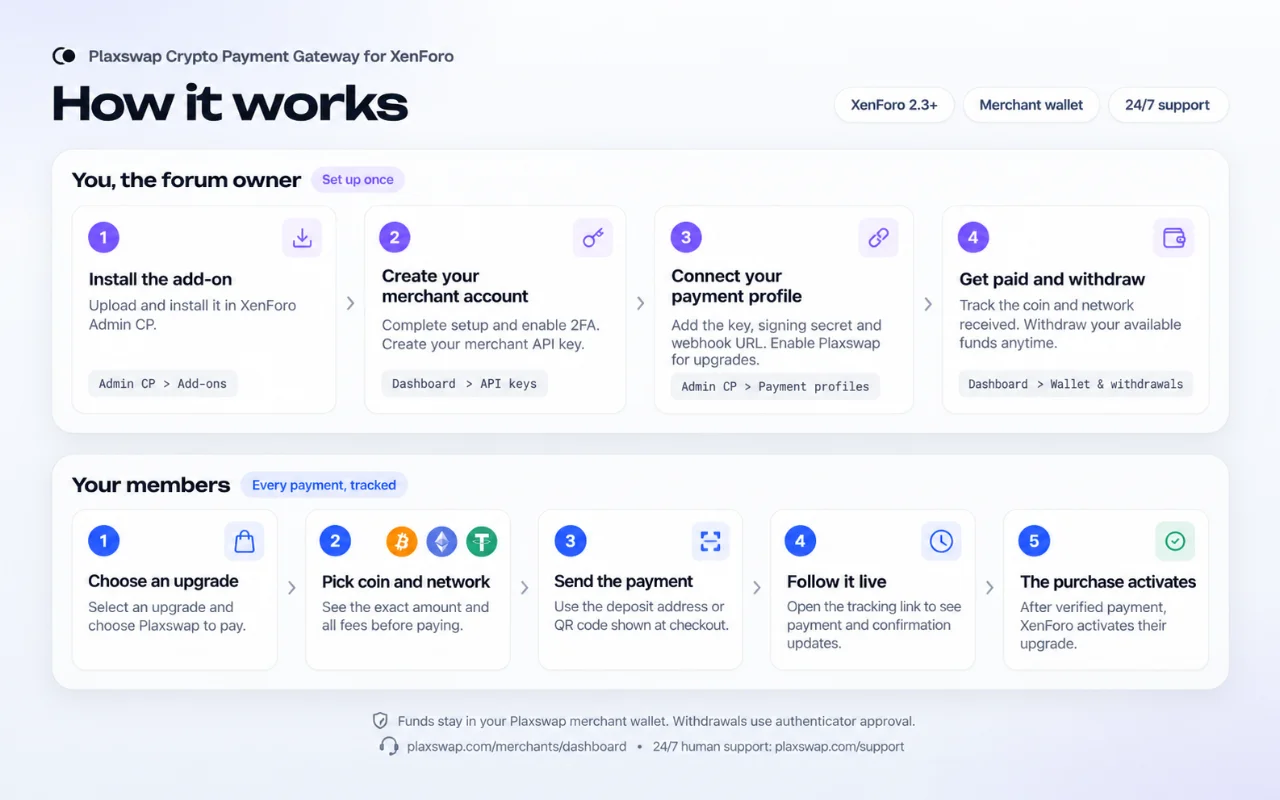
Plaxswap Crypto Payment Gateway lets your forum accept crypto payments for purchases. Buyers choose a supported coin and network, review the charges and follow their payment live. Funds are credited to your Plaxswap merchant wallet.
Merchant account, API keys and wallet: https://plaxswap.com/merchants/dashboard
1. Account and security · 2. Connect XenForo · 3. Payment links and checkout
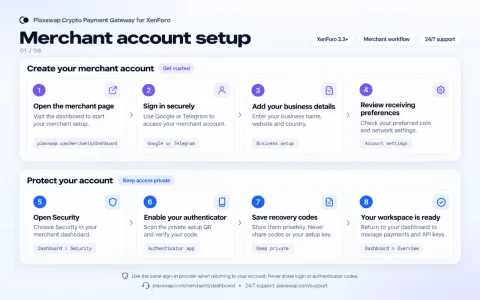
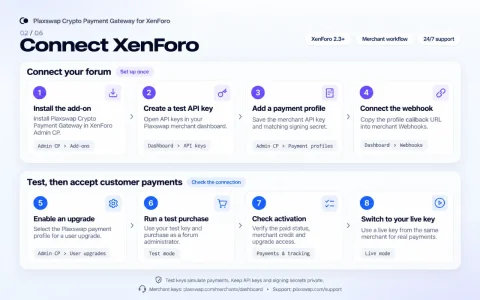
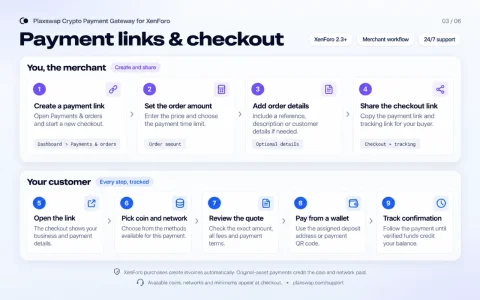
4. Wallet, orders and fees · 5. Withdrawals · 6. Manual wallet swaps
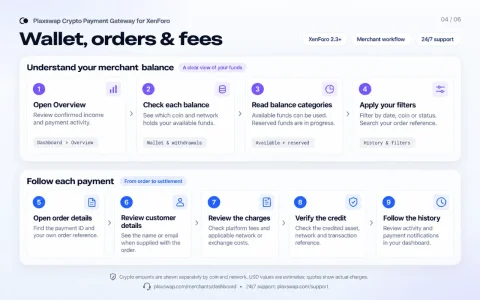
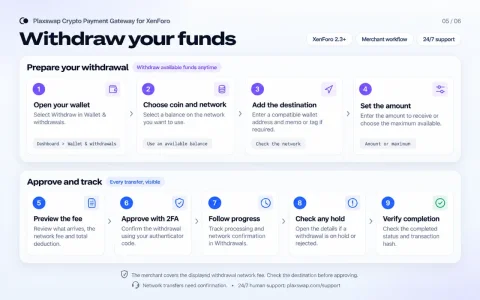
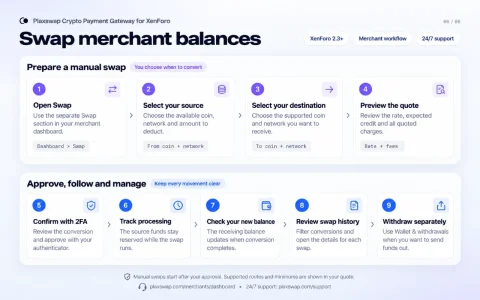
How it works
Accept crypto payments
- A native XenForo payment provider for compatible purchases, with hosted checkout and verified purchase activation.
- Create payment links in your merchant dashboard for products, services and other orders, then share a direct checkout and tracking link with your buyer.
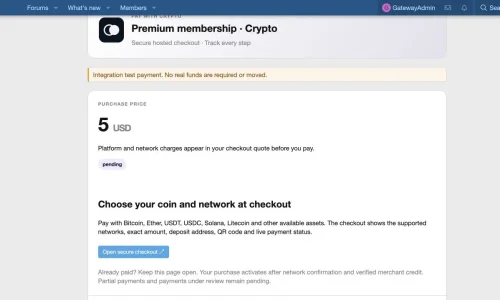
- Bitcoin, Ether, USDT, USDC, Solana, Litecoin, Dogecoin and other supported assets. Available coins, networks and minimums are shown in the checkout.
- The payment page shows the exact amount, deposit address, QR code and live confirmation status.
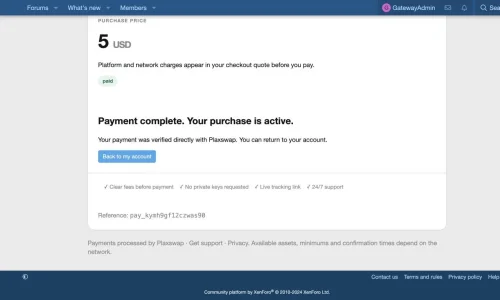
- A signed payment notification and an independent merchant API check verify settlement. Pending payments are also checked by a XenForo scheduled job.
Your merchant account and wallet
- Sign in with Google or Telegram and complete your merchant business setup.
- Payments credit your Plaxswap merchant balance in the original coin and network paid.
- See available and reserved balances separately for each coin and network.
- Withdraw your available funds anytime. Open Merchant dashboard → Wallet & withdrawals, choose your balance and destination, review the network fee and confirm with your authenticator.
- Use the separate merchant Swap section when you want to manually convert a supported wallet balance. Review the rate and charges before approval.
Fees, orders and tracking
- The standard platform fee is 1.5%, subject to the fee configured for your merchant account. Checkout quotes show the buyer's platform and applicable network or exchange charges.
- The merchant covers the displayed withdrawal network fee. The preview shows the amount received and the total deducted before confirmation.
- Track income, orders and payment activity using date, coin, network, status and reference filters.
- Open payment details to see credits, fees and transaction references. Customer name or email is shown when supplied.
- Review wallet activity, withdrawal progress and platform notifications in the merchant dashboard.
- XenForo Admin CP includes invoice history, payment mode/status filters, exact credited amounts, transaction references and a verification refresh action.
Requirements
- XenForo 2.3.0 or newer, PHP 7.2 or newer with OpenSSL, and outbound HTTPS.
- A Plaxswap merchant account with a merchant integration API key and webhook signing secret: https://plaxswap.com/merchants/dashboard.
- A public HTTPS payment callback URL and working XenForo scheduled jobs.
Data and privacy (please read)
- The add-on connects to plaxswap.com. It sends the invoice amount/currency, product description, an opaque purchase reference, verification metadata and return/cancel URLs to create and verify a payment.
- Sharing the buyer's forum email is optional and off by default. The add-on does not forward the forum member's IP address. Hosted checkout receives the buyer's own web request.
- Integration credentials are encrypted and kept on the forum server. The add-on stores invoice/status history and a limited payment summary for reconciliation.
- The add-on does not hold a hot-wallet key, recovery phrase or merchant authenticator secret, and cannot initiate a merchant withdrawal.
- Plaxswap is operated by SAMZAL LLC. Hosted checkout uses Plaxswap's terms, privacy policy and service availability rules.
Visible branding
The payment pages show the Plaxswap logo and payment/support links.Installation
- Install the release ZIP in Admin CP → Add-ons → Install/upgrade from archive, or upload its
uploadcontents to your XenForo root and install Plaxswap Crypto Payment Gateway. - Open your merchant dashboard, complete the setup and authenticator enrollment, and create a test integration API key.
- Admin CP → Setup → Payment profiles: add Plaxswap Crypto Payment Gateway and save the key and matching webhook signing secret.
- Reopen the profile, copy its callback URL and save it in your merchant dashboard's Webhooks section.
- Select the payment profile on your compatible XenForo purchase. Test as a forum administrator, then use a live key from the same merchant account for customer payments.
Support
24/7 human support: https://plaxswap.com/supportMerchant account, API keys and wallet: https://plaxswap.com/merchants/dashboard
Merchant workflow guides
Click an image to see the complete steps. These are illustrated guides.1. Account and security · 2. Connect XenForo · 3. Payment links and checkout
4. Wallet, orders and fees · 5. Withdrawals · 6. Manual wallet swaps
Screenshots
From the local XenForo 2.3.4 test installation: member checkout and completed purchase. These use integration/sandbox payments. - Related resources
- Plaxswap Crypto Swaps: https://xenforo.com/community/resources/plaxswap-crypto-swaps.10926/
