

- Compatible XF 2.x versions
- 2.3
- Additional requirements
- XenForo 2.3.0+, PHP 7.2+ with OpenSSL, outbound HTTPS, and a Plaxswap merchant account with an integration API key and webhook signing secret: https://plaxswap.com/merchants/dashboard
- Visible branding
- Yes
Turn your forum into a crypto-ready store in minutes.
Members pay for upgrades and purchases with Bitcoin, USDT, Ether, USDC, Solana, Litecoin and more. Their upgrade switches on automatically, and every payment lands in your own Plaxswap merchant wallet, in the coin they paid. No exchange account, no card chargebacks, no extra page to build.
Why forum owners choose it
 Native XenForo payment profile. Pick it on any compatible purchase, like user upgrades. Nothing to code.
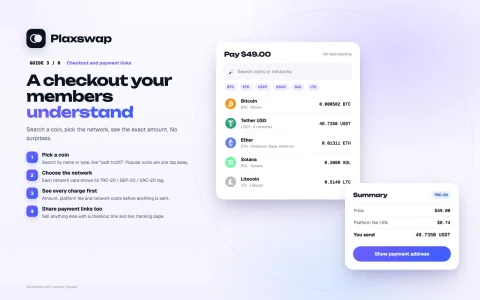
 One-click hosted checkout. Pay opens Plaxswap checkout straight away: the member picks a coin and network, sees the exact amount, address and QR code, and watches confirmations live.
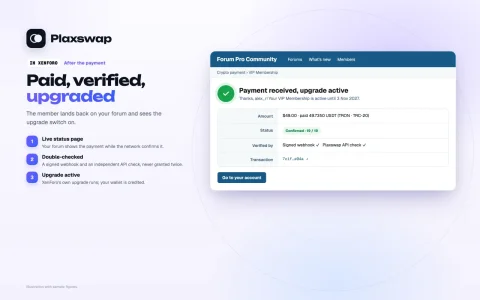
 Automatic activation you can trust. A signed webhook and an independent API check confirm the payment before the upgrade is granted. A scheduled job catches anything delayed, and nothing is ever granted twice.
 Your own merchant wallet. Receive, send, swap and withdraw your balance whenever you want.
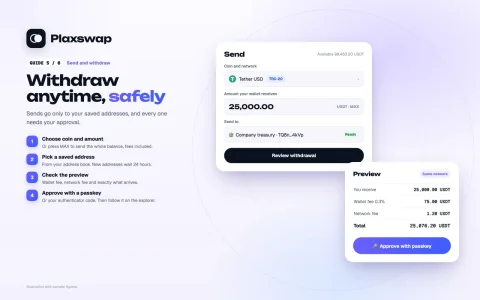
- 🛡 Security inspired by the big exchanges. Authenticator or passkey on every send, an address book with a 24-hour wait, and automatic pauses after security changes.
New in 1.0.3: the Plaxswap merchant wallet
- Receive coins to your own deposit address per coin and network, with a QR code. Receiving is free.
- Send to addresses saved in your address book. A new address can be used 24 hours after you save it, so a stolen login cannot empty your wallet in a hurry.
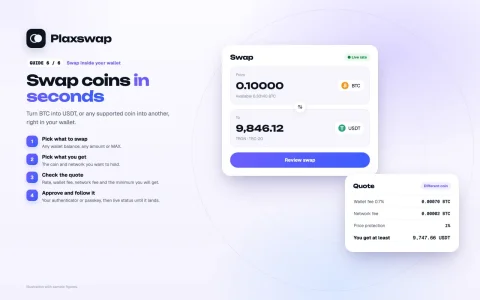
- Swap between coins inside your wallet, with the rate and every fee shown before you approve.
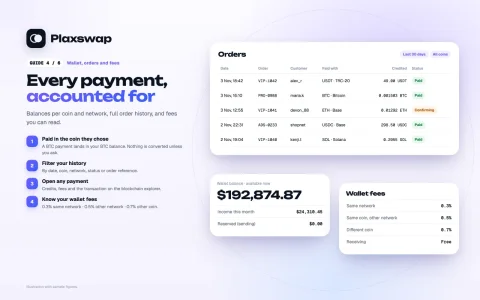
- Simple wallet fees: 0.3% on the same network · 0.5% for the same coin on another network · 0.7% for a different coin, plus the network fee.
- Security that works for you: anti-phishing code in every Plaxswap email, a list of signed-in devices, a "Lock my account" link in security emails, and sends paused for 24 hours after a security change or a new-device sign-in. Payments keep arriving while sends are paused.
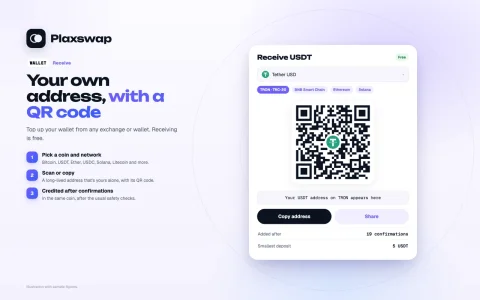
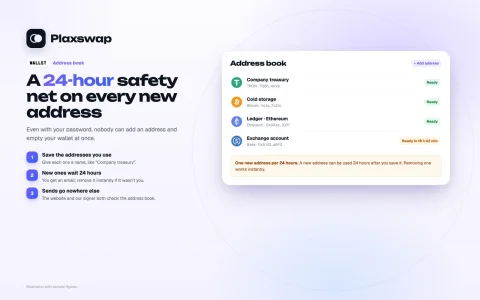
How it works
- A member chooses an upgrade and presses Pay.
- Plaxswap checkout shows the coin, network, exact amount, address and QR code.
- The member pays from any wallet or exchange and follows the confirmations live.
- The payment is verified, the upgrade activates, and the funds appear in your merchant wallet.
Fees
- Checkout: the standard platform fee is 1.5% (or the fee set for your merchant account). The checkout shows the buyer every charge before they pay.
- Your wallet: receiving is free. Sends and swaps cost 0.3%, 0.5% or 0.7% as above, plus the network fee. The preview shows what arrives and what is deducted before you confirm.
Orders, history and tracking
- Merchant dashboard: income, orders and wallet activity with date, coin, network, status and reference filters; payment details with credits, fees and transaction references.
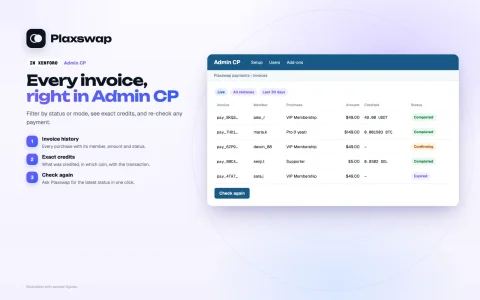
- XenForo Admin CP: invoice history, payment mode and status filters, exact credited amounts, transaction references and a "check again" action.
- Payment links for anything else you sell, with a shareable checkout and tracking link.
Requirements
- XenForo 2.3.0 or newer, PHP 7.2 or newer with OpenSSL, and outbound HTTPS.
- A free Plaxswap merchant account with a merchant API key and webhook signing secret: https://plaxswap.com/merchants/dashboard.
- A public HTTPS payment callback URL and working XenForo scheduled jobs.
Data and privacy (please read)
- The add-on connects to plaxswap.com. It sends the invoice amount and currency, product description, an opaque purchase reference, verification metadata and return/cancel URLs to create and verify a payment.
- Sharing the buyer's forum email is optional and off by default. The add-on does not forward the member's IP address. Hosted checkout receives the buyer's own web request.
- API credentials are encrypted and kept on the forum server. The add-on stores invoice/status history and a limited payment summary for reconciliation.
- The add-on holds no wallet key, recovery phrase or authenticator secret, and cannot send merchant funds.
- Plaxswap is operated by SAMZAL LLC. Hosted checkout uses Plaxswap's terms, privacy policy and service availability rules.
Visible branding
The payment pages show the Plaxswap logo and payment/support links.Installation
- Admin CP → Add-ons → Install/upgrade from archive, and upload the release ZIP (or upload its
uploadcontents to your XenForo root and install). To update, upgrade in place; do not uninstall. - Open your merchant dashboard, complete the setup and authenticator enrollment, and create a test API key.
- Admin CP → Setup → Payment profiles: add Plaxswap Crypto Payment Gateway and save the key and the matching webhook signing secret.
- Reopen the profile, copy its callback URL and save it in your merchant dashboard's Webhooks section.
- Select the payment profile on your purchase. Test as an administrator, then switch to a live key from the same merchant account.
Support
24/7 human support: https://plaxswap.com/supportMerchant account, API keys and wallet: https://plaxswap.com/merchants/dashboard
Merchant workflow guides
Click an image to see the steps. Illustrations with sample figures.1. Account and security · 2. Connect XenForo · 3. Checkout and payment links
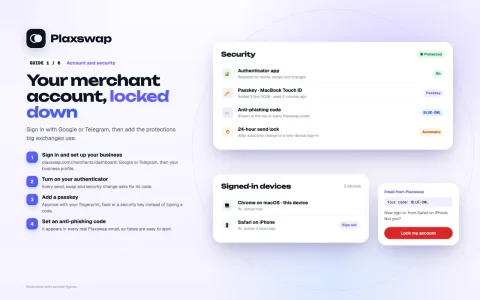
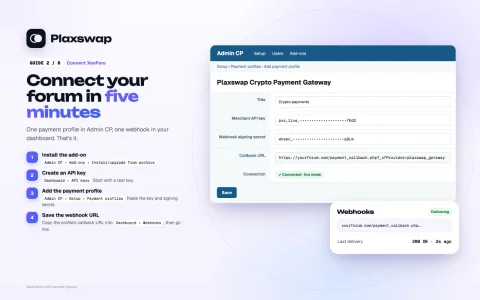
4. Wallet, orders and fees · 5. Send and withdraw · 6. Swap inside your wallet
In XenForo
What your members and admins see: the upgrade page, the payment result and the Admin CP invoices. Illustrations with sample figures.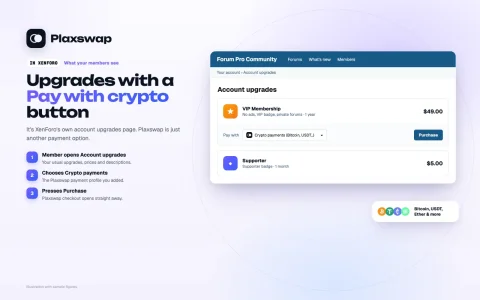
- Related resources
- Plaxswap Crypto Swaps: https://xenforo.com/community/resources/plaxswap-crypto-swaps.10926/
