

- Compatible XF 2.x versions
- 2.2
- 2.3
- Additional requirements
- AI Connect for XenForo 1.2.87+ (free). An API key of an AI provider (Anthropic, OpenAI or any OpenAI-compatible service) or your own model server. Three list commands need AI Connect Pro; "Answer new questions" needs AI Connect Pro 1.2.30+ for its approval queue (1.2.32 is current).
- License
- Commercial licence: one forum per licence, one year of updates. https://goldnat.ai/terms
- Updates duration
- 1 year of updates included from the date of purchase.
- Visible branding
- Yes, but removable without payment
Your forum knows. Now it can answer.
Goldnat AI Assistant for XenForo — an AI agent built into your forum.
Your forum has years of discussions, answers, solutions, and expertise.
But most of that knowledge is buried inside threads. Members have to search, read, scroll, and hope someone has already answered their question.
What if they could simply ask?
Your forum now has an AI agent built in. A member clicks a button inside the forum, and the agent goes to work on your forum's own content: it finds the relevant discussions, summarizes long threads, translates conversations, and answers questions — with links to the original posts.
It works as that member, with that member's own permissions. No external chatbot. No copy and paste. No separate app, no extra accounts for your members.
And when you want it to do something new, you describe it in a chat — and a new command is created.
Just your forum, with a new way to use everything it already knows.

New since the version listed here before (1.10)
The short list:
Everything is explained below.
Your forum becomes easier to use
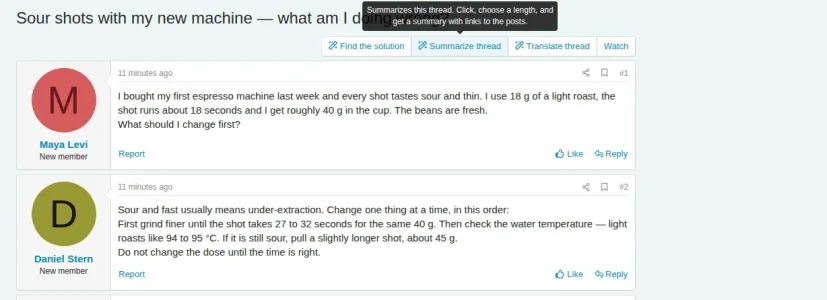
Members interact with the assistant through buttons inside XenForo – in threads, the editor, and navigation.
The assistant works through the same forum permissions as the member who clicks the button. It cannot access private forums, staff areas, or hidden posts that the member cannot see.
And the experience is fully integrated into XenForo.
What members can do

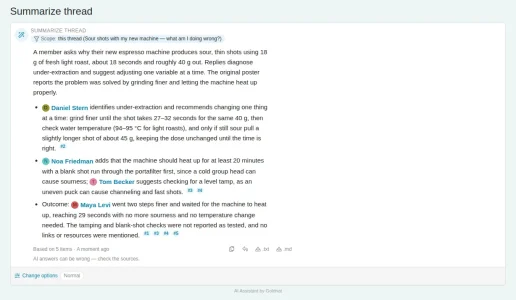
Understand discussions in one click

Come back and catch up in seconds

Write and participate better


Every button includes a short explanation of what it does and how to use it.
Summaries and digests are written in the member's interface language; a question is answered in the language it was asked in. When members appear in results, their names link to their regular XenForo profiles, subject to the viewer's permissions.
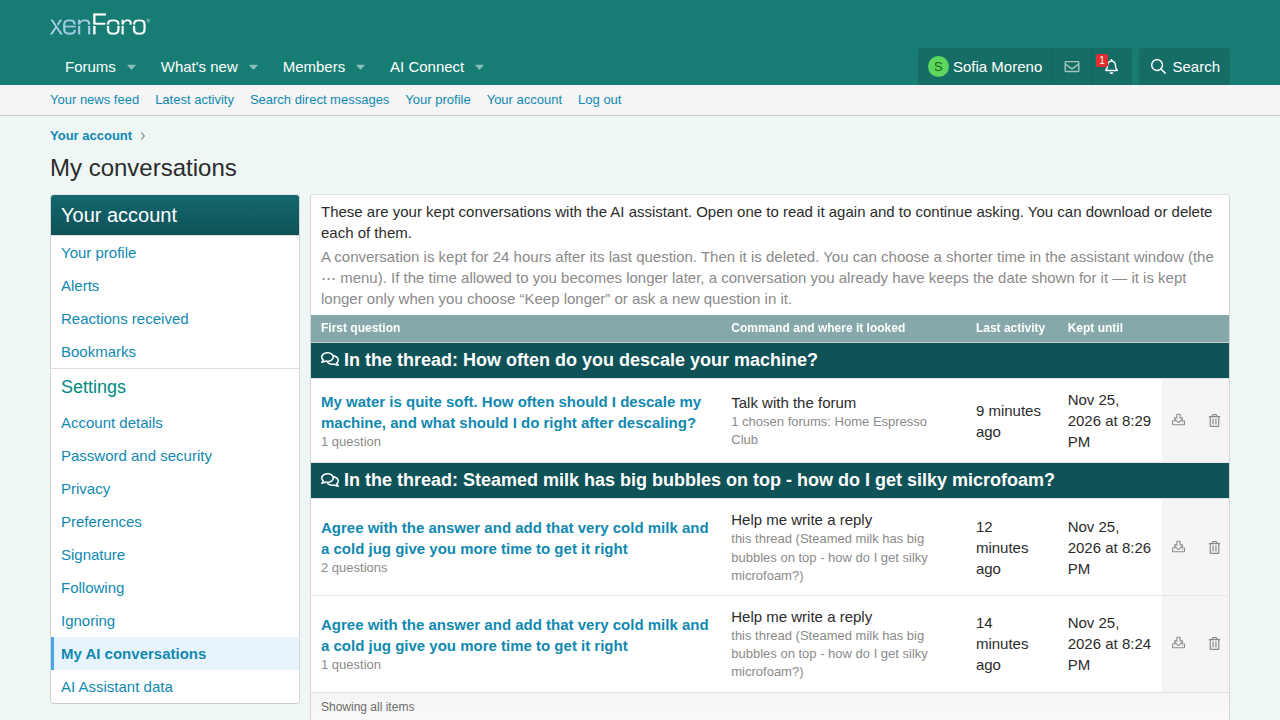
My conversations

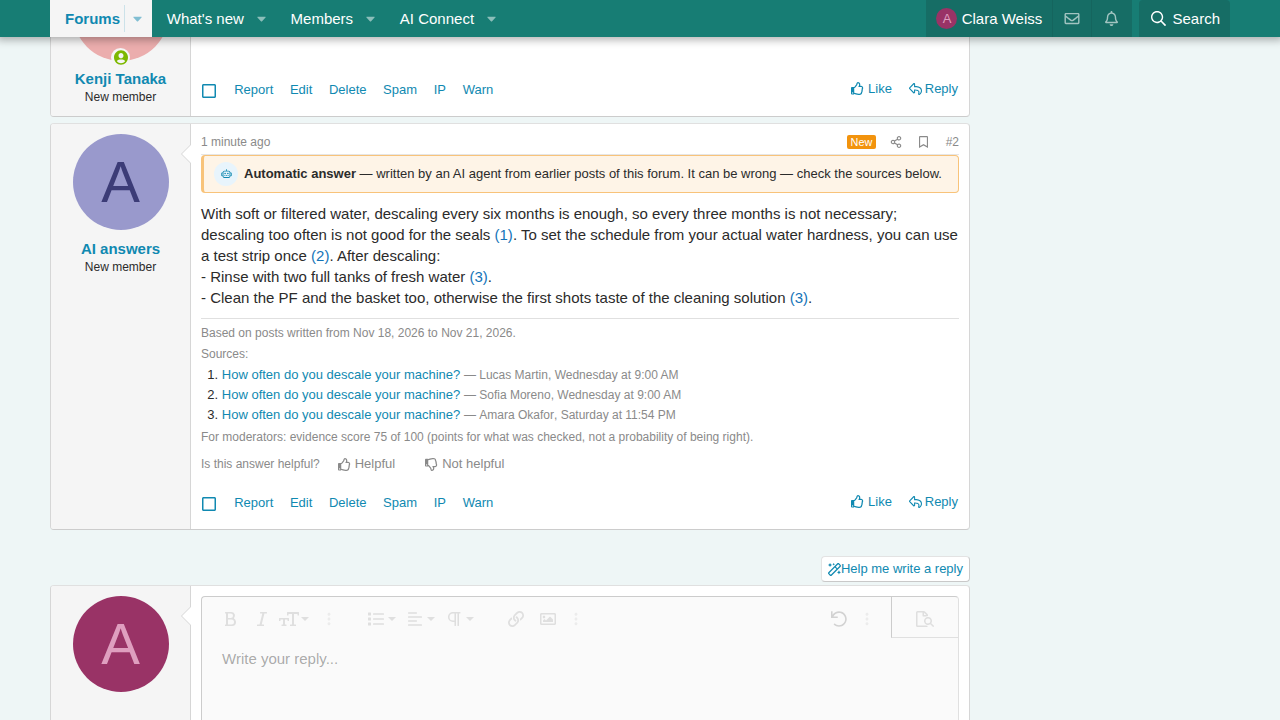
Answer new questions — with a moderator in the loop
Switch it on for a forum, and a new thread there gets one automatic reply, written only from earlier posts of your forum.

No server cron job needed. Automatic answers and background summaries are started by activity in your forum — a new post anywhere, or a visit to a thread that waits — and by XenForo's own job runner, so they work on a normal installation without any server setup. For a forum that is quiet for hours, XenForo's own "Server based trigger" (Options › System and performance) makes them run on time as well.
Summaries that are ready before anyone asks

Pick the forums, and the Assistant keeps a short summary of every thread there — with keywords and synonyms. It is written once, in the background, and shared by every member who reads the same posts.
It is off until you switch it on.
A digest your members actually read
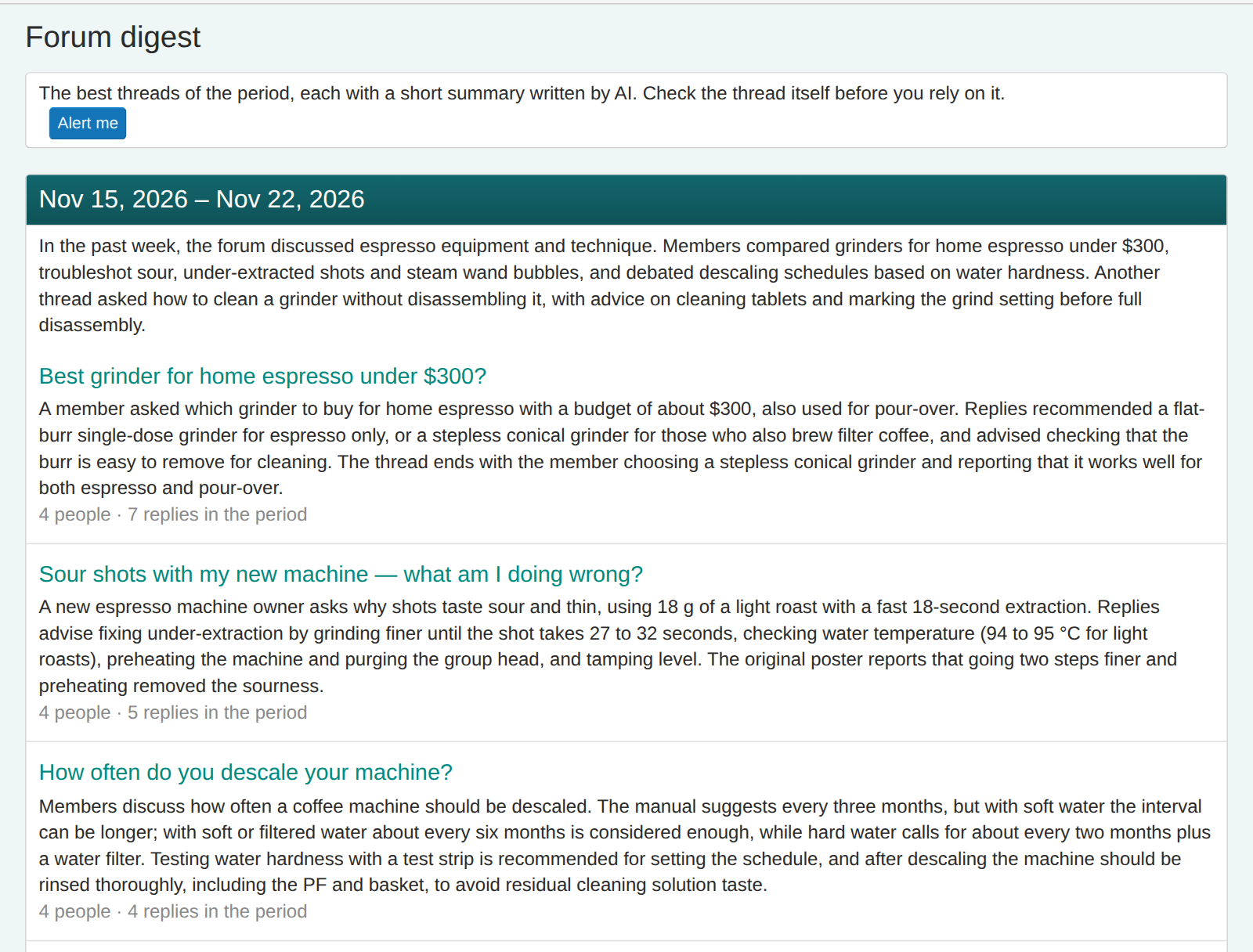
Daily or weekly: the best threads of the period, each with its short summary.
It is off until you switch it on.
A search that finds more
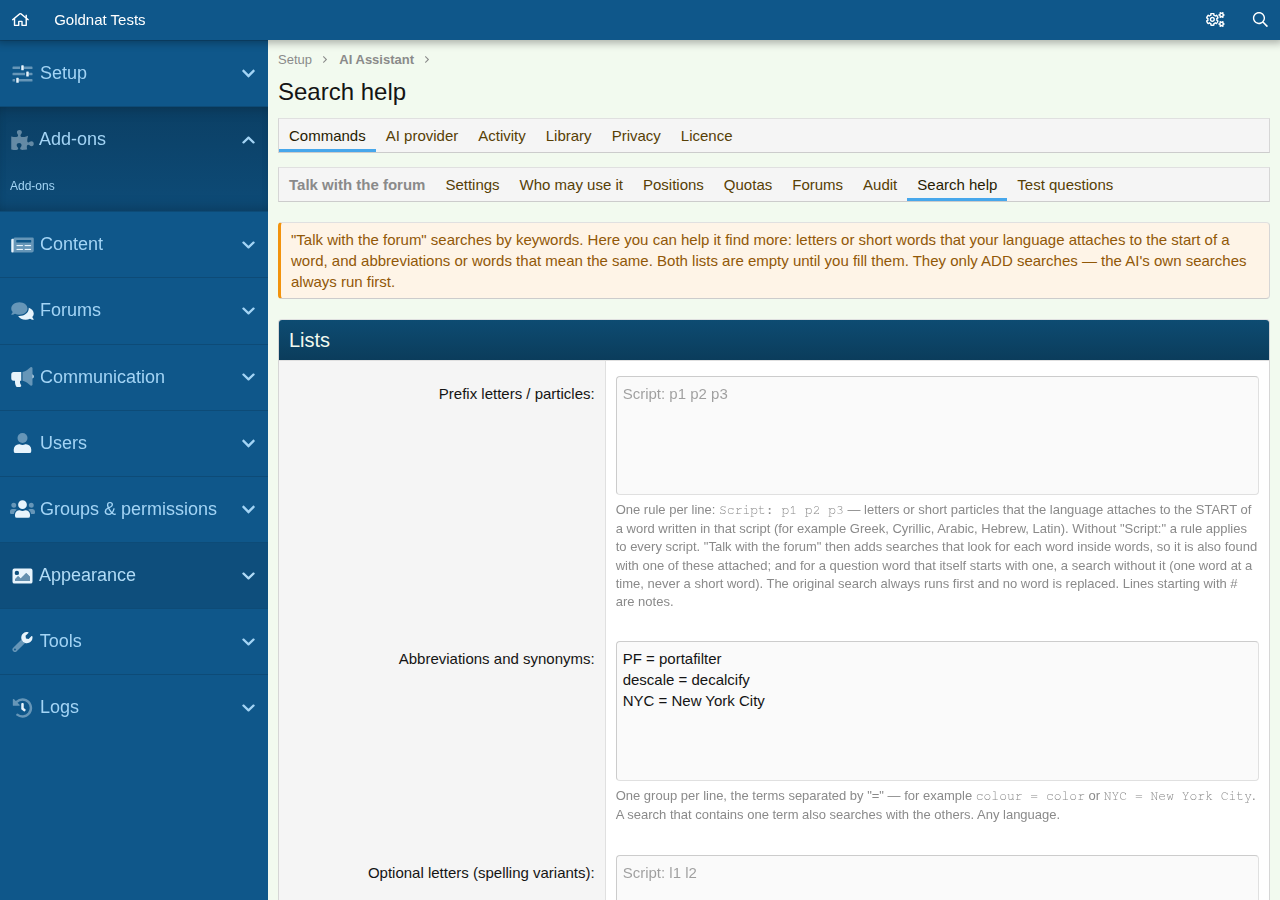
"Talk with the forum" searches your forum with XenForo's own search, as the member. You can help it find more:
Answers you can check
Every point and every answer cites the posts it comes from. A post number the AI did not actually read is removed, and a point without a valid source is removed with it. On top of that:
Built for forum owners, not just forum members
The Assistant is more than a collection of ready-made AI features.
You control what the assistant can do, who can use each command, and where it is available.
Create your own AI commands – just by describing them

Want a command that finds the accepted solution in a discussion? Or one that identifies the most useful advice in a thread?
Just describe what you want in plain language.
The command builder asks questions when necessary, presents a summary of what it understood, and creates the command only after you approve it.
You can modify your commands later in the same kind of conversation.
If something cannot be implemented with the available tools, the builder tells you rather than silently creating something different.
Or start from the library of ready commands
Twelve ready commands come with the add-on: key takeaways, decisions and next steps, pros and cons, open questions, how it developed, explain it simply, links and resources, glossary, how do I…, compare options, make it clearer, friendlier tone. Five categories and a filter help you find the right one. Add one, edit it if you like, switch it on.
And the library grows. Forums share their best commands, Goldnat reviews every suggestion, and every forum gets the approved ones.
Full control over permissions and usage

Configure access separately for each command:
When a member reaches a limit, the message says which limit it is and when the command can be used again.
For example:
A permission report shows exactly who can use each command and why.
One more safety belt: a limit on AI runs at the same time, for the whole forum. Extra requests wait in line, and a long summary continues in the background.
This also gives you a practical way to create AI-powered features for paid membership levels.
Bring your own AI
You choose the AI provider. You pay the provider directly.
Supported options include:
Connect and test your provider, discover available models, and choose the models that fit your needs. An optional fallback provider answers when the main one fails or times out, for the kinds of work you choose.
You can even use different models for different tasks:
Not sure whether to use a hosted API or your own server? See our guide: Choosing the AI for the XenForo Assistant — API or Your Own Server.
Who pays for the AI — and how much
You do, directly to your AI provider, with your own API key. The price of the Assistant does not include AI usage, and nothing is added on top of your provider's price.
How much depends on the model, on how long your threads are, on how many members use the Assistant, and on how often a stored result can be reused. Ten members with the same permissions open the same summary — the AI is paid once.
The AI Cost dashboard shows:
And you hold the brakes:
A way to fund it: link AI use to a paid XenForo user upgrade. The upgrade adds the member to a group; give that group a bigger quota or more commands. A simple check: cost per request × quota per member = the most one member can cost you per month.
The figures are calculated from the tokens of every AI call and the price of each model; the invoice of your AI provider is the final figure.
No surprises. You can monitor and control your AI expenses.
Privacy and security
Your forum content is sent only to the AI provider you configure.
When using your own locally hosted model, forum content does not need to leave your server for AI processing.
Security is built into the architecture:
Your members' data stays theirs:
Goldnat's server is contacted for license verification (it receives your license key, your forum's address and the add-on version), for recommended model and pricing information, and for the online command library (it receives only the add-on version). Forum content is not sent to Goldnat's server.
Designed for international communities
The interface is translated into eight languages:
English, Hebrew (including right-to-left support), German, French, Spanish, Italian, Dutch, and Brazilian Portuguese.
Translations are automatically added for matching languages installed in your XenForo forum.
Members receive results in their interface language, or in a language they choose where a command offers that choice.
How it works
Goldnat AI Assistant for XenForo is the top layer of the Goldnat add-ons for XenForo: the part your members see and use.
It builds on:
The Assistant does not use the separate Goldnat Admin and Moderation add-ons, which are tool sets designed for external AI agents.
And the AI agents outside your forum?
AI Connect can also let a member's own AI agent — Claude, ChatGPT and others — work on the forum as that member. That door is yours to open or close:
A small credit line
Under each AI result there is one small grey line, "AI Assistant by Goldnat", with a link to the product page. It is on by default, and one switch in the add-on's options turns it off – free of charge. The link carries no information about your forum or your members.

Requirements
The following commands require AI Connect Pro:
"Answer new questions" needs AI Connect Pro 1.2.30 or later for its approval queue (1.2.32 is current). All other commands work with the free AI Connect add-on. Since your last visit, My topics, This month a year ago and the digest need thread summaries switched on.
Installation
You're ready to go.
Upgrading from an earlier version? Upgrade AI Connect first, then the Assistant. Your commands, permissions and settings stay as they are. The new features that cost AI calls — thread summaries, pinned summaries, the digest, the citation check, Answer new questions, Help me write a reply — stay off until you switch them on.
Pricing
$49 USD – One XenForo forum, including one year of updates.
One license per forum URL. The license can be transferred to another URL through your Goldnat account. Until a valid key is entered, members do not see the AI buttons. After the year of updates the add-on keeps working; renewing gives you new versions.
AI usage is billed directly by your chosen provider.
Get the Assistant:
plugins.goldnat.ai/xenforo/xf-assistant-ai-connect
Questions or support: goldnat.ai/contact
Your forum already has the knowledge. Give your members a better way to use it.
Goldnat AI Assistant for XenForo.
Goldnat AI Assistant for XenForo — an AI agent built into your forum.
Your forum has years of discussions, answers, solutions, and expertise.
But most of that knowledge is buried inside threads. Members have to search, read, scroll, and hope someone has already answered their question.
What if they could simply ask?
Your forum now has an AI agent built in. A member clicks a button inside the forum, and the agent goes to work on your forum's own content: it finds the relevant discussions, summarizes long threads, translates conversations, and answers questions — with links to the original posts.
It works as that member, with that member's own permissions. No external chatbot. No copy and paste. No separate app, no extra accounts for your members.
And when you want it to do something new, you describe it in a chat — and a new command is created.
Just your forum, with a new way to use everything it already knows.
New since the version listed here before (1.10)
The short list:
- Answer new questions — a new thread in a forum you switch on gets one automatic reply, written only from earlier posts, with its sources and their dates. A moderator approves every answer by default.
- Help me write a reply — a chat next to the reply editor drafts the text; the member edits it and posts it.
- Talk with the forum (was "Ask the forum") — longer questions, answers prepared in the background, and a conversation opened on a thread stays with that thread.
- My conversations — every member sees, continues, downloads or deletes their kept conversations. You set how long they are kept, per user group.
- Discussion map — a summary form that lists the sub-issues, the positions and who holds them, and what is still open.
- Pinned summary on long threads — written in the background, refreshed after new replies, approved and managed by moderators.
- Summaries that follow the content — length by substance, not by post count; long threads read far faster, with progress you can see.
- Summaries that are ready before anyone asks — kept in the background for the forums you choose, with Since your last visit, My topics and This month a year ago built on them, and a daily or weekly digest.
- Answers you can check — strict mode, a citation check, and test questions for the admin.
- A library of ready commands — twelve come with the add-on, more arrive after Goldnat reviews them, and you can suggest your own.
- A search that finds more — your synonyms and abbreviations, word-prefix rules per writing system, and a settings code to copy them to another forum.
- A fallback AI provider, Suggest tags / prefix, a limit on AI runs at the same time, and clearer quota messages.
- Requirements changed: XenForo 2.3 or later and AI Connect 1.2.87 or later (see Requirements).
Everything is explained below.
Your forum becomes easier to use
Members interact with the assistant through buttons inside XenForo – in threads, the editor, and navigation.
The assistant works through the same forum permissions as the member who clicks the button. It cannot access private forums, staff areas, or hidden posts that the member cannot see.
And the experience is fully integrated into XenForo.
What members can do
Understand discussions in one click
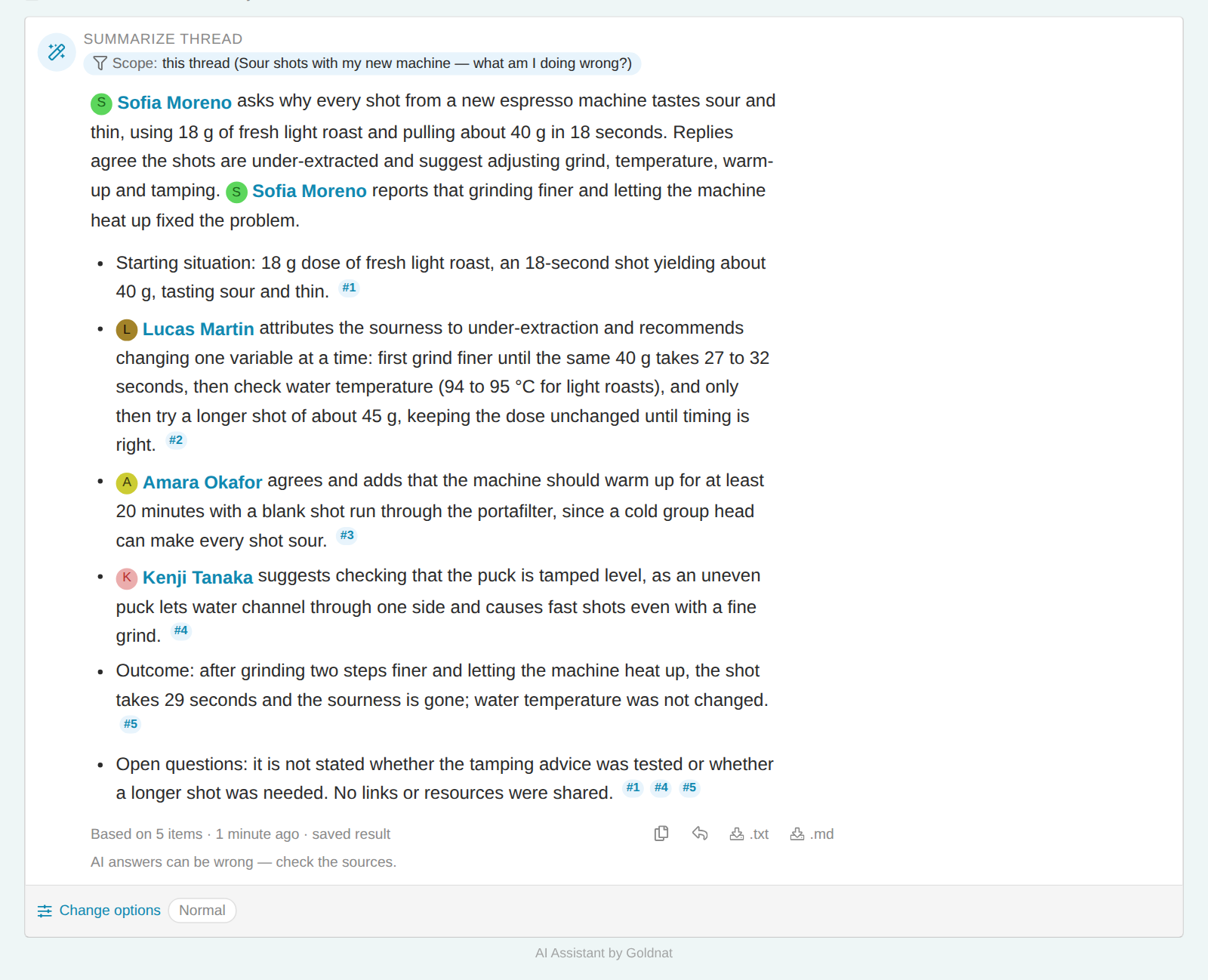
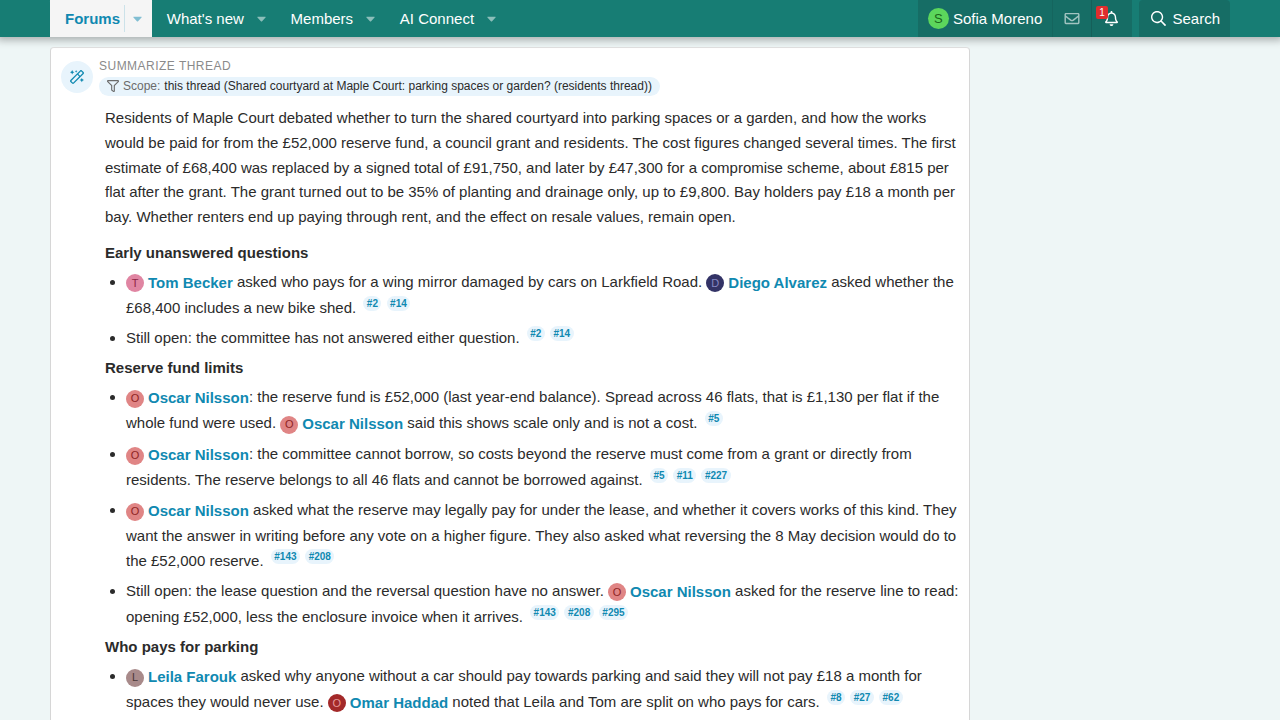
- Summarize a thread: Choose the form — Brief, or Discussion map (the sub-issues, the positions and who holds them in which posts, how it ended or what is still open). The length follows the substance of the thread, not its number of posts, and you can say what to look for ("every price mentioned", "who changed their mind"). Long threads run in the background with progress; the member may leave the page and find the result later.
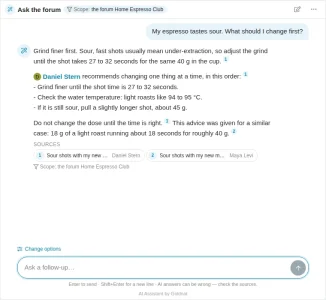
- Talk with the forum: Ask a question (up to 4,000 characters) and receive an answer based exclusively on forum posts, with numbered, dated sources linking directly to the original discussions. When posts disagree, the later one counts and the answer says what changed. Follow-up questions continue in the same chat; a conversation opened on a thread stays with that thread. The answer is prepared in the background — the member sees what is being done and may leave the page. The member can narrow the search to chosen forums from the forum tree: their sub-forums come with them, and any of them can be left out.
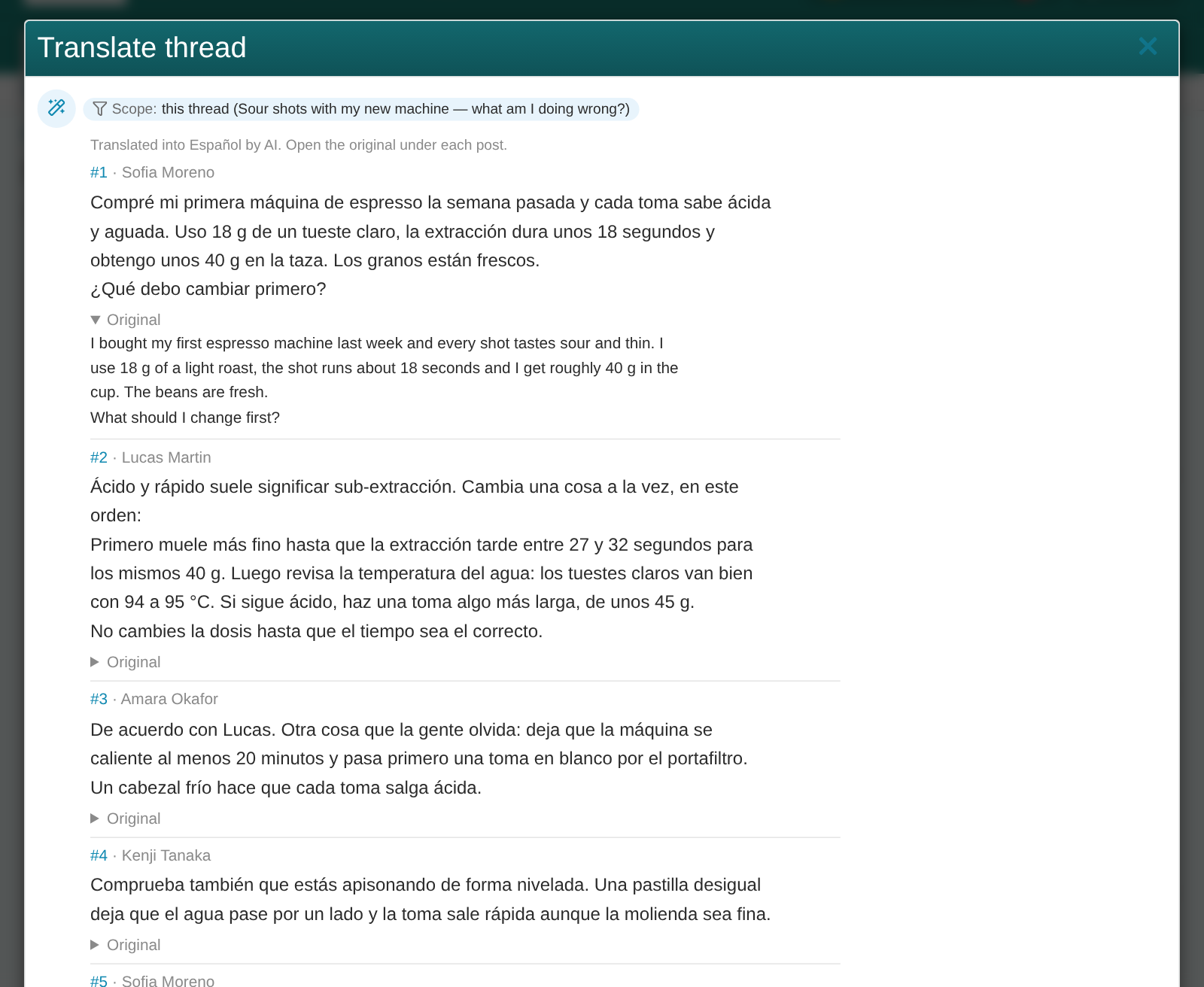
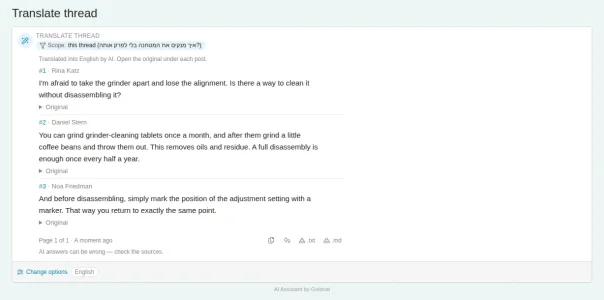
- Translate a thread: Read discussions in any of 40 languages, with the original under each post.
Come back and catch up in seconds
- Since your last visit: The threads with new posts since the member was last here — or today, yesterday, the last 3 or 7 days — each with its short summary. No waiting: the summaries are ready.
- My topics: The threads a member started or took part in that have new posts.
- This month a year ago: The best threads started in the same month one year ago. Old gold, back on the table.
- What did I miss? A short update on the threads the member is watching.
- Questions waiting for answers: Find discussions where members still need help.
- What's hot this week: The most active discussions, with a short summary of each.
Write and participate better
- Help me write a reply: A chat next to the reply editor of a thread. Say what you want to answer, get a draft, ask for changes, and put it into the editor — the member posts it; the assistant never posts. Off until you switch it on for chosen user groups and forums; optionally a line "Drafted with AI help" under such replies, per forum.
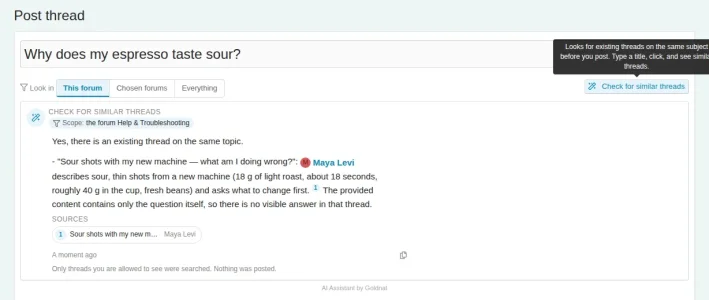
- Check if already asked: Find similar existing discussions before creating a new thread.
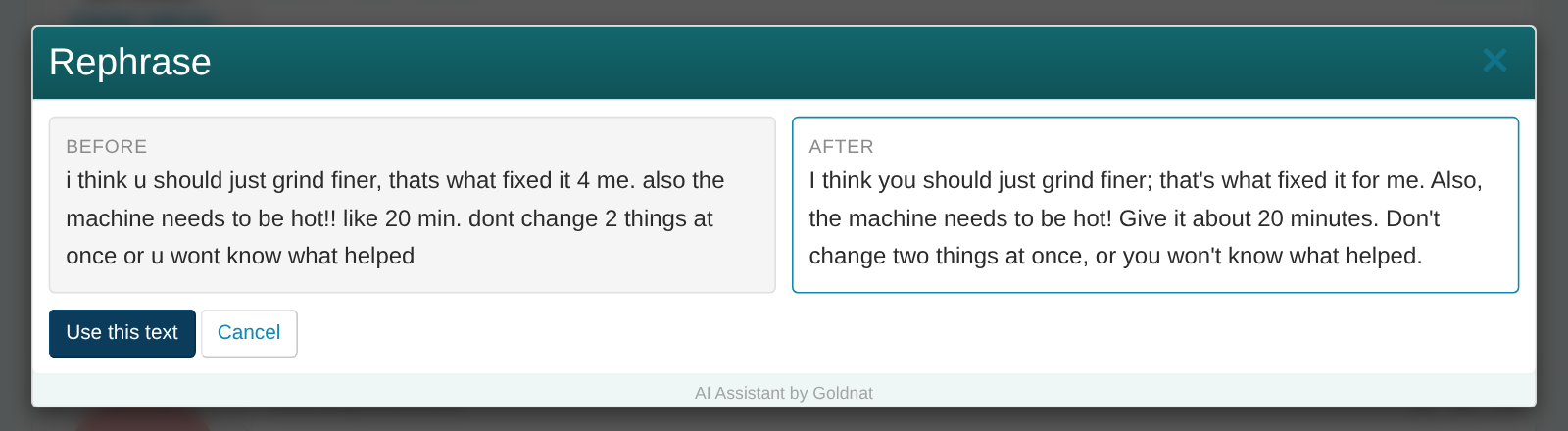
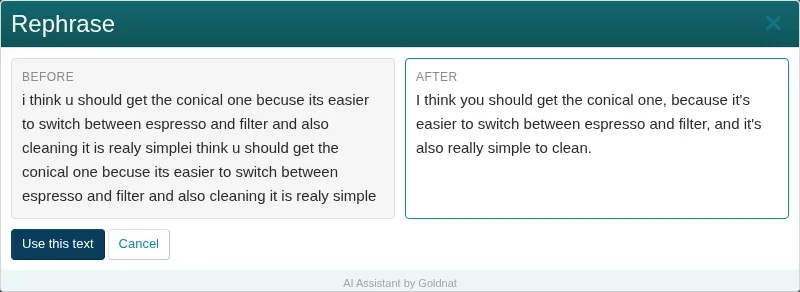
- Rephrase: Improve a post before submitting it. Compare the original and the rewritten version, then decide whether to use the suggestion. (Switched off on a new installation — one click turns it on.)
Every button includes a short explanation of what it does and how to use it.
Summaries and digests are written in the member's interface language; a question is answered in the language it was asked in. When members appear in results, their names link to their regular XenForo profiles, subject to the viewer's permissions.
My conversations
- Every member has a page with their kept conversations — command, first question, last activity, kept until. Read again with the source links, continue asking, download or delete; delete all in one step.
- You set how long conversations are kept, per user group, right in the Privacy table. A kept answer is shown only while the member can still see the posts it was written from.
Answer new questions — with a moderator in the loop
Switch it on for a forum, and a new thread there gets one automatic reply, written only from earlier posts of your forum.
- The reply is posted by a member account you choose for it, with a clear label "automatic answer by an AI agent", its sources and their dates.
- Per forum: a moderator approves every answer in XenForo's approval queue (the default), or answers whose evidence score reaches your line go out by themselves. In the queue the moderator sees the score, why it waits and the posts it was written from.
- Sources: this forum, chosen forums or all — always only posts that everybody who can see the new thread may see.
- When posts disagree, the later one is taken as the current state and the answer says what changed and when. Questions about prices, versions, dates and schedules never go out without a moderator.
- A separate check tries to refute every statement before the answer is scored. The asker and other members rate the answer; a later reply that contradicts it collapses it. A log and a ratings table show how it does, per forum.
- A forum you switch on brings its sub-forums with it. Threads started by members of the groups you exclude (your staff, for example) get no automatic answer.
- Daily limits keep the cost in check; it is off until you switch it on. The approval queue needs AI Connect Pro 1.2.30 or later.
No server cron job needed. Automatic answers and background summaries are started by activity in your forum — a new post anywhere, or a visit to a thread that waits — and by XenForo's own job runner, so they work on a normal installation without any server setup. For a forum that is quiet for hours, XenForo's own "Server based trigger" (Options › System and performance) makes them run on time as well.
Summaries that are ready before anyone asks
Pick the forums, and the Assistant keeps a short summary of every thread there — with keywords and synonyms. It is written once, in the background, and shared by every member who reads the same posts.
- For the member groups you choose. A forum that only a paid group or your staff can read gets summaries too — for those members only. One page shows every XenForo permission combination: its groups, its members, the threads it can read, and what it adds to the cost.
- See the cost before you switch it on. The estimate shows both sides: what the background writing costs per month, and what it typically saves when members use the ready summaries.
- New forums join by themselves if you want — or stay out until you tick them.
- "Talk with the forum" finds more. It also finds threads through their summaries, keywords and synonyms.
- Pinned summary on long threads (optional): a full summary at the top of long threads, written in the background — opening a thread makes no AI call. It shows which posts it covers, refreshes after new replies and is taken down at once when a post is edited or deleted. Moderators can approve it before the first publication, rebuild it, switch it off for one thread, and restore an earlier version. Members can collapse it, say whether it helped and report a mistake.
- Always permission-safe. A member gets a stored summary only if, checked again as that member, they can still see the thread and every post the summary was written from. Deleted posts and posts awaiting approval are never used. Forums where members see only their own threads are never summarised.
It is off until you switch it on.
A digest your members actually read
Daily or weekly: the best threads of the period, each with its short summary.
- Ranked by quality — people taking part, replies, reactions — not only by the number of replies.
- Public content only: what a guest or an ordinary registered member can read (your choice).
- Optional: you approve each edition before it goes out.
- Quiet windows: days of the week, hours or dates when nothing is sent. The next edition covers the whole time.
- Delivered as an alert (members subscribe on the digest page), as a section of XenForo's own activity-summary email, and on a page.
- No AI call per member.
It is off until you switch it on.
A search that finds more
"Talk with the forum" searches your forum with XenForo's own search, as the member. You can help it find more:
- Your synonyms and abbreviations: "colour = color", "NYC = New York City". They only add searches; the AI's own searches always run first.
- Letters your language attaches to the start of a word: one list per writing system.
- Settings code: copy these settings to another forum with one line of code. You see what the code sets before anything changes, and you choose: Add to the lists you already have, or Replace them.
- Ignore accents and in-word marks (with the free AI Connect, off by default): cafe finds café. Exact search stays one pair of "quotes" away.
- Works with XenForo's MySQL search and with Enhanced Search (Elasticsearch).
Answers you can check
Every point and every answer cites the posts it comes from. A post number the AI did not actually read is removed, and a point without a valid source is removed with it. On top of that:
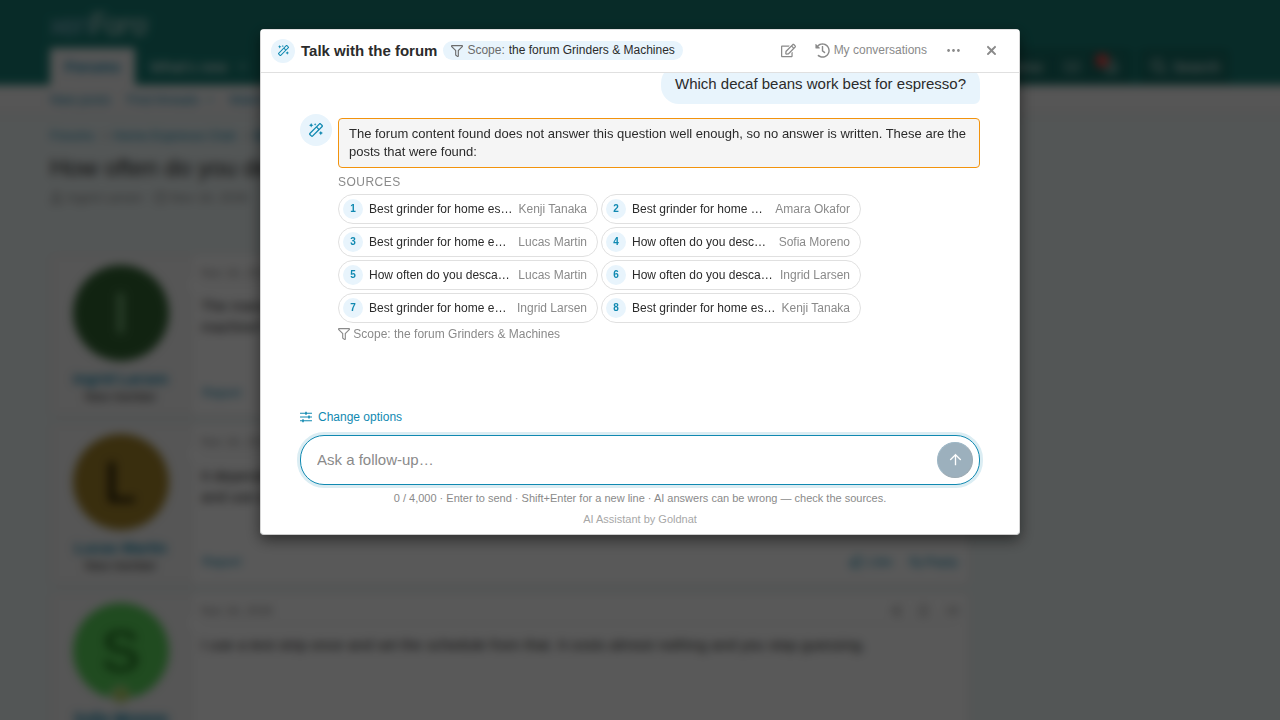
- Strict mode (per command): when the forum does not have the answer, the assistant says so and shows only the posts it found. No answer text, no guessing.
- Citation check (per command): one more fast AI call compares every statement with the post it cites. You choose: list the unsupported statements under the answer, or remove them.
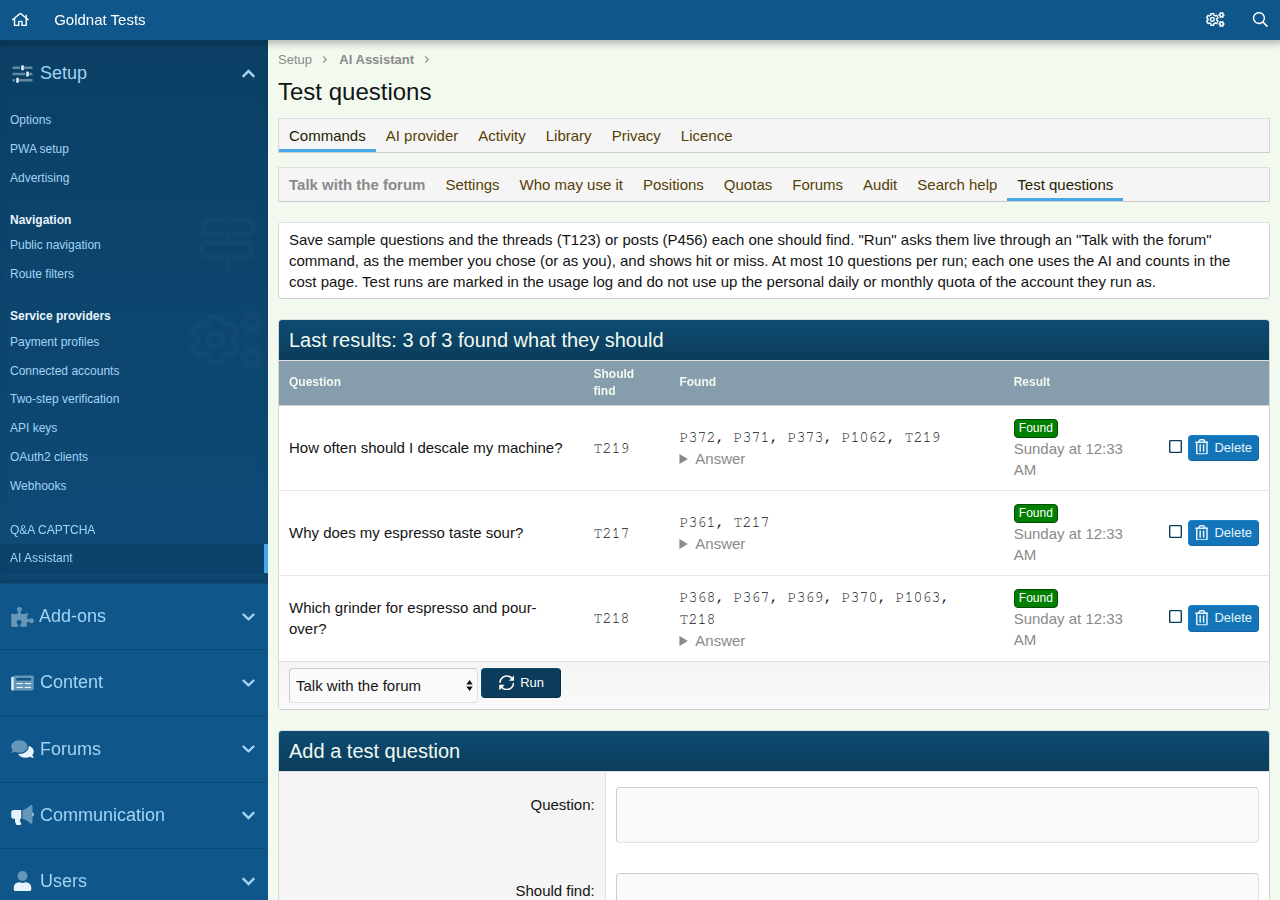
- Test questions (for you, the admin): save sample questions and the threads they should find. One click runs them as a member you choose and shows found / missed. Use it after you change the search help, the summaries or the model.
- Your own note under each command — for example "AI answers can be wrong — check the sources" — in every language, or a different text per language.
Built for forum owners, not just forum members
The Assistant is more than a collection of ready-made AI features.
You control what the assistant can do, who can use each command, and where it is available.
Create your own AI commands – just by describing them
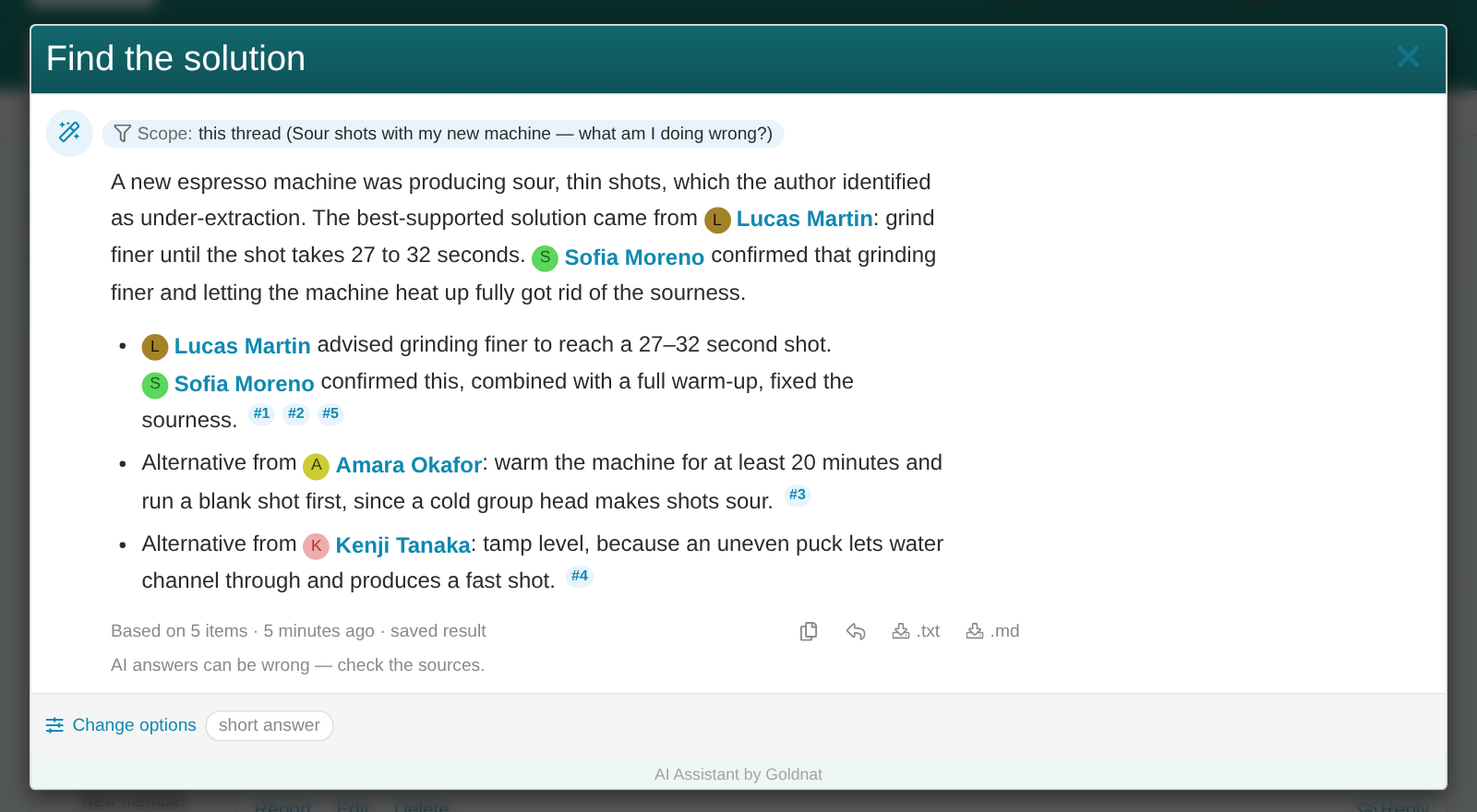
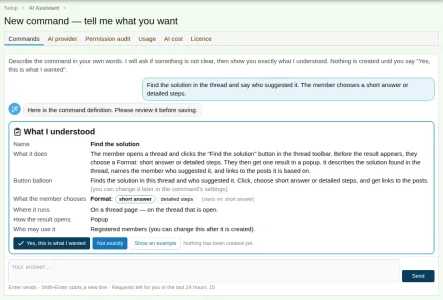
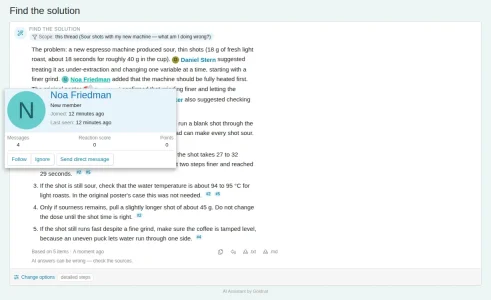
Want a command that finds the accepted solution in a discussion? Or one that identifies the most useful advice in a thread?
Just describe what you want in plain language.
The command builder asks questions when necessary, presents a summary of what it understood, and creates the command only after you approve it.
You can modify your commands later in the same kind of conversation.
If something cannot be implemented with the available tools, the builder tells you rather than silently creating something different.
Or start from the library of ready commands
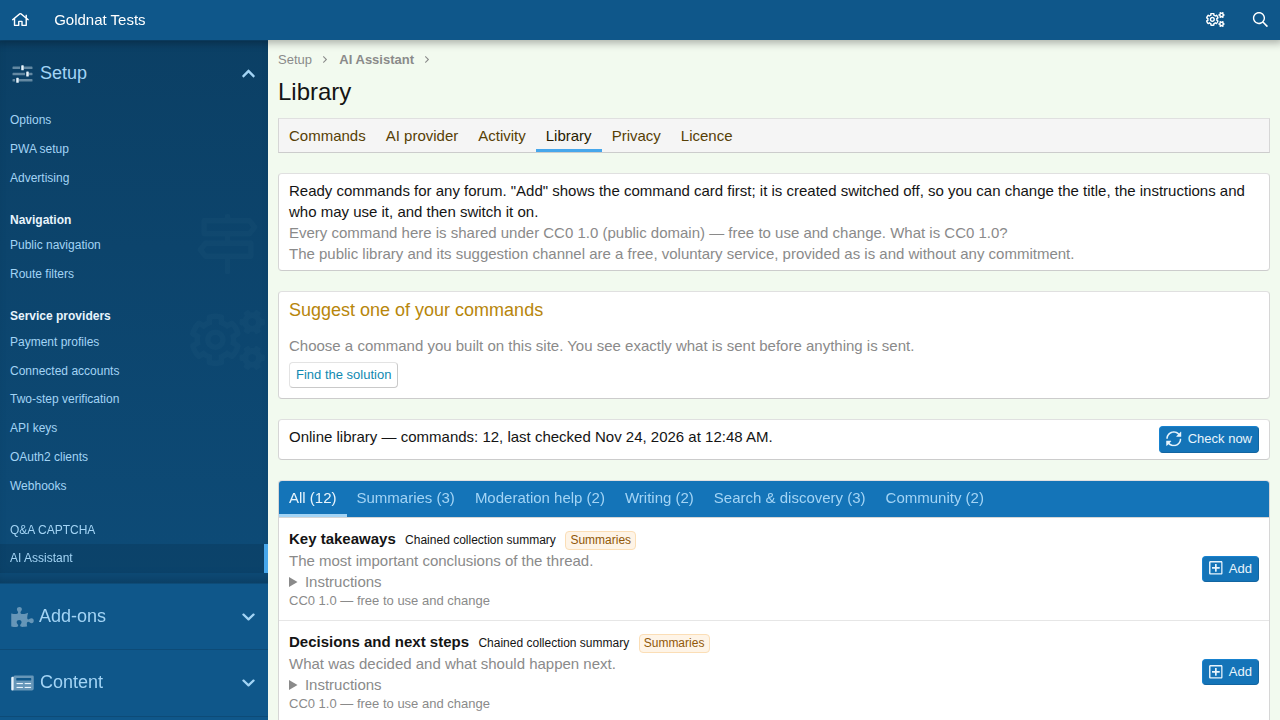
Twelve ready commands come with the add-on: key takeaways, decisions and next steps, pros and cons, open questions, how it developed, explain it simply, links and resources, glossary, how do I…, compare options, make it clearer, friendlier tone. Five categories and a filter help you find the right one. Add one, edit it if you like, switch it on.
And the library grows. Forums share their best commands, Goldnat reviews every suggestion, and every forum gets the approved ones.
- A command you add from the library is created switched off. You see it first.
- The list is signed by Goldnat and checked before it is used. No connection? The last good copy stays.
- Every command in the library is shared under CC0 1.0 (public domain): free to use and change, no credit needed.
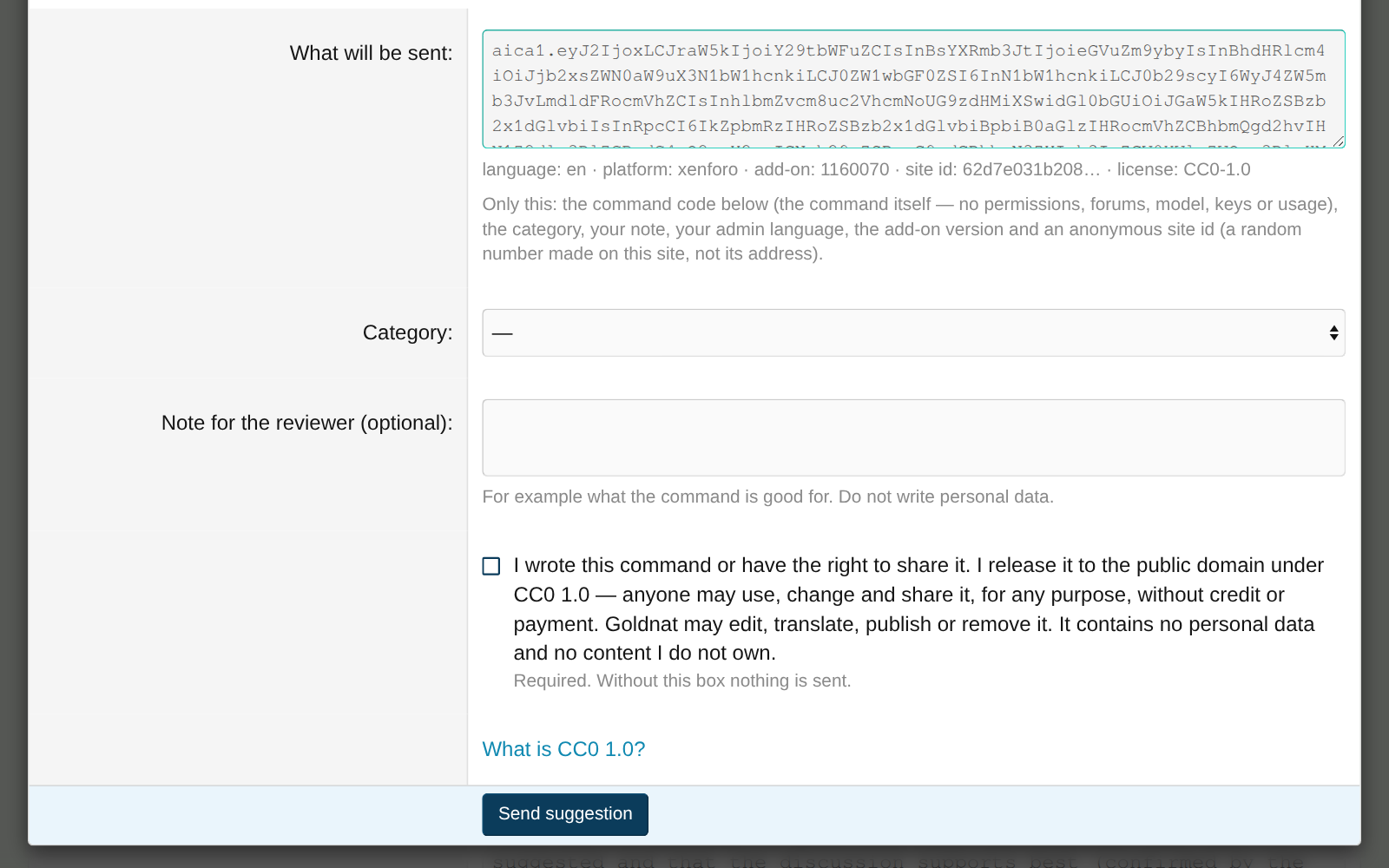
- Share yours: every command you made has a button "Suggest to the public library". You see exactly what is sent — the command itself; no permissions, forums, model, keys or usage — tick the CC0 box and confirm.
- A command you do not suggest stays private on your forum. You can still pass it to another forum with a command code.
- One switch turns the online library off completely.
Full control over permissions and usage
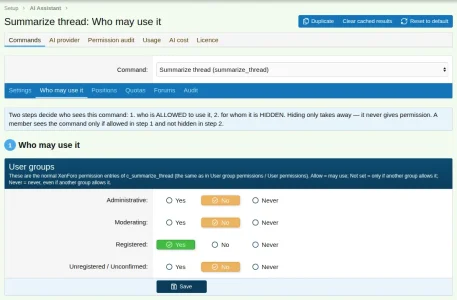
Configure access separately for each command:
- Which user groups can use it.
- Which forums it is available in.
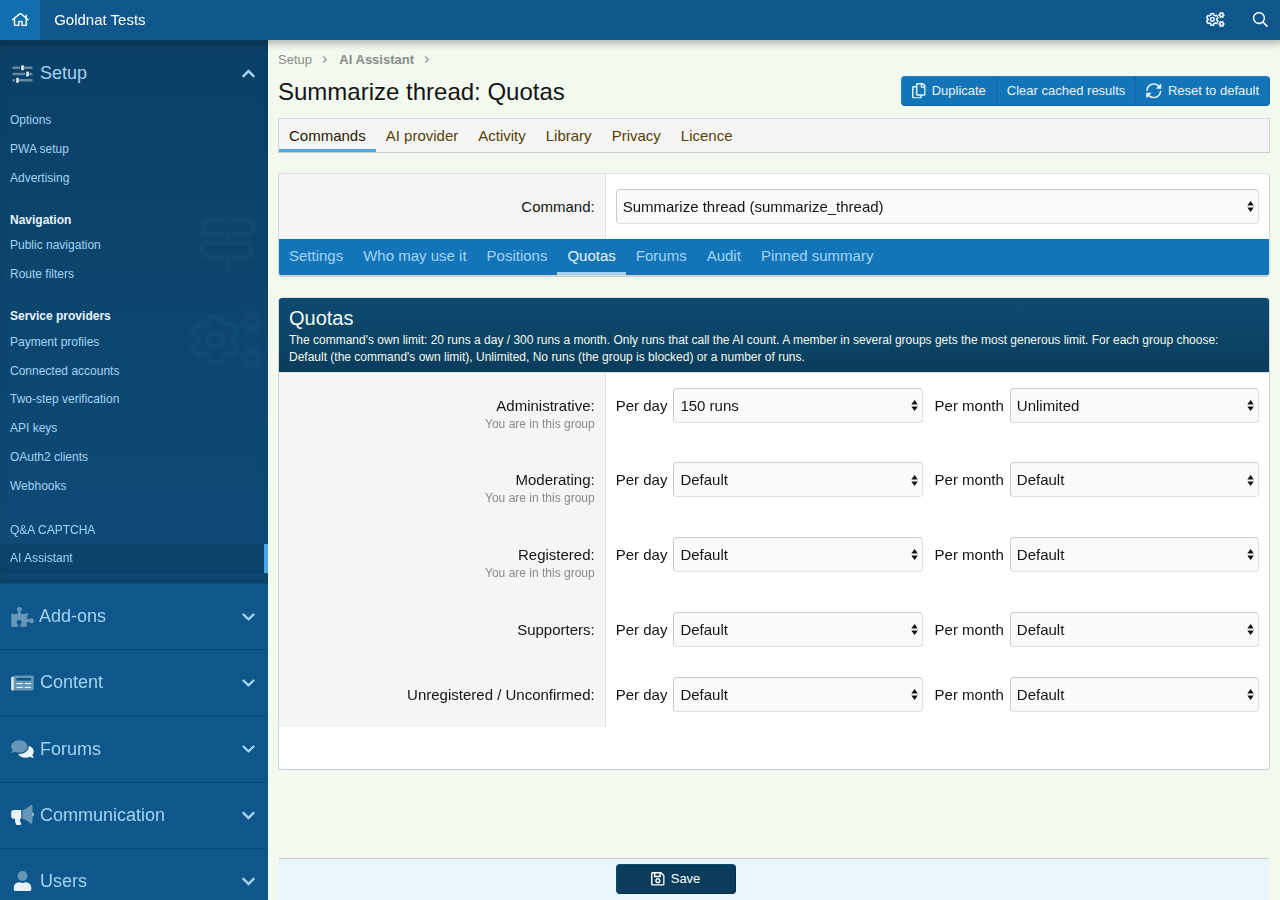
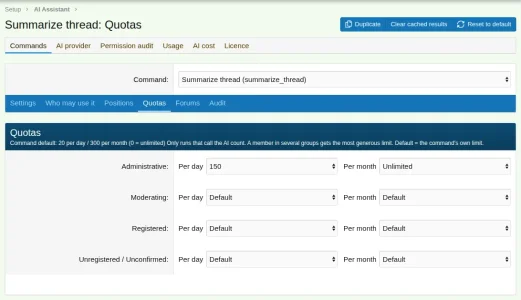
- Daily and monthly usage limits — the command's own limit, and a different limit for any user group you choose.
- Hide a command from a group or a single member (a hide can never grant anything).
When a member reaches a limit, the message says which limit it is and when the command can be used again.
For example:
- Guests: No AI access.
- Registered members: Five thread summaries per day.
- Premium members: Unlimited access to all available commands.
A permission report shows exactly who can use each command and why.
One more safety belt: a limit on AI runs at the same time, for the whole forum. Extra requests wait in line, and a long summary continues in the background.
This also gives you a practical way to create AI-powered features for paid membership levels.
Bring your own AI
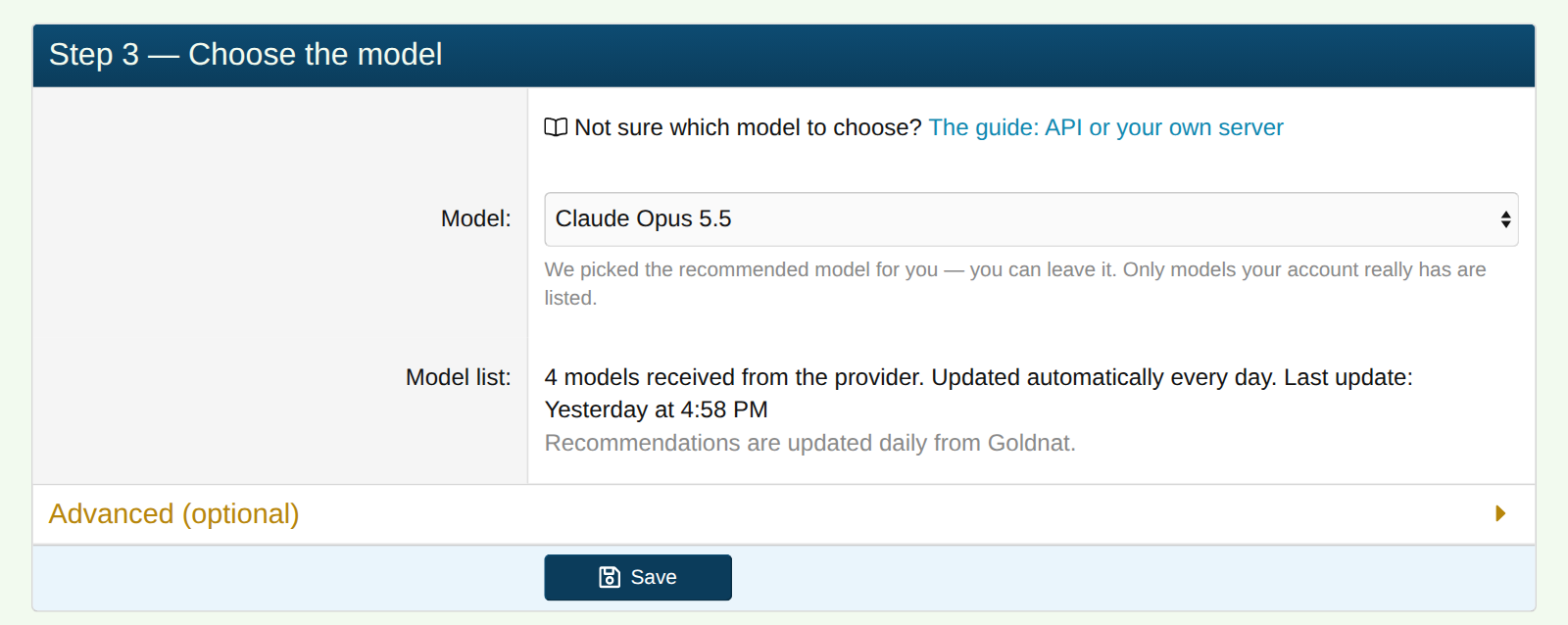
You choose the AI provider. You pay the provider directly.
Supported options include:
- Anthropic.
- OpenAI.
- Any OpenAI-compatible API endpoint.
- Your own models running through Ollama, vLLM, LM Studio, and other compatible services.
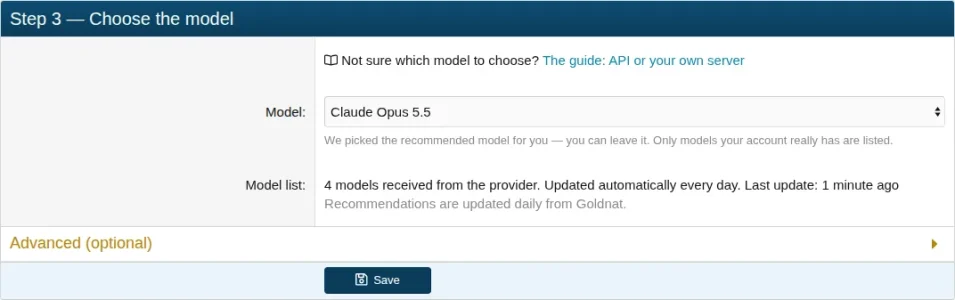
Connect and test your provider, discover available models, and choose the models that fit your needs. An optional fallback provider answers when the main one fails or times out, for the kinds of work you choose.
You can even use different models for different tasks:
- A fast model for intermediate steps and background summaries.
- A stronger model for final answers.
- A cheaper model for the command builder.
Not sure whether to use a hosted API or your own server? See our guide: Choosing the AI for the XenForo Assistant — API or Your Own Server.
Who pays for the AI — and how much
You do, directly to your AI provider, with your own API key. The price of the Assistant does not include AI usage, and nothing is added on top of your provider's price.
How much depends on the model, on how long your threads are, on how many members use the Assistant, and on how often a stored result can be reused. Ten members with the same permissions open the same summary — the AI is paid once.
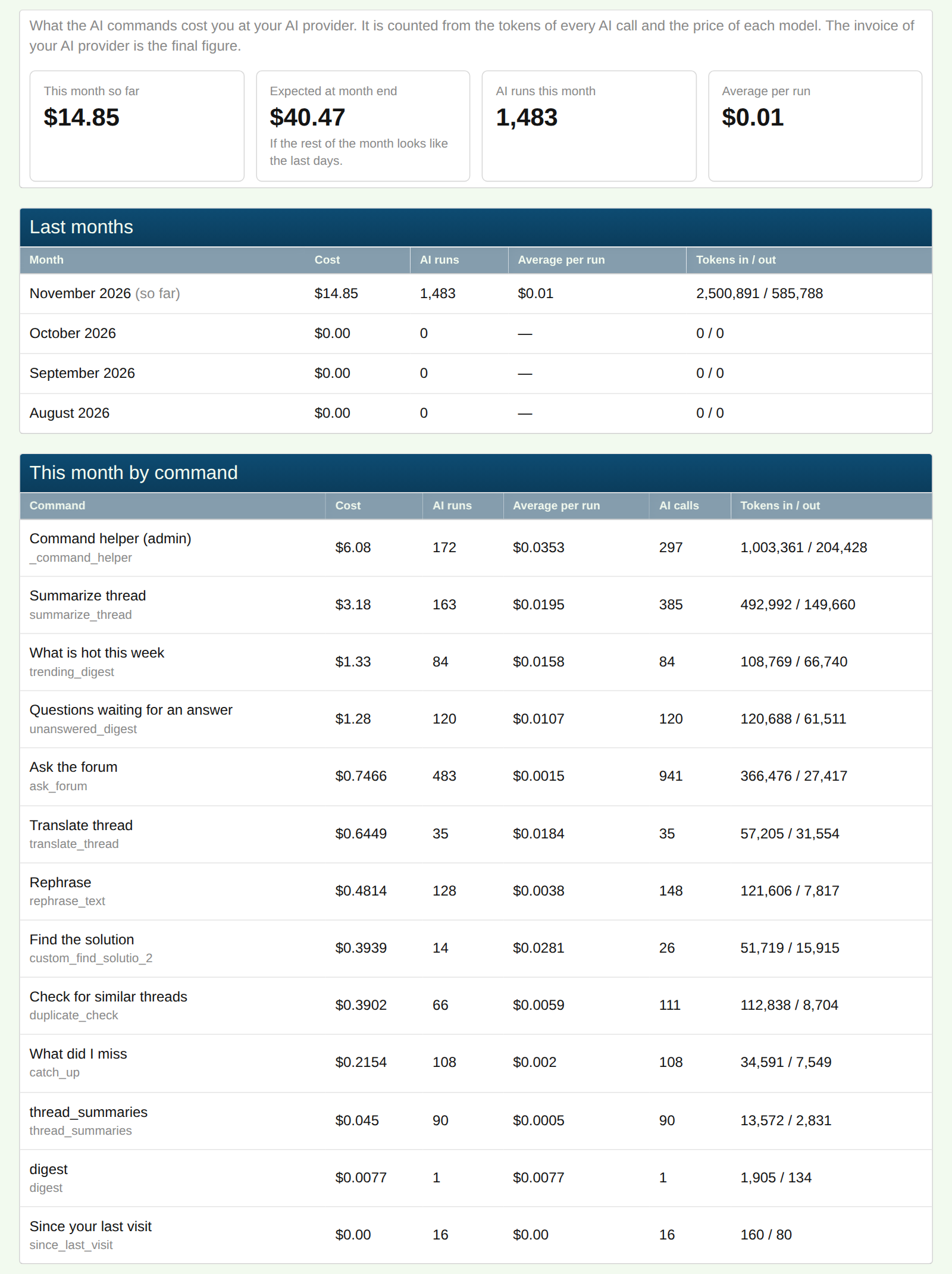
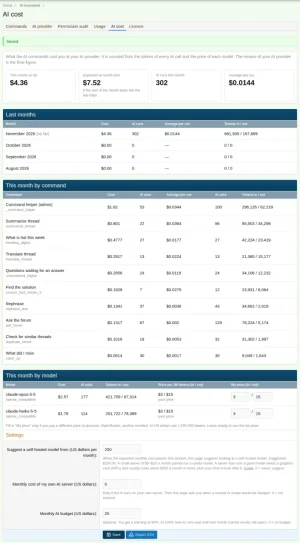
The AI Cost dashboard shows:
- Current monthly spending.
- Projected end-of-month spending.
- Cost breakdown by command.
- Cost breakdown by model.
And you hold the brakes:
- Daily and monthly quotas per user group and per command.
- A monthly budget: a warning at 80%, new AI runs paused at 100%.
- CSV export for further analysis.
A way to fund it: link AI use to a paid XenForo user upgrade. The upgrade adds the member to a group; give that group a bigger quota or more commands. A simple check: cost per request × quota per member = the most one member can cost you per month.
The figures are calculated from the tokens of every AI call and the price of each model; the invoice of your AI provider is the final figure.
No surprises. You can monitor and control your AI expenses.
Privacy and security
Your forum content is sent only to the AI provider you configure.
When using your own locally hosted model, forum content does not need to leave your server for AI processing.
Security is built into the architecture:
- Every request uses the permissions of the member who initiated it.
- Private and hidden content remains inaccessible to unauthorized members.
- The Assistant does not moderate, edit or delete. It posts only through "Answer new questions", only in forums you switched on, as the member account you chose for it, labelled as an AI answer — and by default every such answer waits for a moderator. "Help me write a reply" and "Rephrase" put text only into the member's own editor; "Suggest tags / prefix" changes nothing until someone who may edit the thread approves.
- Forum posts are treated as data, not as instructions: the assistant is told to ignore commands written inside posts.
- Your API key is stored encrypted. After you save it, only its last characters are shown.
Your members' data stays theirs:
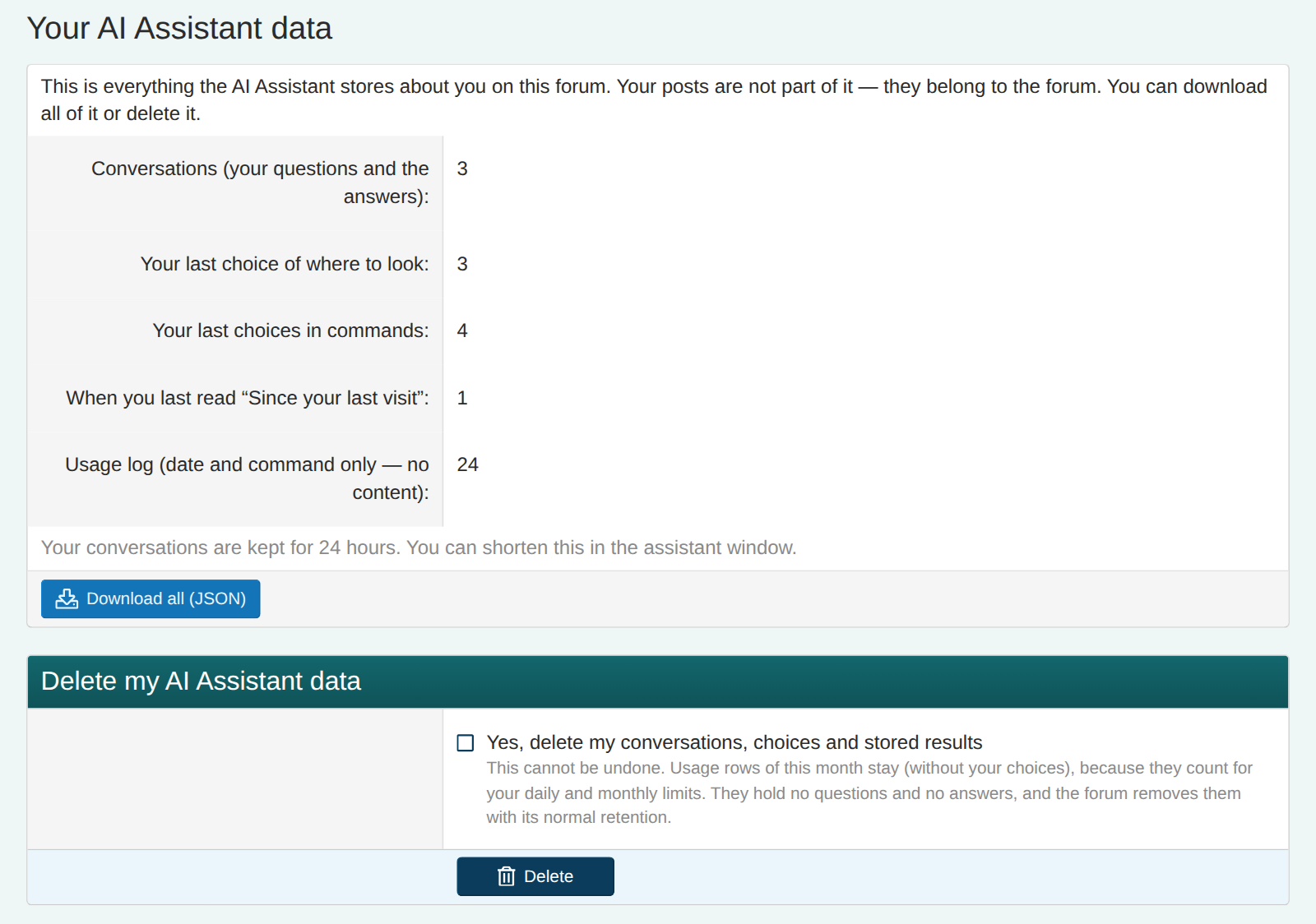
- A member can download or delete their Assistant data at any time (Your account › AI Assistant data). An administrator can do it for a member.
- When a member account is deleted, everything the Assistant stored about that member is deleted with it.
- Stored thread summaries hold no member data — no names, no user IDs.
Goldnat's server is contacted for license verification (it receives your license key, your forum's address and the add-on version), for recommended model and pricing information, and for the online command library (it receives only the add-on version). Forum content is not sent to Goldnat's server.
Designed for international communities
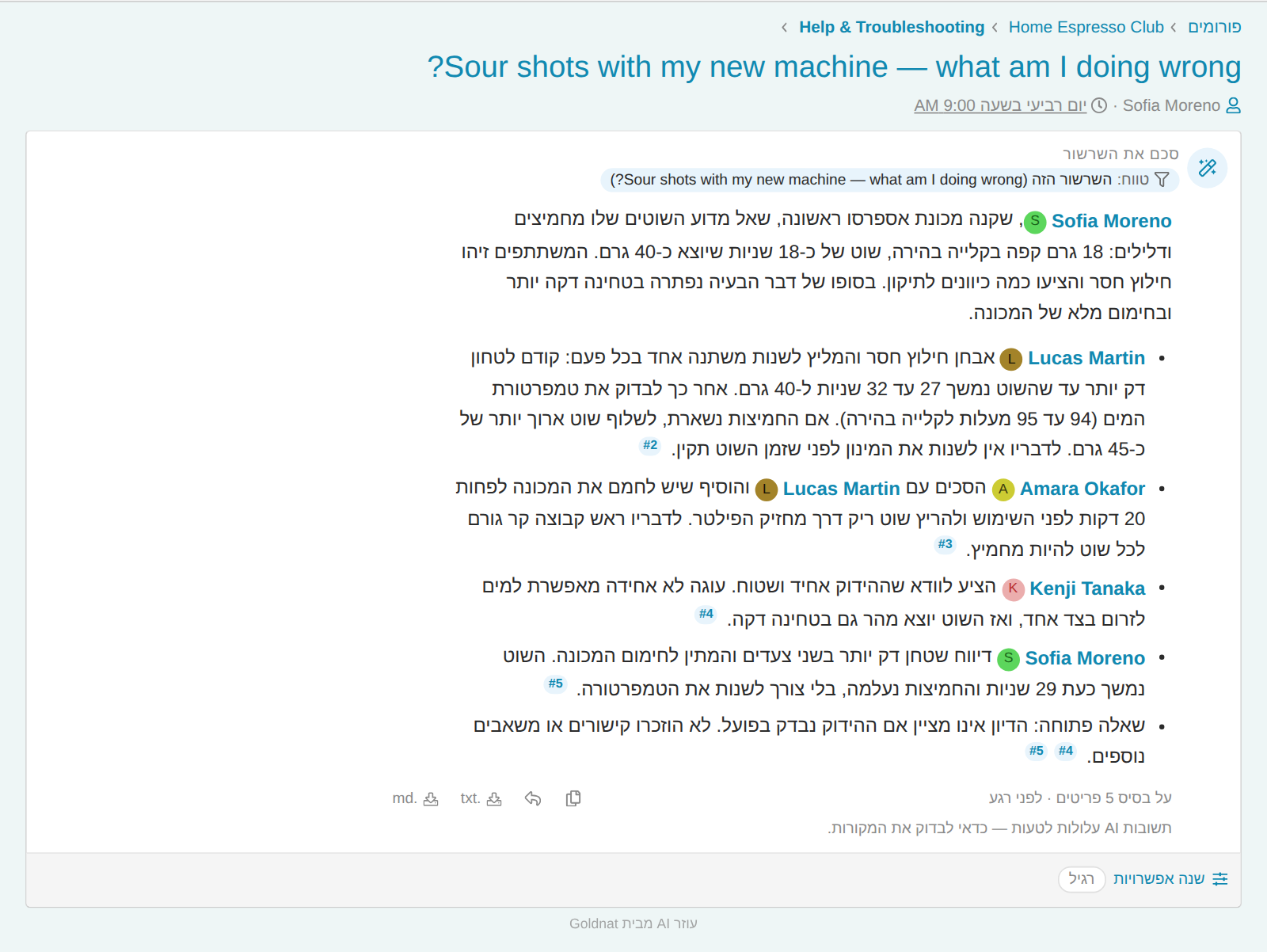
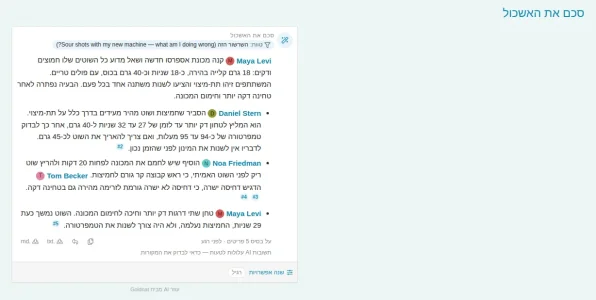
The interface is translated into eight languages:
English, Hebrew (including right-to-left support), German, French, Spanish, Italian, Dutch, and Brazilian Portuguese.
Translations are automatically added for matching languages installed in your XenForo forum.
Members receive results in their interface language, or in a language they choose where a command offers that choice.
How it works
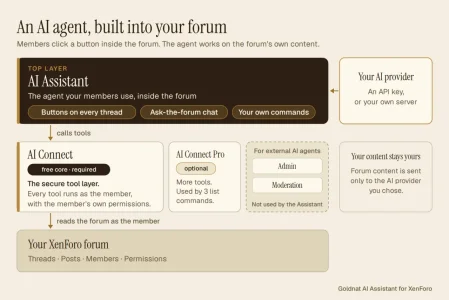
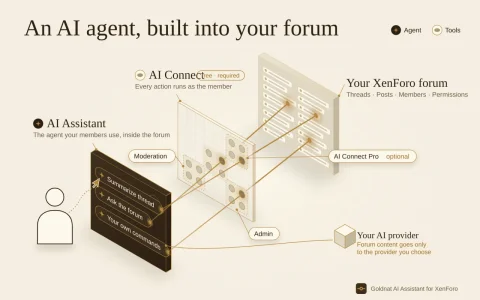
Goldnat AI Assistant for XenForo is the top layer of the Goldnat add-ons for XenForo: the part your members see and use.
It builds on:
- AI Connect (free): The secure tool-access layer through which the assistant reads the forum, as the member who clicked.
- AI Connect Pro: Adds more tools. Three of the list commands need it, and "Answer new questions" posts and holds its answers for approval through it (1.2.30 or later).
- AI Assistant: The agent itself — the buttons and the chats, the ready-made commands, your own commands, stored and pinned summaries, the digest, automatic answers, conversations, permissions, quotas, and cost monitoring.
The Assistant does not use the separate Goldnat Admin and Moderation add-ons, which are tool sets designed for external AI agents.
And the AI agents outside your forum?
AI Connect can also let a member's own AI agent — Claude, ChatGPT and others — work on the forum as that member. That door is yours to open or close:
- One switch for outside agents. Close the door for agents outside the forum, and the Assistant inside the forum keeps working.
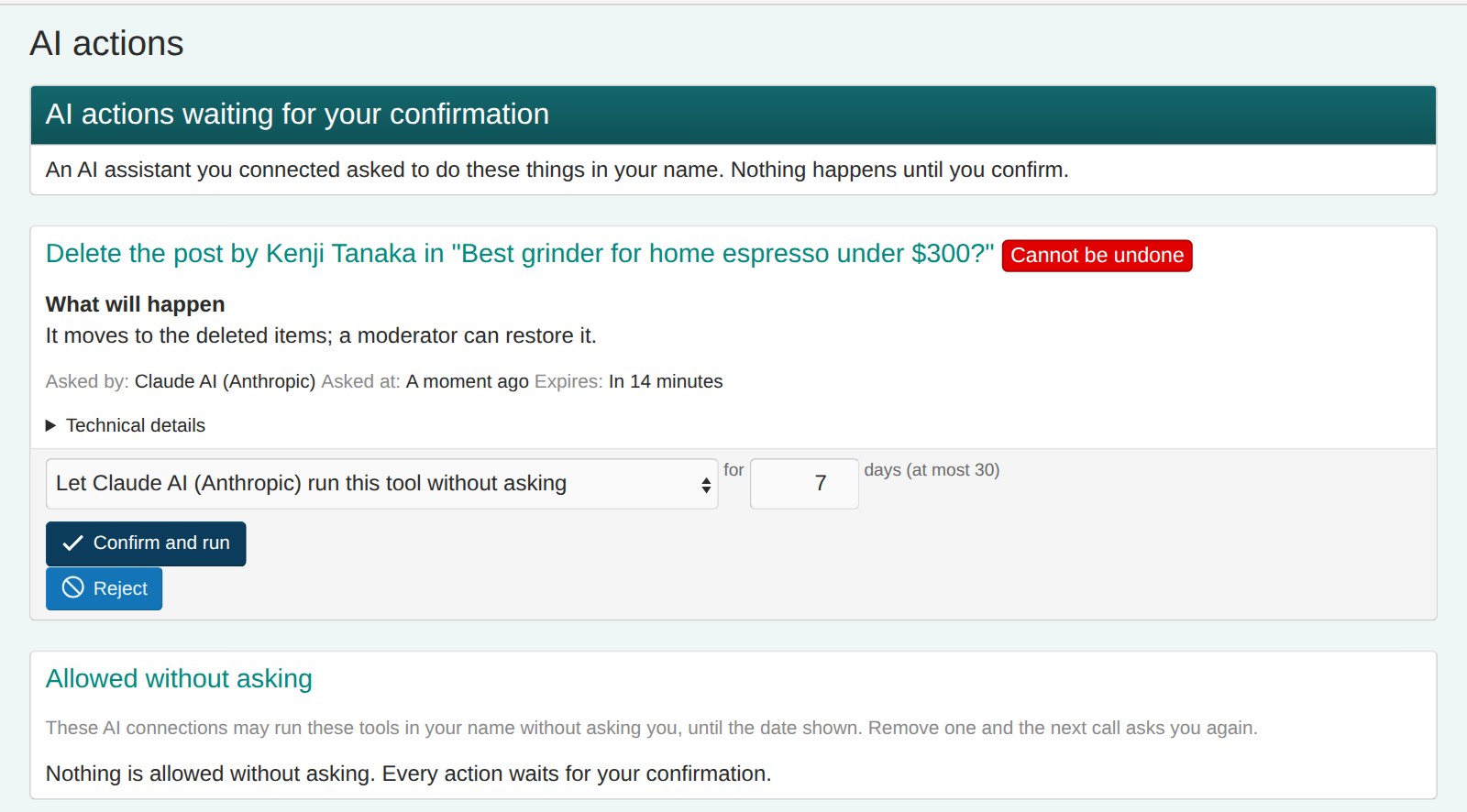
- Risky actions wait for the member. An action that deletes content, punishes a member or changes settings always waits for that member's confirmation on the forum, on their "AI actions" page.
- "Allow without asking" — only if you permit it. Off by default. A member of a group you allow can let one AI connection run one tool without asking — always with an end date, visible on their page, removable at any time. Every run is logged.
A small credit line
Under each AI result there is one small grey line, "AI Assistant by Goldnat", with a link to the product page. It is on by default, and one switch in the add-on's options turns it off – free of charge. The link carries no information about your forum or your members.
Requirements
- XenForo 2.3 or later.
- PHP 7.4 or later.
- Goldnat AI Connect for XenForo (free) 1.2.87 or later. Upgrade AI Connect first, then the other add-ons.
- An AI provider API key or your own compatible model server.
The following commands require AI Connect Pro:
- What did I miss?
- Questions waiting for answers.
- What's hot this week?
"Answer new questions" needs AI Connect Pro 1.2.30 or later for its approval queue (1.2.32 is current). All other commands work with the free AI Connect add-on. Since your last visit, My topics, This month a year ago and the digest need thread summaries switched on.
Installation
- Install and activate AI Connect for XenForo.
- Download the Assistant ZIP from your Goldnat account.
- Install it through the XenForo Admin Control Panel.
- Activate your license: paste the key from the purchase email under Setup › AI Assistant › Licence.
- Configure your AI provider and select your models.
- Configure permissions and availability for each command.
You're ready to go.
Upgrading from an earlier version? Upgrade AI Connect first, then the Assistant. Your commands, permissions and settings stay as they are. The new features that cost AI calls — thread summaries, pinned summaries, the digest, the citation check, Answer new questions, Help me write a reply — stay off until you switch them on.
Pricing
$49 USD – One XenForo forum, including one year of updates.
One license per forum URL. The license can be transferred to another URL through your Goldnat account. Until a valid key is entered, members do not see the AI buttons. After the year of updates the add-on keeps working; renewing gives you new versions.
AI usage is billed directly by your chosen provider.
Get the Assistant:
plugins.goldnat.ai/xenforo/xf-assistant-ai-connect
Questions or support: goldnat.ai/contact
Your forum already has the knowledge. Give your members a better way to use it.
Goldnat AI Assistant for XenForo.
-
 00-agent-in-your-forum.webp
-
 01-buttons-and-balloon.webp
-
 02-summarize-thread.webp
-
 03-ask-the-forum.webp
-
 04-translate-thread.webp
-
 06-rephrase.webp
-
 05-check-if-already-asked.webp
-
 07-create-command-by-chat.webp
-
 08-your-own-command.webp
-
 09-permissions-per-group.webp
-
 10-quotas-per-group.webp
-
 11-choose-ai-model.webp
-
 12-ai-cost.webp
-
 13-right-to-left.webp
-
 14-credit-line-switch.webp
-
 goldnat-assistant-v6-1600x1000.webp


