

- Compatible XF 2.x versions
- 2.2
- 2.3
- Additional requirements
- AI Connect for XenForo 1.2.74+ (free). An API key of an AI provider (Anthropic, OpenAI or any OpenAI-compatible service) or your own model server. Three list commands also need AI Connect Pro.
- License
- Commercial licence: one forum per licence, one year of updates. https://goldnat.ai/terms
- Updates duration
- 1 year of updates included from the date of purchase.
- Visible branding
- Yes, but removable without payment
Your forum knows. Now it can answer.
Goldnat AI Assistant for XenForo — an AI agent built into your forum.
Your forum has years of discussions, answers, solutions, and expertise.
But most of that knowledge is buried inside threads. Members have to search, read, scroll, and hope someone has already answered their question.
What if they could simply ask?
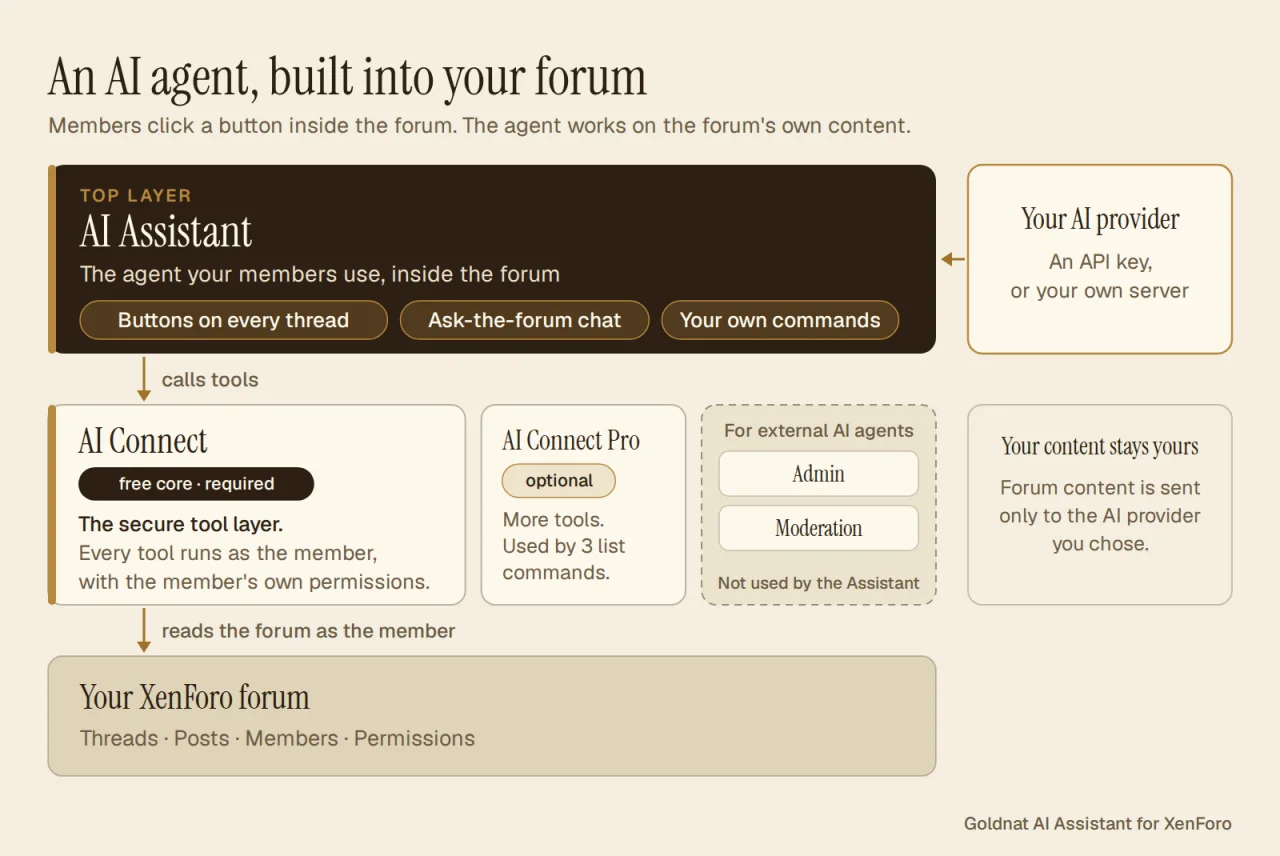
Your forum now has an AI agent built in. A member clicks a button inside the forum, and the agent goes to work on your forum's own content: it finds the relevant discussions, summarizes long threads, translates conversations, and answers questions — with links to the original posts.
It works as that member, with that member's own permissions. No external chatbot. No copy and paste. No separate app, no extra accounts for your members.
And when you want it to do something new, you describe it in a chat — and a new command is created.
Just your forum, with a new way to use everything it already knows.
Your forum becomes easier to use
Members interact with the assistant through buttons inside XenForo – in threads, the editor, and navigation.
The assistant works through the same forum permissions as the member who clicks the button. It cannot access private forums, staff areas, or hidden posts that the member cannot see.
And the experience is fully integrated into XenForo.
What members can do
Understand discussions in one click
Stay informed
Write and participate better
Every button includes a short explanation of what it does and how to use it.
Summaries and digests are written in the member's interface language; a question is answered in the language it was asked in. When members appear in results, their names link to their regular XenForo profiles, subject to the viewer's permissions.
Built for forum owners, not just forum members
The Assistant is more than a collection of ready-made AI features.
You control what the assistant can do, who can use each command, and where it is available.
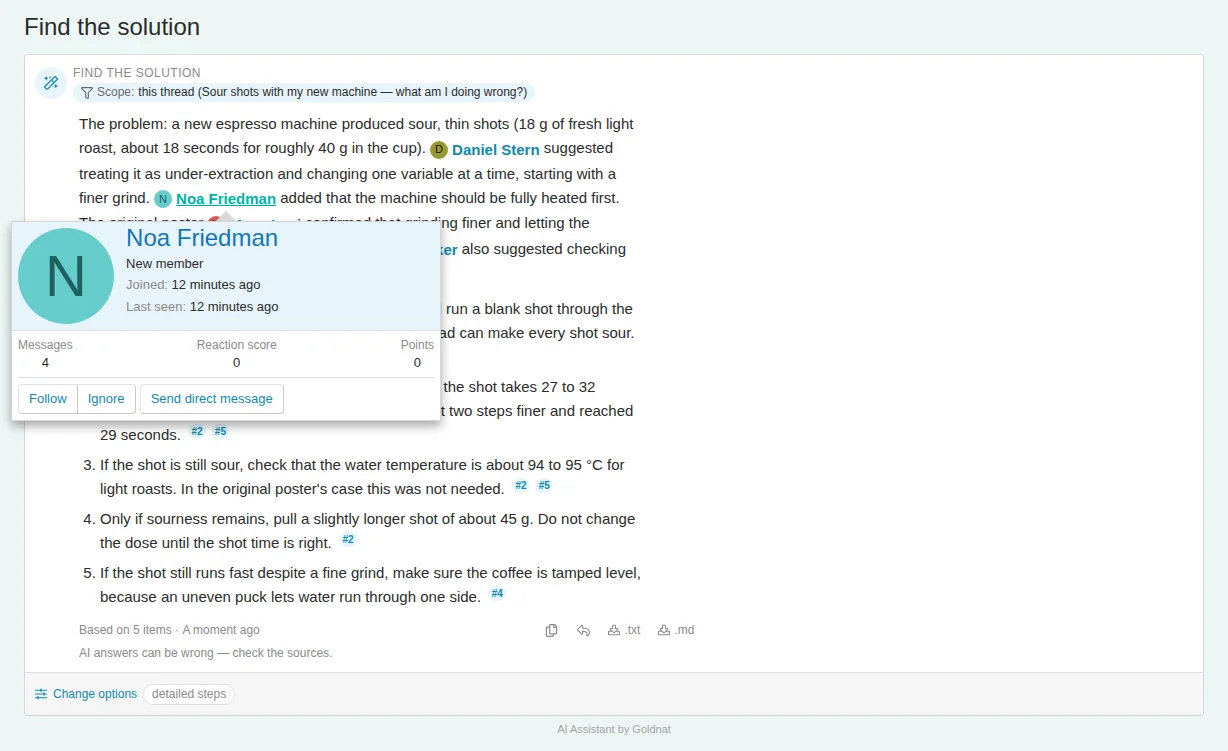
Create your own AI commands – just by describing them
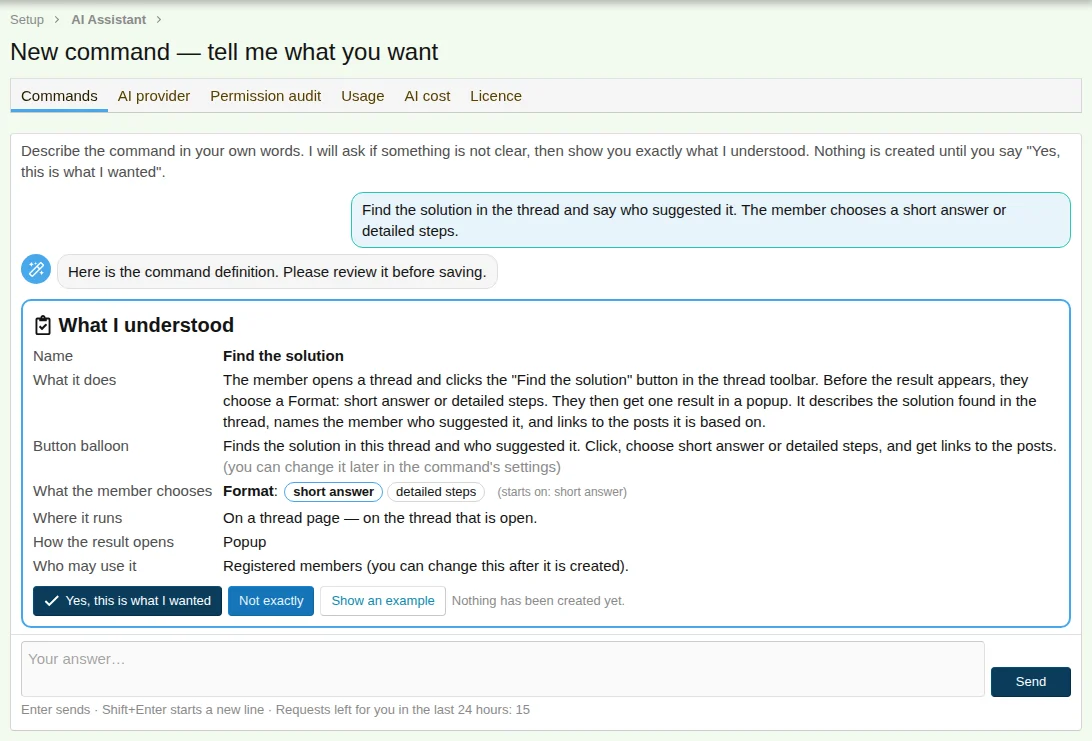
Want a command that finds the accepted solution in a discussion? Or one that identifies the most useful advice in a thread?
Just describe what you want in plain language.
The command builder asks questions when necessary, presents a summary of what it understood, and creates the command only after you approve it.
You can modify your commands later in the same kind of conversation.
If something cannot be implemented with the available tools, the builder tells you rather than silently creating something different.
Full control over permissions and usage
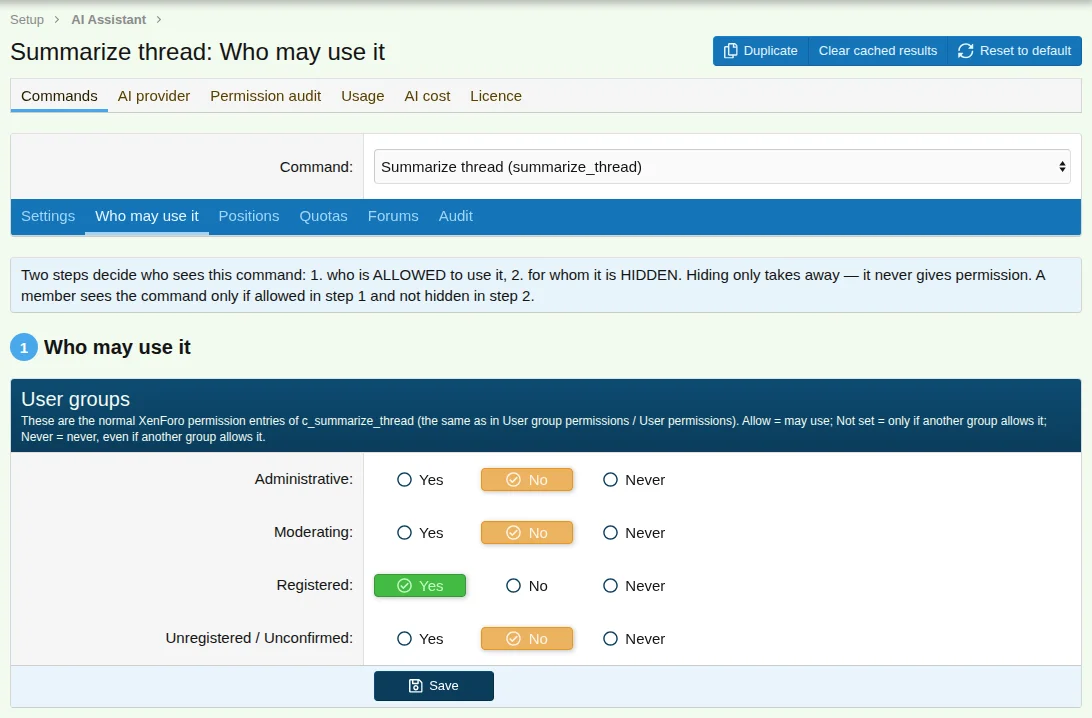
Configure access separately for each command:
For example:
A permission report shows exactly who can use each command and why.
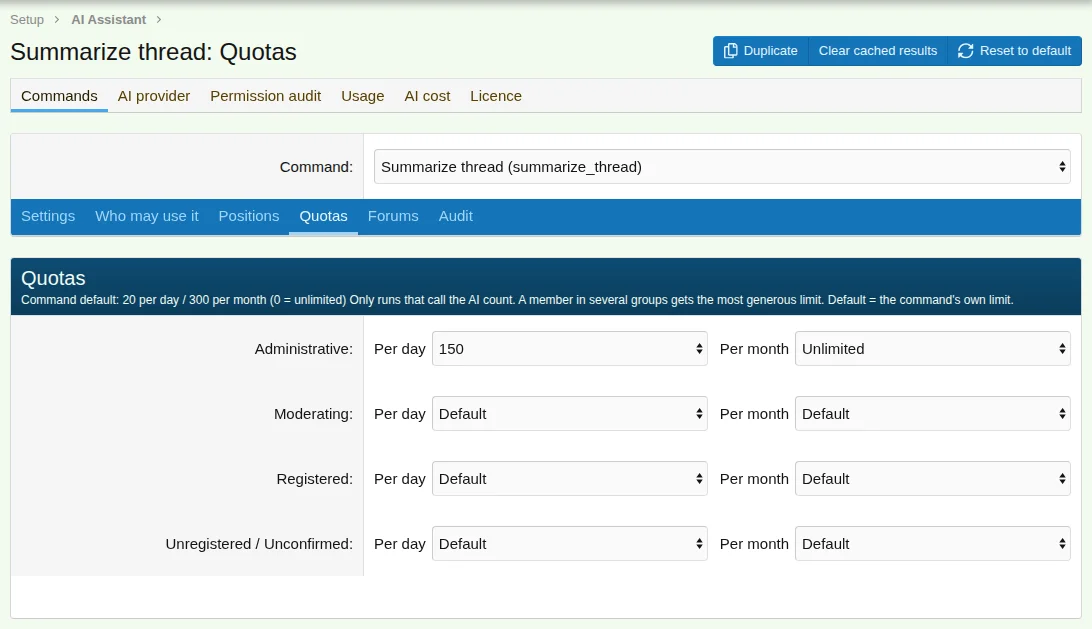
This also gives you a practical way to create AI-powered features for paid membership levels.
Bring your own AI
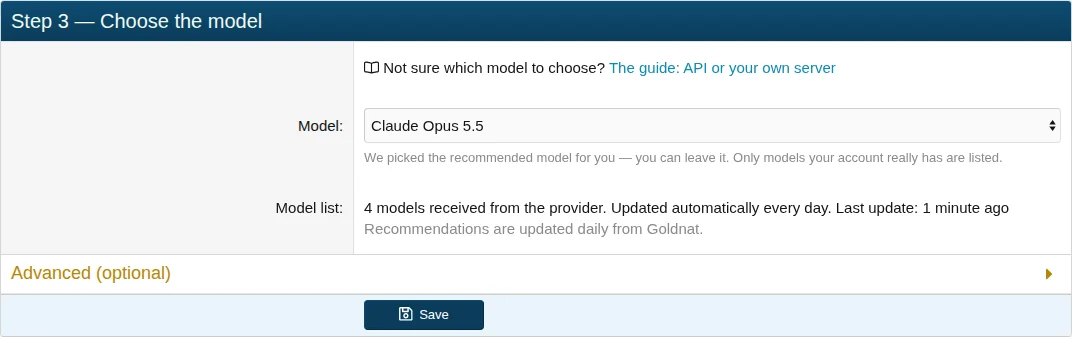
You choose the AI provider. You pay the provider directly.
Supported options include:
Connect and test your provider, discover available models, and choose the models that fit your needs.
You can even use different models for different tasks:
The Assistant does not include AI usage fees. You maintain direct control over your AI provider and its costs.
Not sure whether to use a hosted API or your own server? See our guide: Choosing the AI for the XenForo Assistant — API or Your Own Server.
Know what your AI costs
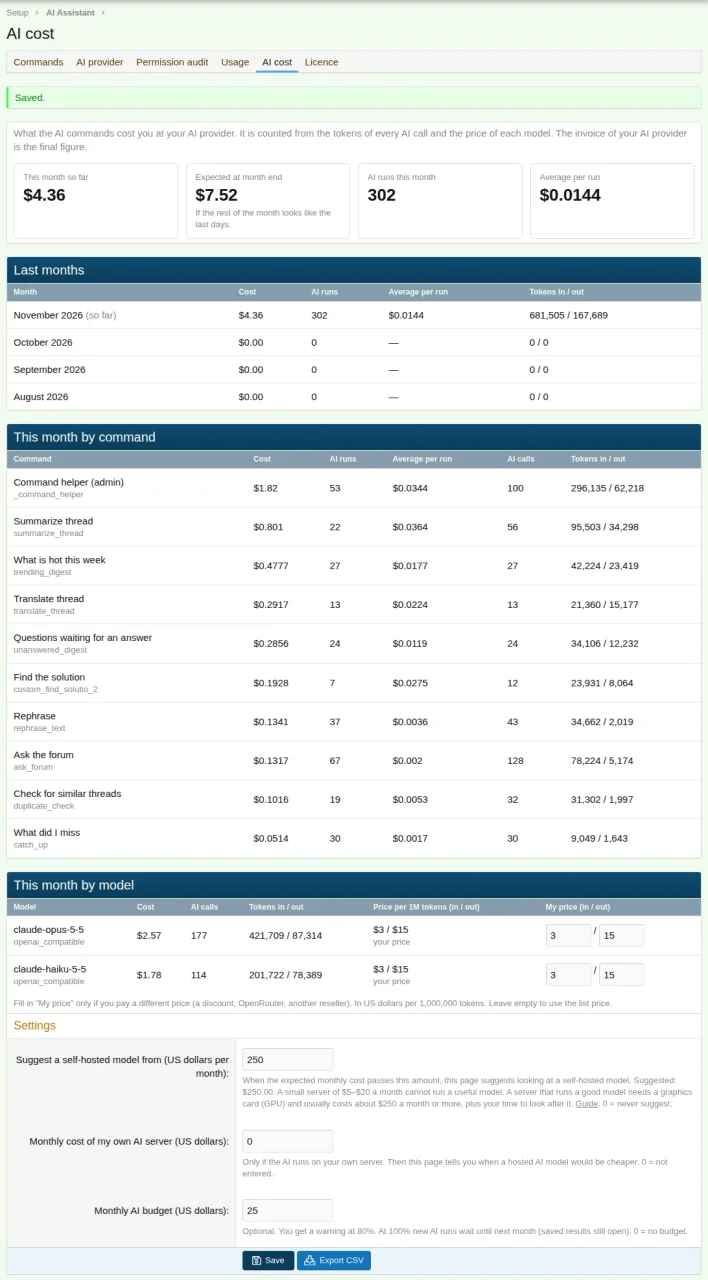
The AI Cost dashboard shows:
You can also configure a monthly budget:
The figures are calculated from the tokens of every AI call and the price of each model; the invoice of your AI provider is the final figure.
No surprises. You can monitor and control your AI expenses.
Privacy and security
Your forum content is sent only to the AI provider you configure.
When using your own locally hosted model, forum content does not need to leave your server for AI processing.
Security is built into the architecture:
Goldnat's server is contacted for license verification (it receives your license key, your forum's address and the add-on version) and for recommended model and pricing information. Forum content is not sent to Goldnat's server.
Designed for international communities
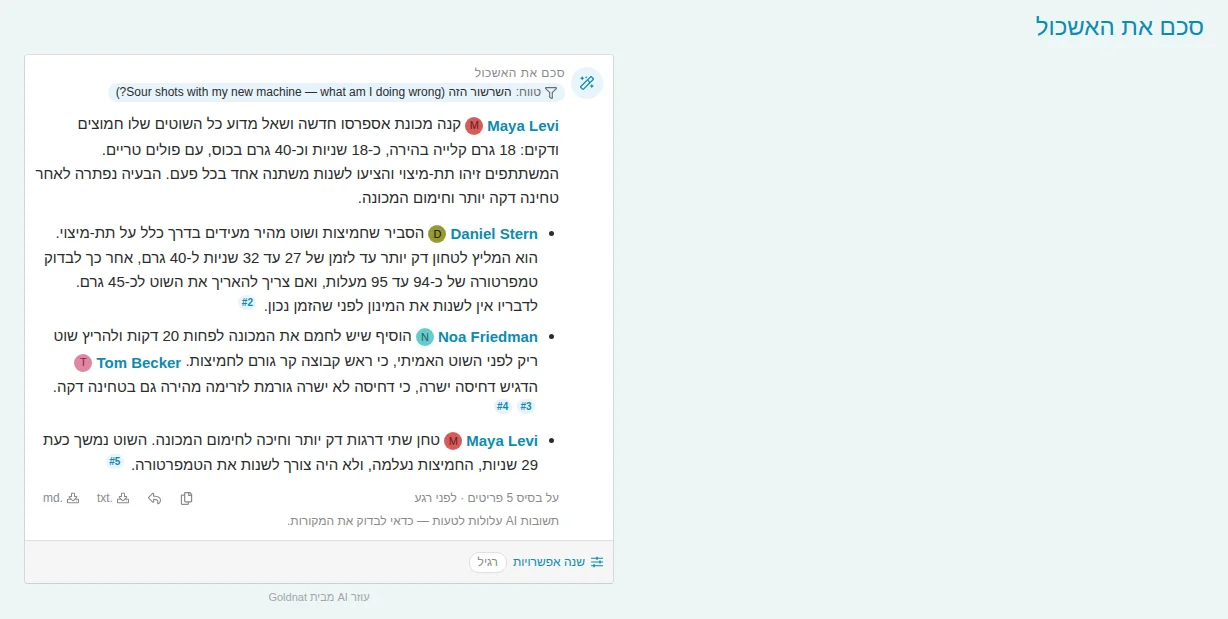
The interface is translated into eight languages:
English, Hebrew (including right-to-left support), German, French, Spanish, Italian, Dutch, and Brazilian Portuguese.
Translations are automatically added for matching languages installed in your XenForo forum.
Members receive results in their interface language, or in a language they choose where a command offers that choice.
How it works
Goldnat AI Assistant for XenForo is the top layer of the Goldnat add-ons for XenForo: the part your members see and use.
It builds on:
The Assistant does not use the separate Goldnat Admin and Moderation add-ons, which are tool sets designed for external AI agents.
A small credit line
Under each AI result there is one small grey line, "AI Assistant by Goldnat", with a link to the product page. It is on by default, and one switch in the add-on's options turns it off – free of charge. The link carries no information about your forum or your members.

Requirements
The following commands require AI Connect Pro:
All other commands work with the free AI Connect add-on.
Installation
You're ready to go.
Pricing
$49 USD – One XenForo forum, including one year of updates.
One license per forum URL. The license can be transferred to another URL through your Goldnat account. Until a valid key is entered, members do not see the AI buttons. After the year of updates the add-on keeps working; renewing gives you new versions.
AI usage is billed directly by your chosen provider.
Get the Assistant:
plugins.goldnat.ai/xenforo/xf-assistant-ai-connect
Questions or support: goldnat.ai/contact
Your forum already has the knowledge. Give your members a better way to use it.
Goldnat AI Assistant for XenForo.
Goldnat AI Assistant for XenForo — an AI agent built into your forum.
Your forum has years of discussions, answers, solutions, and expertise.
But most of that knowledge is buried inside threads. Members have to search, read, scroll, and hope someone has already answered their question.
What if they could simply ask?
Your forum now has an AI agent built in. A member clicks a button inside the forum, and the agent goes to work on your forum's own content: it finds the relevant discussions, summarizes long threads, translates conversations, and answers questions — with links to the original posts.
It works as that member, with that member's own permissions. No external chatbot. No copy and paste. No separate app, no extra accounts for your members.
And when you want it to do something new, you describe it in a chat — and a new command is created.
Just your forum, with a new way to use everything it already knows.
Your forum becomes easier to use
Members interact with the assistant through buttons inside XenForo – in threads, the editor, and navigation.
The assistant works through the same forum permissions as the member who clicks the button. It cannot access private forums, staff areas, or hidden posts that the member cannot see.
And the experience is fully integrated into XenForo.
What members can do
Understand discussions in one click
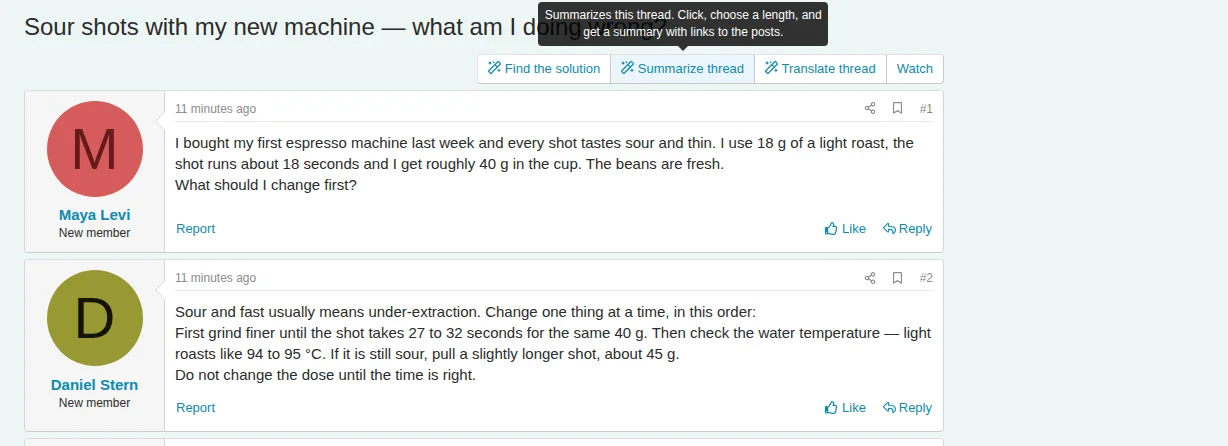
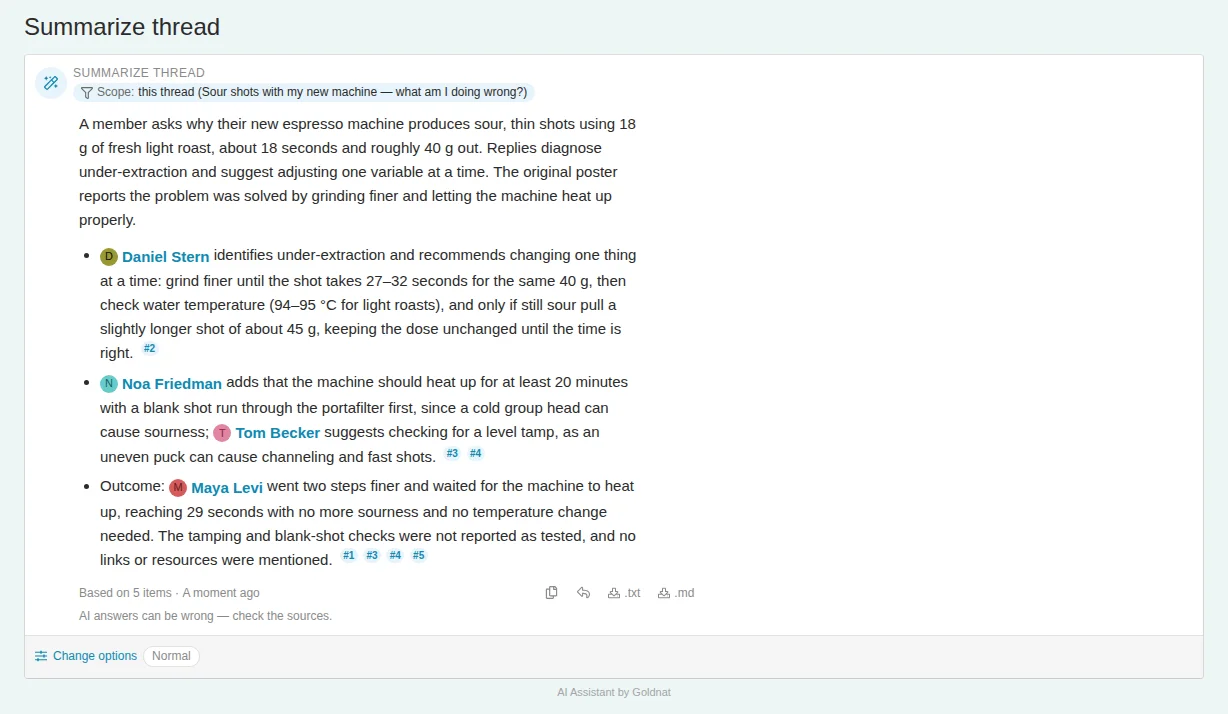
- Summarize a thread: Get the question, main arguments, conclusions, and unresolved points. Choose the summary length. Long threads are processed in parts, and summaries can be updated as new posts arrive.
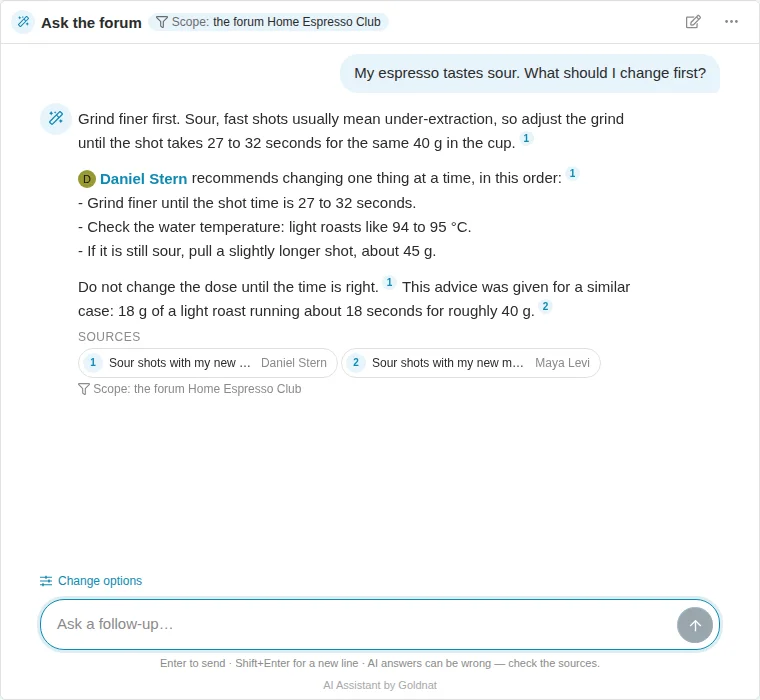
- Ask the forum: Ask a question and receive an answer based exclusively on forum posts, with numbered sources linking directly to the original discussions. Follow-up questions continue in the same chat.
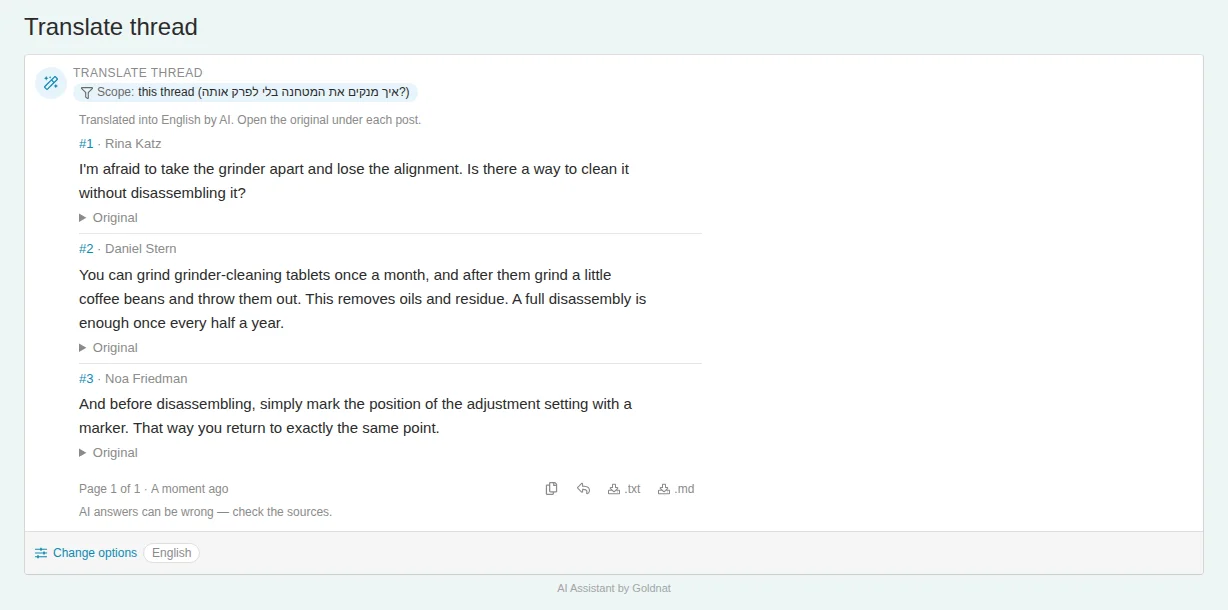
- Translate a thread: Read discussions in any of 40 languages, with the original under each post.
Stay informed
- What did I miss? Get a short update on threads you're following.
- Questions waiting for answers: Find discussions where members still need help.
- What's hot this week: Discover the most active discussions, with a short summary of each.
Write and participate better
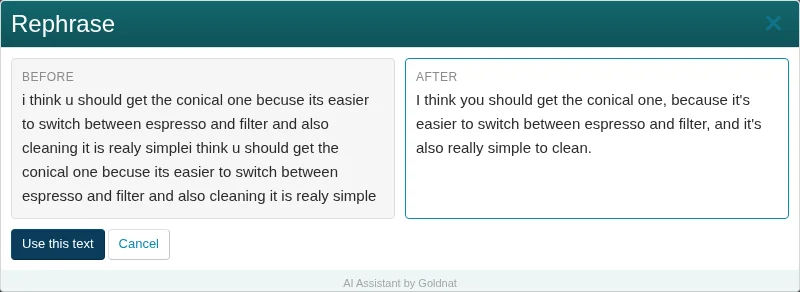
- Rephrase: Improve your post before submitting it. Compare the original and rewritten versions, then decide whether to use the suggestion.
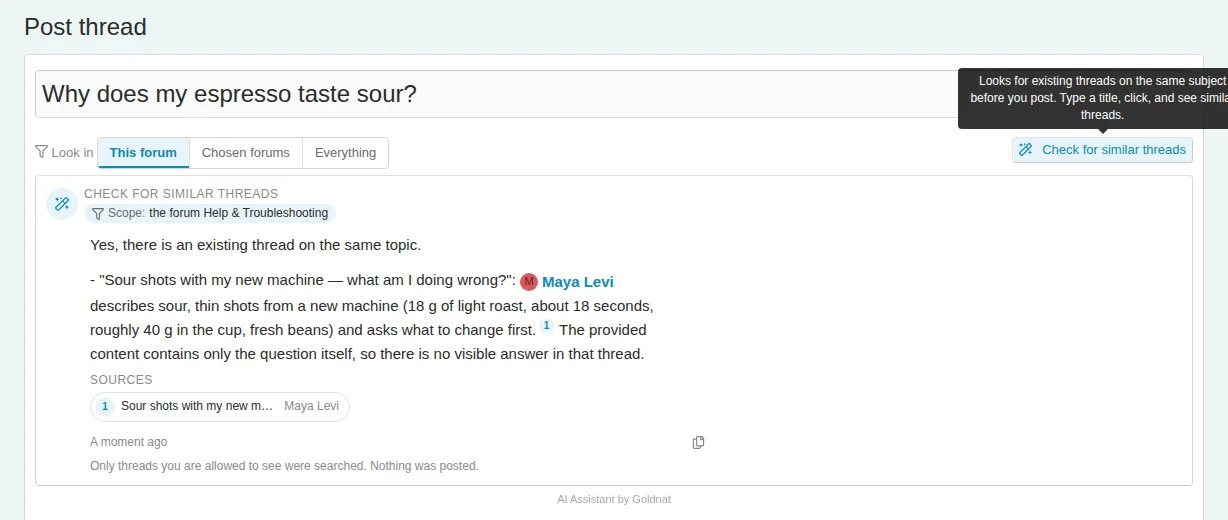
- Check if already asked: Find similar existing discussions before creating a new thread.
Every button includes a short explanation of what it does and how to use it.
Summaries and digests are written in the member's interface language; a question is answered in the language it was asked in. When members appear in results, their names link to their regular XenForo profiles, subject to the viewer's permissions.
Built for forum owners, not just forum members
The Assistant is more than a collection of ready-made AI features.
You control what the assistant can do, who can use each command, and where it is available.
Create your own AI commands – just by describing them
Want a command that finds the accepted solution in a discussion? Or one that identifies the most useful advice in a thread?
Just describe what you want in plain language.
The command builder asks questions when necessary, presents a summary of what it understood, and creates the command only after you approve it.
You can modify your commands later in the same kind of conversation.
If something cannot be implemented with the available tools, the builder tells you rather than silently creating something different.
Full control over permissions and usage
Configure access separately for each command:
- Which user groups can use it.
- Which forums it is available in.
- Daily and monthly usage limits.
- Different limits for different membership levels.
For example:
- Guests: No AI access.
- Registered members: Five thread summaries per day.
- Premium members: Unlimited access to all available commands.
A permission report shows exactly who can use each command and why.
This also gives you a practical way to create AI-powered features for paid membership levels.
Bring your own AI
You choose the AI provider. You pay the provider directly.
Supported options include:
- Anthropic.
- OpenAI.
- Any OpenAI-compatible API endpoint.
- Your own models running through Ollama, vLLM, LM Studio, and other compatible services.
Connect and test your provider, discover available models, and choose the models that fit your needs.
You can even use different models for different tasks:
- A fast model for intermediate steps.
- A stronger model for final answers.
- A cheaper model for the command builder.
The Assistant does not include AI usage fees. You maintain direct control over your AI provider and its costs.
Not sure whether to use a hosted API or your own server? See our guide: Choosing the AI for the XenForo Assistant — API or Your Own Server.
Know what your AI costs
The AI Cost dashboard shows:
- Current monthly spending.
- Projected end-of-month spending.
- Cost breakdown by command.
- Cost breakdown by model.
You can also configure a monthly budget:
- Warning at 80%.
- New AI executions paused at 100%.
- CSV export for further analysis.
The figures are calculated from the tokens of every AI call and the price of each model; the invoice of your AI provider is the final figure.
No surprises. You can monitor and control your AI expenses.
Privacy and security
Your forum content is sent only to the AI provider you configure.
When using your own locally hosted model, forum content does not need to leave your server for AI processing.
Security is built into the architecture:
- Every request uses the permissions of the member who initiated it.
- Private and hidden content remains inaccessible to unauthorized members.
- Forum posts are treated as data, not as instructions: the assistant is told to ignore commands written inside posts.
- Your API key is stored encrypted. After you save it, only its last characters are shown.
Goldnat's server is contacted for license verification (it receives your license key, your forum's address and the add-on version) and for recommended model and pricing information. Forum content is not sent to Goldnat's server.
Designed for international communities
The interface is translated into eight languages:
English, Hebrew (including right-to-left support), German, French, Spanish, Italian, Dutch, and Brazilian Portuguese.
Translations are automatically added for matching languages installed in your XenForo forum.
Members receive results in their interface language, or in a language they choose where a command offers that choice.
How it works
Goldnat AI Assistant for XenForo is the top layer of the Goldnat add-ons for XenForo: the part your members see and use.
It builds on:
- AI Connect (free): The secure tool-access layer through which the assistant reads the forum, as the member who clicked.
- AI Connect Pro: Adds more tools. Three of the list commands need it.
- AI Assistant: The agent itself — the buttons and the chat, the ready-made commands, your own commands, permissions, quotas, and cost monitoring.
The Assistant does not use the separate Goldnat Admin and Moderation add-ons, which are tool sets designed for external AI agents.
A small credit line
Under each AI result there is one small grey line, "AI Assistant by Goldnat", with a link to the product page. It is on by default, and one switch in the add-on's options turns it off – free of charge. The link carries no information about your forum or your members.
Requirements
- XenForo 2.2 or later (developed and tested on XenForo 2.3).
- PHP 7.4 or later.
- Goldnat AI Connect for XenForo 1.2.74 or later.
- An AI provider API key or your own compatible model server.
The following commands require AI Connect Pro:
- What did I miss?
- Questions waiting for answers.
- What's hot this week?
All other commands work with the free AI Connect add-on.
Installation
- Install and activate AI Connect for XenForo.
- Download the Assistant ZIP from your Goldnat account.
- Install it through the XenForo Admin Control Panel.
- Activate your license: paste the key from the purchase email under Setup › AI Assistant › Licence.
- Configure your AI provider and select your models.
- Configure permissions and availability for each command.
You're ready to go.
Pricing
$49 USD – One XenForo forum, including one year of updates.
One license per forum URL. The license can be transferred to another URL through your Goldnat account. Until a valid key is entered, members do not see the AI buttons. After the year of updates the add-on keeps working; renewing gives you new versions.
AI usage is billed directly by your chosen provider.
Get the Assistant:
plugins.goldnat.ai/xenforo/xf-assistant-ai-connect
Questions or support: goldnat.ai/contact
Your forum already has the knowledge. Give your members a better way to use it.
Goldnat AI Assistant for XenForo.


