You are using an out of date browser. It may not display this or other websites correctly.
You should upgrade or use an alternative browser.
You should upgrade or use an alternative browser.

2.0.0. Rebuilt on native XenForo: a design that follows your style, core moderation and votes, and an Insert game button in the editor.
- Every page, public and admin, is rebuilt with native XenForo components: titles, breadcrumbs, sidebars, tabs, filter bars, lists and forms. GameHub now follows your style in light and dark variations and works at every width down to small phones.
- Insert game button in the editor: search the database as you type and drop a [game] tag at the cursor, in rich text and BB code mode alike.
- Soft delete and undelete for games and reviews, with a reason, an optional alert to the author and the deletion log. Permanent deletion is a new separate permission.
- Inline moderation for games and reviews: approve, unapprove, delete and undelete several items at once.
- New games and reviews appear in What's new and on member profiles, and the home page, game page, rankings and library have native widget positions.
- Structured data (schema.org VideoGame with aggregate rating, publisher, release date and cover) and native sharing metadata on every game page.
- Follow a genre or a platform straight from the filtered game list, tag auto-complete on the add and edit forms, and five rating tier colours as style properties.
- Screenshots are now attachments with native thumbnails and lightbox, resized on upload with EXIF data removed. Covers are re-encoded on upload and on download from a URL.
- Helpful votes on reviews use the native XenForo vote system. Reviews use the rich text editor with spam and flood checks, and a review awaiting approval no longer counts in the average.
- Faster pages: statistics and trending lists are cached and rebuilt hourly, the profile tab loads on demand, and no page loads the whole catalogue. Notifications are sent in the background, only to members who can see the content.
- Discuss this game creates the thread through XenForo's own thread creator, so forum prefixes, spam checks and the full editor are respected.
- Deleting a game checked the edit permission instead of the delete permission, and rights removed by an administrator could be granted back after an update.
- Security: the discussion alert could reveal the title of a thread in a private forum, unlinking a thread is limited to its linker, the thread starter and moderators, and the Steam import reads the library from Steam itself.
- Reviews, sessions, lists, BB codes and widgets check that the viewer can see the game, and the tier list, player card, [gamecard] and profile tab respect the member's profile privacy.
- Manual thread links survive an edit of the first post, session dates follow the visitor's time zone, the API keeps fields missing from a partial update and refuses requests while GameHub is disabled, and every alert links to its content.
- Upgrade: install the archive over any 1.x version from the Admin CP and back up first. Votes are copied and screenshots converted by a background job. The fourteen 1.x style properties are replaced by five tier colours, and template edits made in a child style should be reverted.
See it running before you update: live demo, log in as demo / demo2026.
The full changelog, release by release, is on the version history.
This update brings GameHub from 1.2.0 to 1.2.2. What each release added:
1.2.2. Banners that follow your style, an index header with search and filters, a readable dark variation, and bulk imports that keep platforms and genres.
1.2.1. The Admin CP rebuilt around seven new screens, configurable rating scales, and three fixes reported by users.
See it running before you update: live demo, log in as demo / demo2026.
The full changelog, release by release, is on the version history.

GameHub 1.1.0
The biggest update since launch. GameHub now fills its own database, behaves like native XenForo content everywhere, and ships a permission system built for real communities.
Your database fills itself
The hardest part of running a game database is day one: the page is empty, and nobody wants to type two hundred games by hand.
Bulk import fixes that. Upload a CSV, or browse RAWG by platform, genre and year, and import as many titles as you want in one pass.
- Duplicates are detected and unchecked for you
- Platforms and genres are matched against your own controlled vocabulary
- Runs as a background job, so it never times out
- Optional cover art download
Built on XenForo, not beside it
1.0.6 used four of XenForo's content type handlers. 1.1.0 uses seventeen. Games now behave like any other content on your board:
- Sitemap : every game page is submitted to search engines. For a database, this is the single biggest SEO win available.
- Edit history : wiki style editing finally has an audit trail. Every edit is recorded, diffed and revertible through XenForo's own interface.
- Reporting : members can report a game or a review to your normal report queue.
- Approval queue : optional moderation of new games and reviews, off by default.
- Webhooks, tags, bookmarks, moderator log, spam handling, ACP statistics, link unfurling and trending content.
There is also a full REST API with read and write scopes, and a dedicated admin permission.
New for your members
- Steam library import : paste a public Steam profile, get your owned games and playtime imported, with missing games created automatically.
- Play sessions : schedule a session on a game with a date, a platform and a number of slots. Members join and get an alert an hour before.
- Progress journal : dated entries, hours played and completion percentage.
- Gamer card and tier list : both embeddable in posts through BBCode.
- Store links : show where a game can be bought, with affiliate parameters you configure once.
- Targeted subscriptions : follow a genre, a platform, a franchise or a studio instead of the whole database.
A permission system that fits a real community
The old model had a singleeditpermission that quietly controlled everything: editing, deleting, approving, moderating reviews, collections, sessions, media and reports. There was no way to let a member fix their own entry without letting them edit everyone else's.
1.1.0 splits this into 27 permissions across two groups, following XenForo's own own/any convention. Members geteditOwnanddeleteOwn. Staff getedit,deleteAny,approve,viewModerated,manageReviews,manageLists,manageSessions,manageMedia,manageTagsandhandleReportsin a moderation group of their own. Two numeric limits are included: screenshots per game and collections per member.
Design
- The action bar was eleven identical buttons over three lines. It is now XenForo's native action bar: four actions and a proper dropdown menu.
- Game pages use two real columns, content on one side, ratings and personal actions on the other.
- Game pages take on the colours of their cover art. Colours are extracted once when the cover is saved, so there is no rendering cost.
- Games without cover art show their initials on a tinted gradient instead of an empty grey box.
Notable fixes
- Rounded corners never worked. The block radius style property shipped empty, producing 50 invalid CSS declarations. Every corner controlled by it now renders.
- Every page had a duplicate heading, the native one plus the add-on's own. Fixed across 21 pages.
- Six phrases were referenced but never existed, showing raw keys on screen.
- Several missing styles, including the play session form header.
Upgrading
Install over the top. Schema changes apply automatically.
Nothing changes on an existing board. Every group that hadeditautomatically inherits the matching moderation permissions, so your setup behaves exactly as before. New installations get the safer defaults, and grantingeditto members restores the fully open wiki behaviour.
Requires XenForo 2.3.0+ and PHP 8.0+. A free RAWG API key enables metadata and bulk import; a Steam Web API key enables library import. Both are optional.
This release adds captions to the screenshot galleries. Members can now describe what each screenshot shows (a boss fight, a hidden area, a favorite build, a modded setup), which makes galleries a lot more useful to browse.
Screenshots can now tell their story
What's new
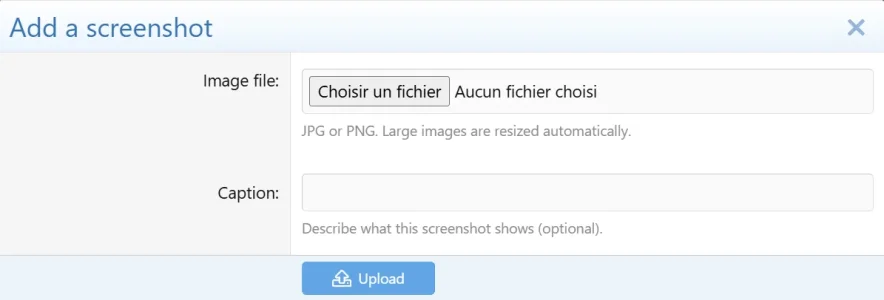
- Caption on upload: the screenshot upload form now has an optional Caption field.
- Caption existing screenshots: an ✎ edit button on each thumbnail lets the uploader (or staff) add or change a caption at any time, so your whole existing gallery can be captioned too.
- Shown where it counts: the caption appears as a clean overlay on the thumbnail (on hover), and in full beneath the enlarged image in the lightbox.
- Completely optional. Screenshots left without a caption look exactly as before.
Upgrading
Upload the new files and run the upgrade from Admin CP > Add-ons. The new caption field is added to your database automatically, with nothing to configure and no existing data affected.
Attachments
GameHub 1.0.5
This update is mostly about one thing a few of you had asked for: making GameHub match your forum without having to touch any CSS.
You can now restyle everything from the Admin CP
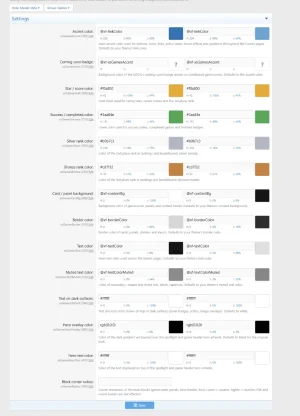
There's a new Games group under Appearance → Style properties with 14 settings. From there you can change:
- the accent colour, the rating stars and the "completed" green
- the gold, silver and bronze used for the podium ranks
- card and panel backgrounds, plus the border colour
- main text, muted text, and the text that sits on top of dark covers
- the hero header overlay and its text
- the "Coming soon" badge colour
- and the corner radius of the blocks, if you like them squarer or rounder
Everything defaults to your current theme, so nothing actually changes until you want it to — it'll keep looking native whatever style you're running.
Older Safari
A couple of people on older Macs were getting stretched cover art and a blown-up "Trending" row in Safari. That's sorted now — I've dropped the newer CSS that old WebKit didn't deal with, so covers stay the right size everywhere. The same pass also fixed some sideways scrolling on mobile.
Smaller fixes
- half-star scores (like 3.5) now save properly
- the file health check comes back clean after install or upgrade
- a handful of small display tidy-ups across the hub, the game pages and the ACP