- Compatible XF 2.x versions
- 2.3
- Additional requirements
- XenForo 2.3.12 or newer.
A modern browser with JavaScript and WebAssembly support is required for gameplay.
The required EmulatorJS runtime and supported emulator cores are bundled with ROM Console; no separate emulator installation or third-party XenForo add-on is required.
Players must provide their own legally obtained compatible ROM files. No commercial game ROMs are supplied with this product.
Gamepad/controller support depends on the capabilities of the player's browser and device. Keyboard and mobile touch controls are also supported.
- License
- Commercial proprietary licence. One licence per XenForo installation.
- Updates duration
- 12 months of updates included. Renewal required for continued access to new versions and updates after the initial 12-month period. The installed version may continue to be used after the update entitlement expires.
- Visible branding
- No
Eggy ROM Console
Turn your XenForo community into a complete browser-based retro gaming platform.
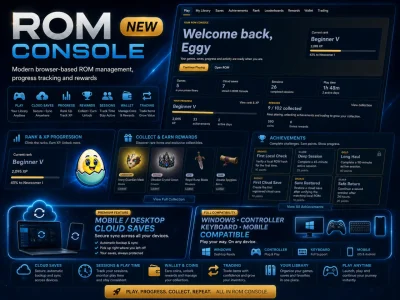
Play supported retro games directly through XenForo with controller, keyboard and mobile compatibility, local ROM verification, cloud saves, achievements, XP and ranks, rewards, leaderboards, wallet features, trading, guest play and full Admin Control Panel management.
Built for XenForo. Designed as a gaming platform, not just an emulator page.
Live Demo
Try Eggy ROM Console
YouTube Demonstration
 Xbox Controller / Keyboard / Mobile Compatible - Play the way you want.
Limited-Time Sale
The aim is to keep ROM Console expandable, with new system support added as separate extensions over time.
One of ROM Console's standout features is support for multiple input methods across desktop and mobile devices.
Desktop players can use a keyboard or compatible controller, while mobile and tablet users receive an on-screen touch interface with directional and game controls.
Landscape orientation is recommended for the best mobile gameplay experience.
Windows • Controller • Keyboard • Mobile Compatible
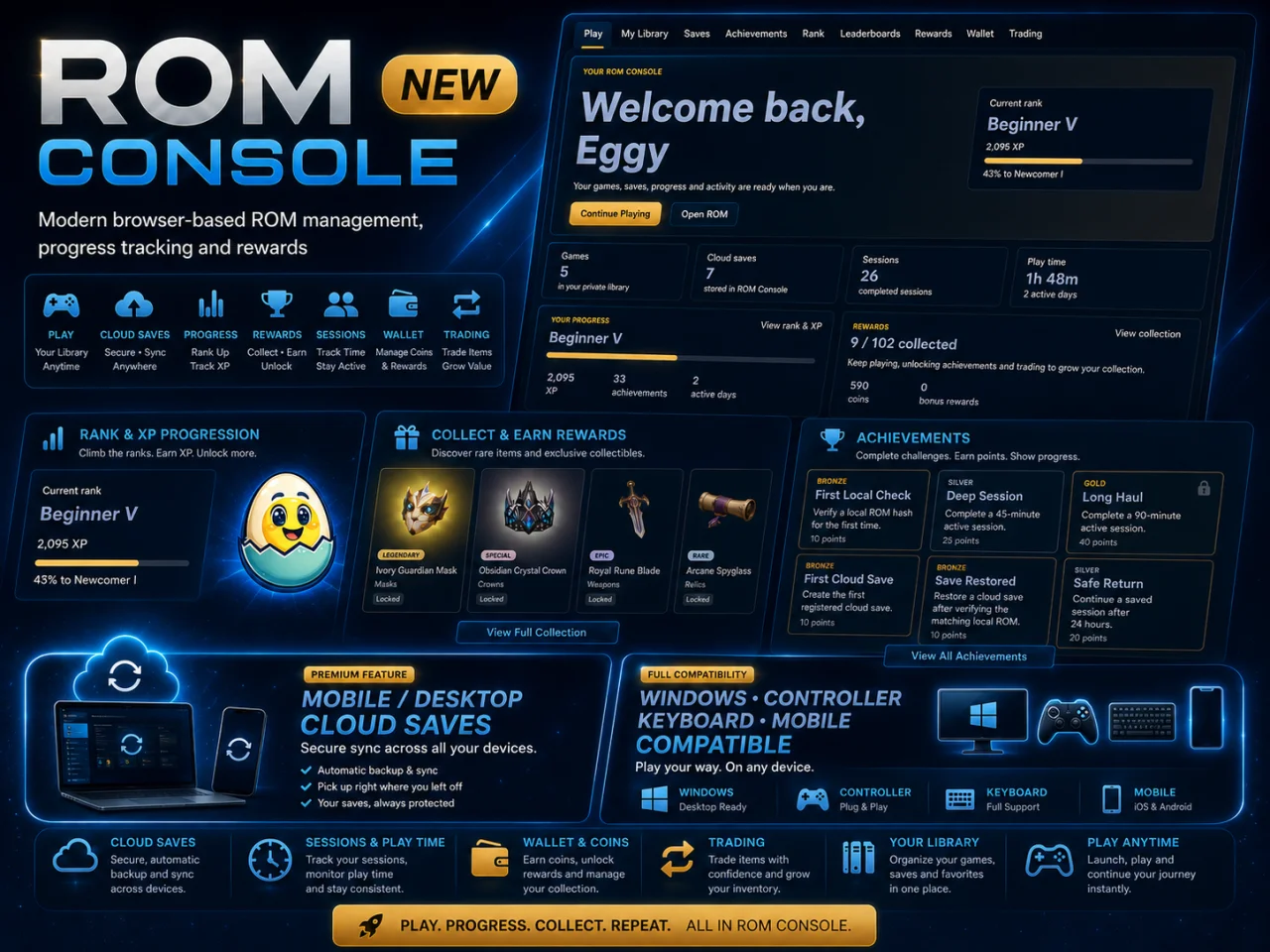
 Browser-Based Retro Gaming
Eggy ROM Console includes its own bundled EmulatorJS runtime and supported browser emulator cores.
Current supported systems:
Supported local ROM formats:
No separate EmulatorJS installation is required for the bundled supported runtime.
 Local ROM Playback & Verification
Players can select compatible ROM files directly from their own device.
ROM Console verifies the selected file against registered game metadata before allowing playback.
This means a player's personal ROM collection does not need to be permanently uploaded to your XenForo installation simply to play local games.
No commercial game ROMs are supplied with ROM Console.
 Private Game Library
Registered members can maintain their own ROM Console game library within XenForo.
Players can organise supported games, return to previously played titles and keep their gaming activity connected to their XenForo account.
ROM Console also supports site-managed games where configured by the administrator.
 Cloud Saves & Save Management
Registered members can maintain persistent game progress through ROM Console.
Features include:
Compatible saves can be restored through the ROM Console player rather than being limited to temporary browser storage.
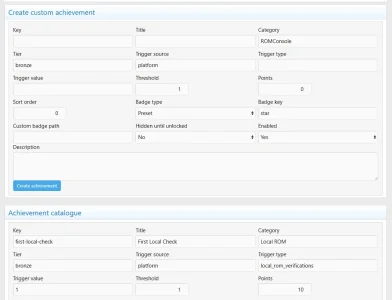
 Achievements
ROM Console includes its own persistent achievement system.
Players can complete challenges, earn achievement progress and build a gaming profile directly through their XenForo account.
Achievements are managed through the ROM Console Admin Control Panel and form part of the wider progression system.
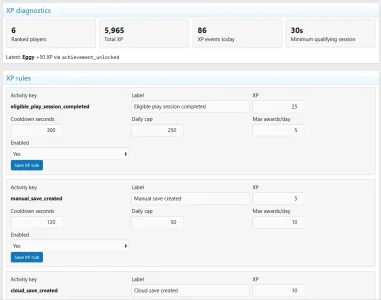
 XP & Rank Progression
Gameplay can contribute towards persistent player progression.
ROM Console gives members something to build over time rather than simply launching a game and leaving.
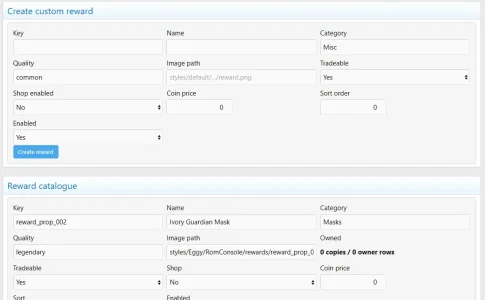
 Reward Drops & Collectibles
ROM Console includes a collectible reward system with visual reward drops.
Reward drops are presented visually to the player and can form part of the wider wallet and trading economy.
 Leaderboards
ROM Console includes leaderboard functionality for community competition and progression.
Players can compare their gaming activity and progression with other members directly within XenForo.
Administrators also receive dedicated leaderboard management tools in the Admin Control Panel.
 Wallet & Coins
ROM Console includes its own player wallet functionality.
Depending on your configured permissions and economy settings, members can:
Administrators retain dedicated wallet controls through the Admin Control Panel.
 Trading
Players can participate in the ROM Console trading system.
Trading allows collectible rewards and supported inventory activity to become part of the wider community economy rather than remaining isolated to one player.
Dedicated trading administration tools are included for staff oversight.
 Sessions & Play Time
ROM Console records player gaming sessions and activity.
This allows the system to maintain session information, play-time statistics and progression activity while also providing administrators with dedicated session-management tools.
 Guest Play
Optional guest gameplay is supported.
Guest sessions remain separated from registered-player progression.
Guests do not retain the same persistent account-based benefits as registered members, including:
This allows visitors to experience ROM Console while keeping persistent progression as a benefit of registration.
 Native XenForo User Group Permissions
ROM Console integrates with XenForo's native permission system.
Administrators can control access to individual ROM Console capabilities through user-group permissions.
Available permission areas include:
This makes it possible to provide different ROM Console capabilities to different XenForo membership levels.
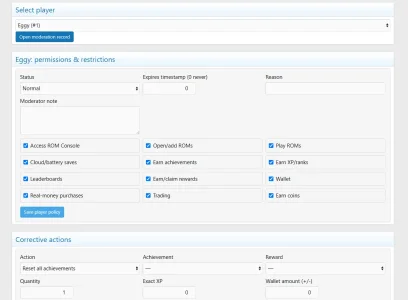
 Player Moderation
ROM Console includes player-specific moderation tools inside the XenForo Admin Control Panel.
Staff can inspect and manage ROM Console player activity without requiring a separate moderation application.
The moderation system works alongside XenForo's existing account and permission structure.
 Full Admin Control Panel
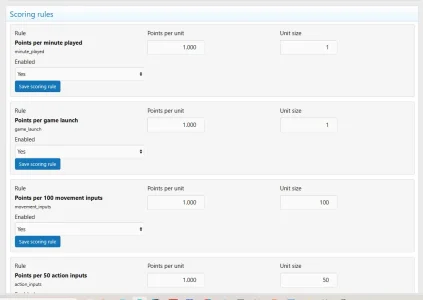
ROM Console includes a substantial XenForo Admin Control Panel covering the major parts of the gaming platform.
Administrative areas include:
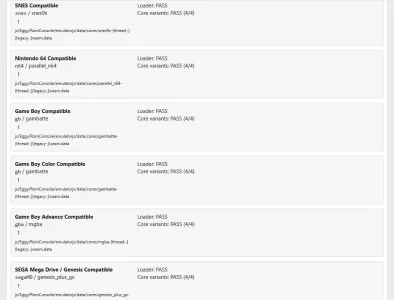
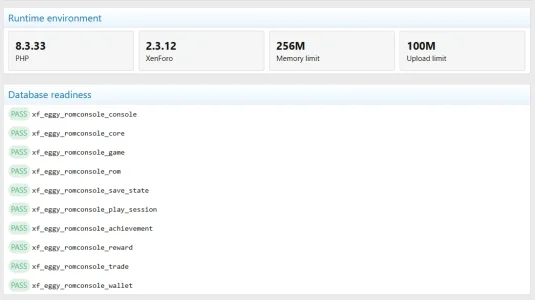
 Emulator Cores & System Readiness
ROM Console includes dedicated tools for managing and checking the bundled emulator runtime.
Administrators can inspect supported console/core configuration and use the readiness area to confirm that required runtime components are correctly deployed.
This removes much of the guesswork normally associated with setting up a browser-based emulator platform.
 Responsive Player Interface
ROM Console includes a dedicated responsive gaming interface designed for desktop and mobile use.
 XenForo Compatibility
XenForo 2.3.12 or newer
A modern browser with JavaScript and WebAssembly support is required for gameplay.
Controller/gamepad compatibility depends on the player's browser and device.
 Included With ROM Console
No separate gaming CMS or external emulator installation is required for the bundled supported runtime.
 ROM Files
Play. Progress. Collect. Repeat.
All inside XenForo with Eggy ROM Console.
Turn your XenForo community into a complete browser-based retro gaming platform.
Play supported retro games directly through XenForo with controller, keyboard and mobile compatibility, local ROM verification, cloud saves, achievements, XP and ranks, rewards, leaderboards, wallet features, trading, guest play and full Admin Control Panel management.
Built for XenForo. Designed as a gaming platform, not just an emulator page.
Live Demo
Try Eggy ROM Console
YouTube Demonstration
Xbox Controller / Keyboard / Mobile Compatible - Play the way you want.Limited-Time Sale
The aim is to keep ROM Console expandable, with new system support added as separate extensions over time.
One of ROM Console's standout features is support for multiple input methods across desktop and mobile devices.
- Compatible gamepads / controllers
- Keyboard controls
- Built-in mobile touch controls
- Automatic controller detection where supported
- Fullscreen gameplay
- Desktop, laptop, tablet and mobile support
Desktop players can use a keyboard or compatible controller, while mobile and tablet users receive an on-screen touch interface with directional and game controls.
Landscape orientation is recommended for the best mobile gameplay experience.
Windows • Controller • Keyboard • Mobile Compatible
Browser-Based Retro GamingEggy ROM Console includes its own bundled EmulatorJS runtime and supported browser emulator cores.
Current supported systems:
- Nintendo Entertainment System / NES
- Super Nintendo / SNES
- Nintendo 64
- Game Boy
- Game Boy Color
- Game Boy Advance
- SEGA Mega Drive / Genesis
Supported local ROM formats:
Code:
.nes
.sfc
.smc
.n64
.z64
.v64
.gb
.gbc
.gba
.md
.gen
.bin
No separate EmulatorJS installation is required for the bundled supported runtime.
Local ROM Playback & VerificationPlayers can select compatible ROM files directly from their own device.
ROM Console verifies the selected file against registered game metadata before allowing playback.
This means a player's personal ROM collection does not need to be permanently uploaded to your XenForo installation simply to play local games.
No commercial game ROMs are supplied with ROM Console.
Private Game LibraryRegistered members can maintain their own ROM Console game library within XenForo.
Players can organise supported games, return to previously played titles and keep their gaming activity connected to their XenForo account.
ROM Console also supports site-managed games where configured by the administrator.
Cloud Saves & Save ManagementRegistered members can maintain persistent game progress through ROM Console.
Features include:
- Cloud save states
- Save management interface
- Game-linked save data
- ROM SHA-256 integrity tracking
- Save-state SHA-256 integrity tracking
- Battery-save importing
- .sav support
- .srm support
- Save verification against matching ROM metadata
Compatible saves can be restored through the ROM Console player rather than being limited to temporary browser storage.
AchievementsROM Console includes its own persistent achievement system.
Players can complete challenges, earn achievement progress and build a gaming profile directly through their XenForo account.
Achievements are managed through the ROM Console Admin Control Panel and form part of the wider progression system.
XP & Rank ProgressionGameplay can contribute towards persistent player progression.
- Earn XP
- Progress through configurable ranks
- Track progress towards the next rank
- Build long-term gaming progression
- Combine rank progression with achievements and rewards
ROM Console gives members something to build over time rather than simply launching a game and leaving.
Reward Drops & CollectiblesROM Console includes a collectible reward system with visual reward drops.
- Collectible reward items
- Reward artwork
- Reward qualities / rarities
- Claimable reward drops
- Persistent player collections
- Administrative reward management
Reward drops are presented visually to the player and can form part of the wider wallet and trading economy.
LeaderboardsROM Console includes leaderboard functionality for community competition and progression.
Players can compare their gaming activity and progression with other members directly within XenForo.
Administrators also receive dedicated leaderboard management tools in the Admin Control Panel.
Wallet & CoinsROM Console includes its own player wallet functionality.
Depending on your configured permissions and economy settings, members can:
- Earn coins
- Maintain a ROM Console wallet
- Use supported purchase functionality
- Interact with reward and trading systems
Administrators retain dedicated wallet controls through the Admin Control Panel.
TradingPlayers can participate in the ROM Console trading system.
Trading allows collectible rewards and supported inventory activity to become part of the wider community economy rather than remaining isolated to one player.
Dedicated trading administration tools are included for staff oversight.
Sessions & Play TimeROM Console records player gaming sessions and activity.
This allows the system to maintain session information, play-time statistics and progression activity while also providing administrators with dedicated session-management tools.
Guest PlayOptional guest gameplay is supported.
Guest sessions remain separated from registered-player progression.
Guests do not retain the same persistent account-based benefits as registered members, including:
- Persistent cloud saves
- XP
- Achievements
- Rewards
- Leaderboard progression
This allows visitors to experience ROM Console while keeping persistent progression as a benefit of registration.
Native XenForo User Group PermissionsROM Console integrates with XenForo's native permission system.
Administrators can control access to individual ROM Console capabilities through user-group permissions.
Available permission areas include:
- Access ROM Console
- Open / add ROMs
- Play games
- Use saves
- Earn achievements
- Earn XP and ranks
- Use leaderboards
- Earn and claim rewards
- Use wallet functionality
- Make supported purchases
- Use trading
- Earn coins
This makes it possible to provide different ROM Console capabilities to different XenForo membership levels.
Player ModerationROM Console includes player-specific moderation tools inside the XenForo Admin Control Panel.
Staff can inspect and manage ROM Console player activity without requiring a separate moderation application.
The moderation system works alongside XenForo's existing account and permission structure.
Full Admin Control PanelROM Console includes a substantial XenForo Admin Control Panel covering the major parts of the gaming platform.
Administrative areas include:
- Dashboard
- System Readiness
- Consoles & Cores
- Games
- Players
- Moderation
- Sessions
- Guest Activity
- Leaderboards
- Ranks & XP
- Achievements
- Rewards
- Trading
- Wallet
- Import Tools
- Settings
Emulator Cores & System ReadinessROM Console includes dedicated tools for managing and checking the bundled emulator runtime.
Administrators can inspect supported console/core configuration and use the readiness area to confirm that required runtime components are correctly deployed.
This removes much of the guesswork normally associated with setting up a browser-based emulator platform.
Responsive Player InterfaceROM Console includes a dedicated responsive gaming interface designed for desktop and mobile use.
- Responsive player layout
- Fullscreen gameplay
- Mobile touch controls
- Player menu
- Controller detection
- Keyboard input
- Gamepad input
- Save and restore controls
- Guest/player session information
XenForo CompatibilityXenForo 2.3.12 or newer
A modern browser with JavaScript and WebAssembly support is required for gameplay.
Controller/gamepad compatibility depends on the player's browser and device.
Included With ROM Console- Eggy ROM Console XenForo add-on
- Bundled EmulatorJS runtime
- Bundled supported emulator cores
- ROM Console JavaScript player
- Reward artwork and sound assets
- Fresh-install database schema and seed data
- Native XenForo permissions
- Admin Control Panel tools
- File-integrity hashes
No separate gaming CMS or external emulator installation is required for the bundled supported runtime.
ROM FilesPlay. Progress. Collect. Repeat.
All inside XenForo with Eggy ROM Console.