We're pleased to announce
Eggy Login Log 1.0.4, introducing
Login Guard, a new account security and recovery system.
This update was inspired by a customer feature request to detect repeated failed login attempts and offer affected members assistance. We've expanded on that idea considerably, introducing additional security monitoring, administrator notifications and account recovery safeguards.
What's New in 1.0.4?
- Login Guard: Detect excessive failed login attempts against individual member accounts and IP addresses using configurable thresholds.
- Native XenForo Alerts: Automatically notify designated administrators through XenForo's built-in bell notification system when suspicious login activity is detected.
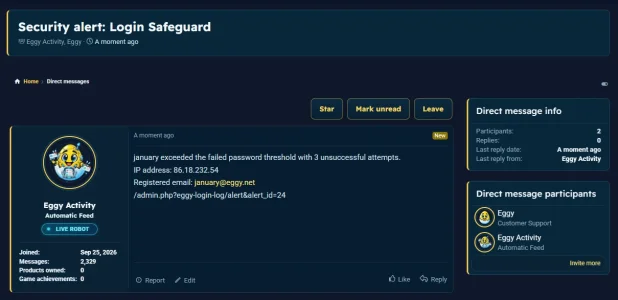
- Automated Direct Messages: Send detailed security notifications directly to selected administrators through XenForo conversations (DMs), using a configurable bot account.
- Email Notifications: Send security alerts to administrators and optional assistance emails to affected members.
- Detailed Security Reports: Administrator notifications can include the affected account, originating IP address, registered email address and a link to the recorded security event.
- Memorable Question Recovery: Allow members to configure a personal security question and answer, providing an alternative method of signing in when recovery becomes available.
- Recovery Safeguards: Includes limited answer attempts, expiring challenges, cooldown periods and session validation.
- Activity Monitoring: Review security events, login attempts and notification delivery results.
- Administration Controls: Configure detection thresholds, notification recipients, delivery methods and recovery settings.
Administrator Security Notifications
One of the key additions is the ability to
deliver security notifications directly to administrators through XenForo's native alerts and private conversation system.
Rather than requiring administrators to continually inspect login records, Login Guard can proactively notify them when configured security thresholds are reached.
Notifications can distinguish between repeated failed attempts against a specific member account and multiple attempts originating from the same IP address.
Administrators can choose between native bell alerts, automated bot DMs and email notifications, with each delivery method independently configurable.
Optional and Fully Configurable
All new Login Guard features are
disabled by default and must be enabled by an administrator.
Login Guard works alongside XenForo's existing password authentication, password recovery and two-step verification systems.
Developed from Customer Feedback
What began as a customer suggestion for failed login assistance has evolved into a more comprehensive security and account recovery feature, providing communities with additional ways to protect members and keep administrators informed.