- Compatible XF 2.x versions
- 2.3
- Additional requirements
- XenForo 2.3.0 or newer.
No additional add-ons or external services required.
- Visible branding
- No
New in 1.0.4: Login Guard
Eggy Login Log now includes Login Guard, a new optional security and account recovery system introduced following customer feedback.Login Guard can detect excessive failed login attempts against individual accounts or IP addresses and automatically notify administrators through native XenForo bell alerts, direct messages (DMs) and email.
Additional features include member assistance emails, memorable question account recovery, configurable detection thresholds, recovery attempt limits, cooldowns and security activity monitoring.
All new features are disabled by default and can be independently configured through the XenForo administration panel.
Eggy Login Log is a free XenForo 2.3.x administrative utility providing detailed auditing of successful and failed member authentication activity.
Designed as a lightweight administration tool, Eggy Login Log makes it easy to investigate account access, review failed authentication attempts, identify unusual login patterns and filter login activity without relying on external services.
All information is stored locally within your XenForo installation. Passwords, password hashes, cookies and session tokens are never recorded.
Successful login tracking
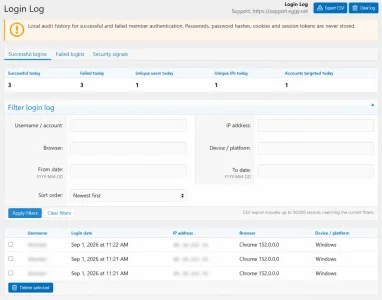
Review successful member logins including the account, login date and time, IP address, browser and device or platform.
Failed login tracking
Failed authentication attempts are recorded separately, allowing administrators to investigate attempted accounts, originating IP addresses, browsers and devices.
Security signals
A dedicated security signals view helps surface potentially interesting authentication patterns and makes unusual login activity easier to investigate.
At-a-glance statistics
Quickly view:
- Successful logins today
- Failed logins today
- Unique users today
- Unique IP addresses today
- Accounts targeted today
Advanced filtering
Filter records using:
- Username or attempted account
- IP address
- Browser
- Device or platform
- Date range
- Ascending or descending login date
The filter panel remains collapsed when not required, keeping the login history itself at the forefront of the interface.
Additional features
- Successful and failed login tabs
- Security signals
- IP investigation
- Per-user login history
- Browser and device detection
- CSV export
- Selective record deletion
- Clear log controls
- Configurable log retention
- Automatic pruning
- Dedicated Admin CP permissions
- Eggy Tools Admin CP integration
- No external APIs
- No telemetry
- No external data collection
Privacy focused
Login audit information remains on your own XenForo installation. Eggy Login Log does not transmit authentication records to Eggy Network or any third-party service.
Compatibility
XenForo 2.3.0+
Support
Support and bug reports: