You are using an out of date browser. It may not display this or other websites correctly.
You should upgrade or use an alternative browser.
You should upgrade or use an alternative browser.

Collaborative Drafts: write threads as a team, review, then publish 3.0.1
No permission to buy (€19.99)
- Author SenseiXS
- Creation date
-
- Tags
- collaborate drafts xensupport
This update removes the "XenForo add-ons by ©XenSupport" line that Drafts added to your forum footer, separator included. Nothing to configure: install the archive over the previous version from Admin CP > Add-ons and the line is gone once the upgrade has run.
The resource page now says so too: Visible branding: No.
3.0.0. Rebuilt on native XenForo, with autosave that never overwrites, live presence, any-two-version diffs and the native approval queue.
- Every page is rebuilt with XenForo's own components (thread list, edit history, overlays, sidebar) and takes its colours from your style, light and dark. The 14 Drafts style properties are no longer needed and are removed on upgrade.
- Autosave a few seconds after you stop typing, with conflict protection: if a co-author saved in the meantime, autosave pauses instead of overwriting, and a manual save keeps their version in the history. Ctrl+S saves without leaving the editor.
- Live presence: see which co-authors have the draft open and who is editing right now.
- Compare any two versions, word by word or line by line, with XenForo's native diff.
- Publish with a thread prefix, tags and watch options. Attachments now follow the draft into the thread.
- Update the published thread: push later changes of the draft to the first post, which keeps its native edit history.
- Pending drafts appear in XenForo's approval queue, in a new "Awaiting approval" list for approvers and in the Admin CP. Approving a draft that was submitted with a date schedules it for that date.
- Change a co-author's role, remove a co-author, or leave a draft you were invited to.
- Edit comments, @mention completion in comments, a filter for resolved comments.
- Native bookmarks (drafts appear in your bookmarks), inline moderation on the list, alert preferences, native statistics and a "Recent drafts" widget.
- Admin CP dashboard with items that need attention, latest drafts and top authors; manager with state tabs, search and sorting.
- Scheduled dates now use the member's time zone. A scheduled publication that cannot happen is cancelled with the reason in the activity and an alert to the author, instead of retrying forever.
- Approvers can open the drafts they are alerted about; editing an approved draft, or choosing another forum, asks for approval again.
- Invitation limits are applied the same way everywhere (-1 unlimited, 0 none), and members who cannot use drafts are no longer invited. Existing limits of 0 become unlimited on upgrade, as they behaved before.
- Renamed, merged and deleted members are handled in drafts, versions, comments and invitations.
- A fresh install grants sensible default permissions; the footer credit is no longer removed on upgrade; uninstalling leaves nothing behind.
See it running before you update: live demo, log in as demo / demo2026.
The full changelog, release by release, is on the version history.
2.0.1. Mentions no longer raise a server error, a Drafts tab in the navigation, and a flat banner that follows your style.
- Mentioning a member with @Name in a draft or in a comment no longer raises a server error after saving.
- Mentioned members who can open the draft now receive their alert, once, even when the draft is edited again.
- Invitees are now really told when a draft they were invited to is permanently deleted.
- Saving a draft without a title shows a proper message instead of a raw phrase key.
- The activity timeline shows approval steps as sentences instead of internal names.
- The counter next to each filter now matches the number of drafts that filter lists.
- A "Drafts" tab in the public navigation, shown to members who are allowed to use drafts and highlighted on every Drafts page.
- The banner is one flat colour taken from your style, with no gradient, readable in light and dark variations. If you customised the banner colours, check "Banner background" and "Banner text" in the Drafts style properties.
- Counters are shown once, next to the filters. The forum-wide block is now labelled "Forum totals".
- The search box also searches the content of drafts, as its label says.
- The publish form only lists forums the member can post in.
- Better text contrast, labels on icon buttons for screen readers, and a diff view that wraps on small screens.
See it running before you update: live demo, log in as demo / demo2026.
The full changelog, release by release, is on the version history.
Drafts 2.0.0 — the Command Center update
The biggest update since launch: a complete, fully theme-safe redesign of the front end, a brand-new admin control panel, and the whole look now yours to customise.
▶ See it live: forum.xen-support.com/drafts — click around the real thing, no install needed.
A completely new look
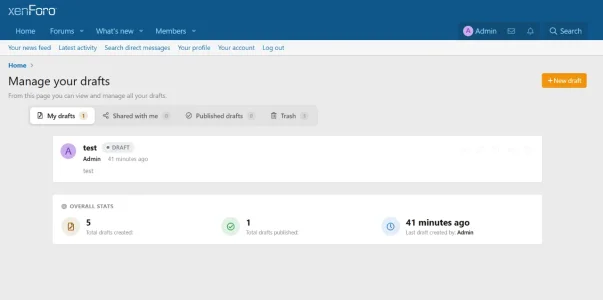
- Command-center hub — a hero banner with your stats at a glance, and richer draft cards showing co-author avatar stacks, status, and version info.
- Document reading view — a clean, focused layout with tidy panels for comments, invitees and the activity timeline.
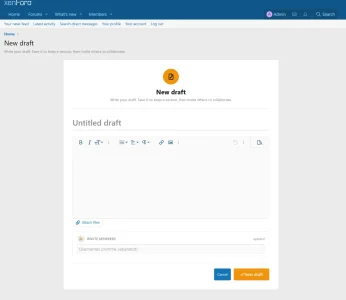
- Unified editor — the writing screen is now one calm, cohesive card around the native XenForo editor.
- Version timeline + visual diff — every save on a clear timeline, with colour-coded added/removed lines when you compare versions.
Drafts now has its own top-level Admin CP tab (no longer buried in a sub-menu), with:
A brand-new Admin control panel
- Dashboard — at-a-glance stat cards (in progress / pending / scheduled / published / trash), a top-authors leaderboard, and an 8-week "drafts created" chart.
- Approval queue — review, approve or reject pending drafts right from the Admin CP, without leaving the back end.
- Manage drafts — the full searchable, filterable list of every draft on your board.
Every colour now derives from your theme, so Drafts looks at home on any style — light, dark or custom — right out of the box. Want to fine-tune it? There are 14 style properties under Appearance → Style properties → "Drafts": accent, hero gradient, status colours (published / pending / rejected / scheduled), card and border colours, text colours, and a block corner radius (square by default, set it to 0 for perfectly sharp corners).
100% theme-safe — and yours to customise
Fixes
- Auto-save now works. The 30-second auto-save silently never fired on previous versions due to an editor field-name mismatch — it now reliably keeps your work safe while you write.
- Removed legacy stylesheet leftovers for a leaner, faster front end.
A safe, drop-in upgrade — no database changes. Just install over your existing copy from Admin CP → Add-ons. Your existing drafts, invitees and versions are untouched.
Upgrading
▶ Try the live demo: forum.xen-support.com/drafts
Questions and feedback are welcome in the discussion thread.
Improved design of the add-on pages
Minor bug fixes
Attachments
Drafts 1.1.3 — What's new
Live presence indicator
- Real-time notice above the editor showing who else is currently editing the same draft
- Their avatars and usernames are displayed ("Also editing: Alice, Bob")
- Three states: solo / one other / multiple others — each with its own icon and message
- Polls every 15 seconds with automatic cleanup of stale presence rows
- Restyled with accent palette and colored border for clear visibility on any theme
File attachments
- Full XenForo-native attachment support on drafts (same UX as posting a thread)
- "Attach files" button below the editor with drag-and-drop, multi-file upload, progress bar
- Inline insertion as thumbnail or full image directly into the draft content
- Clean attachment gallery on the draft view page (thumbnails with lightbox preview)
- Attachments are cascade-deleted when a draft is permanently removed
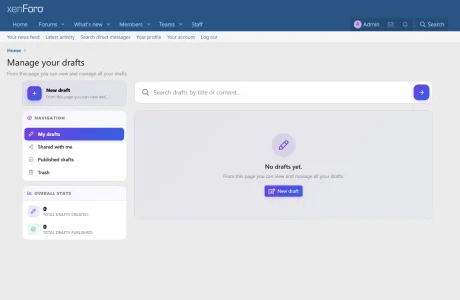
- New segmented-control navigation (My / Shared / Published / Trash) with live counters
- "+ New draft" CTA integrated into the native XenForo title bar
- Card list refactored: avatar · title · status pill · meta · excerpt · hover-revealed actions
- New "Community pulse" stat card (total drafts, total published, last activity)
- Avatars now rendered as small circular icons
Invite panel redesigned
- New shared template used by View and Edit pages (DRY)
- Two clean sections: Invite members / Invite a user group
- Role chips (Editor / Reader) as a real radio segmented control
- Invitee list with avatar, name, invitation date, role pill and quick remove
- New-draft page invite block restyled to match
Bug fixes
- Permissions disappearing on upgrade — 4 permissions (
view,comment,inviteGroups,approveDrafts) were not properly declared in the addon source and got wiped on every reimport. Permanently fixed.- Permission phrases missing — same 4 permissions showed as raw IDs in the ACP. Now properly localised.
- Admin CP "Drafts" page 404 — the admin route was missing from the addon source. Restored.
actionUninvitelacked anisPost()guard; now correctly rejects GET requests.- Role toggle UI bug — one of the two role options was unreadable due to overlapping hidden inputs. Replaced with independent chips.
- Attach files opened in a new page — missing
data-xf-init="attachment-manager"on the form. Now opens the native picker.- Duplicate page title in list view caused by a redundant custom hero. Removed.
- Invisible label on inactive tab in some themes due to over-dark palette tokens. Replaced with neutral
rgba()values.- Phantom horizontal scrollbar on tabs removed.
- Template error on the view page (incorrect macro reference) fixed.
- All 9 raw SQL calls moved from the controller into the Repository (XenForo idiomatic pattern) — no more
\XF::db()in the controller.- New uninstall step removes orphan attachments tied to
xs_draftcontent type.- New
Attachment\Drafthandler implementing the fullAbstractHandlercontract.- New TO_MANY
Attachmentsrelation on the Draft entity.
Upgrade notes
- No data loss. Existing drafts, invites, versions, comments and bookmarks are preserved.
- The new
attach_countcolumn is added automatically. No manual action.- Users previously affected by the permission-wipe bug will keep their permissions on this and all future upgrades.
Compatibility: XenForo 2.3.0+, PHP 7.4+