- Compatible XF 2.x versions
- 2.3
- Visible branding
- No
Battle Boards Pro – XenForo 2.3
Build rivalries. Unite communities. Battle for championship glory.Battle Boards Pro is an exciting, competitive community championship system developed by StreamWave Development for XenForo 2.3.
Transform your forum into the home of an organized online community competition where websites, forums, gaming communities, internet radio stations and other online communities compete against one another in seasonal head-to-head battles.
Unlike traditional website voting directories, Battle Boards Pro introduces a structured league system featuring competitive divisions, scheduled fixtures, supporter clubs, community voting, championship standings, promotion and relegation, and season prizes.
Encourage friendly competition, attract new members, increase community engagement and create lasting partnerships between participating websites.
Championship League System
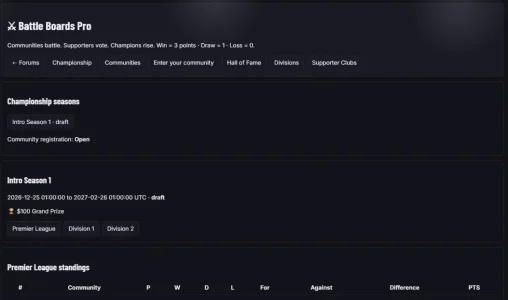
Battle Boards Pro features three competitive divisions:- Premier League – The highest level of competition, where leading communities battle for championship glory.
- Division 1 – A competitive division where communities fight for promotion to the Premier League.
- Division 2 – An entry-level competitive division where communities begin their journey toward the top.
Seasonal Competitions
Organize competitions into individual championship seasons, allowing communities to compete over a defined period.Administrators can create new seasons, manage competition status, organize participating communities, generate fixtures and record championship results.
Each season provides a fresh opportunity for communities to demonstrate their popularity, supporter engagement and competitive spirit.
Head-to-Head Community Battles
Rather than simply accumulating votes on a traditional leaderboard, participating communities compete directly against other communities through scheduled fixtures.Supporters can vote for their preferred community during an eligible battle.
Battle results contribute to the overall league standings, creating an exciting competitive environment where every fixture matters.
Automatic Fixture Generation
Battle Boards Pro includes a round-robin fixture generation system designed to simplify competition organization.Administrators can generate scheduled battles for participating communities within their respective divisions.
This eliminates the need to manually create every individual matchup and provides an organized framework for running seasonal competitions.
League Standings
Follow the progress of participating communities through competitive league tables.League standings include:
- Community position.
- Battles played.
- Battles won.
- Battles drawn.
- Battles lost.
- League points.
- Overall competitive performance.
Promotion and Relegation
Battle Boards Pro introduces a traditional promotion and relegation system, creating meaningful competition across multiple seasons.Successful communities can earn promotion to higher divisions, while lower-performing communities may face relegation.
The competition structure provides three promotion and relegation positions where applicable.
This creates ongoing excitement, giving communities something to compete for regardless of their current division.
Community Registration
Website owners and community representatives can apply to enter their communities into Battle Boards competitions.The registration system allows administrators to review applications before accepting communities into the competition.
Administrators retain control over:
- Opening community registration.
- Closing community registration.
- Reviewing submitted applications.
- Approving participating communities.
- Rejecting unsuitable applications.
- Suspending participating communities.
- Assigning approved communities to divisions.
- Managing division capacity.
Supporter Clubs
Build excitement around participating communities with integrated supporter clubs.Members can register their support for participating communities, helping create a sense of identity, loyalty and friendly rivalry throughout the championship.
Supporter clubs encourage communities to promote their participation, recruit supporters and actively engage with the competition.
Community Voting
Battle Boards Pro includes a structured voting system designed specifically for head-to-head community competitions.Voting controls include:
- Member-based voting eligibility.
- Native XenForo permission integration.
- Minimum voter account age configuration.
- Duplicate-vote protection.
- Fixture-based voting.
- Competition status restrictions.
Championship Hall of Fame
Celebrate successful communities through the Battle Boards Hall of Fame.The Hall of Fame provides a historical record of competition achievements, allowing communities to build their reputation across multiple championship seasons.
Recognize successful competitors, celebrate previous champions and encourage returning communities to defend their achievements.
Competition Rules
Administrators can define official competition rules to ensure participating communities and supporters understand their responsibilities.Rules can cover:
- Community eligibility.
- Registration requirements.
- Voting restrictions.
- Fair competition.
- Promotional conduct.
- Prohibited voting manipulation.
- Promotion and relegation.
- Prize eligibility.
- Administrative decisions.
- Competition disputes.
Championship Prizes
Reward successful communities through the integrated prize management system.Administrators can organize and record competition prizes and manually manage prize payouts.
Possible prizes include:
- Cash prizes.
- Premium memberships.
- Website advertising packages.
- Hosting packages.
- Software licenses.
- Premium themes and add-ons.
- Sponsored products.
- Community promotional opportunities.
- Championship recognition.
Dedicated Admin Control Panel
Battle Boards Pro includes a dedicated administration center integrated into the XenForo Admin Control Panel.Administrators can manage the competition without relying on public-facing management pages.
Administration Features
- Open and close community registration.
- Create championship seasons.
- Manage season status.
- Review community applications.
- Approve, reject or suspend communities.
- Assign communities to divisions.
- Monitor division capacity.
- Generate round-robin fixtures.
- Configure voting eligibility.
- Manage competition rules.
- Apply promotion and relegation.
- Manage championship prizes.
- Record manual prize payouts.
- Review administrative audit history.
Native XenForo Usergroup Permissions
Battle Boards Pro integrates with XenForo's existing usergroup permission system.Administrators can configure access according to their community's membership structure, controlling which members are eligible to participate in the competition and use its management features.
This allows Battle Boards Pro to operate alongside existing registered member groups, VIP memberships, premium usergroups, moderators and administrators.
Theme-Responsive Design
Battle Boards Pro is designed to integrate with your existing XenForo style.The public competition interface uses theme-responsive styling, allowing league tables, competition panels, forms, buttons and community listings to complement your forum's appearance.
Responsive layouts are designed for desktop computers, tablets and mobile devices.
Installation Instructions
Installing Battle Boards Pro
- Download the Battle Boards Pro installation ZIP.
- Log in to your XenForo Admin Control Panel.
- Navigate to Add-ons.
- Select Install/upgrade from archive.
- Upload the supplied ZIP archive.
- Follow the XenForo installation prompts.
- Configure the appropriate usergroup permissions.
- Open the Battle Boards administration center.
Upgrading an Existing Installation
- Back up your XenForo database and files.
- Download the latest Battle Boards Pro release.
- Navigate to Admin CP → Add-ons → Install/upgrade from archive.
- Upload the new version.
- Complete the upgrade process.
Administrator Operating Instructions
Step 1 – Access the Administration Center
Open your XenForo Admin Control Panel and locate the dedicated Battle Boards Pro navigation section.The administration center can also be accessed directly at:
Replace yourdomain.com with your XenForo installation address.
Step 2 – Configure Usergroup Permissions
Navigate to:Admin CP → Groups & permissions → User group permissions
Select the usergroup you wish to configure and locate the Battle Boards permissions.
Configure appropriate access for registered members, moderators, premium members and administrators.
Only trusted staff members should receive competition management permissions.
Step 3 – Create Your First Championship Season
Open the Battle Boards administration center and locate the season management section.Create a new championship season and provide the requested season information.
Example season names:
- Battle Boards Championship – Season 1
- Winter Community Championship
- Summer Battle League
- International Forum Championship
- StreamWave Community Cup
Step 4 – Establish Competition Rules
Open the competition rules management section and enter your official championship rules.Clearly explain who can participate, how voting works, how winners are determined and what behavior is prohibited.
Publish your rules before opening registration so applicants understand the competition requirements.
Step 5 – Open Community Registration
From the administration center:- Locate Registration control.
- Set registration to Open.
- Save your registration settings.
When sufficient communities have registered, return to the administration center and close registration.
Closing registration prevents additional community applications.
Step 6 – Review Community Applications
Open the community management section to review submitted applications.Before approving a community, administrators should check:
- The submitted website is operational.
- The community meets competition eligibility requirements.
- The applicant is authorized to represent the website.
- The community agrees to the competition rules.
- The website contains appropriate content.
Step 7 – Assign Communities to Divisions
Assign approved communities to their respective divisions.Available divisions are:
| Division | Maximum communities |
|---|---|
| Premier League | 12 |
| Division 1 | 12 |
| Division 2 | 12 |
| Total | 36 |
Future seasons can use promotion and relegation results to determine division membership.
Step 8 – Configure Voting Eligibility
Open the voting settings section.Configure the minimum voter account age and ensure the appropriate XenForo usergroups have permission to participate.
A minimum account age can help discourage members from creating new accounts solely to manipulate competition results.
Administrators should also monitor suspicious voting activity throughout the season.
Step 9 – Generate Competition Fixtures
Once participating communities have been approved and assigned to divisions:- Open fixture management.
- Select the appropriate competition season.
- Generate the round-robin fixtures.
- Review the generated competition schedule.
- Confirm that communities have been assigned correctly.
Step 10 – Activate the Championship Season
Open season management and activate the appropriate championship season.Ensure that:
- Community registration has been completed.
- Participating communities are approved.
- Division assignments are correct.
- Fixtures have been generated.
- Voting permissions are configured.
- Competition rules are available.
- Any advertised prizes have been confirmed.
Step 11 – Monitor Active Battles
Throughout the competition, administrators should regularly review:- Active fixtures.
- Community participation.
- Voting activity.
- League standings.
- Community eligibility.
- Competition disputes.
- Administrative audit records.
Step 12 – Complete the Championship Season
When the competition has concluded:- Review the final battle results.
- Confirm the final league standings.
- Investigate outstanding disputes.
- Complete the season through the administration center.
- Recognize successful communities.
- Apply promotion and relegation where appropriate.
- Record and distribute any advertised prizes.
Step 13 – Prepare the Next Season
Create a new championship season and review participating communities.Confirm division assignments following promotion and relegation, update competition rules if necessary and reopen registration when ready.
This allows Battle Boards Pro to operate as an ongoing seasonal competition rather than a one-time event.
Member Operating Instructions
Registering a Community
When registration is open, eligible members can access Battle Boards Pro and submit their community for consideration.Provide the requested community information, complete any ownership verification requirements and submit the application for administrative review.
Once approved, the community can be assigned to a competitive division.
Supporting a Community
Members can browse participating communities and register their support through the supporter system.Encourage friends and fellow community members to participate fairly and follow the official competition rules.
Voting in Community Battles
Visit the Battle Boards competition page and locate an eligible head-to-head fixture.Select the community you wish to support and submit your vote.
Voting is subject to account eligibility, usergroup permissions, fixture availability and duplicate-vote restrictions.
Viewing League Standings
Open the competition standings to follow participating communities throughout the season.Track championship positions, battle results and promotion or relegation opportunities.
Viewing Previous Champions
Visit the Hall of Fame to explore previous competition achievements and celebrate successful participating communities.Example Championship Rules
The following rules can be adapted for your own competition:- Participating communities must operate a legitimate and accessible website.
- Community representatives must be authorized to submit their websites.
- All participating communities must follow the published competition rules.
- Automated voting, duplicate accounts and artificial vote manipulation are prohibited.
- Members must meet the configured voting eligibility requirements.
- Communities may promote their participation through legitimate promotional activities.
- Harassment, abuse and deliberate disruption of competing communities are prohibited.
- Administrators reserve the right to investigate suspicious competition activity.
- Prize eligibility is subject to compliance with the official competition rules.
- Championship disputes will be reviewed by the competition administration team.
Ideal Uses
Battle Boards Pro is ideal for:- Online forum championships.
- Gaming community competitions.
- Internet radio station battles.
- Website popularity competitions.
- Community networking platforms.
- Forum promotion communities.
- Technology and developer communities.
- Sports fan communities.
- Entertainment websites.
- Hosting customer competitions.
- Community partnership programs.
- Sponsored online championships.
- Seasonal member engagement campaigns.
Benefits for Community Owners
- Encourage recurring member engagement.
- Create exciting seasonal community events.
- Attract new visitors and potential members.
- Build partnerships with other websites.
- Encourage friendly community rivalries.
- Generate promotional opportunities.
- Reward active and loyal supporters.
- Create long-term competitive traditions.
- Provide sponsors with championship promotional opportunities.
Technical Requirements
- XenForo 2.3.
- A compatible PHP environment.
- MySQL or MariaDB supported by XenForo.
- Appropriate XenForo administrative permissions.
No separate community software installation is required.
Product Information
Product: Battle Boards ProCurrent Version: 1.1.1
Developer: StreamWave Development
Platform: XenForo 2.3
Installation: Standard XenForo add-on archive
Competitive Divisions: 3
Maximum Communities Per Division: 12
Total Competition Capacity: 36
Seasonal Championships: Yes
Promotion and Relegation: Yes
Community Voting: Yes
Supporter Clubs: Yes
Hall of Fame: Yes
Prize Management: Manual fulfillment
Dedicated Admin CP: Yes
Native Usergroup Permissions: Yes
Theme Responsive: Yes
Let the Battle Begin!
Battle Boards Pro brings the excitement of competitive league championships into the world of online communities.Give your members something to support, your community partners something to compete for and your forum an exciting new reason for visitors to return.
From the opening fixture to the final championship battle, every vote, every victory and every supporter matters.
One Championship. Three Divisions. Thirty-Six Communities. Who Will Rise to the Top?
Developed by StreamWave Development.
Official Website: https://streamwaveforums.net
Discover the StreamWave Community Suite: https://streamwaveforums.com