

- Compatible XF 2.x versions
- 2.3
- Additional requirements
- XenForo 2.3.0+
- License
- Proprietary
- Updates duration
- 12 Months from purchase
- Visible branding
- No
Eggy Ban Page & Appeals
Transform XenForo's standard account suspension message into a dedicated, customisable suspension experience with integrated appeals, staff decisions and account restoration.
Instead of presenting suspended members with a basic error message, Eggy Ban Page & Appeals provides detailed information about their restriction, including the reason, suspension dates, account status and configurable notices.
Site administrators can also enable an optional appeal system, allowing suspended members to communicate with staff and request a review without regaining normal forum access.
A Better Account Suspension Experience
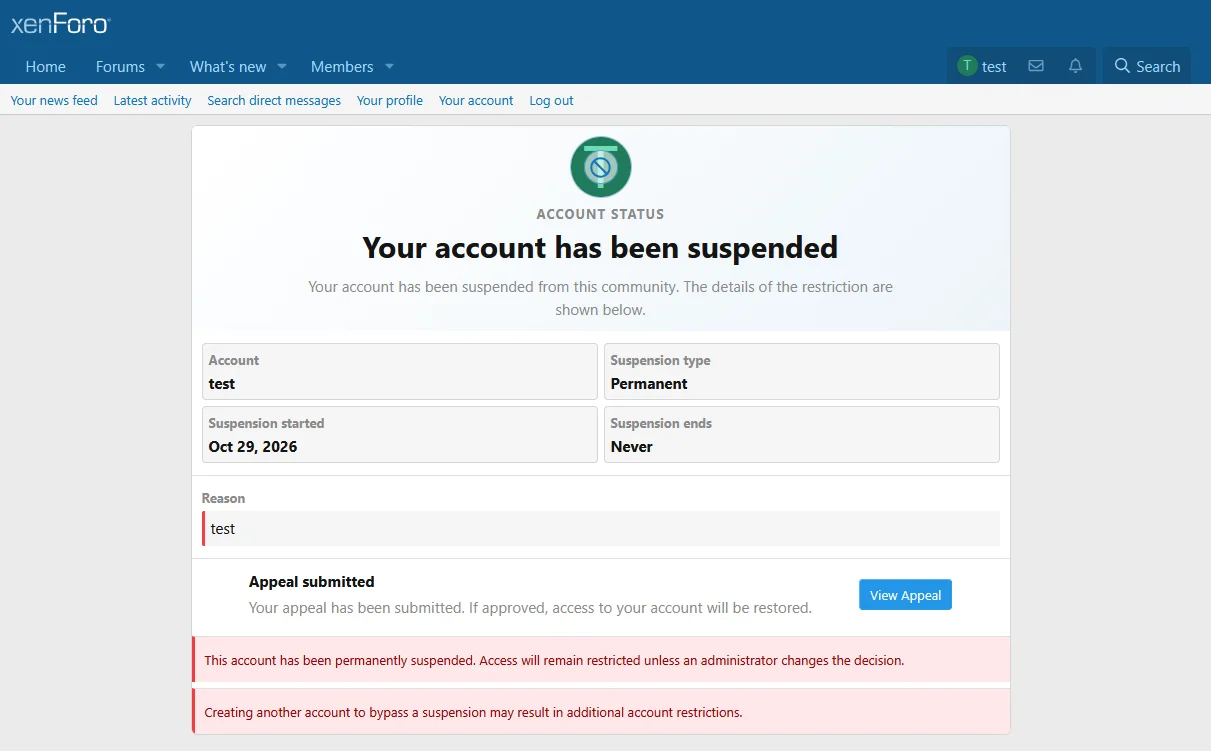
The custom suspension screen provides a clear overview of the member's account restriction in a clean, responsive interface.
The example below demonstrates a permanent suspension with an appeal already submitted. The member can return to their existing appeal directly from the suspension screen.
Temporary Suspensions
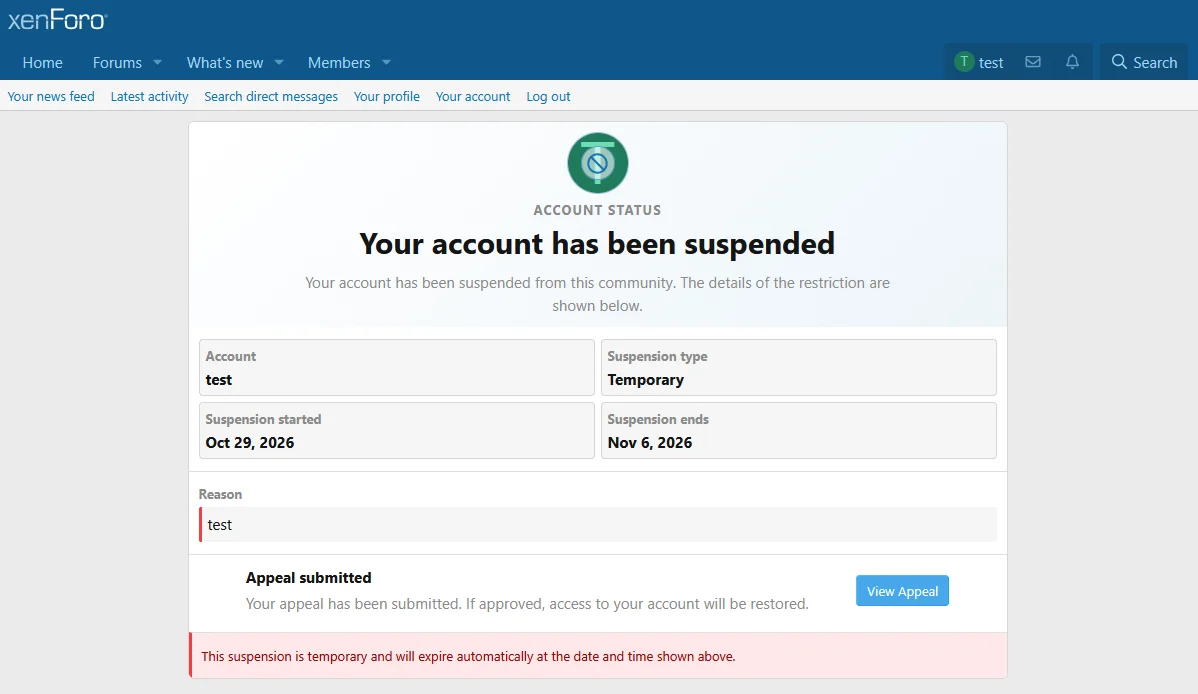
Temporary suspensions receive the same detailed presentation, including the date on which the restriction is scheduled to expire.
The appropriate temporary suspension notice is displayed automatically, and administrators can customise its wording through the Admin Control Panel.
Integrated Suspension Appeals
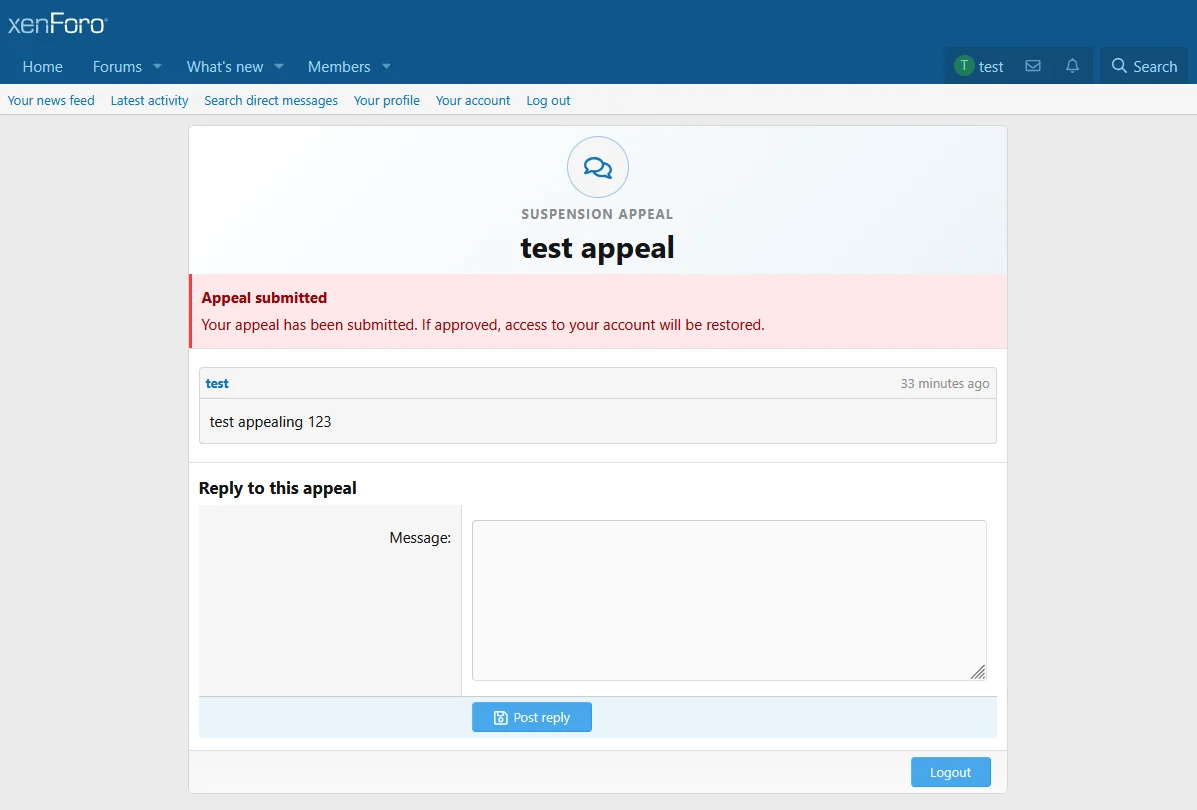
The optional appeal system allows suspended members to request a review through a dedicated appeal portal.
Members are limited to one appeal per suspension, preventing repeated submissions for the same restriction.
Once submitted, the suspension screen reflects the existing appeal rather than continuing to offer a new submission.
Members can return to their case, review messages and respond to staff while the appeal remains open.
The screenshot below shows a submitted appeal, including its current status, message history and reply form.
Staff Appeal Management
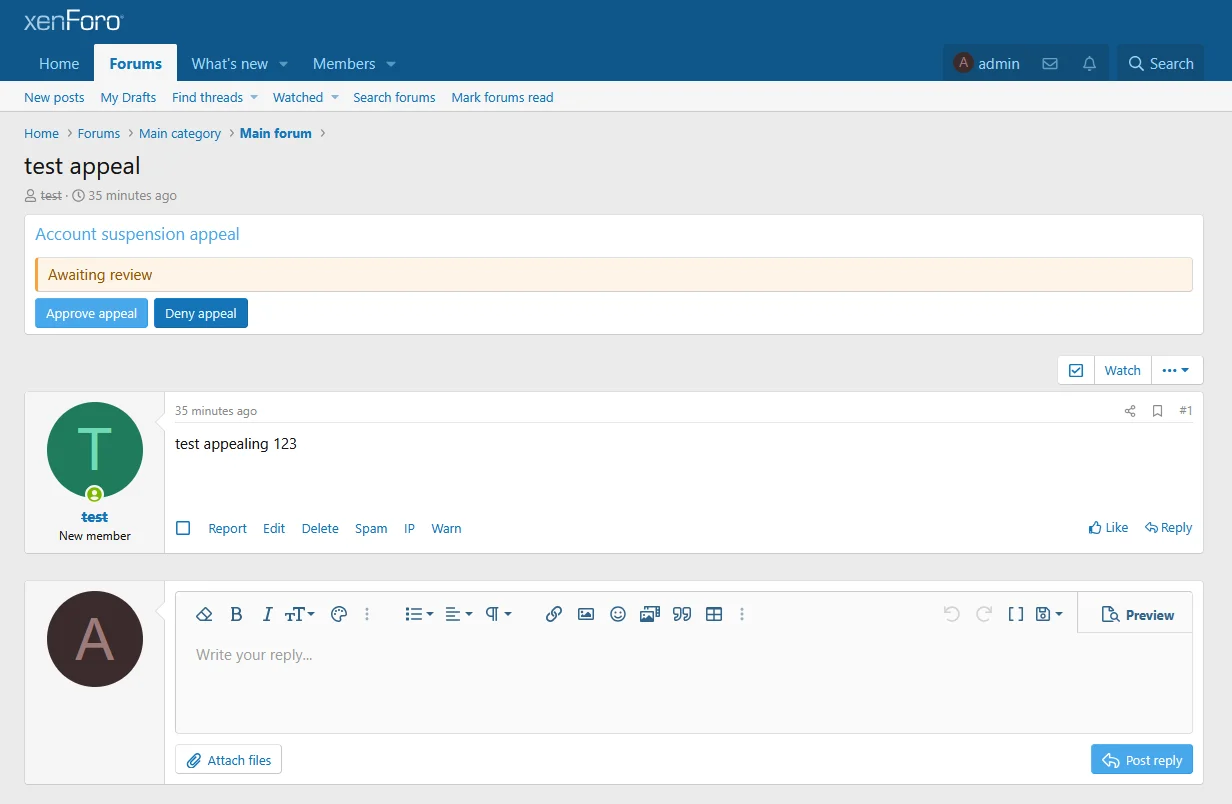
Appeals are created as XenForo forum threads within the forum selected by the administrator.
This allows staff to handle appeals through the familiar XenForo thread interface rather than learning a separate moderation dashboard.
Authorised staff are provided with two dedicated actions:
Staff can also communicate with the suspended member through ordinary thread replies while the appeal remains open.
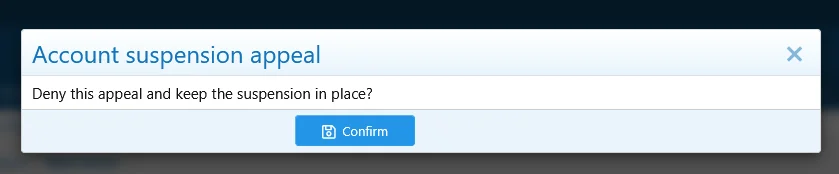
Decision Confirmation
Appeal decisions require confirmation before being applied.
This helps prevent accidental approval or denial while allowing moderators to make a clear, final decision.
Denied Appeals
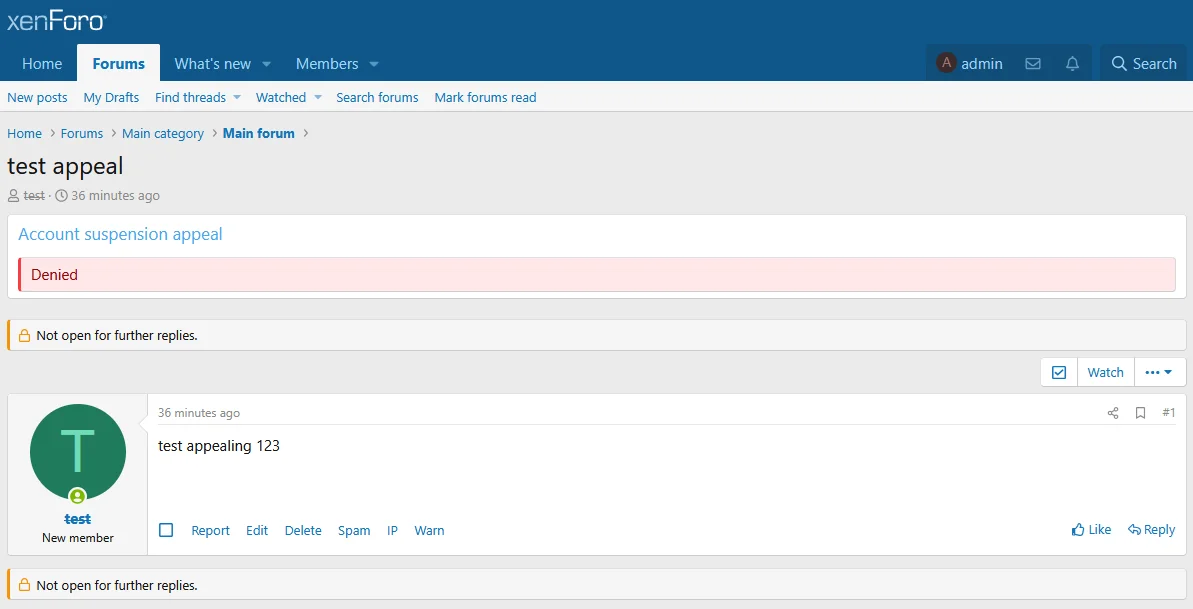
When an appeal is denied, the original suspension remains active.
The corresponding thread displays the recorded denial and is closed to further replies, preventing additional submissions for the same suspension.
Clear Appeal Outcomes for Members
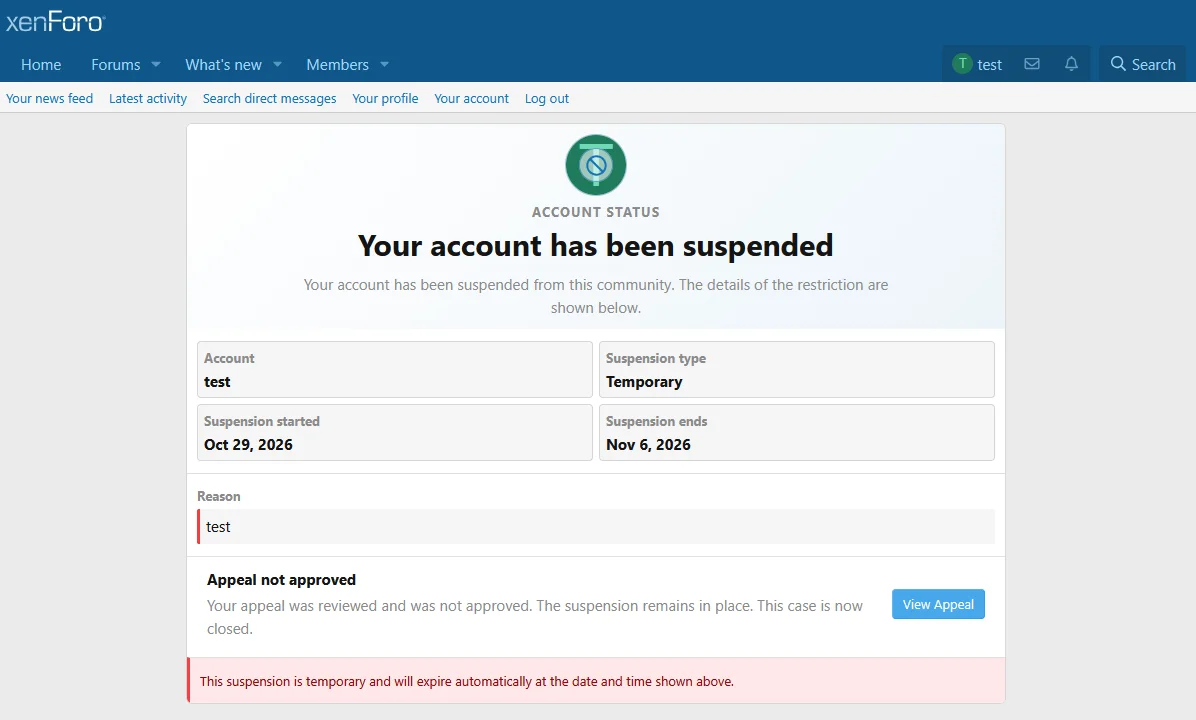
Appeal decisions are also reflected on the suspended member's account status screen.
For example, a denied appeal displays an explanation that the request was not approved and that the suspension remains in place.
The member can still view their existing appeal to review the outcome.
Admin Control Panel Configuration
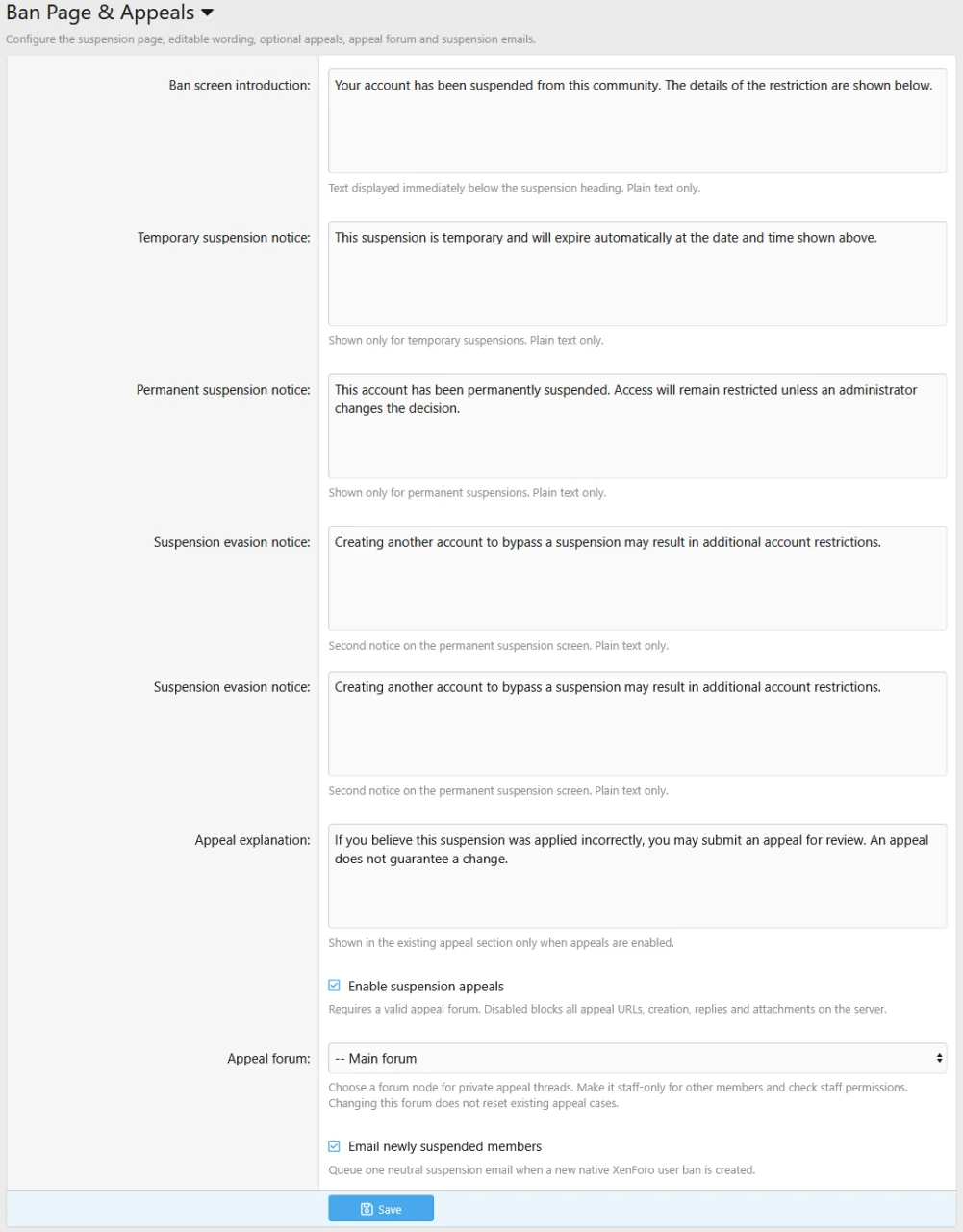
Eggy Ban Page & Appeals includes a dedicated options area, allowing site administrators to configure the suspension experience without editing templates or source files.
Available settings include:
All customer-facing notices use neutral default wording and can be customised to suit the individual community.
Appeal Forum Configuration
Administrators can create a dedicated forum for receiving suspension appeals and select it through the add-on's ACP settings.
Suspended members use the dedicated appeal portal to access their cases, while staff manage the corresponding forum threads.
Important: Forum visibility and node permissions are the responsibility of the site administrator. We recommend creating a staff-restricted appeals forum and testing appeal submission and replies using a suspended account before enabling the system publicly.
Appeals Are Completely Optional
Not every community requires an appeal system.
Administrators who only want a custom suspension screen can disable appeals entirely while retaining the enhanced account restriction display and configurable suspension notices.
Additional Features
Requirements
Please Note
Eggy Ban Page & Appeals enhances XenForo's existing suspension system rather than replacing its underlying account moderation functionality.
Transform XenForo's standard account suspension message into a dedicated, customisable suspension experience with integrated appeals, staff decisions and account restoration.
Instead of presenting suspended members with a basic error message, Eggy Ban Page & Appeals provides detailed information about their restriction, including the reason, suspension dates, account status and configurable notices.
Site administrators can also enable an optional appeal system, allowing suspended members to communicate with staff and request a review without regaining normal forum access.
A Better Account Suspension Experience
The custom suspension screen provides a clear overview of the member's account restriction in a clean, responsive interface.
- Displays the suspended account name.
- Shows whether a suspension is temporary or permanent.
- Displays the suspension reason and applicable dates.
- Provides configurable suspension and policy notices.
- Displays the current appeal status when applicable.
- Uses XenForo style properties for compatibility with different forum styles.
The example below demonstrates a permanent suspension with an appeal already submitted. The member can return to their existing appeal directly from the suspension screen.
Temporary Suspensions
Temporary suspensions receive the same detailed presentation, including the date on which the restriction is scheduled to expire.
The appropriate temporary suspension notice is displayed automatically, and administrators can customise its wording through the Admin Control Panel.
Integrated Suspension Appeals
The optional appeal system allows suspended members to request a review through a dedicated appeal portal.
Members are limited to one appeal per suspension, preventing repeated submissions for the same restriction.
Once submitted, the suspension screen reflects the existing appeal rather than continuing to offer a new submission.
Members can return to their case, review messages and respond to staff while the appeal remains open.
- Dedicated appeal portal for suspended members.
- One appeal per suspension.
- Appeal status displayed on the suspension screen.
- Private correspondence through the dedicated appeal interface.
- Support for submitted, approved and denied decisions.
- Existing appeal cases remain accessible for review where applicable.
The screenshot below shows a submitted appeal, including its current status, message history and reply form.
Staff Appeal Management
Appeals are created as XenForo forum threads within the forum selected by the administrator.
This allows staff to handle appeals through the familiar XenForo thread interface rather than learning a separate moderation dashboard.
Authorised staff are provided with two dedicated actions:
- Approve Appeal - Approves the appeal and lifts the associated XenForo account suspension.
- Deny Appeal - Rejects the appeal, preserves the suspension and closes the case.
Staff can also communicate with the suspended member through ordinary thread replies while the appeal remains open.
Decision Confirmation
Appeal decisions require confirmation before being applied.
This helps prevent accidental approval or denial while allowing moderators to make a clear, final decision.
Denied Appeals
When an appeal is denied, the original suspension remains active.
The corresponding thread displays the recorded denial and is closed to further replies, preventing additional submissions for the same suspension.
Clear Appeal Outcomes for Members
Appeal decisions are also reflected on the suspended member's account status screen.
For example, a denied appeal displays an explanation that the request was not approved and that the suspension remains in place.
The member can still view their existing appeal to review the outcome.
Admin Control Panel Configuration
Eggy Ban Page & Appeals includes a dedicated options area, allowing site administrators to configure the suspension experience without editing templates or source files.
Available settings include:
- Custom suspension screen introduction.
- Temporary suspension notice.
- Permanent suspension notice.
- Account evasion warning.
- Appeal explanation text.
- Enable or disable suspension appeals.
- Select the forum used for submitted appeals.
- Enable or disable suspension notification emails.
All customer-facing notices use neutral default wording and can be customised to suit the individual community.
Appeal Forum Configuration
Administrators can create a dedicated forum for receiving suspension appeals and select it through the add-on's ACP settings.
Suspended members use the dedicated appeal portal to access their cases, while staff manage the corresponding forum threads.
Important: Forum visibility and node permissions are the responsibility of the site administrator. We recommend creating a staff-restricted appeals forum and testing appeal submission and replies using a suspended account before enabling the system publicly.
Appeals Are Completely Optional
Not every community requires an appeal system.
Administrators who only want a custom suspension screen can disable appeals entirely while retaining the enhanced account restriction display and configurable suspension notices.
Additional Features
- Responsive suspension and appeal interfaces.
- Integration with XenForo's native account banning system.
- Optional suspension notification emails.
- Style inheritance through XenForo properties.
- Dedicated account restriction and appeal status displays.
- Staff approval and denial controls.
- No external services or Node.js required.
- Installation through XenForo's standard add-on installer.
Requirements
- XenForo 2.3.0 or newer
- A configured XenForo forum node if using suspension appeals. (optional)
Please Note
Eggy Ban Page & Appeals enhances XenForo's existing suspension system rather than replacing its underlying account moderation functionality.


