

- Compatible XF 2.x versions
- 2.3
- Additional requirements
- XenForo: 2.3.7 or newer
XenForo Resource Manager (XFRM): must be installed and enabled
PHP: 8.0+ recommended (works with XF 2.3 supported PHP versions)
- Visible branding
- No
 Features
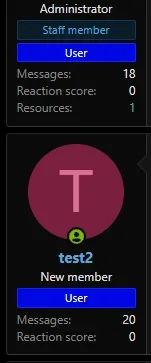
 Displays XFRM resource count in postbit
- Clickable link to /resources/authors/USERNAME.ID/
- Automatically hidden when count is 0
- Phrase-based label (fully customizable & translatable)
- Upgrade safe (template mod + class extension)
- Lightweight and performance-friendly
- No core edits required
 Installation
1) Upload Files
Upload the add-on folder to: /src/addons/AIXF/XfrmCountUnderAvatar2) Install Add-on
In Admin CP: Admin CP → Add-ons → Install AddInstall: AIXF XFRM Count Under Avatar
3) Rebuild Caches (Recommended)
Admin CP → Tools → Rebuild caches⚙ Configuration
Change Label Text (Phrase)
To change the label text: Admin CP → Appearance → PhrasesSearch for: aixf_xfrm_resources
Default value: XFRM Resources
You can change this to:
- Resources
- Uploads
- Marketplace Items
- Mods
- Files
- Assets
- Anything you want
 Resource Link Behavior
Clicking the number opens:/resources/authors/USERNAME.ID/
Which shows all public resources created by that user.
 Display Location
The counter appears:- Under the avatar
- Below Reaction score
- Inside the standard XenForo "postbit stats" area


