Follow along with the video below to see how to install our site as a web app on your home screen.
Note: This feature may not be available in some browsers.
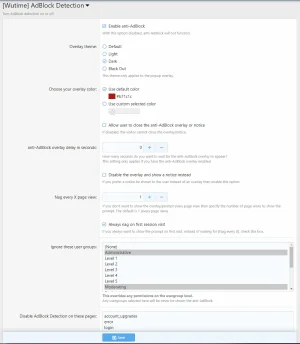
Automatically generates JavaScript every 6 hours by Cron Features optional secondary detection method Automatically randomizes all filenames and folders Automatically deletes old JavaScript (defaults to 24 hours old) Automatically deletes all JavaScript on uninstall Updated defaults for new installs Added uninstall routine
Added new theme (Black Out) Added ability to choose your primary overlay color using a color picker Randomized key
Weekly key randomization
Bug fix missing DOM variable Moved crawler detection Randomized one variable
Made the secondary detection crawler friendly SEO friendly (will not fire on known bots)
Added fallback injection method if basic injection is detected clean Randomly re-tests other known elements up to 12 times Automatically minifies entire addon (JS, HTML, CSS) Automatically randomizes all JavaScript elements on fallback routine
The overlay can now be made almost instantaneous on load (set timer to 0) Note, setting the timer to 0 and disallowing "close overlay" will make your site almost inaccessible until the adblocker is disabled (to most novice users (the majority)).
Added ability to close the notice for the end user Ability to close the overlay follows the option setting for "Allow user to close the anti-AdBlock overlay or notice "
Fixed injection point for custom themes so the notice shows on custom themes Fixed the notice JavaScript flash when the notice isn't to be shown on a non X page view Thanks to @duderuud, @intgbh and @bzcomputers for their help and input
Added <script type="text/javascript"> for <script> improves backwards compatibility with old MS and handhelds Randomized identifiers
We use essential cookies to make this site work, and optional cookies to enhance your experience.
See further information and configure your preferences