1.1.0: Warning Tickets
When you warn someone in XenForo, the optional
start a conversation feature only includes the moderator who issued the warning. The rest of the team isn’t part of the discussion that follows.
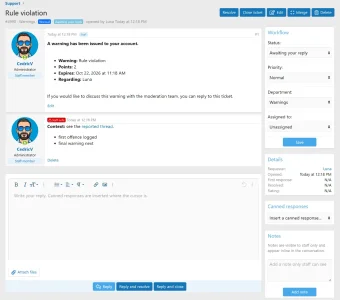
Now, a warning can automatically open a Support Ticket instead. The warned member and the whole staff team end up in the same place, on the forum, just like any other ticket.
How it works
You warn members exactly as you always have. Following, a ticket is opened in a dedicated
Warnings department, owned by the member and visible to its staff.
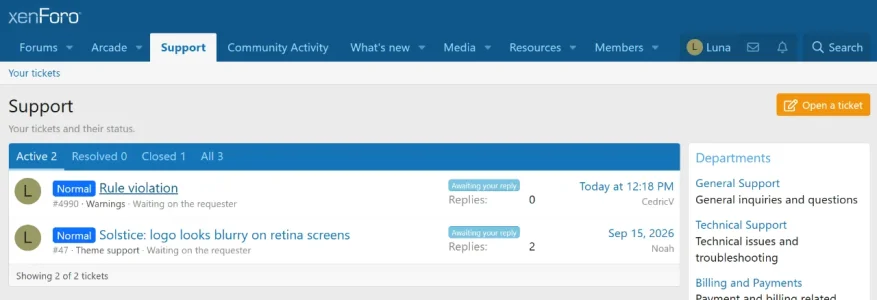
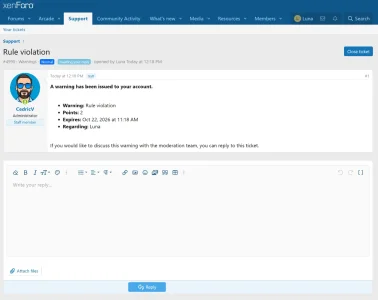
The first message lays out the details: the reason, points, expiry and what the warning was issued for. The ticket opens awaiting the member, so they can acknowledge it, ask a question or appeal, while the whole team can follow along and respond.
XenForo's own warning system is left untouched. If you still want the built-in private conversation, tick it as usual. The ticket runs alongside it, not instead of it.
The details
- Warnings department: created automatically. It's a normal department, so you can rename it, assign staff, set a priority or disable it entirely.
- Private staff notes: any notes added to the warning are carried over as a staff-only note on the ticket. The member never sees them.
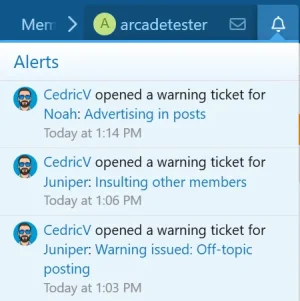
- Two new alerts: the member gets one letting them know a ticket was opened, including email if they've opted in. And staff so your whole staff team is in the loop from the start.
- One setting: Admin CP → Options → Support Tickets → Warning ticket department. Choose any department or Disabled. It ships pointing to the Warnings department, so the feature is enabled by default.
Upgrading
The usual upload and upgrade through Admin CP → Add-ons. The department, setting and alerts are all created automatically.
Requirements are unchanged: XenForo 2.3.0+ and PHP 8.1+.
Thanks for the suggestion
@MaximilianKohler

![[AC] Support Tickets](/community/data/resource_icons/10/10795.jpg?1789905645)