
You are using an out of date browser. It may not display this or other websites correctly.
You should upgrade or use an alternative browser.
You should upgrade or use an alternative browser.
![[XTR] IP Threat Monitor](/community/data/resource_icons/10/10134.jpg?1763724168)
[XTR] IP Threat Monitor [Paid] 1.1.1
No permission to buy ($30.00)
- Thread starter Osman
- Start date
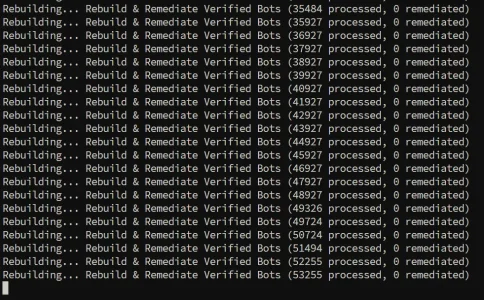

Haha, I promise you it's definitely not hardcoded! 
There are two very good reasons why your counter is proudly sitting at 0:
1. Look at your blacklist breakdown from post #197:

The rebuilder's job is to auto-heal false positives (legitimate search crawlers mistakenly flagged in older versions). Since none of your 53k processed entries were actual search crawlers in disguise, the tool rightfully didn't lift a single ban! Zero false positives is actually the best possible news for your forum.
Sit back and let it finish chewing through the rest of the 1.29M. If any lost crawler ever got caught in that 0.1% auto-ban slice, the rebuilder will find and rescue it!
There are two very good reasons why your counter is proudly sitting at 0:
1. Look at your blacklist breakdown from post #197:
- 70.1% of your blocks are Blocked Country (Vietnam, Brazil, Colombia, Chile...)
- 27.7% are VPN / Proxy flags
The rebuilder's job is to auto-heal false positives (legitimate search crawlers mistakenly flagged in older versions). Since none of your 53k processed entries were actual search crawlers in disguise, the tool rightfully didn't lift a single ban! Zero false positives is actually the best possible news for your forum.
Sit back and let it finish chewing through the rest of the 1.29M. If any lost crawler ever got caught in that 0.1% auto-ban slice, the rebuilder will find and rescue it!
What we fixed in 1.0.46:
You can safely upgrade to 1.0.46. Once updated, run the rebuilder via Admin CP (Tools > Rebuild caches) or via CLI:
- Ultra-Fast Rebuilder: We introduced in-memory CIDR matching and smart crawler User-Agent pre-filtering. The tool now instantly recognizes that 99.9% of those 320k (or 1.29M!) records aren't search engines and skips them in microseconds without making any network DNS calls.
- Qwantbot Integration: Official Qwant IP subnets (
194.187.171.0/24and91.242.162.0/24) and dual-stack FCrDNS verification are now fully supported. Genuine Qwant crawlers will never be labeled as "Fake Bot" again.- On-the-fly Auto-Healing: Any verified bot that visits your forum will have its historical blacklist or rate-limit violations automatically cleared from the database on the fly.
It will now breeze through those hundreds of thousands of records in just a couple of minutes instead of two days. Enjoy!Code:php cmd.php xf-rebuild:xentr-ipt-remediate-bots -vv
Sadly not really as it seems. After the upgrade to 1.0.46 I restarted the remediate process and after exactly one hour this was the state of affairs:
Code:
Erstellt neu... Rebuild & Remediate Verified Bots (4563 processed, 10 remediated)
Erstellt neu... Rebuild & Remediate Verified Bots (4575 processed, 10 remediated)
Erstellt neu... Rebuild & Remediate Verified Bots (4586 processed, 10 remediated)
So judging from the numbers of the verbose output even 25% slower than before. It may however well be that skipped entries (as to the description above) are not counted in the output and that this way the number is not comparable. The fact that there are a couple of remediated entries now after just one hour whereas there was just one after 10 hours with the last version does potentially hint in that direction.
Anyway this
does not seem to be true for my installation. Possibly the limitation is in the shared hosting having limited resources rather than in the code?It will now breeze through those hundreds of thousands of records in just a couple of minutes instead of two days. Enjoy!
Last edited:

Left mine overnight... Was done by the morning. In fact ended up accidentally running it twice... First time :
Rebuilding... Rebuild & Remediate Verified Bots (1293195 processed, 1012 remediated)
Second time:
Rebuilding... Rebuild & Remediate Verified Bots (1293992 processed, 6 remediated)
Rebuilding... Rebuild & Remediate Verified Bots (1293195 processed, 1012 remediated)
Second time:
Rebuilding... Rebuild & Remediate Verified Bots (1293992 processed, 6 remediated)
The process has sped up quite a bit in the meantime. Currently, after four hours, it looks like that:Sadly not really as it seems. After the upgrade to 1.0.46 I restarted the remediate process and after exactly one hour this was the state of affairs:
So judging from the numbers of the verbose output even 25% slower than before. It may however well be that skipped entries (as to the description above) are not counted in the output and that this way the number is not comparable. The fact that there are a couple of remediated entries now after just one hour whereas there was just one after 10 hours with the last version does potentially hint in that direction.Code:Erstellt neu... Rebuild & Remediate Verified Bots (4563 processed, 10 remediated) Erstellt neu... Rebuild & Remediate Verified Bots (4575 processed, 10 remediated) Erstellt neu... Rebuild & Remediate Verified Bots (4586 processed, 10 remediated)
Code:
Erstellt neu... Rebuild & Remediate Verified Bots (315640 processed, 1128 remediated)
Erstellt neu... Rebuild & Remediate Verified Bots (315641 processed, 1128 remediated)
Erstellt neu... Rebuild & Remediate Verified Bots (315665 processed, 1128 remediated)
There were some quite remarkable jumps in it like this:
Code:
Erstellt neu... Rebuild & Remediate Verified Bots (287223 processed, 787 remediated)
Erstellt neu... Rebuild & Remediate Verified Bots (287509 processed, 897 remediated)
Erstellt neu... Rebuild & Remediate Verified Bots (287793 processed, 973 remediated)
Erstellt neu... Rebuild & Remediate Verified Bots (288285 processed, 986 remediated)
Erstellt neu... Rebuild & Remediate Verified Bots (289227 processed, 993 remediated)
Erstellt neu... Rebuild & Remediate Verified Bots (290227 processed, 999 remediated)
Erstellt neu... Rebuild & Remediate Verified Bots (291227 processed, 1009 remediated)
Erstellt neu... Rebuild & Remediate Verified Bots (292227 processed, 1016 remediated)
Erstellt neu... Rebuild & Remediate Verified Bots (293227 processed, 1027 remediated)
Erstellt neu... Rebuild & Remediate Verified Bots (294227 processed, 1042 remediated)
Erstellt neu... Rebuild & Remediate Verified Bots (295188 processed, 1054 remediated)
Erstellt neu... Rebuild & Remediate Verified Bots (296145 processed, 1059 remediated)
Erstellt neu... Rebuild & Remediate Verified Bots (297145 processed, 1062 remediated)
Erstellt neu... Rebuild & Remediate Verified Bots (298145 processed, 1066 remediated)
Erstellt neu... Rebuild & Remediate Verified Bots (299145 processed, 1073 remediated)
Erstellt neu... Rebuild & Remediate Verified Bots (300145 processed, 1073 remediated)
Erstellt neu... Rebuild & Remediate Verified Bots (301145 processed, 1074 remediated)
Erstellt neu... Rebuild & Remediate Verified Bots (302145 processed, 1075 remediated)
Erstellt neu... Rebuild & Remediate Verified Bots (303145 processed, 1075 remediated)
Erstellt neu... Rebuild & Remediate Verified Bots (304145 processed, 1076 remediated)
Erstellt neu... Rebuild & Remediate Verified Bots (305145 processed, 1080 remediated)
Erstellt neu... Rebuild & Remediate Verified Bots (306145 processed, 1090 remediated)
Erstellt neu... Rebuild & Remediate Verified Bots (307145 processed, 1097 remediated)
Erstellt neu... Rebuild & Remediate Verified Bots (308145 processed, 1102 remediated)
Erstellt neu... Rebuild & Remediate Verified Bots (309145 processed, 1105 remediated)
So basically one single batch / line can consist of anything between one and 1.000 entries.
Should finish soon now.
Done now: 327988 processed, 1132 remediated. Took about 4,5 hours all in.
Thank you both for sharing the results!
@Paul — 1,012 verified bots rescued out of 1.29M records, and the second run returning exactly 0 confirms that the auto-healing worked seamlessly and the counter was definitely not hardcoded!
@smallwheels — Chewing through ~328k records in 4.5 hours on a shared hosting environment while recovering 1,132 legitimate crawlers is a solid result. When the rebuilder encounters non-crawler IPs, the in-memory CIDR pre-filter kicks in and breezed through those 1,000-entry batches as you noticed.
Both of your forums now have clean crawler access with zero false positives. Enjoy 1.0.46!
@Paul — 1,012 verified bots rescued out of 1.29M records, and the second run returning exactly 0 confirms that the auto-healing worked seamlessly and the counter was definitely not hardcoded!
@smallwheels — Chewing through ~328k records in 4.5 hours on a shared hosting environment while recovering 1,132 legitimate crawlers is a solid result. When the rebuilder encounters non-crawler IPs, the in-memory CIDR pre-filter kicks in and breezed through those 1,000-entry batches as you noticed.
Both of your forums now have clean crawler access with zero false positives. Enjoy 1.0.46!
Noticed a problem - and it's not a problem with the app, however maybe only one that can be fixed by it. It may be that it can already be done, and i just dont know how to (this is more likely!) 
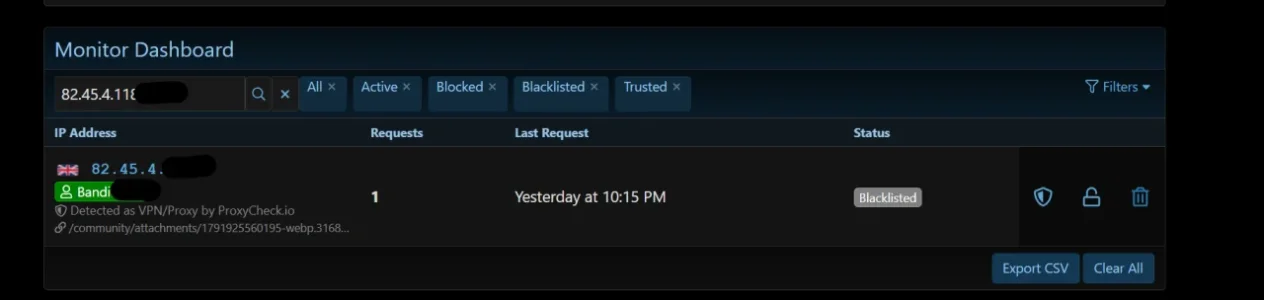
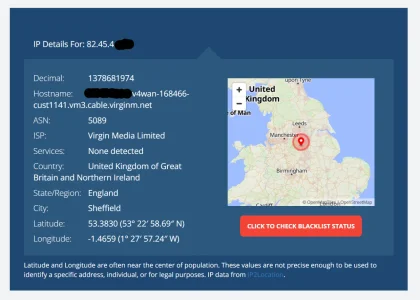
Have had this three or four times now.. User complains that they are denied access. Ip Threat Monitor lists it as a VPN address (with info pulled from proxycheck.io). However, when checked elsewhere the Ip address isnt a vpn address at all, however is a standard UK broadband address.
example :
Just to add (and i'm not sure how this works with vpn) - this user may well be idnetified as being on a VPN, however he is a registered member and i thought that the way it worked was that registered members dont get blocked?
What beats what? Should a registered member beat the fact they are on a vpn, so therefore the vpn doesnt matter? Or does that fact that the user is on a VPN override this?
Have had this three or four times now.. User complains that they are denied access. Ip Threat Monitor lists it as a VPN address (with info pulled from proxycheck.io). However, when checked elsewhere the Ip address isnt a vpn address at all, however is a standard UK broadband address.
example :
Just to add (and i'm not sure how this works with vpn) - this user may well be idnetified as being on a VPN, however he is a registered member and i thought that the way it worked was that registered members dont get blocked?
What beats what? Should a registered member beat the fact they are on a vpn, so therefore the vpn doesnt matter? Or does that fact that the user is on a VPN override this?
Hi! You are completely right — this is a classic false positive from ProxyCheck.io.
Residential ISPs like Virgin Media dynamically reassign IP pools. If a previous subscriber on that IP ran a VPN node, P2P client, or Apple Relay, ProxyCheck.io might still have that IP flagged as a proxy in their database.
The good news is that IP Threat Monitor already has built-in features to easily resolve and prevent this:
1. How to unban and whitelist this user right now:
On your dashboard screenshot, look at the action icons on the right side of that IP row:
Go to Admin CP > Options > [XENTR] IP Threat Monitor > Exemptions & Whitelist:
Residential ISPs like Virgin Media dynamically reassign IP pools. If a previous subscriber on that IP ran a VPN node, P2P client, or Apple Relay, ProxyCheck.io might still have that IP flagged as a proxy in their database.
The good news is that IP Threat Monitor already has built-in features to easily resolve and prevent this:
1. How to unban and whitelist this user right now:
On your dashboard screenshot, look at the action icons on the right side of that IP row:
- Click the Shield icon: This immediately marks the IP as Trusted and whitelists it permanently from all blocks.
- Or click the Unlock icon: This lifts the blacklist status and returns the IP to active browsing.
Go to Admin CP > Options > [XENTR] IP Threat Monitor > Exemptions & Whitelist:
- Enable "Protect Registered Members" (Recommended).
- When enabled, all logged-in forum members are automatically exempt from VPN checks and rate-limit blocks. Only guests and unknown crawlers will be strictly filtered.

I have also been curious about the order things are processed.What beats what? Should a registered member beat the fact they are on a vpn, so therefore the vpn doesnt matter? Or does that fact that the user is on a VPN override this?
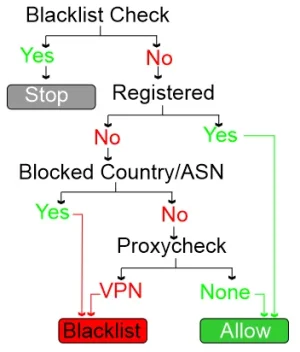
I hope it works something like this?
What happens if a member logs out, their IP address changes and they come back to the forum and happen to be using a VPN or are coming from a blocked country? In this scenario won't they not be recognized as a valid member and be blocked before they can even login?2. How to prevent registered members from ever being blocked by VPN checks:
Go to Admin CP > Options > [XENTR] IP Threat Monitor > Exemptions & Whitelist:
- Enable "Protect Registered Members" (Recommended).
- When enabled, all logged-in forum members are automatically exempt from VPN checks and rate-limit blocks. Only guests and unknown crawlers will be strictly filtered.
On my tiny speck of a new forum, I don't see this ever being a problem and it may not be for anyone? I'm just curious where Protect Registered Members gets its information from? If a registered member logs out don't they lose their protected status and possibly be blocked trying to get back in?
I wouldn't worry about this. IP Threat Monitor is doing exactly what I want/need it to do.
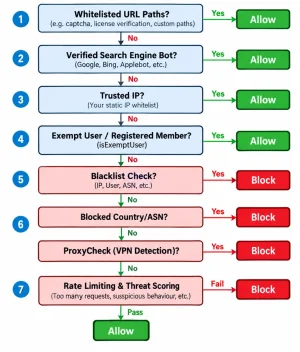
@Paul @Elisabeth_K — Great questions and a fantastic diagram, Elisabeth! 
Here is the exact technical hierarchy of how IP Threat Monitor evaluates every request:
1. Evaluation Order (Who beats who?):
Because member exemption is evaluated at step 4 before any VPN or country checks occur (step 6), a logged-in member browsing on a VPN will never be flagged or blocked.
2. What happens if a member logs out and returns on a VPN / Blocked Country?
@Elisabeth_K hit an interesting edge case here!
If you want to ensure your registered members can always access the login screen even when completely logged out and on a VPN or traveling in a blocked country, simply go to:
Admin CP > Options > [XENTR] IP Threat Monitor > Exemptions & Whitelist
Add this to Whitelisted Request Paths:
Because Whitelisted Paths are checked at Step 1, the login page will always open. The second they enter their credentials and log in, their
Here is the exact technical hierarchy of how IP Threat Monitor evaluates every request:
1. Evaluation Order (Who beats who?):
- Whitelisted URL Paths (e.g. captcha, license verification, or custom paths)
- Verified Search Engine Bots (Google, Bing, Applebot, etc.)
- Trusted IPs (Your static IP whitelist)
- Exempt Users / Registered Members (
isExemptUser) <--- RIGHT HERE! - Blacklist Check
- Country, ASN & ProxyCheck VPN Detection
- Rate Limiting & Threat Scoring
Because member exemption is evaluated at step 4 before any VPN or country checks occur (step 6), a logged-in member browsing on a VPN will never be flagged or blocked.
2. What happens if a member logs out and returns on a VPN / Blocked Country?
@Elisabeth_K hit an interesting edge case here!
- Where does it get its info? It reads XenForo's native visitor session (
\XF::visitor()->user_id). If a user explicitly clicks "Log out", XenForo destroys that session and treats them as an anonymous Guest. - If you are using the default Moderate VPN mode, guests are not aggressively probed on their first request, meaning they can still browse to the login screen and sign in normally.
- However, if you have strict Country Blocking or First Visit VPN mode enabled, a logged-out guest on a blocked IP would indeed be stopped before reaching the login screen.
If you want to ensure your registered members can always access the login screen even when completely logged out and on a VPN or traveling in a blocked country, simply go to:
Admin CP > Options > [XENTR] IP Threat Monitor > Exemptions & Whitelist
Add this to Whitelisted Request Paths:
Code:
/login/Because Whitelisted Paths are checked at Step 1, the login page will always open. The second they enter their credentials and log in, their
user_id is restored and Protect Registered Members immediately shields them from all blocks!
Thanks @Osman and @Elisabeth_K

Thinking it through, doesn that mean that everyone can still hit the login page, which by default also means the register page, and therefore it just moves the problem down the line i.e. people just register and then they get free reign via a VPN to scour the site?
Ideally I want to block people if they are using VPN on their first visit (or rather, when registering). Once they have registered, and their genuine location is logged, I'm on the fence as to wether to allow vpn's or not. Currently i block all vpn's - however it also means that people dont understand and I get an intermittant stream of "I seem to have been blocked" emails....
So, using @Elisabeth_K 's idea of a diagram (I like diagrams, so much easier to understand!), Something like this??Evaluation Order (Who beats who?):
- Whitelisted URL Paths (e.g. captcha, license verification, or custom paths)
- Verified Search Engine Bots (Google, Bing, Applebot, etc.)
- Trusted IPs (Your static IP whitelist)
- Exempt Users / Registered Members (
isExemptUser) <--- RIGHT HERE!- Blacklist Check
- Country, ASN & ProxyCheck VPN Detection
- Rate Limiting & Threat Scoring
Already set, and active when my example above was taken - hence why it identifies the person, however also flags that they are on a vpn (and banned them because of this)Enable "Protect Registered Members" (Recommended).
I'm tempted to apply this, however something that general makes me twitchAdd this to Whitelisted Request Paths:
Code:/login/
Thinking it through, doesn that mean that everyone can still hit the login page, which by default also means the register page, and therefore it just moves the problem down the line i.e. people just register and then they get free reign via a VPN to scour the site?
Ideally I want to block people if they are using VPN on their first visit (or rather, when registering). Once they have registered, and their genuine location is logged, I'm on the fence as to wether to allow vpn's or not. Currently i block all vpn's - however it also means that people dont understand and I get an intermittant stream of "I seem to have been blocked" emails....
Last edited:
Great info, everyone. I have learned so much here.
I am also considering enabling "Force API Check for Block Lists"? I'm on the $4 tier at Proxycheck and get 10,000 hits per month with 3 burst tokens. I've only exceeded 1,000 once and decided to go paid. My forum is still new and tiny (46 users, 566 threads, 3896 posts) and Bing,Google, DuckDuck and Yahoo are the only legit bots I allow and Google doesn't even seem know we exist. I have something like 200 bots distllowed in robots.txt too, for whatever that's worth?
I have 140 countries blocked but only 35 ASNs. Sometimes I'll see a blocked country slip by, lookup their ASN and block it. I've added 4 new ASNs just today. I also think I could now almost pass a "flags of the world" test?
I do have one small appearance niggle: I have been trusting IPs from most users with relatively static IPv4 addresses - when their IPs are trusted, in the iP List view they show up in 'all" but trusted IPs don't show up in the active list when they are active. It would be nice if they did.
Same here on first visit. I have no problems blocking all VPNs.Currently i block all vpn's
I am also considering enabling "Force API Check for Block Lists"? I'm on the $4 tier at Proxycheck and get 10,000 hits per month with 3 burst tokens. I've only exceeded 1,000 once and decided to go paid. My forum is still new and tiny (46 users, 566 threads, 3896 posts) and Bing,Google, DuckDuck and Yahoo are the only legit bots I allow and Google doesn't even seem know we exist. I have something like 200 bots distllowed in robots.txt too, for whatever that's worth?
I have 140 countries blocked but only 35 ASNs. Sometimes I'll see a blocked country slip by, lookup their ASN and block it. I've added 4 new ASNs just today. I also think I could now almost pass a "flags of the world" test?
I do have one small appearance niggle: I have been trusting IPs from most users with relatively static IPv4 addresses - when their IPs are trusted, in the iP List view they show up in 'all" but trusted IPs don't show up in the active list when they are active. It would be nice if they did.
@Paul That diagram is brilliant!
Regarding your points:
1. Why Bandi got blacklisted despite "Protect Registered Members":
Look closely at the requested URL in your screenshot:
When attachment/media URLs are requested (often opened in a new tab, direct-linked, or cached previews), the browser request frequently arrives without an active, authenticated member session (
2. The
You raised a very valid security concern. Whitelisting
If your goal is to stop VPNs at the registration gate while preventing false-positive lockouts for established members, marking genuine member IPs as Trusted via the dashboard shield icon is currently the cleanest solution.
@Elisabeth_K Regarding your questions:
1. "Force API Check for Block Lists":
With a tight-knit forum of 46 users and a paid 10,000 monthly queries plan on ProxyCheck, you can safely enable this option! Your monthly traffic will easily stay well within that 10k allowance, giving you ironclad enforcement of your 140 blocked countries and 35 ASNs on every visitor's very first hit.
2. Trusted IPs not showing in the "Active" filter:
Spot-on observation! Currently, the database stores status as a single state:
We completely agree that if a Trusted IP is currently browsing the site, it makes total sense for an admin to see them under Active traffic as well. We've noted this down for a filter improvement in an upcoming update!
Regarding your points:
1. Why Bandi got blacklisted despite "Protect Registered Members":
Look closely at the requested URL in your screenshot:
/community/attachments/1791925560195-webp.3168...When attachment/media URLs are requested (often opened in a new tab, direct-linked, or cached previews), the browser request frequently arrives without an active, authenticated member session (
user_id = 0). Because the system saw that specific hit as an unauthenticated guest, ProxyCheck ran, returned a false-positive VPN flag, and permanently blacklisted the IP. Because Bandi previously used that IP while logged in, the dashboard tied the blacklisted record to his username.2. The
/login/ vs. Registration Dilemma:You raised a very valid security concern. Whitelisting
/login/ only matches routes containing /login/ — it does not whitelist /register/. However, as you rightly pointed out, allowing VPNs during onboarding makes it easier for bad actors to slip through.If your goal is to stop VPNs at the registration gate while preventing false-positive lockouts for established members, marking genuine member IPs as Trusted via the dashboard shield icon is currently the cleanest solution.
@Elisabeth_K Regarding your questions:
1. "Force API Check for Block Lists":
With a tight-knit forum of 46 users and a paid 10,000 monthly queries plan on ProxyCheck, you can safely enable this option! Your monthly traffic will easily stay well within that 10k allowance, giving you ironclad enforcement of your 140 blocked countries and 35 ASNs on every visitor's very first hit.
2. Trusted IPs not showing in the "Active" filter:
Spot-on observation! Currently, the database stores status as a single state:
active, blocked, blacklisted, or trusted. When clicking the "Active" filter, it strictly filters by status = 'active', which is why Trusted IPs only appear under "All" or "Trusted".We completely agree that if a Trusted IP is currently browsing the site, it makes total sense for an admin to see them under Active traffic as well. We've noted this down for a filter improvement in an upcoming update!
we are btw. hitting a conceptional problem here: True residential and mobile proxies do typically only have a limited lifespan until their IP changes. If you keep the blacklist that you partly build up through classification via the proxycheck API forever (or even just for a couple of days) this will inevitably lead to overblocking: Blocking IPs that once were used by a proxy but have since been swapped to a genuine user. The solution would be to limit the lifespan of the blacklist to very short. But: This would again rise the number of API requests dramatically.Residential ISPs like Virgin Media dynamically reassign IP pools. If a previous subscriber on that IP ran a VPN node, P2P client, or Apple Relay, ProxyCheck.io might still have that IP flagged as a proxy in their database.
Proxycheck has since the beginning of the year improved their detection for residential proxies dramatically (yet they still only catch a tiny fraction) and importantly they have limited the lifespan of their classification also massively. I.e. here one sees that in this example after 4 hours it would be set back to clean:
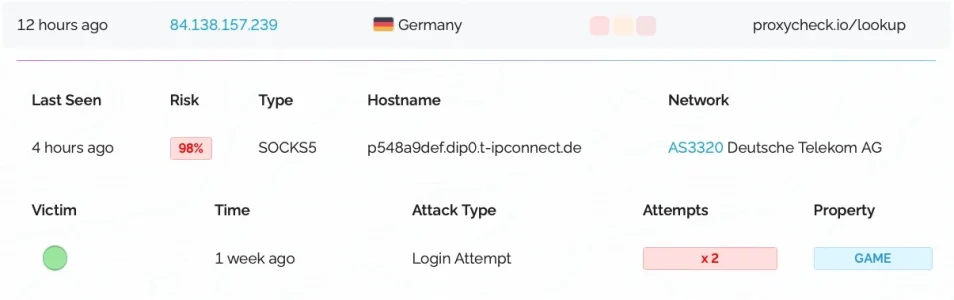
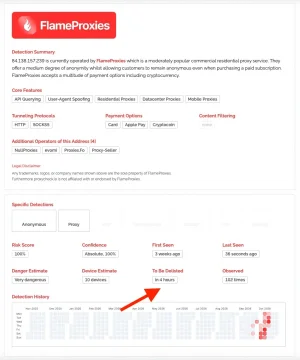
However: One sees also that this IP has been acting as a proxy for three weeks already, so that IP rotation seems not to have taken place. Proxycheck describe in a recent blog post how they handle resident entries with individual lifespans for proxies:


Their API seems to transmit the "residential" classification for a given IP, according to their API description:

So IP Threat Monitor could make use of that and re-adjust the internal classification of residential IPs (and only those) accordingly while still following ASN and country blocks. This will/would increase API requests to a degree, but maybe it is worth it.
This would also need some rework in regards of the log entries which may be valuable anyway. I.e. according to the log quite a bunch of members have been blocked despite being logged in:
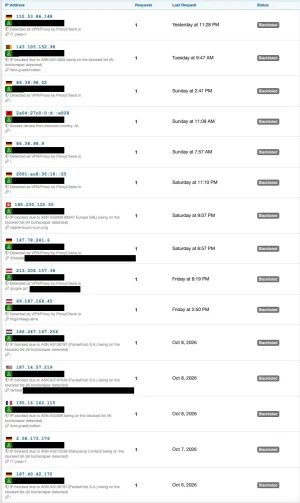
In fact I doubt that this is true, even less so when you say that "logged in member" overrules anything and is early in the process. It seems rather that possibly these are exitisting, older log entries that have been reused when the member showed up using that IP. I have even found myself categorizes as "blacklisted" a couple of days ago due to rate-limiting violations which is more than strange as 1) I am superadmin, so I should never be blacklisted 2.) the URL in the log was within ACP 3.) I did not exceed rate limits knowingly 4.) I did not suffer from any effects that blacklisting would have had. ;-9
However, the log seems a bit strange given the number of IPs and the various causes for blacklisting. I am wondering anyway how it can be possible that some of my members all of a sudden come via ASNs that clearly are server ranges and have historically had no other output than scrapers and are basically well known and famous to be nothing but useless bad actors (like i.e. Datacamp Limited or M247 Europe).
Add this to Whitelisted Request Paths:
Code:/login/
Absolutely love that! This is a brilliant solution for members that traveled abroad into a blocked country or similar. I've added this to the phrase on the 403-notification of Threat Manager (that I've customized anyway):
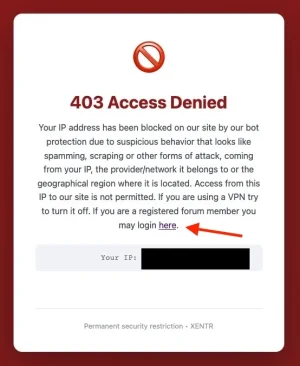
I'll monitor if I see any negative side effects like attempts to log in but fail in doing so.
@Osman : Based on recent experiences with resident proxies I have a bit of a huge feature-request: For one I had the situation that a whole new set of proxies and ASNs outsmarted proxycheck as well as my existing configuration of IP Thread Monitor to a large degree (see here) and secondly I see a rise in resident proxies within my geographical core user area (DACH region and surrounding European countries) where blocking dialup ASNs would cause massive colateral damage. Thirdly there are the US with a crazy amount of resident proxies but also a crazy amount of dialup ASNs.
What could be a promising approach to deal with this would be the option to force challenge countries and ASNs with a (at best configurable) captcha. This should honor the existing exceptions for members and whitelists as well as any hits through the proxycheck API and, in case of a country being set to challenge, existing ASN blocks and blacklist entries. So if i.e. I would set Italy to be challenged but had blocked ASN12345 (which would mainly be in Italy) an IP from that ASN should not be challegend but still blocked.
This would help me to get rid of wider parts of the resident proxies within my core region as well as lifting some existing ASN bans for dialup networks in some countries and avoid to constantly have to add new US dialup ASNs to the blocking list due to the amount of resident proxies they contain.
Do you think this would be feasible?
What could be a promising approach to deal with this would be the option to force challenge countries and ASNs with a (at best configurable) captcha. This should honor the existing exceptions for members and whitelists as well as any hits through the proxycheck API and, in case of a country being set to challenge, existing ASN blocks and blacklist entries. So if i.e. I would set Italy to be challenged but had blocked ASN12345 (which would mainly be in Italy) an IP from that ASN should not be challegend but still blocked.
This would help me to get rid of wider parts of the resident proxies within my core region as well as lifting some existing ASN bans for dialup networks in some countries and avoid to constantly have to add new US dialup ASNs to the blocking list due to the amount of resident proxies they contain.
Do you think this would be feasible?
Btw: An alternative (and probably simpler) solution that would also save API-queries would be to use the existing "block" option of IP Threat Manager for IPs with the flag "residential": If one would have a configurable time window for how log such an IP should be blocked before it is released and prixycheck is asked again when it pops up one could configure it to i.e. 24h or 48h. Would be less precise but the colateral damage would be way more limited than currently.So IP Threat Monitor could make use of that and re-adjust the internal classification of residential IPs (and only those) accordingly while still following ASN and country blocks. This will/would increase API requests to a degree, but maybe it is worth it.
Osman updated [XTR] IP Threat Monitor with a new update entry:
1.0.47
Read the rest of this update entry...
1.0.47
This update focuses on delivering smarter protection for residential visitors and refining log filtering within the Admin Control Panel.
Smarter Handling for Home and Mobile Internet Users
Dynamic IP addresses used by home broadband and mobile network providers rotate frequently. Occasionally, an ordinary household connection may temporarily host an unauthorized proxy and get flagged by security lookup services. However, these services also clear such dynamic addresses very rapidly...
Read the rest of this update entry...
@Osman : You are the man - your speed is incredible!
Regarding the new setting for residential IPs:
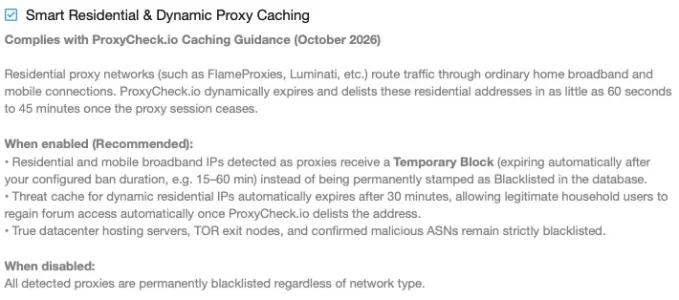
I am wondering where exactly to find the configuration of the ban duration mentioned:
Regarding the new setting for residential IPs:
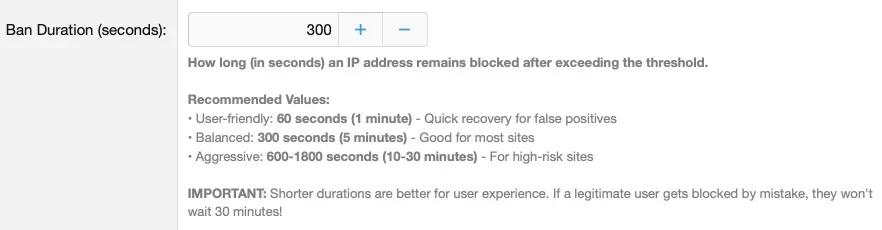
I am wondering where exactly to find the configuration of the ban duration mentioned:
Does this refer to the setting in the rate-limiter configuration?When enabled (Recommended):
• Residential and mobile broadband IPs detected as proxies receive a Temporary Block (expiring automatically after your configured ban duration, e.g. 15–60 min) instead of being permanently stamped as Blacklisted in the database.
Hello @smallwheels,
Thank you so much for the kind words! We always strive to deliver the best and fastest solutions for our community.
Yes, exactly! It refers directly to that "Ban Duration (seconds)" setting (xentr_ipt_ban_duration) in the Rate Limiter options that you screenshotted.
Here is how the smart logic operates under the hood:
Hope this clarifies it!
Thank you so much for the kind words! We always strive to deliver the best and fastest solutions for our community.
Yes, exactly! It refers directly to that "Ban Duration (seconds)" setting (xentr_ipt_ban_duration) in the Rate Limiter options that you screenshotted.
Here is how the smart logic operates under the hood:
- Automatic Minimum Floor (30 Minutes): ProxyCheck.io’s dynamic residential listing lifecycle generally runs between 1 to 45 minutes. Therefore, to prevent a dynamic residential IP from being released too early while the proxy session might still be active, the system enforces a minimum floor of 1,800 seconds (30 minutes) (max(1800, $banDuration)).
- Higher Custom Duration: If you configure your "Ban Duration" to a higher value (for example, 3,600 seconds / 60 minutes), the system will respect your higher configured duration instead.
Hope this clarifies it!