XF 2.3 How to add an HREF anchor to a Page?

tomwood

Member
Licensed customer
Hello,

I have a Page with a table of contents that are links to several other Pages. The Page is busy enough with other stuff above it, that I want to single out the table of contents as a link point. I want to make 'Table of Contents' an HREF anchor so I can put a direct link to it at the bottom of each of the related Pages so users can jump directly back to it.

How do I do this using native Xenforo syntax? GeminiAI had suggestions, but warned that its version might break due to Xenforo preferences.

Thanks!

ETA: I did search the manual, but I'm not familiar enough to use the right search terminology to find it.
 
Last edited:
Solution
This how I remember anchor links working, but it's not working here:

Code:
At the desired location on the Page with the Table of Contents:
<div id="table-of-contents"></div>

At the bottom of the other Pages where I want to link back to the Table of Contents:
<a href="https://hopepunks.com/pages/clarity-or-delusion-metadata-scenes/#table-of-contents”>Table of Contents</a>

That code to link back also causes sections of the code below it to turn bright red, like it's introducing an error right away.

I'm stumped.

This link works:
Link to table of contents

Copy and paste this for your html on the other pages and it should work:

<a...
Easiest might be to give the table a heading and then link to the heading. The heading could probably eeven by in a table cell itself.


Screenshot 2026-10-06 at 18.04.27.webp


To find the link of a heading hover over the heading text and you see a link icon - click on that to get the URL or right click and copy the address

Heading​


This is a link to a heading inside a table in the test forum: Link to table

This is a link to a heading above the table: Link to heading above table
 
Last edited:
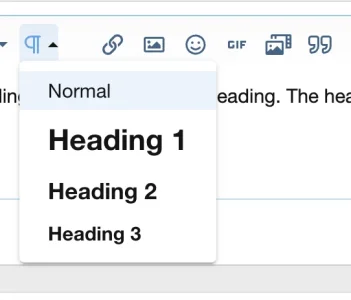
I don't see any of those formatting icons in the edit window of a Xenforo Page. Is that available, or only for Forum Threads?

Gemini suggested this:

Code:
<h2><a href="https://hopepunks.com/pages/clarity-or-delusion-metadata-scenes/" class="headerLink">List of Scenes</a></h2>

But that just goes back to the top of the Page.

Building a Table in a Page is beyond my capability unless there is a way to get those formatting icons to help.
 
For anchors you can use the advanced BB Codes add on from @Xon


which contain an anchor code. Or, depending from your needs, you can use the Threadmarks add on:


There is also this Table of Content add on, but I don't know if it works with 2.3.x

 
  • Like
Reactions: Xon
This how I remember anchor links working, but it's not working here:

Code:
At the desired location on the Page with the Table of Contents:
<div id="table-of-contents"></div>

At the bottom of the other Pages where I want to link back to the Table of Contents:
<a href="https://hopepunks.com/pages/clarity-or-delusion-metadata-scenes/#table-of-contents”>Table of Contents</a>

That code to link back also causes sections of the code below it to turn bright red, like it's introducing an error right away.

I'm stumped.
 
This how I remember anchor links working, but it's not working here:

Code:
At the desired location on the Page with the Table of Contents:
<div id="table-of-contents"></div>

At the bottom of the other Pages where I want to link back to the Table of Contents:
<a href="https://hopepunks.com/pages/clarity-or-delusion-metadata-scenes/#table-of-contents”>Table of Contents</a>

That code to link back also causes sections of the code below it to turn bright red, like it's introducing an error right away.

I'm stumped.

This link works:
Link to table of contents

Copy and paste this for your html on the other pages and it should work:

<a href="https://hopepunks.com/pages/clarity-or-delusion-metadata-scenes/#table-of-contents">Link to table of contents</a>

Your code here looks almost the same but does not work:

<a href="https://hopepunks.com/pages/clarity-or-delusion-metadata-scenes/#table-of-contents”>Link to table of contents</a>

I believe it's to do with the text formatting of ” vs " - note the difference.
 
Last edited:
Solution
We may have crossed paths.

After a few more back and forths with Gemini, it came up with this:

Code:
    <a href="{{ link('pages', {'node_name': 'clarity-or-delusion-metadata-scenes'}) }}#table-of-contents">Back to Table of Contents</a>

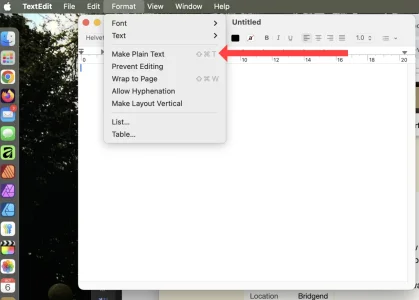
Wow, sharp eye on the quote marks! You're right, that version now works too. Now I have to figure out why TextEdit is randomly using curly quotes! - It's in the Settings.
 
Last edited:
We may have crossed paths.

After a few more back and forths with Gemini, it came up with this:

Code:
    <a href="{{ link('pages', {'node_name': 'clarity-or-delusion-metadata-scenes'}) }}#table-of-contents">Back to Table of Contents</a>
That seems to be overcomplicating it given that plain old html works, ie

<a href="https://hopepunks.com/pages/clarity-or-delusion-metadata-scenes/#table-of-contents">Link to table of contents</a>
 
That seems to be overcomplicating it given that plain old html works, ie

<a href="https://hopepunks.com/pages/clarity-or-delusion-metadata-scenes/#table-of-contents">Link to table of contents</a>
Agree. I've been copy/pasting from Gemini, but at some point I must have accidentally deleted a straight quote mark, and TextEdit made it a curly when I typed it back in.

Thank you for your time and effort on this - much appreciated!
 
Another thought - instead of adding an unnecessary div with id, you could actually just add the id to the h2 tag List of Scenes

<h2 id ="list-of-scenes">List of Scenes</h2>
 
Last edited:
Back
Top Bottom