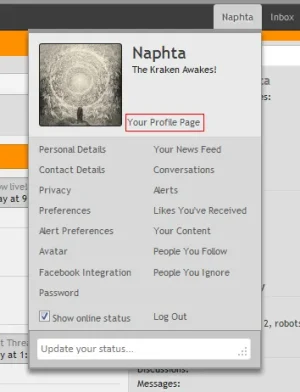
Naphta New member Licensed customer Aug 4, 2013 #1 Just wondering if there would be a way to position it in line with the text above without actually using a margin. I suppose I could add a container to the template but it seems a bit extreme.
Just wondering if there would be a way to position it in line with the text above without actually using a margin. I suppose I could add a container to the template but it seems a bit extreme.
Steve F Well-known member Licensed customer Aug 4, 2013 #2 Code: #AccountMenu .menuHeader .links .fl { left: 116px !important; } Add that to extra.css template and adjust it as needed. But kinda wondering why it isn't lined up already as the default style is. Upvote 0 Downvote
Code: #AccountMenu .menuHeader .links .fl { left: 116px !important; } Add that to extra.css template and adjust it as needed. But kinda wondering why it isn't lined up already as the default style is.
Naphta New member Licensed customer Aug 4, 2013 #3 Qwk86gn said: Code: #AccountMenu .menuHeader .links .fl { left: 116px !important; } Add that to extra.css template and adjust it as needed. But kinda wondering why it isn't lined up already as the default style is. Click to expand... I suppose I added some padding somewhere or something like that which it didn't like. Upvote 0 Downvote
Qwk86gn said: Code: #AccountMenu .menuHeader .links .fl { left: 116px !important; } Add that to extra.css template and adjust it as needed. But kinda wondering why it isn't lined up already as the default style is. Click to expand... I suppose I added some padding somewhere or something like that which it didn't like.