[XTR] IP Threat Monitor

[XTR] IP Threat Monitor [Paid] 1.1.1

No permission to buy ($30.00)
Osman updated [XTR] IP Threat Monitor with a new update entry:

1.1.0

In version 1.1.0, we focused on refining the inspection order, enhancing verification lifecycles, and bringing our diagnostic tools fully up to date.

What is new in this update?

First, we prioritized location and network blocking. Previously, guest dynamic route protection on pages like search and what's new ran before the blocked countries check, which meant visitors from completely restricted countries could receive a verification challenge instead of being stopped dead at the door. With...

Read the rest of this update entry...
 
My only issue with the current version of IP Threat Monitor is that visitors challenged on dynamic routes appear to be stuck in verifying the captcha and their state doesn't change to blacklisted when they don't complete the challenge. I think this is temporary and mostly cosmetic but I have temporarily disabled it until I see if things change in the next release.
I think you probably have a bit of a misunderstanding here. IP Threat Monitor works primarily IP based (while other solutions work i.e. primarily session or request based). If you know dead sure that a certain IP, ASN or country is a constant source of trouble you blacklist them - simple, reliable, eternal. Captchas on the other hand are helpful when you cannot be sure if an IP is harmless or bad. The captcha basically tries to prove that there is a human using that IP. A human can solve the captcha, a robot can not. At least that is the theory, sadly it no longer does hold true.

Therefor in most cases you would use captchas / challenges on networks with dial up IPs, so dynamic IP ranges where IPs are reassigned regularly.

In case s/o cannot solve the captcha there is no need to blacklist that IP b/c the request is stuck anyway. Next time the same IP requests again it will be challenged again. If the captcha is solved it will be allowed to pass, if not, it is stuck again. Blacklisting would, in opposite to that, "eternally" block that IP, which would in case of dynamically reassignes IPs be absolutely counterproductive and lead to many false positives.
 
Thanks Osman, appreciate the quick reply and the update!
I understand it's IP-based, which isn't quite ideal for my situation, but it could still help a lot.

One thing I'm wondering: can I set the rate limiter specifically for thread views, over a short period? For example, 10–15 threads within 10 seconds?

That's really the kind of activity I'm trying to stop, without affecting people browsing normally.


Thanks
Hi @LogicWhisper,

Thank you for your question. You have pointed out a very real and increasingly common scenario with modern AI scrapers and automated browser tools.

In the current version, the rate limiter works on a global window and request threshold (across all forum routes). Additionally, registered members are exempt by default under the "Protect registered members" setting. While you could technically lower the global window, applying a tight limit (such as 10-15 requests in 10 seconds) globally could unintentionally impact legitimate members who open multiple tabs at once or quickly browse media-heavy pages.

What you are describing specifically targets rapid topic viewing (threads/*) at superhuman speeds. To address this exact problem without causing any false positives for normal browsing, I am already designing a dedicated Thread View Burst Rate Limiter feature for an upcoming update.

This will allow you to define a specific short-period rule (e.g., maximum 10-15 thread views in 10 seconds) that can monitor rapid scraping patterns—even when automated tools operate through member sessions—while keeping general browsing completely untouched and seamless for your community.

Thank you once again for your valuable feedback and support!
 
Hi @LogicWhisper,

Thank you for your question. You have pointed out a very real and increasingly common scenario with modern AI scrapers and automated browser tools.

In the current version, the rate limiter works on a global window and request threshold (across all forum routes). Additionally, registered members are exempt by default under the "Protect registered members" setting. While you could technically lower the global window, applying a tight limit (such as 10-15 requests in 10 seconds) globally could unintentionally impact legitimate members who open multiple tabs at once or quickly browse media-heavy pages.

What you are describing specifically targets rapid topic viewing (threads/*) at superhuman speeds. To address this exact problem without causing any false positives for normal browsing, I am already designing a dedicated Thread View Burst Rate Limiter feature for an upcoming update.

This will allow you to define a specific short-period rule (e.g., maximum 10-15 thread views in 10 seconds) that can monitor rapid scraping patterns—even when automated tools operate through member sessions—while keeping general browsing completely untouched and seamless for your community.

Thank you once again for your valuable feedback and support!
Thanks Osman, that's exactly the kind of feature I'm looking for

Just curious, will the new limiter track logged-in members by account or still by IP? And once the limit is reached, will it actually block further thread views?

Really appreciate you looking into this!
 
@Osman : Some observations from 1.0.50 and 1.1.0:

Preconditions:
• I've set de as a country to be challenged
• I've set members to be protected, so they should not be affected

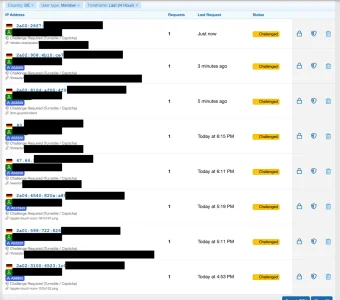
Despite that, a bunch of members got challenged, according to the logs: When I checked the last 24h this morning I found:

  • 231 IPs with the status "challenged"
  • 204 of them with the comment "challenge required"
  • 28 of them with the comment "challenge passed"
So far so good. Sadly, 19 of those with "challenge required" were in fact logged in members. That, due to the status, probably did not pass the challenge, which seems somewhat strange. In fact not a single one of the the challenged members got the comment "challenge passed". One used an rss reader, this would explain the missed challenge. The others seemed to be genuine users on Android, iOS, Windows, Mac and Linux. So this seems somewhat frightening.

What was interesting was that in this data set not a single one of this challenged members got challenged with a "/tread/..." URL. They got challenged when requesting things like icons or other non-human (background) stuff. Maybe this can explain why they did not solve the captcha: Possibly they did not even see it?
However: Only a fraction of the members got challenged - which does make no sense at all.

I do see with 1.1.0 as well, that logged in members still get challenged - and now it seems to affect all members:

Bildschirm­foto 2026-10-20 um 19.34.08.webp

As with 1.1.0 the logging seems to have changed and earlier entries seem to have been nulled the list is very short due to 1.1.0 has only been installed shortly before 5 p.m.. However: The list is suspiciously short and none of the members has a comment "challenge passed" - somewhat frigthening...

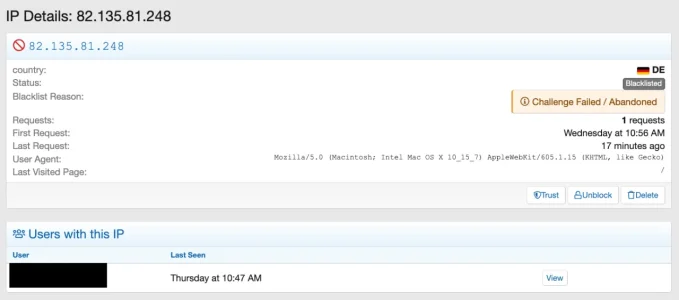
The behaviour seems partly to have changed as well. I now found this entry:

Bildschirm­foto 2026-10-20 um 18.51.55.webp

So a new comment "challenge failed / abandoned" and the IP got blacklisted b/c of that. Unfortunately this makes no sense at all: The IP belongs to a DSL Dialup network...

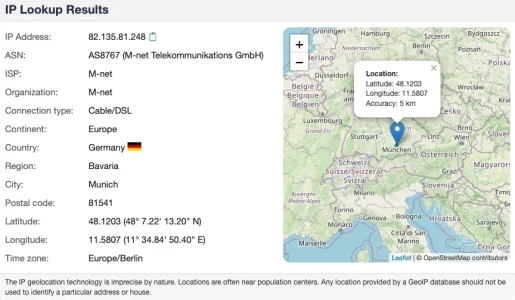
Bildschirm­foto 2026-10-20 um 19.22.55.webp


... so gets dynamically reassigned. In Germany, typically every 24h. Through the blacklisting, whoever will get this IP in future will not be able to visit my forum. This has potentially drastic consequences. In detail view one can see, that this IP has been on my forum at least three times during the last couple of days: Wednesday, Thursday and today. On Thursday, it was used by a logged in forum member:

Bildschirm­foto 2026-10-20 um 18.57.38.webp


As written above blacklisting dialup IPs b/c of an abandoned captcha is in my eyes counterproductive and leads to false positives:

Therefor in most cases you would use captchas / challenges on networks with dial up IPs, so dynamic IP ranges where IPs are reassigned regularly.

In case s/o cannot solve the captcha there is no need to blacklist that IP b/c the request is stuck anyway. Next time the same IP requests again it will be challenged again. If the captcha is solved it will be allowed to pass, if not, it is stuck again. Blacklisting would, in opposite to that, "eternally" block that IP, which would in case of dynamically reassignes IPs be absolutely counterproductive and lead to many false positives.
 
I appreciate all the time and effort that has gone into the latest release. My Analytic page error has been fixed.

There's a few other things I have noticed too with the new version but have been waiting a few hours for things to shake out and to gain a better understanding of them before posting plus it feels like I am being a troublemaker driving poor Osman crazy. Here's a few anyway. :rolleyes:

It is great that Country and ASN blacklisting now has a higher priority. That helps a lot (y)

It would be nice if a residential proxy visitor gets challenged with a timeout and other regular guests that hit a dynamic route challenge and don't solve it get blacklisted because they're probably bots.


I've also had a registered user with a trusted IP get challenged on a dynamic route

challenged.webp
-- a tiny cosmetic issue when viewing details of a member's IP has been noticed - wrong font color on name
wrongcolor.webp


Probably not possible but I would like a settings similar to those that challenge a country or ASN that would challenge a specific member's IP and be able to override their protected status. Something is fishy going on with one of my users and I want them human challenged every time they visit.


In IP List View, Challenged and Blocked categories can't seem to make up their mind. :)One or the other may be redundant or maybe they could be combined?


In Test Configuration
  • The ability to dismiss or ignore warnings would be nice. I get one on an intentional setting
  • The BotGuard Interoperability check says BotGuard is detected and a warning issued. BotGuard has never been installed


Unrelated:

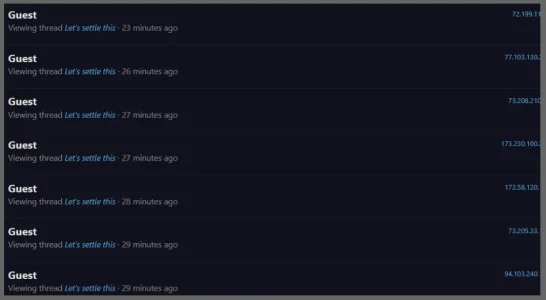
Is this a distributed botnet or something? This is a new pattern. Multiple unique IPs in allowed countries from all over hitting the same page at almost the same time. I've seen several waves of these all hitting a different page at same time within a minute or two. This example hasn't been posted in for over a week. (it was about pie preferences)

Botnet.webp

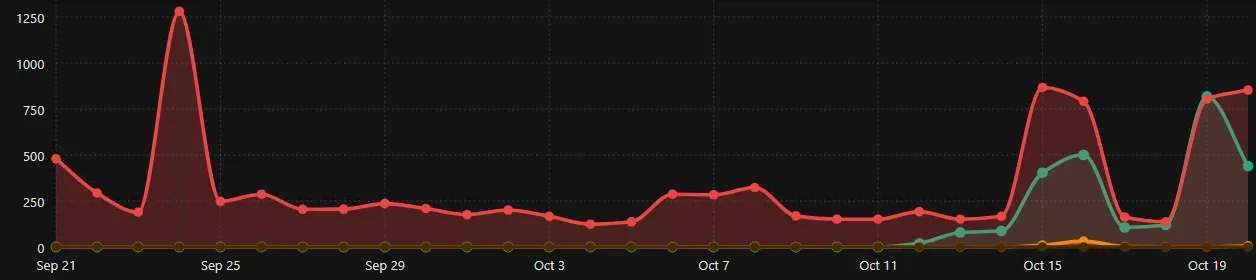
Since Thursday we've been seeing our highest visitor traffic since September. I'm sure happy I'm using IP Threat Monitor!
30-day graph
1792523372319.webp
 
It would be nice if a residential proxy visitor gets challenged with a timeout
Do you know what a residential proxy is? It is your home IP being used, with, or without, your consent by an app within your network. The app is what allows your IP to be used as a proxy, hiding the original IP.

What you're asking is to potentially block your own IP because someone uses it maliciously?

This is why IP blocking is generally useless, unless you're targeting things like VPN IP's or known Proxies, not residential proxies.
 
Last edited:
As written above blacklisting dialup IPs b/c of an abandoned captcha is in my eyes counterproductive and leads to false positives:

Absolutely but where is the fault here? Is it because Proxycheck did not recognize this dial-up connection as a temporary residential proxy?

I agree residential proxies should work something like this

Visitor is identified as connecting through a temporary residential proxy
  • They initially get a blocked status and presented with a captcha challenge
  • If they solve it, they get 30 minutes of access and then get another challenge (unless they sign in)
  • If they don't solve the challenge, they remain blocked for 30 minutes
  • After 30 minutes the block should be lifted so the temporary IP can be reused.
Their IP should not be blacklisted. If a registered member is identified on a residential proxy, they should be exempt from further restrictions or challenges after logging in until the next time they connect with a possibly different iP.


Where I think the lifecycle needs to be refined a little is guests who are not country, ASN or VPN blocked or identified as a residential proxy and then hit a dynamic route (whats-new and search) challenge.

Those users currently end up in the challenged bucket and just seem to die there if they don't answer the captcha. I would like to see those visitors, who probably aren't humans, automatically after x minutes get blacklisted with a challenge failed/abandoned message and cleared out of the challenged list. I have some in the challenged list now that have been sitting there all day. I assume if they try again they won't get in but more visibility of their actual status would be helpful.

I am not worried that legitimate guests might get blacklisted in this scenario but perhaps a toggle to permanently blacklist or challenge if they try again hitting any URL directly (not whats-new/search) could be implemented? I know this is making things complicated.

It would also be nice to know what other routes are considered dynamic that could be added to that filter?
 
Anthony and smallwheels are spot on regarding residential & dynamic IPs. Permanently blacklisting residential IPs or abandoned captchas leads to severe false positives because these IPs rotate among innocent home/mobile users.

In version 1.1.1, we implemented exactly what Elisabeth suggested for residential proxies: when detected, they receive a temporary 30-minute block/challenge countdown instead of a permanent blacklist. Once the timeout expires, the IP is freed automatically.

For abandoned captchas on dynamic routes (like whats-new), auto-blacklisting them is too risky for the same reason. Instead, they expire gracefully without permanently locking out future legitimate visitors who might inherit that dynamic IP.
 
Osman updated [XTR] IP Threat Monitor with a new update entry:

1.1.1

This update introduces enhanced protection against modern automated scraping threats while delivering critical stability improvements designed to prevent legitimate community members from experiencing accidental access restrictions.

To counter aggressive automated tools and AI crawlers that rapidly open dozens of discussion threads within seconds, a dedicated "Thread View Burst Rate Limiter" has been implemented. This feature monitors rapid consecutive thread views within a short time...

Read the rest of this update entry...
 
I'm going be get hated if I keep this up! :)

1.1.1 Installed. Thank you so much for your efforts. I can't believe everything you do for us.

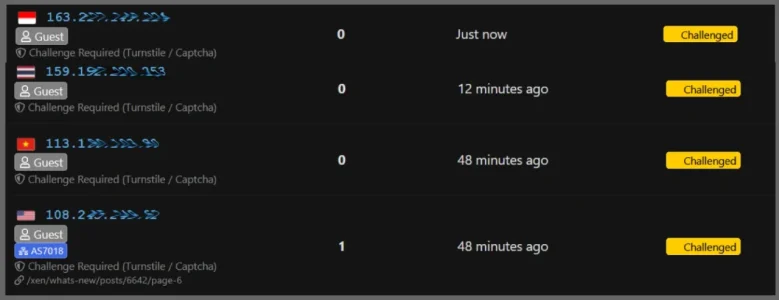
I am again seeing blocked countries showing up in the Challenged list. They show 0 requests and do not contain the same information as a guest hitting a dynamic route challenge. I don't know if this means anything? The 4th from the U.S. (allowed) looks normal.

challengedblocked.webp

What is the time allowed before challenged visitors are recycled and how does this list get cleared out after they have expired?
 
Hi Elisabeth,

What you are seeing is actually 100% normal and proof that the firewall is doing its job perfectly at the front door! Here is why:
  1. Why 0 Requests and No URL for Challenged Countries (ID, TH, VN): These visitors come from countries configured in your Challenged Countries / First Visit list. When they connect, they are intercepted immediately at the front door before loading a single forum page and redirected to Turnstile/Captcha. Because they never viewed or completed a forum request, their request count is naturally 0, and there is no content URL yet. They were stopped dead at the entrance!
  2. Why the US Visitor Shows 1 Request and a URL: The US is an allowed country, so they were allowed inside the forum. Once inside, they clicked on /xen/whats-new/posts/... which triggered the Dynamic Protected Routes filter. Because they were actively browsing that page when challenged, it recorded 1 request and the exact URL.
  3. Lifecycle and Expiry: • Challenged visitors have an active 120-second window to solve the Turnstile challenge. • If they abandon the page without solving it, the system does not trap dynamic residential IPs indefinitely; stale records expire gracefully and are recycled. • The list is automatically cleaned by the daily maintenance cron (runs at 03:00 AM) or anytime you run Smart Prune from the Prune / Clear Logs tool.
Everything is working exactly as engineered!
 
Thank you for your reply.

Why 0 Requests and No URL for Challenged Countries (ID, TH, VN): These visitors come from countries configured in your Challenged Countries / First Visit list. When they connect, they are intercepted immediately at the front door before loading a single forum page and redirected to Turnstile/Captcha. Because they never viewed or completed a forum request, their request count is naturally 0, and there is no content URL yet. They were stopped dead at the entrance!

1792551365902.webp
I do not have any challenged countries or ASNs. They are hard blocked and Indonesia even has 3 or 4 ASNs blocked to boot. I saw this in 1.0.49 and it was fixed n 1.0.50. Now it is doing it again! :)

The U.S. guest is what I expect when they hit whats-new with the dynamic route challenge

Thanks for letting me know how and when the challenged list gets cleared out.
 
Perhaps if there were some concise guide to using Cloudflare that didn't require a technical degree to understand and there weren't 94 pages of often conflicting information and advice to wade through that mere mortals could comprehend I might consider it but thanks for the suggestion
Cloudflare won't catch everything, but it (or a similar service, or server process like Anubis) should be a first line of defense against the bots. It's not wise to have all that traffic hit our servers, especially since this add-on and XenForo itself run via the PHP interpreter, which adds more overhead to serving files across the Internet.

Even with basic rules, CF can take care of the worst of the traffic, which eases the load presented to our servers, and add-ons like this one (which I'll be getting for one of the forums I'm upgrading in the next couple of months) then don't have to work so hard to help get rid of the remainder of the bots. I'd rather have a large bot swarm mostly mitigated by CF, but then let this add-on tackle the remainder, which can still be a subtantial number of bots. CF mitigates traffic the server itself will never see.

Server protection should be multi-layered, in other words.

In my case, our server firewall has closed off almost everything to the public Internet, and all 80/443 traffic (http "web" traffic) ports through CF, whose servers are the only ones allowed access to ports 80 and 443. CF filters out a lot of the garbage, but I don't have it so restrictive that all traffic gets congested. There is still enough getting through that we can use IP Threat Monitor as the last line of defense.

The thread is a mess, I agree, but since the bot traffic changes so often, and different bots swarm all of our sites differently, by nature of that the thread has grown large because there are so many different issues all of us are trying to solve. If anything, I'd recommend looking at some of @Anthony Parsons recent rules that take care of browser impersonations as a starting point, as well as first whitelisting those elements you don't want affected (like the xf_user cookie, your own IP address so you're not locked out, allowed search engine scrapers, etc.).

CF lets you start out with an "expression builder" that eases you into how the language works and then, once you're used to it, you can start making your own more advanced rules as needed. And any of us are willing to help if you ever need it. :) (If a dense idiot like myself can figure it out...anyone can. 😁)

While I prefer CF for keeping the bad traffic from hitting our physical server, if I had to do away with CF, I would use Anubis on the server. Or, I'd probably set up Anubis on a small proxy server of our own to filter the incoming traffic, so the load doesn't take away from CPU cycles for Apache, PHP, etc. (as well as Elasticsearch and MySQL if hosted on the same server). I'd never assume even Anubis could get rid of everything, which is why I'd use IP Threat Monitor as a safety net beyond that.

 
To counter aggressive automated tools and AI crawlers that rapidly open dozens of discussion threads within seconds, a dedicated "Thread View Burst Rate Limiter" has been implemented. This feature monitors rapid consecutive thread views within a short time...
This is exactly what I witnessed while looking at analytics in Cloudflare this morning. I realize some users, like me, may open several tabs at a time, but even I can't click fast enough to open several tabs within one or two seconds. And even so, if I'm logged in, it shouldn't matter anyway. A visitor may be a bot if they access in a burst like that and I agree, that burst activity is an indicator of unwanted bot activity. If it's a human visitor, they can exercise a little patience.

As I mentioned above, on the large installation I'm working on right now, I'll pick up this add-on once we're converted to 2.3 and we're ready. CF is taking care of a lot of the bot swarms, but taking care of what gets through CF is helpful, and I can sleep at night.
 
It's not wise to have all that traffic hit our servers, especially since this add-on and XenForo itself run via the PHP interpreter, which adds more overhead to serving files across the Internet.
This is from the software architecture handbook. It holds true, but praxis shows that the load caused by IP Threat Monitor is not an issue.

Server protection should be multi-layered, in other words.
Again, this is a clean architecture by the book. Do you have real world experience with this add on? If not you lack the foundation to tell anything about how it would behave.

If anything, I'd recommend looking at some of @Anthony Parsons recent rules that take care of browser impersonations as a starting point, as well as first whitelisting those elements you don't want affected (like the xf_user cookie, your own IP address so you're not locked out, allowed search engine scrapers, etc.).
Please, do not derail the support thread for this add on into yet another Cloudflare Thread.
if I had to do away with CF, I would use Anubis on the server. Or, I'd probably set up Anubis on a small proxy server of our own to filter the incoming traffic, so the load doesn't take away from CPU cycles for Apache, PHP, etc. (as well as Elasticsearch and MySQL if hosted on the same server).
@Elisabeth_K is running on shared hosting, so these solutions are completely out of range and furthermore not everyone wants to become an IP nerd, when he or she just wants to run a forum.
I'd never assume even Anubis could get rid of everything, which is why I'd use IP Threat Monitor as a safety net beyond that.
Given you use Cloudflare and Anubis I wonder what IP Threat Monitor could do for you. Maybe rate limiting. Bot honestly: For the most part it is an IP based, easy to use WAF that comfortably integrates into XF and takes advantage of that.
 
Thank you for pointing this out, Elisabeth!

You were completely right. We investigated the issue and resolved a priority conflict between Hard Blocked Countries/ASNs and the Dynamic Protected Routes challenge. Hard-blocked visitors will now always receive an immediate 403 Forbidden and will never be challenged or show up in the challenged list.

We have refreshed the 1.1.1 release package with this fix. Please re-download 1.1.1 and overwrite the files. Thank you for helping us make the add-on better!
 
Please, do not derail the support thread for this add on into yet another Cloudflare Thread.
^ This

@Elisabeth_K is running on shared hosting, so these solutions are completely out of range and furthermore not everyone wants to become an IP nerd, when he or she just wants to run a forum.
^ More This. Thank you!

You were completely right. We investigated the issue and resolved a priority conflict between Hard Blocked Countries/ASNs and the Dynamic Protected Routes challenge. Hard-blocked visitors will now always receive an immediate 403 Forbidden and will never be challenged or show up in the challenged list.

We have refreshed the 1.1.1 release package with this fix. Please re-download 1.1.1 and overwrite the files.

Outstanding! ⭐⭐⭐

I have no issues and will sleep better at night knowing everything is working perfectly. Thank you so much!
 
All is well today but I have a question about the IP Threat Monitor cleanup cron job.

I wasn't sure it was working so I ran it manually. It cleared out the stale entries in challenged but the expired ones in blocked are a couple days old.

Is this how it is supposed to work?
 
Back
Top Bottom