[XTR] IP Threat Monitor

[XTR] IP Threat Monitor [Paid] 1.1.1

No permission to buy ($30.00)
I've added this straight to our roadmap for version 1.0.49.
Wow, thanks a lot for that!

You'll be able to choose whether blocked countries and ASNs get an outright 403 or a captcha challenge instead.
It would be crucial to be able to make this decision per country/ASN, not either/or for all at once. There are countries like China, Singpore or India that clearly will need to be blocked completely while others like the US may be better served with a a captcha.

Also, a country challenge should not invalidate an existing IP or ASN block or a Proxycheck outcome. This way i.e. bad US datacenter ASNs would be blocked while normal IP Ranges would be challenged and allowed Bots like Bing or Google as well as normal users could pass like it is now.

In the end I am hunting for a solution for countries, that have relevant amounts of residential proxies but also some real users. For me, this affects European countries like i.e. France and Spain which I do not want to block completely but on the other hand there is no good way to avoid the major part of the scrapers at the moment.
 
Last edited:
Osman updated [XTR] IP Threat Monitor with a new update entry:

1.0.49

With the 1.0.49 release, we are introducing a major security and user-experience upgrade designed specifically to solve one of the most frustrating dilemmas forum administrators face: dealing with scraper traffic without locking out genuine international visitors.

You Don't Have to Completely Ban an Entire Country Anymore!
Previously, blocking a country meant shutting the door on everyone from that region with a hard 403 error. In the real world, this is rarely ideal. Countries like...

Read the rest of this update entry...
 
Still an amazing addon @Osman, I would say the best on Xenforo for stopping the issue.

Now you've added turnstile to your addon, can you expand that to the /search and /whats-new systems, excluding logged in users, which is one of the largest load bearing issues, especially for shared hosting users and those not using cloudflare.

People only need to be a cloudflare free customer to get keys for turnstile, they don't need to use CDN, DNS, etc.
 
People only need to be a cloudflare free customer to get keys for turnstile, they don't need to use CDN, DNS, etc.
I just ran a test of the new challenged country feature and received a captcha to solve. I do not have a Cloudflare account and in my forum registration options have hCaptcha selected.

Is there some advantage to Cloudflare Turnstile since users coming through an IP Threat Monitor challenged country still have to solve a captcha?
 
I just ran a test of the new challenged country feature and received a captcha to solve. I do not have a Cloudflare account and in my forum registration options have hCaptcha selected.

Is there some advantage to Cloudflare Turnstile since users coming through an IP Threat Monitor challenged country still have to solve a captcha?
Cloudflare Turnstile is a captcha that you can use instead of hCaptcha. The advantage over hCaptcha is that the CF captcha, being "just" a checkbox, that often checks it self automatically, is less annoying for genuine users. It is free to use, you just have to have a free CF account. IP Threat monitor seems to use the Captcha that you configured in the XF settings for registration.
 
Absolutely brilliant, thanks so much @Osman ! Sadly, with the captcha turned on this results in a conflict with the Bot Guard add on in case a visitor hits the captcha rule: The Browser then reports a redirect error. Judging from the URL the reason seems to be that IP Threat Monitor redirects to the captcha while Bot Guard at the same time wants to start its Java Script inspection of the Browser, doing another redirect, which leads to a dead lock:

Bildschirmfoto 2026-10-18 um 10.41.09.webp

I assume this is something to solve on the side of the Bot Guard add on and reported it there. For the moment, the two add ons seem to be no longer play nicely together if you make use of the captcha in IP Threat Monitor.
 
Last edited:
I moved Mexico from a blocked country to a challenged country to see what would happen. This morning I have 6 active visitors from Mexico. I can assume that they passed the challenge but without some kind of a flag they did, I get a little suspicious. There is no reason people in Mexico would know about my forum or be interested.

Could this be because the hCaptcha is too easy for bots to solve or are these real people? Would Cloudflare Turnstile be better at stopping non-humans?

Other Thoughts:
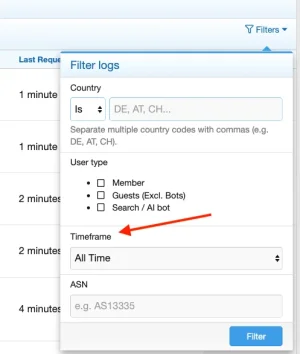
  • It would be helpful if the IP List View categories could be filtered by last 24 hours, last 7 days, etc. to reduce the size of the CSV exports
  • I really like the new temporary residential proxy thing

Question:
  • In the IP List View/Status Distribution, what is Limiter activity?

A weird one:
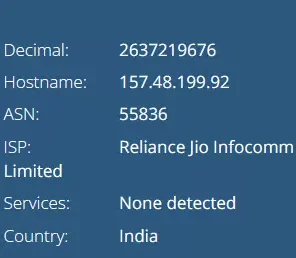
India is a blocked country with several ASNs from India blocked. Forum shows "verifying captcha" from an Indian IP. I don't recall seeing verifying captcha before but maybe I just missed it? (forum is using standard hCaptcha) Our traffic has been very light for the list 24 hours - 320 visitors so it's not like it is getting swamped.

1792342980272.webp

1792342648113.webp

This IP doesn't show up in IP Threat Monitor IP lists anywhere. Even with 3 Indian ASNs blocked and India blocked as a country, In this case, why would a visitor from a blocked country with a blocked ASN be getting a captcha challenge? Is this just xenForo getting confused?

I still get several every day from India that make it through as active even with country and ASN blocked.

As I write, I see a visitor from another blocked country showing up in the forum's current visitor list as "verifying captcha". After 15 minutes their IP address does not show up anywhere in IP Threat Monitor. Weird.
 

Attachments

  • 1792342606462.webp
    1792342606462.webp
    3.4 KB · Views: 0
I moved Mexico from a blocked country to a challenged country to see what would happen. This morning I have 6 active visitors from Mexico. I can assume that they passed the challenge but without some kind of a flag they did, I get a little suspicious. There is no reason people in Mexico would know about my forum or be interested.
Mexico is famous for large amounts of residential proxies, so whoever requested a page on your forum is probably not a person from Mexico.
Could this be because the hCaptcha is too easy for bots to solve or are these real people? Would Cloudflare Turnstile be better at stopping non-humans?
Maybe. Hard to tell. There are all kinds of bots in the wild, some of them can solve Captchas, sometimes with support from a 3rd party service. This affects all captchas, including Cloudflare. Rumour says CF would be harder to solve for bots than others, no idea if this is true.

  • It would be helpful if the IP List View categories could be filtered by last 24 hours, last 7 days, etc. to reduce the size of the CSV exports
They can and this will reduce the csv-export size. I know that b/c I requested that feature, it was implemented and I am using it all the time. ;)
Bildschirmfoto 2026-10-18 um 21.55.11.webp

Bildschirm­foto 2026-10-18 um 22.11.59.webp


I still get several every day from India that make it through as active even with country and ASN blocked.
As said earlier: Geoblocking is not an exact science. IPs get reassigned constantly, the databases are sometimes wrong or lagging and ASNs often span more than one counry. Therefor there's always the chance that something slips trough.

I do have, as mentioned before, this behavior from time to time as well and reported it already back in February:

🐞 1. Threat monitor misses a beat from time to time​


(...) every now and then IPs that have been blocked by either country or ASN get through unnoticed.
As @Osman said a couple of postings earlier: There are a bunch of possible reasons for that from local load issues to a delayed API response.

As for the occasional slip-through on first hit: on busy days with thousands of hits, if the remote ProxyCheck API reaches its daily rate/quota limit or experiences a latency timeout, the system fails open for a brief moment to ensure legitimate forum traffic never hangs.

As I write, I see a visitor from another blocked country showing up in the forum's current visitor list as "verifying captcha". After 15 minutes their IP address does not show up anywhere in IP Threat Monitor. Weird.
That is not really weird. While IP Threat Monitor usually acts before traffic hits the XF counter/application this changes with the use of the captcha. This is why you see visitors that are stuck in the captcha with this status in the visitor's list. This list lags quite a bit. is updated only every couple of minutes and keeps visitors for I think something between 15 and 30 minutes or so. So often you'll see visitors in there that have in fact already left or given up.

It would be nice to have some kind of statistics about the captcha attemps and solving rates in IP Threat Manager. ATM I am experimenting a bit with it to see, how effective it is and think about what kind of statistic exactly would be valuable.
 
Last edited:
After checking the logs of IP Threat Monitor and the web server log it seems, that clients that are hit with a captcha are listed as "active" in IP Thread manager no matter if they solve the captcha or not. The URL in IP Threat Manager's log is the URL that they tried to reach when the captcha hit.

I found a bunch of typical residential proxy requests that seemed to be stuck in the captcha, a couple of what seemed to be genuine guests, that solved the captcha successfully and also a couple that tried to hit a nonexisting URL and did not hit a captcha (despite they should have, given the country they were coming from) and others that hit a page that is only accessible for logged in members (and hit a captcha).

All of them were equally listed as "active" in IP Threat Manager's logs and currently there seems no way to find out the real outcome of a challenge or if they were challenged at all w/o diving into the log of the web server itself.

This means that at the moment IP Threat Manager's status shows basically any client as "active" that has either not hit by a rule or has been hit by a captcha, no matter if it passed it or not. Therefor the pass rate / active rate in the statistic is way higher than it is in reality and a lot of the target URLs have in fact not been hit by the clients that intended to hit them.
 
Last edited:
Hi @Osman ,

I've read the discussion about disabling Protect Registered Members to apply rate limiting to logged-in users.
One thing I couldn't find an answer to: does the rate limit follow the user's account, or just their IP?

I'm trying to stop AI agents that log in with a regular account and rapidly download threads. I tested one that opened 10 threads in 8 seconds.
Also, I'm on XenForo Cloud and already use XF Bot Guard. Can both add-ons run together without CAPTCHA conflicts?

Just want to make sure this will work before purchasing.

Thanks!
 
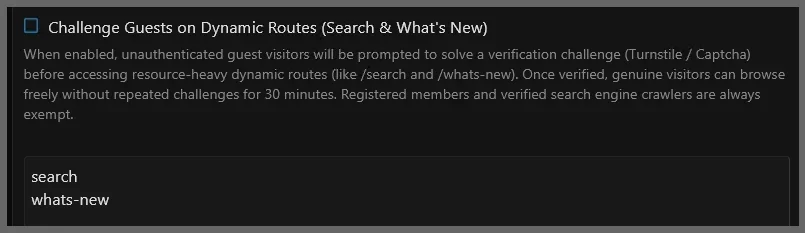
Thank you all for the valuable feedback! Version 1.0.50 is now live, addressing the BotGuard redirect conflict, introducing dedicated "Challenged" status tracking, and adding guest protection for dynamic routes like search and what's new.

@LogicWhisper To answer your questions: rate limits are strictly IP-based (evaluated before authentication), meaning they won't interfere with multiple users sharing an account or legitimate members on different devices. The add-on is fully self-contained, works independently without requiring BotGuard, runs smoothly on standard XenForo Cloud/shared setups, and with 1.0.50, it now works seamlessly side-by-side with BotGuard as well.
 
Osman updated [XTR] IP Threat Monitor with a new update entry:

1.0.50

Our main goal with this release is to provide crystal-clear reporting for site owners, eliminate confusing visitor numbers, and ensure harmonious coexistence with other forum security tools.

Seamless Compatibility with Other Security Add-ons
When running alongside other security add-ons on the same forum, visitors encountering a challenge screen could occasionally get caught in browser redirect deadlocks. In version 1.0.50, we have added strict background safeguards on our...

Read the rest of this update entry...
 
@smallwheels, thank you for pointing out the filters. I did see it was mentioned and resolved before but I just forgot about it. Duh.

Thank you also for digging into the verifying captcha situation. I have found that a couple of those that get stuck in this did they or didn't they captcha limbo do not show up in IP Threat Monitor at all. ProxyCheck has flagged and blocked some Mexican visitors but more have gotten through than have been blocked. I think I'll move Mexico back to country blocked rather than challenged.

FYI, in user options, I have Online Status Timeout set to 60 minutes or I probably wouldn't have seen guests verifying captcha. When it has gotten super busy with guests, I have reduced this to 15 minutes because some of my users freak out seeing a lot of guests. I adjust the verbiage in the Members Online widget accordingly.


And as I write, a new update has been released! @Osman is a monster in the best possible way. 👏
 
I am sorry to be such a pain but I would like some help understanding what I am seeing this morning.

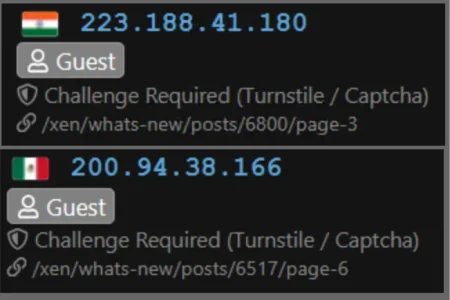
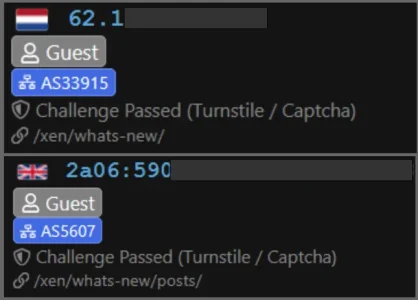
1. Here are two samples from blocked countries that age getting a challenge:
1792414805686.webp
Q: I understand they are being challenged on dynamic routes but why are they not blocked BEFORE then can even get to whats-new? If they solve the captcha then what happens? Fallback to being blacklisted for blocked country, I hope, but shouldn't that come first?

I am seeing a lot of these.

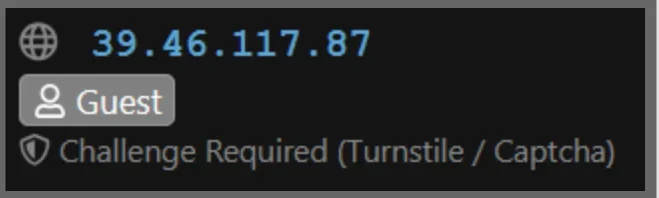
2. This is a blocked country that hasn't been identified (Pakistan) that is getting a challenge for unknown reasons. I've seen several others like this from other blocked countries
1792415084034.webp
Q: Why would they be getting a challenge and why isn't country identified? Shouldn't a blocked country be the end of the line?

3. I do see several from allowed countries that have passed the challenge and show active so that's good and I'll be kind and assume they are human.
1792415802658.webp

In the IP List view, temporary residential proxies that formerly showed up under blocked with an expiration counter now show up only in active and challenged but no longer under blocked and their status remains challenged even if their timer has expired.
  • I would like to see blocked countries and ASNs get stopped dead in their tracks before they can hit whats-new or search and get a challenge.
  • I would like everyone that gets a challenge to be automatically blacklisted if it is not solved in 1 or 2 minutes and if possible, their status updated with the reason they're blacklisted (Challenge Failed).
I realize this makes everything more complicated, may not even be possible and I'm asking for the moon. 🌛

Sorry again (even though I'm not Canadian - lol)
 
I understand they are being challenged on dynamic routes but why are they not blocked BEFORE then can even get to whats-new?
You need cloudflare to do that, to block them at DNS. Everything you need, if using cloudflare, is in https://xenforo.com/community/threads/crazy-amount-of-guests.233649/

They are not loading your search when stopped at your search with turnstile. That is the important part. They go to use it, get turnstile, solve it and search happens, or do not and nothing further happens, no load, no bringing down your server with search.
 
Thank you all for the valuable feedback! Version 1.0.50 is now live, addressing the BotGuard redirect conflict, introducing dedicated "Challenged" status tracking, and adding guest protection for dynamic routes like search and what's new.

@LogicWhisper To answer your questions: rate limits are strictly IP-based (evaluated before authentication), meaning they won't interfere with multiple users sharing an account or legitimate members on different devices. The add-on is fully self-contained, works independently without requiring BotGuard, runs smoothly on standard XenForo Cloud/shared setups, and with 1.0.50, it now works seamlessly side-by-side with BotGuard as well.
Thanks Osman, appreciate the quick reply and the update!
I understand it's IP-based, which isn't quite ideal for my situation, but it could still help a lot.

One thing I'm wondering: can I set the rate limiter specifically for thread views, over a short period? For example, 10–15 threads within 10 seconds?

That's really the kind of activity I'm trying to stop, without affecting people browsing normally.


Thanks
 
You need cloudflare to do that, to block them at DNS. Everything you need, if using cloudflare, is in https://xenforo.com/community/threads/crazy-amount-of-guests.233649/
Perhaps if there were some concise guide to using Cloudflare that didn't require a technical degree to understand and there weren't 94 pages of often conflicting information and advice to wade through that mere mortals could comprehend I might consider it but thanks for the suggestion

They are not loading your search when stopped at your search with turnstile. That is the important part. They go to use it, get turnstile, solve it and search happens, or do not and nothing further happens, no load, no bringing down your server with search.

You may not be familiar with it but IP Threat Monitor also does this

RouteChallenge.webp

Detected residential proxies are also challenged. If not using Cloudflare Turnstile to present the challenge, IP Threat Monitor uses whatever captcha type is configured in xenForo's user registration options such as hCaptcha, reCaptcha v2, Turnstile, etc.

My only issue with the current version of IP Threat Monitor is that visitors challenged on dynamic routes appear to be stuck in verifying the captcha and their state doesn't change to blacklisted when they don't complete the challenge. I think this is temporary and mostly cosmetic but I have temporarily disabled it until I see if things change in the next release.

My forum is new and very small with normally 330 to 600 visitors in 24 hours but I've seen upwards of 4000 a day on occasion. 144 countries are completely blocked as are a growing list of 51 ASNs and anyone using a VPN do not get through.

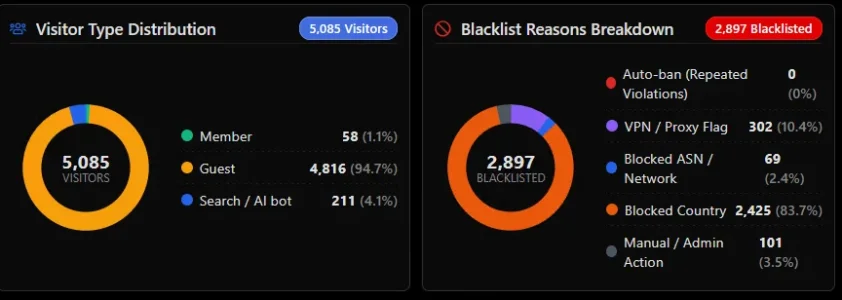
It has been busier than usual the last seven days but you can see how effective IP Threat Monitor has been at stopping unwanted traffic during that period.
1792463328292.webp
In the last 30 days, there have been 13,799 visitors to my site with 11,458 of them not getting in.

I am on shared hosting. In the last 24 hours average CPU usage has been 2%, memory 73 MB used of 3072, PHP workers 2 of 60, processes 3 of 120 and throughput 186 KB/s from 20,480 KB/s available. I am not getting swamped and at this point in the game, overloading server resources is not a problem so I'm perfectly happy with not involving Cloudflare. That's not saying I won't in the future or add Bot Guard but for now I am happy with the way things are without making everything overly complicated.
 
My only issue with the current version of IP Threat Monitor is that visitors challenged on dynamic routes appear to be stuck in verifying the captcha and their state doesn't change to blacklisted when they don't complete the challenge.
You don't want them blacklisted, you want them to not load your server. Two different things. If legitimate users are getting stuck in search, then you need to raise it as an issue.
 
If legitimate users are getting stuck in search, then you need to raise it as an issue.
That is not what I said. "Visitors" from allowed countries not using a VPN are not challenged. As far as things "getting stuck", as noted, I believe this is a temporary cosmetic issue of their status not being updated and not some functional problem.

If guests are using a VPN or are from a blocked country, they are blacklisted immediately and do not get in.. VPNs can be whitelisted but it is kind of a broad brush. VPN and proxy detection can be disabled entirely and there are various other controls for residential and dynamic proxies in addition to unique settings for handling dynamic routes like whats-new and search.

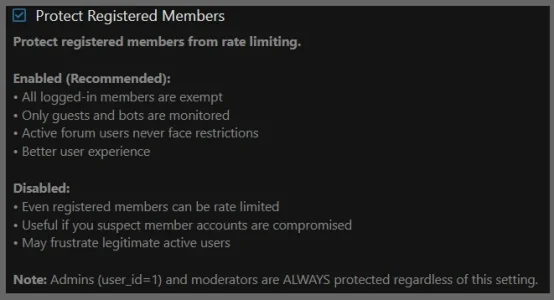
Registered users are protected and never restricted.

Protected.webp

Granted, it would be better for unwanted things to be stopped before they even hit my server for processing but for my environment at this time, the overhead is negligible and having one less thing to manage and monitor is great because I am a sole admin/moderator also trying to build user engagement and interest and it already seems there's not enough hours in the day.

It doesn't seem you are really familiar with IP Threat Monitor at all? I think it is probably a lot more than you think it is
 
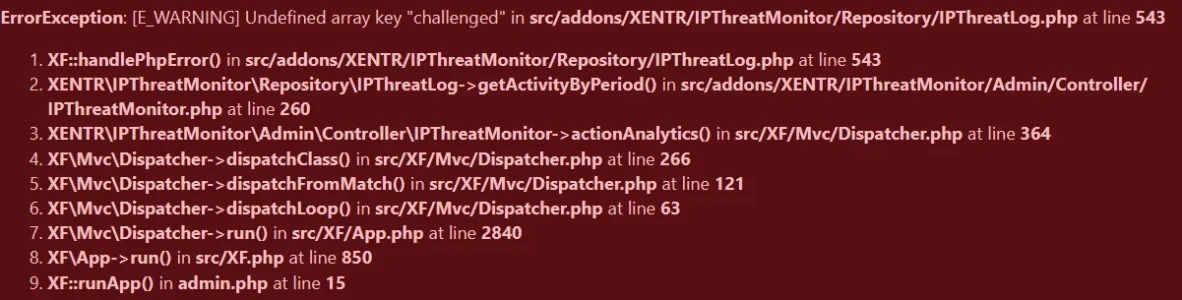
@Osman I don't normally use the analytics page and haven't looked at since upgrading to 1.0.50. Tonight I did and received an error. Everything else is working as expected including the configuration test page and the diagnostics screen.

1792480900592.webp


  • ErrorException: [E_WARNING] Undefined array key "challenged"
  • src/addons/XENTR/IPThreatMonitor/Repository/IPThreatLog.php:543
  • Generated by: -- TPTB --
  • Oct 20, 2026 at 12:15 AM

Stack trace​

#0 src/addons/XENTR/IPThreatMonitor/Repository/IPThreatLog.php(543): XF::handlePhpError(2, '[E_WARNING] Und...', '/home/u47938973...', 543)
#1 src/addons/XENTR/IPThreatMonitor/Admin/Controller/IPThreatMonitor.php(260): XENTR\IPThreatMonitor\Repository\IPThreatLog->getActivityByPeriod(1)
#2 src/XF/Mvc/Dispatcher.php(364): XENTR\IPThreatMonitor\Admin\Controller\IPThreatMonitor->actionAnalytics(Object(XF\Mvc\ParameterBag))
#3 src/XF/Mvc/Dispatcher.php(266): XF\Mvc\Dispatcher->dispatchClass('XENTR\\IPThreatM...', 'Analytics', Object(XF\Mvc\RouteMatch), Object(XENTR\IPThreatMonitor\Admin\Controller\IPThreatMonitor), NULL)
#4 src/XF/Mvc/Dispatcher.php(121): XF\Mvc\Dispatcher->dispatchFromMatch(Object(XF\Mvc\RouteMatch), Object(XENTR\IPThreatMonitor\Admin\Controller\IPThreatMonitor), NULL)
#5 src/XF/Mvc/Dispatcher.php(63): XF\Mvc\Dispatcher->dispatchLoop(Object(XF\Mvc\RouteMatch))
#6 src/XF/App.php(2840): XF\Mvc\Dispatcher->run()
#7 src/XF.php(850): XF\App->run()
#8 admin.php(15): XF::runApp('XF\\Admin\\App')
#9 {main}

Request state​

array(4) {
["url"] => string(42) "/xen/admin.php?ip-threat-monitor/analytics"
["referrer"] => string(77) "https://www.citadel-81.com/xen/admin.php?ip-threat-monitor/test-configuration"
["_GET"] => array(1) {
["ip-threat-monitor/analytics"] => string(0) ""
}
["_POST"] => array(0) {
}
}
 
Back
Top Bottom