XF Bot Guard

XF Bot Guard 1.4.1

No permission to download
Another theory: a Cloudflare outage? My forum and the other two are linked to Cloudflare in some way.
And by the way, late evening (German time), the issue had disappeared!
My site is loading quickly again and rendering at normal speed!
I dont use Cloudflare. My site has been running great since turning the Reverse DNS off
 
German time
I Germany you may run into "funny issues" with Cloudflare if you use Deutsche Telekom as a provider (or their network/backbone via a reseller) caused by the insufficient connection between Deutsche Telekom and Cloudflare, causes bei DT's arrogant peering policy.
 
Another theory: a Cloudflare outage? My forum and the other two are linked to Cloudflare in some way.
And by the way, late evening (German time), the issue had disappeared!
My site is loading quickly again and rendering at normal speed!

I also had another user recently after upgrading who experienced a slower forum, before it returned to normality within a few days. It may just be some kind of artifact of the upgrade process. I am not 100% sure.
 
Like many others, our sites are getting HAMMERED by bots :(

... to the point where our servers / services are crashing.

I was excited to see this addon and give it a try, but from what I've read, it might struggle with very large sites that are getting a LOT of requests?

So, my questions:
  1. What database growth should we expect in Light-DB at roughly 25 million requests/day?
  2. Overall, how does this addon perform on very large/busy sites with a ton of large bot waves?
Thanks in advance!
 
I also had another user recently after upgrading who experienced a slower forum, before it returned to normality within a few days. It may just be some kind of artifact of the upgrade process. I am not 100% sure.

So the question is or was:

Was it the upgrade process, the respective forums being overloaded by bots, or something related to Cloudflare?
In any case, the three forums I checked were all equally slow at the same time, and they all relied on Cloudflare!
I noticed that on the login screen. That’s my theory, anyway!
 
So the question is or was:

Was it the upgrade process, the respective forums being overloaded by bots, or something related to Cloudflare?
In any case, the three forums I checked were all equally slow at the same time, and they all relied on Cloudflare!
I noticed that on the login screen. That’s my theory, anyway!

If I had to guess, it would be related to the upgrade process clearing or invalidating some caches (e.g., XenForo, or on the server services like DB) and this creates a bit of a rebuild and stabilise period. But, sometimes Cloudflare does dip in performance and it could easily be that too.
 
Quick update, Bot Guard Pro is nearly here, been in testing, coming along real nicely... but also, some other great new features available to all, such as:

Smarter protection against throwaway browser waves...

Some advanced bots no longer attack from one obvious IP; they show up from the same nearby network area with a fresh-looking browser each time, clear the quick browser check, make one hit, then disappear before they build a normal history. XF Bot Guard’s new range-pressure signal looks for that pattern in a privacy-safe way: if several fresh browsers from the same network neighbourhood pass browser validation but nobody from that neighbourhood ever proves they are human with CAPTCHA, Bot Guard can treat the pattern as higher risk while easing off once a real CAPTCHA pass appears.
 
Oooof! This is complicated! I've installed it but much of it is way over my head. Like many, we've been deluged with bots scraping the site over the last month, meaning that real traffic is down, the site is frequently unavailable, and AI bots are serving our content to their users. I'd been considering putting the whole site behind a login, which is something I'm loathe to do as it's a news site and relies on a lot of unregistered traffic.

Right now it seems to be doing something. Previously the site was near unusable with 90K+ bots crawling it constantly. I've activated the mod, and the online visitors widget now reports bots separately, confirming that these are bots. Great!

I haven't changed any options yet. All default, other than switching it on.

Right now, I can get on the site when logged in my admin account, and it seems to work faster. When I open a private browser window to see how it looks for guests though, I can't get on at all. Just 502 Bad Gateway nginx errors. I don't know if this means guests can't get on the site at all now, or if it's just me in my private browser window.

The Health Check flags up a handful of issues. I don't know what I need to do about these or even what they mean.
  • The downloaded local IPLocate country or ASN database could not be validated. Bot Guard will ignore unavailable local geo lookup data, continue to fail open, and retry through queued managing-admin Health maintenance or the MMDB refresh cron.
  • One or more XF Bot Guard cron entries are missing, inactive, misconfigured, behind schedule or scheduled suspiciously far in the future. Existing detailed cron-specific health rows remain available below.
  • Shared origin pressure is active; automatic mode will buffer event detail rows. Active reasons: load1_per_core, cpu_busy.
  • One or more reverse DNS lookup claims are stale. The normal cleanup cron should remove expired rows; repeated stale pending rows can indicate interrupted lookups or database contention.
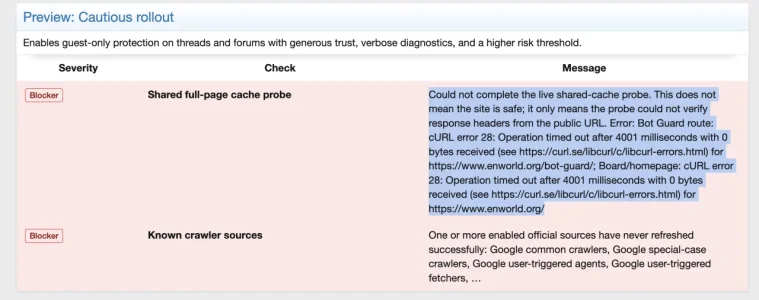
Looking at the quick settings, it's not letting me set them because of a couple of errors its flagging, but I have no idea how to fix those errors (or, indeed, what they mean). So I don't know what my next step should be.

Screenshot 2026-09-22 at 09.31.34.webp

So, any help would be appreciated! Thanks!
 
Oooof! This is complicated! I've installed it but much of it is way over my head. Like many, we've been deluged with bots scraping the site over the last month, meaning that real traffic is down, the site is frequently unavailable, and AI bots are serving our content to their users. I'd been considering putting the whole site behind a login, which is something I'm loathe to do as it's a news site and relies on a lot of unregistered traffic.

Right now it seems to be doing something. Previously the site was near unusable with 90K+ bots crawling it constantly. I've activated the mod, and the online visitors widget now reports bots separately, confirming that these are bots. Great!

I haven't changed any options yet. All default, other than switching it on.

Right now, I can get on the site when logged in my admin account, and it seems to work faster. When I open a private browser window to see how it looks for guests though, I can't get on at all. Just 502 Bad Gateway nginx errors. I don't know if this means guests can't get on the site at all now, or if it's just me in my private browser window.

The Health Check flags up a handful of issues. I don't know what I need to do about these or even what they mean.
  • The downloaded local IPLocate country or ASN database could not be validated. Bot Guard will ignore unavailable local geo lookup data, continue to fail open, and retry through queued managing-admin Health maintenance or the MMDB refresh cron.
  • One or more XF Bot Guard cron entries are missing, inactive, misconfigured, behind schedule or scheduled suspiciously far in the future. Existing detailed cron-specific health rows remain available below.
  • Shared origin pressure is active; automatic mode will buffer event detail rows. Active reasons: load1_per_core, cpu_busy.
  • One or more reverse DNS lookup claims are stale. The normal cleanup cron should remove expired rows; repeated stale pending rows can indicate interrupted lookups or database contention.
Looking at the quick settings, it's not letting me set them because of a couple of errors its flagging, but I have no idea how to fix those errors (or, indeed, what they mean). So I don't know what my next step should be.

View attachment 345282

So, any help would be appreciated! Thanks!

A few things we can already tell:

  • The IPLocate warning should fail open and retry; it should not lock guests out.
  • Shared origin pressure means the server is under load, and Bot Guard is reducing diagnostic detail writes. That warning alone does not block visitors.
  • Origin survival mode would normally return an empty 503 with a Retry-After header. If you are definitely seeing 502 Bad Gateway nginx, that usually points to nginx/PHP-FPM/upstream timeout, WAF, proxy, or server pressure rather than the normal survival-mode response.
  • The Quick settings page is refusing to apply because it cannot yet prove the public Bot Guard route/homepage are reachable, and the official crawler sources have not refreshed successfully. That is intentional safety behaviour.

Please DM me the redacted support bundle so I can see the exact state without guessing.

To get it: go to Admin control panel > XF Bot Guard > Advanced > Health check. Near the top there should be a Support bundle block. Click Copy bundle, then paste that into a private message to me. If the button does not copy, select the text in the bundle box and copy it manually.

Also, if guests are genuinely unable to access the site, temporarily switch XF Bot Guard off while we inspect the bundle. Keeping the site reachable comes first.
 
A few things we can already tell:

  • The IPLocate warning should fail open and retry; it should not lock guests out.
  • Shared origin pressure means the server is under load, and Bot Guard is reducing diagnostic detail writes. That warning alone does not block visitors.
  • Origin survival mode would normally return an empty 503 with a Retry-After header. If you are definitely seeing 502 Bad Gateway nginx, that usually points to nginx/PHP-FPM/upstream timeout, WAF, proxy, or server pressure rather than the normal survival-mode response.
  • The Quick settings page is refusing to apply because it cannot yet prove the public Bot Guard route/homepage are reachable, and the official crawler sources have not refreshed successfully. That is intentional safety behaviour.

Please DM me the redacted support bundle so I can see the exact state without guessing.

To get it: go to Admin control panel > XF Bot Guard > Advanced > Health check. Near the top there should be a Support bundle block. Click Copy bundle, then paste that into a private message to me. If the button does not copy, select the text in the bundle box and copy it manually.

Also, if guests are genuinely unable to access the site, temporarily switch XF Bot Guard off while we inspect the bundle. Keeping the site reachable comes first.
I've DM'd you the support bundle. Note I just changed my username just in case you were wondering who 'Greenwing' was!

I disabled the add-on and am now able to access the site as a guest.
 
Last edited:
I've DM'd you the support bundle. Note I just changed my username just in case you were wondering who 'Greenwing' was!

I disabled the add-on and am now able to access the site as a guest.

I have replied by DM and we can continue the support thread there :)
 
I Germany you may run into "funny issues" with Cloudflare if you use Deutsche Telekom as a provider (or their network/backbone via a reseller) caused by the insufficient connection between Deutsche Telekom and Cloudflare, causes bei DT's arrogant peering policy.
I'm at Strato...

But I don't know if that makes it any better? :unsure:;)
 
I'm at Strato...
For hosting or for internet access?
But I don't know if that makes it any better? :unsure:;)
The issue with Deutsche Telekom is that they tend to not use the official exhange points / peering locations like i.e. DECIX for connecting to other networks but rather create peering points using their own infrastructure in the middle of nowhere. The consequence: If you want a direct peering with DETAG you typically 1.) have to costly rent a line from them to their infrastructure and 2.) if you want to have more than an absolute base level of speed for your peering you have to pay for the traffic. So they act against the traditional principle that peering is free for all parties and they do that (and possibly can afford to do that) due to their enormous customer base and huge own infrastructure, being the successor of the former state-owned monopolist Deutsche Bundespost. Basically they misuse their market position and their internet-access customers pay the price. Companies that offer data-intensive products like video streaming or similar are basically blackmailed into paying for the peering as if they don't wider parts of the audience in Germany suffer from slow connections to their services. Cloudflare is in the middle of that game and I do not know how the actual situation is - but whenever I am using a Telekom internet line it is remarkably slower to many services than with other providers.

For details look i.e. here (in German language):

To view this content we will need your consent to set third party cookies.
For more detailed information, see our cookies page.

here


and here

 
Last edited:
So, we’re pretty sure that activating this addon has made our problem worse. We haven’t been able to get on the site even as admins for an entire day since installing it. We can’t even get into the admin panel to deactivate it. The bots caused slowdowns but it’s never been this bad—completely accessible for a whole day (and counting). We’re not even sure right now how we’re going to deactivate the addon as we can’t access the site.
 
So, we’re pretty sure that activating this addon has made our problem worse. We haven’t been able to get on the site even as admins for an entire day since installing it. We can’t even get into the admin panel to deactivate it. The bots caused slowdowns but it’s never been this bad—completely accessible for a whole day (and counting). We’re not even sure right now how we’re going to deactivate the addon as we can’t access the site.

I’m sorry you’re locked out. First priority is getting you back into the site/admin panel.

The least destructive recovery path is to disable the add-on, not uninstall it and not delete files/tables.

If you have SSH access, from your XenForo root directory you or your server admin can run:

Code:
php cmd.php xf:addon-disable Zee/BotGuard

If SSH is not available, ask your server admin to edit XenForo’s
Code:
src/config.php
and temporarily add:

Code:
$config['enableListeners'] = false;

That temporarily disables XenForo add-on listeners/extensions globally so you can usually get back into the ACP. Once in the ACP, disable XF Bot Guard normally from the add-ons list, then remove that temporary config line again. Do not leave it there longer than needed, because it affects other add-ons too.

Please do not delete the add-on files, uninstall it, or drop database tables as a first step.

For context, the support bundle already showed the server was under extreme pressure before this final outage: very high DB connection usage, very high load, delayed cron execution, and live probes timing out. Installing or enabling any request-time security add-on when the origin is already operating at its limit is risky, and XF Bot Guard is not a replacement for host capacity, PHP-FPM/MySQL stability, CDN/WAF controls, or upstream bot mitigation. It can help once the origin has enough headroom to run it, but it cannot make an already saturated server absorb unlimited traffic.

Let’s get you back into the ACP first, then we can look at the safest low-cost configuration or leave it disabled. I sent you a DM about that. p.s. I recommend speaking also to your host about a Redis or Memcached cache for XenForo, which Bot Guard can use also (LightDB) and materially reduces the running cost.
 
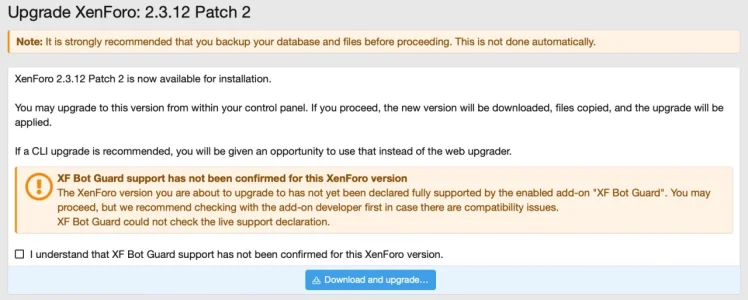
@zeeb0t does XF Bot Guard already fully support Xenforo 2.3.13. At the update page I get a warning wit this:

View attachment 344265

I wan't to update to the latest version, but I don't want to corrupt Bot Guard by doing so.
I will get around to doing a full analysis soon and officially boosting the declared supported version. But as others and yourself report, it does look to be fine - even on my own install :)
@zeeb0t : Did you forget to follow up or did I miss the message? How soon is soon? The above was on Sept. 9th. I've personally no issue ignoring the warning based on the statements above - but then it does not make too much sense to have a warning if it shall be ignored and the update is a security update, so best not too stretched too long.

Bildschirm­foto 2026-09-26 um 18.06.36.webp
 
@zeeb0t : Did you forget to follow up or did I miss the message? How soon is soon? The above was on Sept. 9th. I've personally no issue ignoring the warning based on the statements above - but then it does not make too much sense to have a warning if it shall be ignored and the update is a security update, so best not too stretched too long.

View attachment 345620

XenForo 2.3.13 changed part of the internal HTTP client stack that XF Bot Guard uses for outbound safety checks and trusted-source refreshes. The next XF Bot Guard release will include a compatibility adjustment for that change, and will update the support declaration so XenForo 2.3.13 is treated as a confirmed supported version.

For those who have already upgraded XenForo to 2.3.13, the expected impact before this XF Bot Guard update is limited. The main front-end request protection should continue to operate, but some outbound checks may fail or report unavailable unexpectedly. This can affect things like XF Bot Guard’s XenForo upgrade support check and remote trusted-source refreshes.

Those who have not upgraded XenForo yet can either wait for the next XF Bot Guard release before moving to XenForo 2.3.13, or proceed knowing that the known issue is expected to be limited to those outbound support/refresh checks rather than the core request-protection path.
 
Back
Top Bottom