XF Bot Guard

XF Bot Guard 1.4.1

No permission to download
Important update: Shortly before my previous message, the forum itself became temporarily unavailable.

XenForo logged multiple:

XF\Db\Exception: Connection timed out

at 12:42 and again at 12:52. These occurred in normal XenForo database operations (PermissionCache/DataRegistry), not specifically inside Bot Guard.

Because I now have approximately 118,000 tempnam() errors, a recent Bot Guard request_gate_fail_open, and actual database connection timeouts/site unavailability, I am going to temporarily disable Light-DB mode while leaving Bot Guard itself enabled, unless you advise otherwise.

I will monitor whether the tempnam() errors stop after disabling Light-DB.

You are likely overloading the server by opting into LightDB with an inefficient XenForo cache configured.

I would simply recommend disabling Bot Guard, fix the XenForo cacher so it can use an available redis or memcached service, and then enable again. You should find your forum overall performs so much better in many ways.
 
I will check specifically, but Bot Guard simply uses the configured cacher XenForo provides. So if there is some issue writing, it's not likely Bot Guard itself, but rather, the permissions / some other issue relating to the XenForo / hosting environment overall.

That being said, the intention was never to run LightDB using a file-based XenForo cache. While it may work, it would surely perform worse than in DB at high load.

I strongly recommend considering memcached or redis for XenForo cache.
Unfortunately, that isn't possible with my current managed server. However, I will be switching servers and hosts soon. That will put an end to the very restrictive 15 GB database limit.

Even so, it would obviously be ideal - even with plenty of headroom to spare - to configure XF Bot Guard permanently so that it runs as efficiently as possible in terms of resource usage.
 
Unfortunately, that isn't possible with my current managed server. However, I will be switching servers and hosts soon. That will put an end to the very restrictive 15 GB database limit.

Even so, it would obviously be ideal - even with plenty of headroom to spare - to configure XF Bot Guard permanently so that it runs as efficiently as possible in terms of resource usage.

With respect, thats exactly what LightDB mode enables... but you have a poor choice in cacher enabled. It may not currently be something within your control, but if you have a forum which is under-resourced and you also don't have a means to give XenForo an efficient method of cache, that is indeed your problem to fix. I already made Bot Guard capable of leveraging the cacher for this purpose.
 
I think this is a nice Add-on (only judging it's functions), but I am somewhat curious about design decisions taken.

Would you mind giving some insights?

For example you've got code like
PHP:
if (false)
{
    /**
     * @disregard P1009 XenForo 2.3 resolves XF\Repository\SessionActivity to this canonical class.
     */
    class XFCP_SessionActivity extends \XF\Repository\SessionActivityRepository
    {
        public function applyActivityDetails($activities)
        {
        }
    }
}

This is basically NOOP and just seems there to please static analyzers / IDE; using smth, like https://xenforo.com/community/resources/xf2-2-xf2-3-rename-aliases.9498/ should be easier & more efficient.

You are using multiple custom JavaScript files, but those are not minified

Your Service classes are not actually XenForo services, why? :)
 
Last edited:
I think this is a nice Add-on (only juding it's functions), but I am somewhat curious about design decisions taken.

Would you mind giving some insights?

For example you've got code like
PHP:
if (false)
{
    /**
     * @disregard P1009 XenForo 2.3 resolves XF\Repository\SessionActivity to this canonical class.
     */
    class XFCP_SessionActivity extends \XF\Repository\SessionActivityRepository
    {
        public function applyActivityDetails($activities)
        {
        }
    }
}

This is basically NOOP and just seems there to please static analyzers / IDE; using smth, like https://xenforo.com/community/resources/xf2-2-xf2-3-rename-aliases.9498/ should be easier & more efficient.

You are using multiple custom JavaScript files, but those are not minified

Your Service classes are not actually XenForo services, why? :)

Thanks, and fair questions.

XFCP / static-analysis stubs

Yes, those if (false) / XFCP_* blocks are development-time scaffolding. XenForo creates the XFCP_* parent aliases dynamically at runtime, but static-analysis tools and IDEs cannot always infer that cleanly.

The SessionActivity example has an extra XenForo 2.3 compatibility wrinkle: XF Bot Guard registers against XF\Repository\SessionActivity for XF 2.1/2.2 compatibility, while XF 2.3 resolves that to XF\Repository\SessionActivityRepository. My local tooling checks that across XF 2.1.15, 2.2.19, and 2.3.12, including parent resolution and method signatures.

So yes, you correctly spotted tooling scaffolding, but it is there to support multi-version compatibility checks rather than runtime behaviour.

I have not used that rename-alias resource mostly because I prefer the add-on’s development tooling to remain self-contained.

Unminified JavaScript

Correct. The bundled third-party JS assets are minified where appropriate, such as FingerprintJS and ECharts, but my first-party JS files are currently shipped readable rather than minified.

They are syntax checked, covered by frontend/browser tests, and cache-busted with versioned URLs, but they are not minified. I agree this belongs in the release/packaging backlog.

Service classes

Most classes in Zee\BotGuard\Service are not XenForo \XF\Service\AbstractService services.

I’m using “service” in the application/domain-service sense: request gating, risk scoring, crawler verification, Cloudflare sync, dashboard building, health checks, and similar add-on logic. They are wired through a small add-on service factory so controllers, cron entries, jobs, and tests do not all need to hand-build the same dependency graphs.

Where the code is actually interacting with a XenForo service, it uses XenForo’s service helper.

More broadly, some of this visible scaffolding comes from trying to keep a security-sensitive add-on stable as a single developer. The local tooling covers PHPUnit, PHPStan, dead-code analysis, JavaScript checks, frontend/browser tests, real XenForo dev-database scenarios, runtime/performance diagnostics, representative traffic replay, and compatibility checks across supported XenForo versions.

 
Getting errors like this right now:
XF Bot Guard activity update failed open: MySQL query error [1114]: The table 'xf_session_activity' is full
 
Getting errors like this right now:
XF Bot Guard activity update failed open: MySQL query error [1114]: The table 'xf_session_activity' is full

If you search The table 'xf_session_activity' is full, you will find this is not a Bot Guard specific error and has been reported in XenForo communities for years:


The important part of the error is this:

Code:
MySQL query error [1114]: The table 'xf_session_activity' is full

xf_session_activity is a XenForo core table used for current visitor / session activity. It includes guest and bot activity, not only logged-in members.

XF Bot Guard can appear in the log prefix because it updates the visitor's current XenForo activity while the visitor is on a Bot Guard validation/challenge route. However, the failing table is still XenForo's own xf_session_activity table, not a Bot Guard table.

The activity update failed open wording means Bot Guard caught the database failure and allowed the request to continue rather than blocking the visitor because XenForo could not update the online activity row.

The immediate recovery others commonly use is to truncate the table:

SQL:
TRUNCATE TABLE xf_session_activity;

Do not drop the table. Truncating it clears temporary online/session activity and XenForo will repopulate it as visitors browse again.

After that, check the actual cause:

SQL:
SHOW TABLE STATUS LIKE 'xf_session_activity';
SHOW CREATE TABLE xf_session_activity;

SELECT COUNT(*) AS rows,
       FROM_UNIXTIME(MIN(view_date)) AS oldest,
       FROM_UNIXTIME(MAX(view_date)) AS newest
FROM xf_session_activity;

SHOW GLOBAL VARIABLES WHERE Variable_name IN ('max_heap_table_size', 'tmp_table_size');

The usual findings are:

  • If the table is MEMORY, increase MySQL/MariaDB max_heap_table_size. The MySQL default is commonly too small for busy XenForo sites or bot surges.
  • After changing max_heap_table_size, restart MySQL/MariaDB and truncate or rebuild the table so the new limit applies.
  • Confirm XenForo cron is running. XenForo's hourly cleanup prunes this table; if cron is stuck, the table can keep growing.
  • If the table fills again quickly even with cron running, look at Current visitors, access logs, Cloudflare/WAF logs, and bot/guest traffic. Recent XenForo reports often point to AI crawlers, rotating guest traffic, or large bursts of bot traffic. These will still populate this table.
  • If the table is InnoDB, investigate disk space, database quota, or tablespace limits instead of max_heap_table_size.

So the short version is: Bot Guard is surfacing the failure because it participates in XenForo's online activity system, but the underlying condition is XenForo/MySQL session activity capacity. Fixing the table limit or cron is the correct path.
 
If you search The table 'xf_session_activity' is full, you will find this is not a Bot Guard specific error and has been reported in XenForo communities for years:


The important part of the error is this:

Code:
MySQL query error [1114]: The table 'xf_session_activity' is full

xf_session_activity is a XenForo core table used for current visitor / session activity. It includes guest and bot activity, not only logged-in members.

XF Bot Guard can appear in the log prefix because it updates the visitor's current XenForo activity while the visitor is on a Bot Guard validation/challenge route. However, the failing table is still XenForo's own xf_session_activity table, not a Bot Guard table.

The activity update failed open wording means Bot Guard caught the database failure and allowed the request to continue rather than blocking the visitor because XenForo could not update the online activity row.

The immediate recovery others commonly use is to truncate the table:

SQL:
TRUNCATE TABLE xf_session_activity;

Do not drop the table. Truncating it clears temporary online/session activity and XenForo will repopulate it as visitors browse again.

After that, check the actual cause:

SQL:
SHOW TABLE STATUS LIKE 'xf_session_activity';
SHOW CREATE TABLE xf_session_activity;

SELECT COUNT(*) AS rows,
       FROM_UNIXTIME(MIN(view_date)) AS oldest,
       FROM_UNIXTIME(MAX(view_date)) AS newest
FROM xf_session_activity;

SHOW GLOBAL VARIABLES WHERE Variable_name IN ('max_heap_table_size', 'tmp_table_size');

The usual findings are:

  • If the table is MEMORY, increase MySQL/MariaDB max_heap_table_size. The MySQL default is commonly too small for busy XenForo sites or bot surges.
  • After changing max_heap_table_size, restart MySQL/MariaDB and truncate or rebuild the table so the new limit applies.
  • Confirm XenForo cron is running. XenForo's hourly cleanup prunes this table; if cron is stuck, the table can keep growing.
  • If the table fills again quickly even with cron running, look at Current visitors, access logs, Cloudflare/WAF logs, and bot/guest traffic. Recent XenForo reports often point to AI crawlers, rotating guest traffic, or large bursts of bot traffic. These will still populate this table.
  • If the table is InnoDB, investigate disk space, database quota, or tablespace limits instead of max_heap_table_size.

So the short version is: Bot Guard is surfacing the failure because it participates in XenForo's online activity system, but the underlying condition is XenForo/MySQL session activity capacity. Fixing the table limit or cron is the correct path.

There is also a XenForo cleanup cutoff for this table.

On XenForo 2.2/2.3, XenForo uses this config value:

PHP:
$config['sessionActivityExpiration'] = 3600;

The default is 3600 seconds. Lowering that value makes XenForo retain less xf_session_activity data when the cleanup runs.

That said, this only helps when cleanup runs. If the table fills again within 20-30 minutes, the practical fixes are still to confirm XenForo cron is running, and increase the MySQL/MariaDB max_heap_table_size limit if the table is MEMORY.
 
Are there any plans to reduce the script load a bit? In debug mode (as a guest), we have:

With the mod disabled
Page Time: 0.0410s
Memory: 2.7084 MB (Peak: 3.0998 MB)
With the mod enabled
Page Time: 0.3241s
Memory: 9.8935 MB (Peak: 10.6097 MB)
 
Are there any plans to reduce the script load a bit? In debug mode (as a guest), we have:

With the mod disabled

With the mod enabled

Do you have guest page cache enabled in your test? It would explain the difference. The next version will provide a way to maintain guest page cache that will help a lot in this scenario.
 
Is it normal for the verification screen to also apply to Google with the default settings?


Viewing verification challenge:

1787982962519.webp
 
Is it normal for the verification screen to also apply to Google with the default settings?


Viewing verification challenge:

View attachment 343733

Yes, that can be normal.

The IP shown is a Google Cloud address, but that does not automatically mean it is Googlebot or an official Google crawler.

With the default settings, XF Bot Guard allows verified Google crawlers through when they match Google’s official crawler/fetcher verification data. It does not trust every server owned by Google, because Google Cloud can also be used by normal apps, scripts, hosting customers, scrapers, and other automated traffic.

So in plain terms: “Google-owned IP” does not always mean “trusted Google search crawler.”

For the IP in your screenshot, it is expected that Bot Guard may show the verification/challenge screen. This is intentional and helps prevent traffic from Google Cloud from being treated as trusted just because it has a Google hostname.
 
Is it normal for the verification screen to also apply to Google with the default settings?


Viewing verification challenge:

View attachment 343733
The IP shown is a Google Cloud address, but that does not automatically mean it is Googlebot or an official Google crawler.
Typically it is neither. "googleusercontent.com" indicates that this IP is part of Googles Cloud offering and used by someone who has rented space on Googlecloud, not by Google themselves. Also, the IP in question belongs to AS396982, which is Google Cloud, whereas the Google
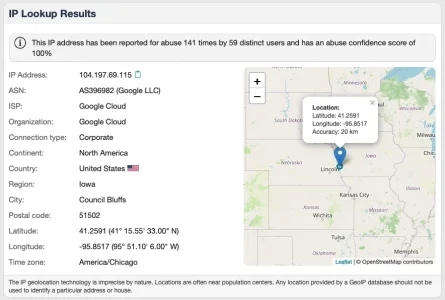
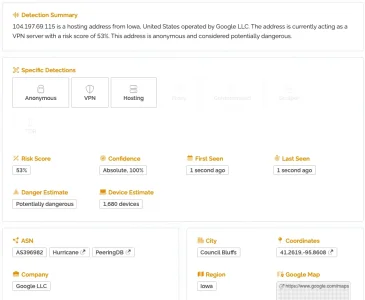
Furthermore 104.197.69.115 seems to have a history already regarding misbehavior:

Bildschirm­foto 2026-08-29 um 09.59.45.webp

Bildschirm­foto 2026-08-29 um 10.12.02.webp


Google's Search indexing Bot typically (and to my knowledge exclusively) comes from IPs belonging to AS15169 and furthermore identifies via it's DNS name as well. Typically looks like that:

Bildschirm­foto 2026-08-29 um 10.02.55.webp

It is really somewhat questionable when forum owners deal with tools they don't unterstand and neither understand how Google and others that they play around with work and due to that fact create support requests that have absolutely no foundation, nothing to do with the add on and could easily be avoided with minimal own research effort.
 
New thought/suggestion, I was using the "Forced challenge IPs/ASN" section, would it be possible to get one to set it by country? That would help a lot. Certain countries are being used for bots, would be nice to force the challenge on specific ones.
 
Back
Top Bottom