XF Bot Guard

XF Bot Guard 1.4.1

No permission to download
Installed this a day or two ago and I don't really know if it makes a big difference.
I wake up today to a very slow response from the forum. SSH in to see that the server load is climbing up to 100 when it's normally around 2.
Do a top command and the mysql process is taking up lot of CPU. This is usually when we are under heavy bot traffic.
Total: 590 (members: 17, guests: 573)
Bots: 5,704 (members: 0, guests: 5,704)

Screenshot 2026-08-24 at 9.48.51 AM.webp
 
The only way to get the load back down to normal is to enable guest caching in the DigitalPoint Cloudflare addon. But this is in conflict with the setting in this addon.
Right after enabling guest caching, the 100+ load quickly goes back to 4 so I"m afraid I will be keeping the guest caching on until there is a sure way to prevent this from happening again.
 
Installed this a day or two ago and I don't really know if it makes a big difference.
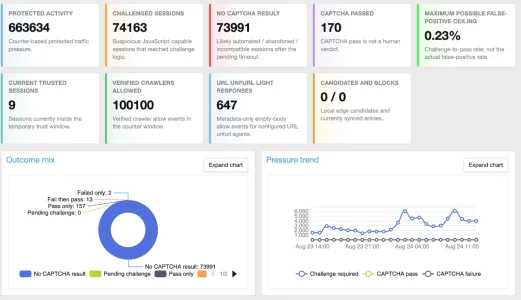
Given your statistics within the last 24h it stopped 73981 bots from scraping your site through captcha alone. If that does not make a big difference for you the question is: Why do do you use this add on? What do you want to achieve?
 
I will be keeping the guest caching on
Which makes this add-on kind of pointless as this will undermine it from working / doing it's job. With guest caching you serve your contents to guests (including bots) from cache before this add on can identify guests. So you can basically simply turn if off as well in this case.
 
What I recommend is: give your AI the documentation file (e.g. https://yourforum.com/docs/xf-bot-guard.html) and ask it, based on your situation, what retention settings it recommends - and then, you could try those out by setting it in the advanced options.
Kudos to the polite way you deal with these kind of support requests. You do provide excessive and excellent documentation for this free add on, yet people are too lazy to read it but instead ask AI and fire whatever slop it produces back to you as a support request that you should answer manually, in high quality and in a timely manner. Free of charge as well, of course. This is basically way worse than before in a world w/o AI.
 
The one main factor for me is to keep my site accessible during high load periods.
I thought prevents the bots via XF Bot Guard would help in this but it wasn't the case.
There is a possibility that I don't have thing configured correctly but when the server load hit 100+, I couldn't even log into XF ACP to turn on/off features.
This addon seems to work well for others and I'm not sure how I can use it in conjunction with Cloudflare to prevent high load.
 
This addon seems to work well for others and I'm not sure how I can use it in conjunction with Cloudflare to prevent high load.
Did you go through the documentation of the add on? It has a lot of switches and the documentation is pretty extensive. I don't use CF, so I can't help here.
 
Is the XF Surge Guard more appropriate to prevent high loads in my case?
.
No, it won't be needed. The problem is highly likely just that your DB server can't keep up, and this is exactly why LightDB mode was created :) check it out, let ke know if you have questions. You will find toggles in quick settings for it.
 
Kudos to the polite way you deal with these kind of support requests. You do provide excessive and excellent documentation for this free add on, yet people are too lazy to read it but instead ask AI and fire whatever slop it produces back to you as a support request that you should answer manually, in high quality and in a timely manner. Free of charge as well, of course. This is basically way worse than before in a world w/o AI.

I am this close to including a chatbot which uses the documentation and the support bundle, to help guide users in what options are available to them. Problem of course being that AI tokens cost money haha.

It's kind of my fault because I have developed an extensive product and very complete documentation. Its a double-edged sword because that makes the documentation less attractive to read. I did create a quick start area both in documentation and the add-on, but it is seemingly missed often. I might need to look at making that more obvious.
 
This addon seems to work well for others and I'm not sure how I can use it in conjunction with Cloudflare to prevent high load.

I’ve found XF Bot Guard very good so far. I installed it after bot scrapers/attacks were driving my site into endless 508 errors despite Cloudflare and my having AI scrapers blocked there to the best of my ability/knowledge.

I’ve found a real benefit setting up XF Bot Guard with the Cloudflare Edge Candidates And Blocks feature enabled, which does seem to reduce server load a fair bit. Not seen any 508s so far after turning that aspect on. It is a constant battle though. My aim is to block as much non-human access as possible aside from high-profile conventional search engines. I don’t consent to any AI harvesting at all so view this all as malicious attacks.
 
Hey Chris,


In the advanced settings, there are a number of DB-related retention settings. For contextual canary, you can configure these also. Similarly, you can switch the feature off, if you like.

Essentially, to answer each of your questions which centre around the same point: there are controls you can use to reduce the data retention settings entirely. What I recommend is: give your AI the documentation file (e.g. https://yourforum.com/docs/xf-bot-guard.html) and ask it, based on your situation, what retention settings it recommends - and then, you could try those out by setting it in the advanced options.

Just make sure the suggestion "makes sense" from an operational and practical perspective. Keeping in mind, the defaults are designed to try balance DB-growth alongside persistence of detection over time.
Thanks. I've now reviewed the current xf-bot-guard.html documentation you suggested.

I may be missing something, so I would like to clarify one specific point before changing any settings.

The documentation states that rows in xf_zee_botguard_shadow_canary normally expire approximately 336 hours after registration, and that expired contextual canary registry rows are then removed by the cleanup process.

However, I cannot find a separate configurable Contextual Canary retention option in the documented Advanced options. The documented retention options I can find are Event, Visitor, Session, Counter, Dashboard Snapshot and Zero-Signal IP retention.

When you said “For contextual canary, you can configure these also”, which exact option/Option ID controls the expiry/retention of xf_zee_botguard_shadow_canary?

My table is currently approximately 310,000 rows / 463 MB after only a few days, and my hosting provider imposes a hard 15 GB total database limit, so I want to shorten Canary retention if this can be done safely without disabling the feature.

If there is a configurable Canary retention value, would you consider 72 or 96 hours a reasonable starting point for a high-traffic installation with a strict database-size limit, or would that materially weaken the usefulness of contextual canaries?

Best regards,
Chris
 
Thanks. I've now reviewed the current xf-bot-guard.html documentation you suggested.

I may be missing something, so I would like to clarify one specific point before changing any settings.

The documentation states that rows in xf_zee_botguard_shadow_canary normally expire approximately 336 hours after registration, and that expired contextual canary registry rows are then removed by the cleanup process.

However, I cannot find a separate configurable Contextual Canary retention option in the documented Advanced options. The documented retention options I can find are Event, Visitor, Session, Counter, Dashboard Snapshot and Zero-Signal IP retention.

When you said “For contextual canary, you can configure these also”, which exact option/Option ID controls the expiry/retention of xf_zee_botguard_shadow_canary?

My table is currently approximately 310,000 rows / 463 MB after only a few days, and my hosting provider imposes a hard 15 GB total database limit, so I want to shorten Canary retention if this can be done safely without disabling the feature.

If there is a configurable Canary retention value, would you consider 72 or 96 hours a reasonable starting point for a high-traffic installation with a strict database-size limit, or would that materially weaken the usefulness of contextual canaries?

Best regards,
Chris

Oh, my bad - I forgot to include a config option for canary duration. At this stage, I would recommend simply turning the feature off (and followed by a truncate of the table specifically, if you need to).

I will look at making it configurable after the next upcoming release. I don't think canaries being disable are going to drastically reduce the effectiveness of Bot Guard, even though it is a neat feature. So, go ahead and disable it for now.
 
I’ve found XF Bot Guard very good so far. I installed it after bot scrapers/attacks were driving my site into endless 508 errors despite Cloudflare and my having AI scrapers blocked there to the best of my ability/knowledge.

I’ve found a real benefit setting up XF Bot Guard with the Cloudflare Edge Candidates And Blocks feature enabled, which does seem to reduce server load a fair bit. Not seen any 508s so far after turning that aspect on. It is a constant battle though. My aim is to block as much non-human access as possible aside from high-profile conventional search engines. I don’t consent to any AI harvesting at all so view this all as malicious attacks.

Thank you for sharing! Please consider adding your rating/review if you get a chance: https://xenforo.com/community/resources/xf-bot-guard.10508/rate
 
Installed this a day or two ago and I don't really know if it makes a big difference.
I wake up today to a very slow response from the forum.
If lightdb mode doesn't work for you, two CF rules will fix most of the nasty stuff (excluding AI bots) which is another rule.

Code:
(((http.user_agent contains "Chrome/1" and not any(lower(http.request.headers.names[*])[*] == "sec-ch-ua"))) or (((http.user_agent contains "Mozilla/5.0" and (http.user_agent contains "Chrome/1" or http.user_agent contains "Firefox/1")) and not any(lower(http.request.headers.names[*])[*] == "sec-fetch-mode"))) or (((http.user_agent contains "Mozilla/5.0" and (http.user_agent contains "Chrome/1" or http.user_agent contains "Firefox/1")) and not any(lower(http.request.headers.names[*])[*] == "accept-language")))) and (not cf.client.bot) and (not http.cookie contains "xf_user")

Code:
(http.user_agent contains "Chrome/120." or http.user_agent contains "Chrome/133." or http.user_agent contains "Chrome/146." or http.user_agent contains "Chrome/145." or http.user_agent contains "Firefox/135." or http.user_agent contains "Firefox/133." or http.user_agent contains "Chrome/131." or http.user_agent contains "Chrome/116." or http.user_agent contains "Chrome/124." or http.user_agent contains "Chrome/107." or http.user_agent contains "Chrome/104." or http.user_agent contains "Chrome/110." or http.user_agent contains "Chrome/136." or http.user_agent contains "Chrome/99." or http.user_agent contains "Chrome/119." or http.user_agent contains "Chrome/123." or http.user_agent contains "Chrome/100." or http.user_agent contains "Chrome/101." or http.user_agent contains "Chrome/142." or http.user_agent contains "Chrome/65." or http.user_agent contains "Firefox/147." or http.user_agent contains "Firefox/144." or http.user_agent contains "Chrome/108." or http.user_agent contains "Chrome/112." or http.user_agent contains "Chrome/109." or http.user_agent contains "Chrome/117." or http.user_agent contains "Chrome/103." or http.user_agent contains "Chrome/106.") and http.referer eq "" and (not cf.client.bot) and (not http.cookie contains "xf_user")
 
Hi zeeb0t,

I have run into a potentially serious issue since enabling Light-DB runtime mode, and I would appreciate your advice before changing anything.

Since yesterday evening at around 20:24, XenForo's Server Error Log has accumulated approximately 118,000 error entries (5,924 pages). They appear to be almost entirely the same error:

ErrorException: [E_NOTICE] tempnam(): file created in the system's temporary directory

src/vendor/doctrine/cache/lib/Doctrine/Common/Cache/FileCache.php:251

The stack traces consistently involve XF Bot Guard's application-cache/Light-DB code.

One example goes through:

Zee\BotGuard\Service\AppCache->set()
Zee\BotGuard\Service\LightDbTelemetry::flushQueuedBucketWrites()
Zee\BotGuard\Service\LightDbTelemetry::flushBucketWriteBatch()

Another occurs during the Light-DB cache readiness probe:

Zee\BotGuard\Service\AppCache->set()
Zee\BotGuard\Service\LightDbMode->probeCache()

XenForo currently uses Doctrine's FilesystemCache, not Redis.

The current Bot Guard Health Check still reports:


  • Light-DB runtime mode: Active
  • Light-DB application cache: Ready
  • Light-DB runtime activity: current
  • Origin pressure: Normal
  • Connection usage: 5/3,000
  • CPU busy: 30.6%
  • I/O wait: 0%
  • Swap: 0

However, for the first time the Health Check also reports:

Request gate fail-open evidence: Recent: 2026-08-27 10:42:09 - A request-gate fail-open was recorded recently.

Light-DB is currently handling a substantial amount of traffic: the Health Check reports approximately 334,000 cache activities and 398,000 decisions over 24 hours.

My questions are:

1. Would you recommend that I disable Light-DB immediately until this issue is resolved, or is it safe to leave it enabled for now?

2. Could the very high Light-DB write rate to XenForo's Doctrine FilesystemCache explain these tempnam() notices, or does this indicate a filesystem/cache-directory configuration or permissions problem on the server?

3. Is Light-DB designed to operate with XenForo's FilesystemCache at this level of traffic, or would you recommend Redis for an installation processing several hundred thousand Bot Guard decisions per day?

4. Could the recent request_gate_fail_open be related to these application-cache write failures? If so, what exactly does Bot Guard do when this particular cache operation fails?

5. Is there anything I should check or change in Bot Guard itself, or should I primarily investigate the XenForo application-cache/temp-directory configuration with my hosting provider?


For reference, the current environment is:

XenForo 2.2.3 Patch 1
PHP 7.4.33
XF Bot Guard 1.4.1
Light-DB enabled

The forum itself is still running normally, but 118,000 XenForo Server Error Log entries in less than a day obviously concerns me, particularly because reducing database writes was one of the main reasons for enabling Light-DB.

I can provide the complete stack traces and the latest redacted support bundle if needed.

Thanks again for your help.

 
Hi zeeb0t,

I have run into a potentially serious issue since enabling Light-DB runtime mode, and I would appreciate your advice before changing anything.

Since yesterday evening at around 20:24, XenForo's Server Error Log has accumulated approximately 118,000 error entries (5,924 pages). They appear to be almost entirely the same error:

ErrorException: [E_NOTICE] tempnam(): file created in the system's temporary directory

src/vendor/doctrine/cache/lib/Doctrine/Common/Cache/FileCache.php:251

The stack traces consistently involve XF Bot Guard's application-cache/Light-DB code.

One example goes through:

Zee\BotGuard\Service\AppCache->set()
Zee\BotGuard\Service\LightDbTelemetry::flushQueuedBucketWrites()
Zee\BotGuard\Service\LightDbTelemetry::flushBucketWriteBatch()

Another occurs during the Light-DB cache readiness probe:

Zee\BotGuard\Service\AppCache->set()
Zee\BotGuard\Service\LightDbMode->probeCache()

XenForo currently uses Doctrine's FilesystemCache, not Redis.

The current Bot Guard Health Check still reports:


  • Light-DB runtime mode: Active
  • Light-DB application cache: Ready
  • Light-DB runtime activity: current
  • Origin pressure: Normal
  • Connection usage: 5/3,000
  • CPU busy: 30.6%
  • I/O wait: 0%
  • Swap: 0

However, for the first time the Health Check also reports:

Request gate fail-open evidence: Recent: 2026-08-27 10:42:09 - A request-gate fail-open was recorded recently.

Light-DB is currently handling a substantial amount of traffic: the Health Check reports approximately 334,000 cache activities and 398,000 decisions over 24 hours.

My questions are:

1. Would you recommend that I disable Light-DB immediately until this issue is resolved, or is it safe to leave it enabled for now?

2. Could the very high Light-DB write rate to XenForo's Doctrine FilesystemCache explain these tempnam() notices, or does this indicate a filesystem/cache-directory configuration or permissions problem on the server?

3. Is Light-DB designed to operate with XenForo's FilesystemCache at this level of traffic, or would you recommend Redis for an installation processing several hundred thousand Bot Guard decisions per day?

4. Could the recent request_gate_fail_open be related to these application-cache write failures? If so, what exactly does Bot Guard do when this particular cache operation fails?

5. Is there anything I should check or change in Bot Guard itself, or should I primarily investigate the XenForo application-cache/temp-directory configuration with my hosting provider?


For reference, the current environment is:

XenForo 2.2.3 Patch 1
PHP 7.4.33
XF Bot Guard 1.4.1
Light-DB enabled

The forum itself is still running normally, but 118,000 XenForo Server Error Log entries in less than a day obviously concerns me, particularly because reducing database writes was one of the main reasons for enabling Light-DB.

I can provide the complete stack traces and the latest redacted support bundle if needed.

Thanks again for your help.

I will check specifically, but Bot Guard simply uses the configured cacher XenForo provides. So if there is some issue writing, it's not likely Bot Guard itself, but rather, the permissions / some other issue relating to the XenForo / hosting environment overall.

That being said, the intention was never to run LightDB using a file-based XenForo cache. While it may work, it would surely perform worse than in DB at high load.

I strongly recommend considering memcached or redis for XenForo cache.
 
Important update: Shortly before my previous message, the forum itself became temporarily unavailable.

XenForo logged multiple:

XF\Db\Exception: Connection timed out

at 12:42 and again at 12:52. These occurred in normal XenForo database operations (PermissionCache/DataRegistry), not specifically inside Bot Guard.

Because I now have approximately 118,000 tempnam() errors, a recent Bot Guard request_gate_fail_open, and actual database connection timeouts/site unavailability, I am going to temporarily disable Light-DB mode while leaving Bot Guard itself enabled, unless you advise otherwise.

I will monitor whether the tempnam() errors stop after disabling Light-DB.
 
Back
Top Bottom