XF Bot Guard

XF Bot Guard 1.4.1

No permission to download
I got the same as a warning on version 1.3.3
View attachment 340434


Running "XF Bot Guard known crawler refresh" cron did not work.

@otto and @dutchbb can you both please give me the output of these queries?

SQL:
SELECT source_id, provider, label, enabled,
       FROM_UNIXTIME(last_checked) AS last_checked,
       FROM_UNIXTIME(last_success) AS last_success,
       fail_count,
       LEFT(last_error, 240) AS last_error
FROM xf_zee_botguard_known_crawler_source
ORDER BY provider, source_id;

SQL:
SELECT entry_id, active, FROM_UNIXTIME(next_run) AS next_run, run_rules
FROM xf_cron_entry
WHERE entry_id = 'zeeBgKnownCrawlerRefresh';
 
zeeb0t updated XF Bot Guard with a new update entry:

Minor Release: v1.3.4

XF Bot Guard 1.3.4

Important upgrade notes for existing customers:


Existing customers using Cloudflare Edge Enforcement should recreate the managed Cloudflare rule and IP list after upgrading.

Go to Overview → Disable Cloudflare managed rule → choose Delete managed rule and IP list. Then return to Overview and click Repair Cloudflare setup.

This is required because XF Bot Guard now uses stricter managed rule ownership tracking, so...

Read the rest of this update entry...
 
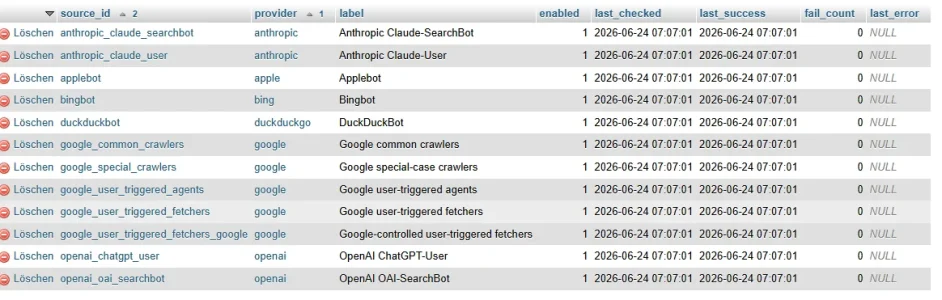
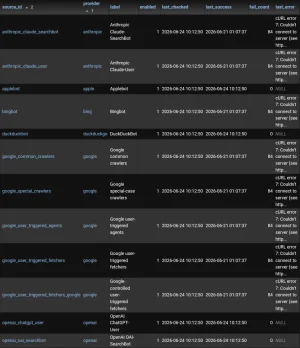
@otto and @dutchbb can you both please give me the output of these queries?

SELECT source_id, provider, label, enabled, FROM_UNIXTIME(last_checked) AS last_checked, FROM_UNIXTIME(last_success) AS last_success, fail_count, LEFT(last_error, 240) AS last_error FROM xf_zee_botguard_known_crawler_source ORDER BY provider, source_id;
1782280090480.webp

SELECT entry_id, active, FROM_UNIXTIME(next_run) AS next_run, run_rules FROM xf_cron_entry WHERE entry_id = 'zeeBgKnownCrawlerRefresh';
1782280146381.webp

I hope it helps... :-)
 
@otto and @dutchbb can you both please give me the output of these queries?

SQL:
SELECT source_id, provider, label, enabled,
       FROM_UNIXTIME(last_checked) AS last_checked,
       FROM_UNIXTIME(last_success) AS last_success,
       fail_count,
       LEFT(last_error, 240) AS last_error
FROM xf_zee_botguard_known_crawler_source
ORDER BY provider, source_id;

SQL:
SELECT entry_id, active, FROM_UNIXTIME(next_run) AS next_run, run_rules
FROM xf_cron_entry
WHERE entry_id = 'zeeBgKnownCrawlerRefresh';
Screenshot_20260624_103700_Opera.webp

Screenshot_20260624_103409_Opera.webp
 
Apologies if I'm missing something obvious here, but I've installed this on a 2nd site, and getting the following blocker:

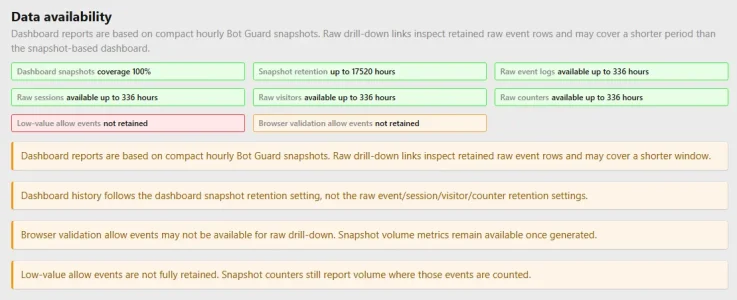
ErrorKnown crawler sources12 enabled sources / 4 refreshed successfully / 710 rangesOne or more enabled official sources have never refreshed successfully: Anthropic Claude-SearchBot, Anthropic Claude-User, Bingbot, Google common crawlers, …
 
Question: We currently have post_max_size and upload_max_filesize set to 8MB to prevent excessively large avatar and banner file uploads. I'd like to increase that to make uploading this add-on more convenient. Does anyone know if Xenforo has another way to limit avatar and banner file sizes?
 
Question: We currently have post_max_size and upload_max_filesize set to 8MB to prevent excessively large avatar and banner file uploads. I'd like to increase that to make uploading this add-on more convenient. Does anyone know if Xenforo has another way to limit avatar and banner file sizes?
Wrong thread...
but:
  • reduce allowed image size to 1200x1200 px eg
  • switch on image optimizer and webp support
Then it should not a problem to upload big pictures, xenforo shrinks them automaticly
 
Apologies if I'm missing something obvious here, but I've installed this on a 2nd site, and getting the following blocker:

ErrorKnown crawler sources12 enabled sources / 4 refreshed successfully / 710 rangesOne or more enabled official sources have never refreshed successfully: Anthropic Claude-SearchBot, Anthropic Claude-User, Bingbot, Google common crawlers, …
I've managed to track this down:

Code:
#   php -r '$url="https://developers.google.com/static/crawling/ipranges/common-crawlers.json"; $host=parse_url($url, PHP_URL_HOST); $records=dns_get_record($host, DNS_A + DNS_AAAA); $resolve=[]; foreach ($records as $r) { $ip=!empty($r["ip"]) ?
  $r["ip"] : (!empty($r["ipv6"]) ? $r["ipv6"] : ""); if ($ip) { $resolve[]=$host . ":443:" . (strpos($ip, ":") !== false ? "[".$ip."]" : $ip); } } $ch=curl_init($url); curl_setopt_array($ch,
  [CURLOPT_RETURNTRANSFER=>true,CURLOPT_FOLLOWLOCATION=>false,CURLOPT_TIMEOUT=>20,CURLOPT_CONNECTTIMEOUT=>5,CURLOPT_HTTPHEADER=>["Accept: application/json","User-Agent: XF-Bot-Guard (+https://xenforo.com/community/resources/xf-bot-
  guard.10508/)"],CURLOPT_RESOLVE=>$resolve]); $body=curl_exec($ch); var_dump($resolve, ["errno"=>curl_errno($ch),"error"=>curl_error($ch),"status"=>curl_getinfo($ch,CURLINFO_RESPONSE_CODE),"bytes"=>strlen((string)$body)]);'
array(10) {
  [0]=>
  string(40) "developers.google.com:443:142.251.30.102"
  [1]=>
  string(40) "developers.google.com:443:142.251.30.100"
  [2]=>
  string(40) "developers.google.com:443:142.251.30.138"
  [3]=>
  string(40) "developers.google.com:443:142.251.30.113"
  [4]=>
  string(40) "developers.google.com:443:142.251.30.139"
  [5]=>
  string(40) "developers.google.com:443:142.251.30.101"
  [6]=>
  string(50) "developers.google.com:443:[2a00:1450:4009:c19::64]"
  [7]=>
  string(50) "developers.google.com:443:[2a00:1450:4009:c19::65]"
  [8]=>
  string(50) "developers.google.com:443:[2a00:1450:4009:c19::8a]"
  [9]=>
  string(50) "developers.google.com:443:[2a00:1450:4009:c19::71]"
}
array(4) {
  ["errno"]=>
  int(7)
  ["error"]=>
  string(26) "Couldn't connect to server"
  ["status"]=>
  int(0)
  ["bytes"]=>
  int(0)
}

The servers only have IPv4 available, so fails on the IPv6 addresses.
 
I've managed to track this down:

Code:
#   php -r '$url="https://developers.google.com/static/crawling/ipranges/common-crawlers.json"; $host=parse_url($url, PHP_URL_HOST); $records=dns_get_record($host, DNS_A + DNS_AAAA); $resolve=[]; foreach ($records as $r) { $ip=!empty($r["ip"]) ?
  $r["ip"] : (!empty($r["ipv6"]) ? $r["ipv6"] : ""); if ($ip) { $resolve[]=$host . ":443:" . (strpos($ip, ":") !== false ? "[".$ip."]" : $ip); } } $ch=curl_init($url); curl_setopt_array($ch,
  [CURLOPT_RETURNTRANSFER=>true,CURLOPT_FOLLOWLOCATION=>false,CURLOPT_TIMEOUT=>20,CURLOPT_CONNECTTIMEOUT=>5,CURLOPT_HTTPHEADER=>["Accept: application/json","User-Agent: XF-Bot-Guard (+https://xenforo.com/community/resources/xf-bot-
  guard.10508/)"],CURLOPT_RESOLVE=>$resolve]); $body=curl_exec($ch); var_dump($resolve, ["errno"=>curl_errno($ch),"error"=>curl_error($ch),"status"=>curl_getinfo($ch,CURLINFO_RESPONSE_CODE),"bytes"=>strlen((string)$body)]);'
array(10) {
  [0]=>
  string(40) "developers.google.com:443:142.251.30.102"
  [1]=>
  string(40) "developers.google.com:443:142.251.30.100"
  [2]=>
  string(40) "developers.google.com:443:142.251.30.138"
  [3]=>
  string(40) "developers.google.com:443:142.251.30.113"
  [4]=>
  string(40) "developers.google.com:443:142.251.30.139"
  [5]=>
  string(40) "developers.google.com:443:142.251.30.101"
  [6]=>
  string(50) "developers.google.com:443:[2a00:1450:4009:c19::64]"
  [7]=>
  string(50) "developers.google.com:443:[2a00:1450:4009:c19::65]"
  [8]=>
  string(50) "developers.google.com:443:[2a00:1450:4009:c19::8a]"
  [9]=>
  string(50) "developers.google.com:443:[2a00:1450:4009:c19::71]"
}
array(4) {
  ["errno"]=>
  int(7)
  ["error"]=>
  string(26) "Couldn't connect to server"
  ["status"]=>
  int(0)
  ["bytes"]=>
  int(0)
}

The servers only have IPv4 available, so fails on the IPv6 addresses.

Ah thats helpful, I'll look at a ipv4 only solution or make it detect capability for that.
 
It looks like the affected installs are likely running into the same IPv6-related edge case.

Some remote sources publish both IPv4 and IPv6 DNS records. On servers that do not have working IPv6 outbound access, the current fetch path can sometimes pin the request to an IPv6 address instead of using a working IPv4 address. That explains why the problem can appear inconsistent - it depends on how the hostname resolves at the time.

I’m patching this so Bot Guard will prefer IPv4 when a public IPv4 address is available, and only use IPv6 when IPv6 is genuinely the only option for that source.

This should resolve the issue for everyone affected by this particular problem, while keeping the existing DNS safety checks in place.

I expect to have the update out tomorrow. I just need to run it in production for a while first to make sure it is stable.
 
Back
Top Bottom