XF Bot Guard

XF Bot Guard 1.4.1

No permission to download
You mean, like, a hard-deny option? Basically, an option that would treat "Forced challenge IPs/CIDRs/ASNs" and "Additional forced challenge CIDR JSON sources" as targets to drop entirely, not just challege?

Yep, there's certain ranges that are 100% AI/data centers that I'd be confident on completely blocking.
 
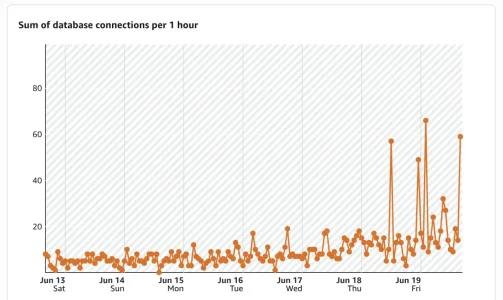
Is anybody else seeing a huge spike in DB connections randomly with this plugin? Installed and implemented yesterday and twice today I've had to reboot my db server because the connections spiked and locked up. Never had this happen until I installed this plugin.

1781909219893.webp

We don't run any other plugins because I tend to be weary of them...
 
Is anybody else seeing a huge spike in DB connections randomly with this plugin? Installed and implemented yesterday and twice today I've had to reboot my db server because the connections spiked and locked up. Never had this happen until I installed this plugin.

View attachment 340213

We don't run any other plugins because I tend to be weary of them...

During a bot storm, or any period of heavy bot load, this can certainly happen.

The add-on is these days much more efficient when handling queries, compared to earlier versions, but the cost of fighting bots is not zero. This is especially noticeable if XenForo caching is not enabled.

With XenForo cache enabled, query results used in the hot path can be cached and reused. Without it, those queries need to run on every single page load, which adds up very quickly under sustained bot traffic.
 
During a bot storm, or any period of heavy bot load, this can certainly happen.

The add-on is these days much more efficient when handling queries, compared to earlier versions, but the cost of fighting bots is not zero. This is especially noticeable if XenForo caching is not enabled.

With XenForo cache enabled, query results used in the hot path can be cached and reused. Without it, those queries need to run on every single page load, which adds up very quickly under sustained bot traffic.
It’s not during a bot storm. The logs don’t support that. I’ll let you know if I find any useful information.
 
It’s not during a bot storm. The logs don’t support that. I’ll let you know if I find any useful information.

That would be great, thank you. If you don't have XenForo cacher enabled, I would highly recommend it, where you can. More than just Bot Guard will benefit from it.
 
It’s not during a bot storm. The logs don’t support that. I’ll let you know if I find any useful information.

Also, please ensure you check the health check page - just in case it is warning about something. Plus, review your log retention settings. Finally, the quick settings "balanced" with SEO overlay applied, plus even original survival mode are a great combination. It is what I run it with.
 
Just a quick note: the next version will include bundled IP databases, so sites that are not using services such as Cloudflare will still receive IP-to-country and IP-to-ASN data in the hot path, provided directly via Bot Guard itself.

This does increase the add-on package size to around 30 MB.
Hmm, is this really a good idea? IP to country relations and IP to ASN relations do change pretty frequently. Which means: the databases need to be updated frequently to be able to deliver correct and up to date information. So how do you plan to update these ip-data?

Other add ons in that field typically use the free maxmind db - one needs to create a (free) account for that and it then automatically updates via a cron job, for the country db most of the time once per week. The de facto location that a bunch (if not the majority) of those add ons are using for the maxmind db is /internal_data/maxmind - which helps, not to have the very same db(s) x times on your forum.
 
Hmm, is this really a good idea? IP to country relations and IP to ASN relations do change pretty frequently. Which means: the databases need to be updated frequently to be able to deliver correct and up to date information. So how do you plan to update these ip-data?

Other add ons in that field typically use the free maxmind db - one needs to create a (free) account for that and it then automatically updates via a cron job, for the country db most of the time once per week. The de facto location that a bunch (if not the majority) of those add ons are using for the maxmind db is /internal_data/maxmind - which helps, not to have the very same db(s) x times on your forum.

That’s a fair concern, and you’re right that IP-to-country and IP-to-ASN data does change over time.

One important distinction, though, is that Bot Guard is not using this data as an absolute source of truth in the sense of “this visitor is from country X, therefore do Y.” Country and ASN are heuristic signals, not hard identity or location proof.

What matters more for Bot Guard is that the lookup source is consistent and available.

For example, one of the useful signals is detecting when a repeat visitor, session pattern, or otherwise related request history suddenly appears to change country or ASN. That is a behavioural signal. It is not about perfectly proving where somebody is located; it is about detecting a meaningful change in the observed network profile.

That is also one reason I prefer Bot Guard to manage its own database by default. If Bot Guard silently depends on another add-on’s MaxMind setup, or a shared /internal_data/maxmind path, then I cannot reliably know whether the database exists, whether it includes ASN data, whether it is current, whether another add-on updates it, or whether its behaviour changes outside Bot Guard’s control.

The bundled database gives Bot Guard a known baseline that works out of the box, including for forums that are not behind Cloudflare and do not already have MaxMind configured.

The bundled data is not MaxMind data. It is IPLocate.io data in MaxMind-compatible MMDB format, and the release packaging pipeline pulls a fresh copy automatically when a Bot Guard release is built. So each Bot Guard release ships with a current copy at build time.

You are right that a database bundled with an add-on is only as current as the installed version. I do not want to pretend otherwise. But for Bot Guard’s use case, the country/ASN value is one input into the scoring and behavioural model, not a compliance-grade geolocation decision. A consistent local signal is still far more useful than having no country/ASN signal at all.

I may look at adding an option later to use an existing local MMDB path, or a Bot Guard-managed updater, for sites that want to maintain those databases independently. But the default needs to be self-contained, predictable, and not dependent on Cloudflare, MaxMind account setup, another add-on, or a shared path that may or may not exist.
 
Getting some errors in my server log:

Code:
XF\Db\DuplicateKeyException: XF Bot Guard Cloudflare Edge Enforcement failed open: MySQL query error [1062]: Duplicate entry '6- \x01\x1C\x00j\x00\x86\x00\xD2\xBD\xA8\xE9g\xFC\x8E\xFB' for key 'ip_unique'

src/XF/Db/AbstractStatement.php:225
Generated by: Unknown account
Jun 20, 2026 at 9:58 AM

Stack trace

INSERT  INTO `xf_zee_botguard_edge_ip` (`ip_version`, `ip_bin`, `ip_text`, `status`, `first_seen`, `last_seen`, `expires_at`, `score_max`, `edge_priority`, `hit_count`, `fail_count`, `reason_codes`, `metadata`, `ip_hash`) VALUES (?, ?, ?, ?, ?, ?, ?, ?, ?, ?, ?, ?, ?, ?)
------------

#0 src/XF/Db/Mysqli/Statement.php(207): XF\Db\AbstractStatement->getException('MySQL query err...', 1062, '23000')
#1 src/XF/Db/Mysqli/Statement.php(83): XF\Db\Mysqli\Statement->getException('MySQL query err...', 1062, '23000')
#2 src/XF/Db/AbstractAdapter.php(96): XF\Db\Mysqli\Statement->execute()
#3 src/XF/Db/AbstractAdapter.php(219): XF\Db\AbstractAdapter->query('INSERT  INTO `x...', Array)
#4 src/addons/Zee/BotGuard/Repository/EdgeIp.php(64): XF\Db\AbstractAdapter->insert('xf_zee_botguard...', Array)
#5 src/addons/Zee/BotGuard/Repository/EdgeIp.php(116): Zee\BotGuard\Repository\EdgeIp->insertEdgeRow(Array)
#6 src/addons/Zee/BotGuard/Service/EdgeEnforcement.php(72): Zee\BotGuard\Repository\EdgeIp->queueIp(Array, '2a02:a474:a8e8:...', 90, 165, 3600, Array, Array)
#7 src/addons/Zee/BotGuard/Service/ChallengeDecider.php(207): Zee\BotGuard\Service\EdgeEnforcement->consider(Array, 'challenge_requi...', 90, Array, Array)
#8 src/addons/Zee/BotGuard/Service/ChallengeDecider.php(93): Zee\BotGuard\Service\ChallengeDecider->evaluateInteractiveDocumentRequest(Array, 1.78194E+9)
#9 src/addons/Zee/BotGuard/Listener.php(159): Zee\BotGuard\Service\ChallengeDecider->evaluate(Array)
#10 src/XF/Extension.php(86): Zee\BotGuard\Listener::dispatcherPreDispatch(Object(XF\Mvc\Dispatcher), Object(XF\Mvc\RouteMatch))
#11 src/XF/App.php(3366): XF\Extension->fire('dispatcher_pre_...', Array, NULL)
#12 src/XF/Mvc/Dispatcher.php(96): XF\App->fire('dispatcher_pre_...', Array)
#13 src/XF/Mvc/Dispatcher.php(57): XF\Mvc\Dispatcher->beforeDispatch(Object(XF\Mvc\RouteMatch))
#14 src/XF/App.php(2824): XF\Mvc\Dispatcher->run()
#15 src/XF.php(814): XF\App->run()
#16 index.php(23): XF::runApp('XF\\Pub\\App')
#17 {main}

Request state

array(4) {
  ["url"] => string(35) "/attachments/img_4597-jpeg.2248372/"
  ["referrer"] => string(67) "https://www.domain.com/threads/bladiebla.389035/page-185"
  ["_GET"] => array(1) {
    ["/attachments/img_4597-jpeg_2248372/"] => string(0) ""
  }
  ["_POST"] => array(0) {
  }
}

 
Getting some errors in my server log:

Code:
XF\Db\DuplicateKeyException: XF Bot Guard Cloudflare Edge Enforcement failed open: MySQL query error [1062]: Duplicate entry '6- \x01\x1C\x00j\x00\x86\x00\xD2\xBD\xA8\xE9g\xFC\x8E\xFB' for key 'ip_unique'

src/XF/Db/AbstractStatement.php:225
Generated by: Unknown account
Jun 20, 2026 at 9:58 AM

Stack trace

INSERT  INTO `xf_zee_botguard_edge_ip` (`ip_version`, `ip_bin`, `ip_text`, `status`, `first_seen`, `last_seen`, `expires_at`, `score_max`, `edge_priority`, `hit_count`, `fail_count`, `reason_codes`, `metadata`, `ip_hash`) VALUES (?, ?, ?, ?, ?, ?, ?, ?, ?, ?, ?, ?, ?, ?)
------------

#0 src/XF/Db/Mysqli/Statement.php(207): XF\Db\AbstractStatement->getException('MySQL query err...', 1062, '23000')
#1 src/XF/Db/Mysqli/Statement.php(83): XF\Db\Mysqli\Statement->getException('MySQL query err...', 1062, '23000')
#2 src/XF/Db/AbstractAdapter.php(96): XF\Db\Mysqli\Statement->execute()
#3 src/XF/Db/AbstractAdapter.php(219): XF\Db\AbstractAdapter->query('INSERT  INTO `x...', Array)
#4 src/addons/Zee/BotGuard/Repository/EdgeIp.php(64): XF\Db\AbstractAdapter->insert('xf_zee_botguard...', Array)
#5 src/addons/Zee/BotGuard/Repository/EdgeIp.php(116): Zee\BotGuard\Repository\EdgeIp->insertEdgeRow(Array)
#6 src/addons/Zee/BotGuard/Service/EdgeEnforcement.php(72): Zee\BotGuard\Repository\EdgeIp->queueIp(Array, '2a02:a474:a8e8:...', 90, 165, 3600, Array, Array)
#7 src/addons/Zee/BotGuard/Service/ChallengeDecider.php(207): Zee\BotGuard\Service\EdgeEnforcement->consider(Array, 'challenge_requi...', 90, Array, Array)
#8 src/addons/Zee/BotGuard/Service/ChallengeDecider.php(93): Zee\BotGuard\Service\ChallengeDecider->evaluateInteractiveDocumentRequest(Array, 1.78194E+9)
#9 src/addons/Zee/BotGuard/Listener.php(159): Zee\BotGuard\Service\ChallengeDecider->evaluate(Array)
#10 src/XF/Extension.php(86): Zee\BotGuard\Listener::dispatcherPreDispatch(Object(XF\Mvc\Dispatcher), Object(XF\Mvc\RouteMatch))
#11 src/XF/App.php(3366): XF\Extension->fire('dispatcher_pre_...', Array, NULL)
#12 src/XF/Mvc/Dispatcher.php(96): XF\App->fire('dispatcher_pre_...', Array)
#13 src/XF/Mvc/Dispatcher.php(57): XF\Mvc\Dispatcher->beforeDispatch(Object(XF\Mvc\RouteMatch))
#14 src/XF/App.php(2824): XF\Mvc\Dispatcher->run()
#15 src/XF.php(814): XF\App->run()
#16 index.php(23): XF::runApp('XF\\Pub\\App')
#17 {main}

Request state

array(4) {
  ["url"] => string(35) "/attachments/img_4597-jpeg.2248372/"
  ["referrer"] => string(67) "https://www.domain.com/threads/bladiebla.389035/page-185"
  ["_GET"] => array(1) {
    ["/attachments/img_4597-jpeg_2248372/"] => string(0) ""
  }
  ["_POST"] => array(0) {
  }
}

Thanks for the bug report. A fix for this one is already staged and will be available in the next release :)

p.s., Nothing went wrong on your end, and Bot Guard continued working as intended. What happened is that a bot appears to have generated a burst of activity, so Bot Guard queued it for Cloudflare edge enforcement.

At roughly the same time, another Bot Guard process tried to queue the same enforcement action for the same bot as well. That created a small race condition.

The end result was just noisy logging - not a protection failure, and nothing you need to change on your side.
 
Just a suggestion @zeeb0t

A complete blacklist for ASN & IP ranges would be nice to prevent any resource loading, maybe just a simple message like "Your IP has been blacklisted".
IMO, informing a visitor that their IP has been blacklisted also informs the bad actors, and they'll simply find a way around it.
 
IMO, informing a visitor that their IP has been blacklisted also informs the bad actors, and they'll simply find a way around it.
You make the message more vague, such as "The site is not accessible from your region"
 
zeeb0t updated XF Bot Guard with a new update entry:

Minor Release: v1.3.3

XF Bot Guard 1.3.3

Important upgrade notes for existing customers:


This release includes new bundled IP country/ASN lookup files and a local MMDB reader, increasing the add-on package size to approximately 30 MB.

If you normally upload add-ons through the XenForo ACP, you may need to increase your PHP post_max_size and upload_max_filesize settings to allow the larger upload. Otherwise, upload the files manually via FTP, SFTP, or SCP...

Read the rest of this update entry...
 
If you’re enjoying XF Bot Guard, please consider leaving a rating or review. You’ll find the option near the download button here:

https://xenforo.com/community/resources/xf-bot-guard.10508/

Reviews really help the add-on reach more XenForo admins, and they also help me know whether I’m moving things in the right direction.

As always, if you have feedback, questions, or need help with anything, please feel free to share. I’m always happy to help.
 
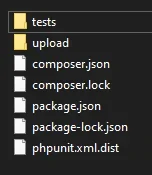
so this is probably answered already. i decided to upload this version manually for obvious reasons and there are a bunch of folders outside the upload folder. do i need to upload them somewhere as well? addon appears to have updated just fine with the content inside upload folder uploaded to the root of the xenforo folder. i had forgotten that addon files are scattered across the file structure and are not limited to a specific addons folder.

1782005512115.webp
 
so this is probably answered already. i decided to upload this version manually for obvious reasons and there are a bunch of folders outside the upload folder. do i need to upload them somewhere as well? addon appears to have updated just fine with the content inside upload folder uploaded to the root of the xenforo folder. i had forgotten that addon files are scattered across the file structure and are not limited to a specific addons folder.

View attachment 340263

You only need to upload the contents of the upload directory. The others that reside outside the upload directory are for those who wish to run the test suite to make sure I am delivering stable product :D
 
ErrorASN range cache3 configured ASN(s) / 831 active rangesConfigured ASNs have no active cached ranges, so their network-list entries cannot match request IPs: AS56046, AS132203

how do i fix this lol?
 
ErrorASN range cache3 configured ASN(s) / 831 active rangesConfigured ASNs have no active cached ranges, so their network-list entries cannot match request IPs: AS56046, AS132203

how do i fix this lol?

That health warning means XF Bot Guard has found ASN entries in your network override options, but two of them do not currently have active cached IP ranges:

Code:
AS56046
AS132203

ASN entries are not matched directly at request time. Bot Guard first expands each configured ASN into CIDR ranges using the scheduled refresh task, then request matching uses that local cache.

Please check the following:

  1. In your Bot Guard options, make sure the ASN entries are entered as plain numbers only, for example:

    Code:
    56046
    132203

    Not:

    Code:
    AS56046
    AS132203

  2. Run the cron task manually:

    Code:
    Tools > Cron entries > XF Bot Guard known crawler refresh > Run now

  3. Recheck the Bot Guard health check afterwards.

If the same ASNs still report no active cached ranges after following the steps above and the cron runs successfully, let me know and we can investigate further.
 
Back
Top Bottom