XF Bot Guard

XF Bot Guard 1.4.1

No permission to download
What are the addons table in database? as I have to manually remove them to make room in order to upload back to my server.

Do you mean the table names it manages? If so, the full list is as follows (as at v1.3.5):

SQL:
xf_zee_botguard_asn_range
xf_zee_botguard_cf_config
xf_zee_botguard_cf_sync_log
xf_zee_botguard_counter
xf_zee_botguard_crawler_rdns
xf_zee_botguard_edge_ip
xf_zee_botguard_edge_never_export
xf_zee_botguard_event
xf_zee_botguard_event_detail
xf_zee_botguard_event_reason
xf_zee_botguard_fp_ip
xf_zee_botguard_ip
xf_zee_botguard_ip_rdns
xf_zee_botguard_known_crawler_range
xf_zee_botguard_known_crawler_source
xf_zee_botguard_link_chronology_dwell
xf_zee_botguard_lock
xf_zee_botguard_network_cidr_range
xf_zee_botguard_network_cidr_source
xf_zee_botguard_online_challenge
xf_zee_botguard_report_snapshot
xf_zee_botguard_report_snapshot_metric
xf_zee_botguard_self_server_ip
xf_zee_botguard_self_server_ip_state
xf_zee_botguard_session
xf_zee_botguard_shadow_canary
xf_zee_botguard_visitor
 
Working fine at the moment.

Nice, I have a full static code analysis occuring as well as my now rather large test suite running over it. I am not seeing any issues. But I will perform manual regression on my own production forum this weekend, before officially giving it the all clear.
 
Do you mean the table names it manages? If so, the full list is as follows (as at v1.3.5):

SQL:
xf_zee_botguard_asn_range
xf_zee_botguard_cf_config
xf_zee_botguard_cf_sync_log
xf_zee_botguard_counter
xf_zee_botguard_crawler_rdns
xf_zee_botguard_edge_ip
xf_zee_botguard_edge_never_export
xf_zee_botguard_event
xf_zee_botguard_event_detail
xf_zee_botguard_event_reason
xf_zee_botguard_fp_ip
xf_zee_botguard_ip
xf_zee_botguard_ip_rdns
xf_zee_botguard_known_crawler_range
xf_zee_botguard_known_crawler_source
xf_zee_botguard_link_chronology_dwell
xf_zee_botguard_lock
xf_zee_botguard_network_cidr_range
xf_zee_botguard_network_cidr_source
xf_zee_botguard_online_challenge
xf_zee_botguard_report_snapshot
xf_zee_botguard_report_snapshot_metric
xf_zee_botguard_self_server_ip
xf_zee_botguard_self_server_ip_state
xf_zee_botguard_session
xf_zee_botguard_shadow_canary
xf_zee_botguard_visitor
That’s right. Thanks
 
That’s right. Thanks

Btw seeing as there is a demand growing for it, I plan to put the no-db-in-hot-path branch I have built through its paces during the start of next week and may hopefully release it in 1.3.6. It eliminates much of the db writing and read path, especially for public requests. The downside is visibility and reducing its running mode to the more blunt instruments. But that is still going to knock out the majority of bots cheaply. Then once they start to give up (as they eventually do, I find) - the full suite which needs a persistent data store (hence DB) can be enabled - once the server resources are reclaimed.

It will be an off my default optional quick setting. And it will require that XenForo cache is enabled so it can at least store some basic hit counters for primitive scoring capabilities.
 
Btw seeing as there is a demand growing for it, I plan to put the no-db-in-hot-path branch I have built through its paces during the start of next week and may hopefully release it in 1.3.6. It eliminates much of the db writing and read path, especially for public requests. The downside is visibility and reducing its running mode to the more blunt instruments. But that is still going to knock out the majority of bots cheaply. Then once they start to give up (as they eventually do, I find) - the full suite which needs a persistent data store (hence DB) can be enabled - once the server resources are reclaimed.

It will be an off my default optional quick setting. And it will require that XenForo cache is enabled so it can at least store some basic hit counters for primitive scoring capabilities.

Yeah. That will be great, I wasn’t aware about DB and now I have to edit the DB locally on my machine as my max quota for DB is limited.
 
Yeah. That will be great, I wasn’t aware about DB and now I have to edit the DB locally on my machine as my max quota for DB is limited.

It would still install the tables by default, but the option would avoid using most of them. So, your hosting environment limits the number of tables you can have in your database?
 
Just wanted to leave a note here. To verify that the data in internal_data folder is not handled by object storage functionality of xenforo. I assume it only handle predefined sets of folders and not everything inside data and internal_data folder?
 
Just wanted to leave a note here. To verify that the data in internal_data folder is not handled by object storage functionality of xenforo. I assume it only handle predefined sets of folders and not everything inside data and internal_data folder?

It only manages files within the zee folder inside internal_data
 
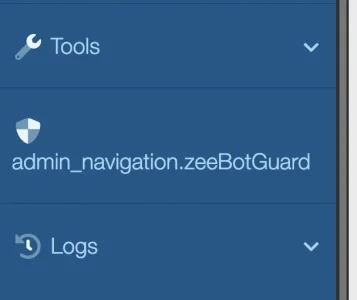
I uninstalled this add-on via the normal admin control panel, and now I have a residual sidebar entry:
1782389237271.webp

Is this an issue with the uninstall process? I haven't seen this occur with any other add-on that I've removed. I can hand-delete it, I believe, using debug mode or through the database but thought I'd ask here first.
 
I uninstalled this add-on via the normal admin control panel, and now I have a residual sidebar entry:
View attachment 340510

Is this an issue with the uninstall process? I haven't seen this occur with any other add-on that I've removed. I can hand-delete it, I believe, using debug mode or through the database but thought I'd ask here first.

Thanks for the report, I will look into it and provide a fix. Meanwhile yes, please delete manually.
 
yeah i faced this issue when i was struggling with server load myself. had to install and uninstall a few times to get rid of it. if you plan to reinstall it later on, it should fix at the time.
 
Upgraded to latest version and ran a manual cron update for the MMDB update.
Code:
The downloaded local IPLocate country or ASN database could not be validated. Bot Guard will ignore unavailable local geo lookup data, continue to fail open, and retry through the MMDB refresh cron.

Still not working. I checked the status.json:
Code:
    "status": "error",
    "last_checked": 1782389629,
    "last_success": 0,
    "last_error": "Downloaded MMDB file did not validate: reader_unavailable",
    "manifest_etag": "",
    "manifest_last_modified": "",
    "manifest_generated_at": "",
    "not_modified": false,
    "files": []

Could it be that a CF or security plugin is the culprit?
 
Thanks for the report, I will look into it and provide a fix. Meanwhile yes, please delete manually.
FWIW, I couldn't find a corresponding entry in any of the admin navigation tables, nor could I find it in development mode, and it didn't seem to be coming from my cache. Initiating a master data rebuild from the CLI removed the offending entry.
 
It would still install the tables by default, but the option would avoid using most of them. So, your hosting environment limits the number of tables you can have in your database?

No, I have limited GB on my dB.
 
for me xf_zee_botguard_counter appears to be the biggest table after running the addon for a few hours from scratch. after that these are the tables.

Code:
xf_zee_botguard_event
xf_zee_botguard_event_detail
xf_zee_botguard_shadow_canary
xf_zee_botguard_session
 
Is it possible to hide the docs folder in the plugin folder, or keep it in the root of the site?
 
for me xf_zee_botguard_counter appears to be the biggest table after running the addon for a few hours from scratch. after that these are the tables.

Code:
xf_zee_botguard_event
xf_zee_botguard_event_detail
xf_zee_botguard_shadow_canary
xf_zee_botguard_session

it needs sorted. My forum went down for a day.
 
Back
Top Bottom