Xenforo Social Proof

Xenforo Social Proof 1.6.0

No permission to download

Mitchy71

Active member
Mitchy71 submitted a new resource:

Xenforo Social Proof - Social Proof for your Xenforo site

✅ [Add-on] Social Proof Popups for XenForo 2.3+


Live user activity • Real download notifications • FOMO-enhancing engagement widget

Bring real-time “social proof” to your forum with a modern popup system that shows live activity happening on your site. Boost engagement, increase downloads, and make your community feel active — automatically.

✨ Features

🔹

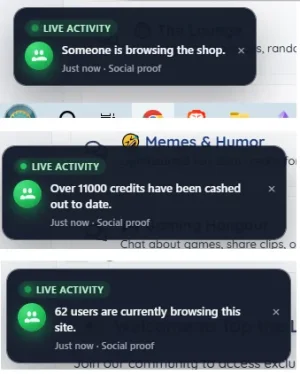
Displays small, non-intrusive notifications in the bottom-left corner of your forum:

“Mitch just downloaded “EVP Analyzer Pack”...

Read more about this resource...
 
Mitchy71 updated Xenforo Social Proof with a new update entry:

Social Proof Popups — Version 1.2.0 Beta

✅ Social Proof Popups — Version 1.2.0 Beta


This update introduces major improvements to event tracking, admin customization, and new integrations — especially with DBTech Shop. It also includes several refinements that make social proof messaging smarter, more accurate, and more flexible.


🚀 New Features


✔ DBTech Shop Integration (Self-Tracking System)


DBTech Shop does not register activity in XenForo’s session tracker, so a custom tracking layer has been built:


Automatically logs...

Read the rest of this update entry...
 
Mitchy71 updated Xenforo Social Proof with a new update entry:

Social Proof Popups — Version 1.4.0 Beta

Social Proof Popups — Version 1.4.0 Beta

This update introduces several major improvements to real-time engagement tracking, frontend visuals, and event coverage across XenForo. Version 1.4.0 Beta significantly expands how activity is detected and displayed, introduces theming options, and enhances the overall polish of the popup system.

🚀 New Features
1. Light / Dark Theme Support (New Admin Option)

A brand-new theming system allows admins to choose between:

Dark theme (default)

Light...

Read the rest of this update entry...
 
Thanks for the feedback! You're totally right that using phrases is the XenForo-preferred way to handle text output — especially when it comes to translations or letting admins customize wording.

For the early beta versions, I hard-coded the messages mainly to focus on getting the feature set and event logic stable before layering in the full phrase system. This kept development fast while everything was still changing frequently.

Now that the core functionality is solid, migrating all popup text and event messages into proper XenForo phrases is absolutely planned. This will:

Support translations

Allow admins to customize popup wording

Make it easier to theme and extend the add-on

Follow XF coding standards more cleanly

You’ll likely see full phrase support in the next beta or stable release.
Appreciate you pointing it out!
 
Mitchy71 updated Xenforo Social Proof with a new update entry:

🎉 Social Proof Popups – 1.5.0 Beta Released!

🎉 Social Proof Popups – 1.5.0 Beta Released!


This update brings another wave of powerful improvements, including full reaction support, reaction name awareness, and a completely phrase-driven message system. Your forum will now feel even more alive with richer, more natural real-time activity notifications

🚀 New Features in 1.5.0 Beta

1. Reaction Events (NEW)

Social Proof now tracks XenForo reactions in real time!

Whenever a user reacts to content, the popup can now display messages...

Read the rest of this update entry...
 
Mitchy71 updated Xenforo Social Proof with a new update entry:

Introducing Social Proof Popups 1.6.0 — Full Stable Release!

🎉 Introducing Social Proof Popups 1.6.0 — Full Stable Release!

Real-Time Engagement for XenForo Just Got a Massive Upgrade 🚀

I’m excited to announce the stable release of Social Proof Popups 1.6.0, which ships with major new features, UI improvements, multiple new themes, and full reaction tracking. After months of development and testing, this add-on is now production-ready and more powerful than ever.


🌟 What is Social Proof Popups?


Social Proof Popups brings your forum to life by...

Read the rest of this update entry...
 
It is possible to remove "Social Proof" from the Live Activity indicators. I think this little bit of text is distracting. If it's there to promote the add-on, could a footer link be used as an alternative?
 
I can't find the phrases in the popup that need translation, like "Live ACTIVITY," "User online," etc. Where can I find them?
Every time I change pages, the popup reappears, showing the same thing if there are no new interactions. You should avoid having the same ad appearing every time you change pages or if it's already been displayed. Furthermore, popups should be displayed randomly, otherwise they'll always be the same.
 
I can't find the phrases in the popup that need translation, like "Live ACTIVITY," "User online," etc. Where can I find them?

Great question!
Most of the popup text is already phrase-based, but a few pieces are still hard-coded in the template or upcoming for phrase conversion.

Here’s where everything currently lives:

✅ Phrases already in the system

You can find the main translatable phrases under:

ACP → Appearance → Phrases → Search for: mitch_socialproof

These include things like the event messages (downloads, purchases, reviews, etc.).

⚠️ Text not yet phrase-based

A few items in the popup—such as:

“Live activity”

“Just now · Social proof”

Online count messages (“X users are browsing…”)

…are currently hard-coded in the template and JavaScript.
Full phrase support for these is planned in an upcoming version so translators can localize every part of the popup.

💬 What to do right now

At the moment, these strings aren’t exposed as phrases, so they can't be translated through the ACP.
This will change soon — the goal is for 100% of all visible text to be phrase-driven.
 
It is possible to remove "Social Proof" from the Live Activity indicators. I think this little bit of text is distracting. If it's there to promote the add-on, could a footer link be used as an alternative?

Thanks for the suggestion, it will be considered :)
 
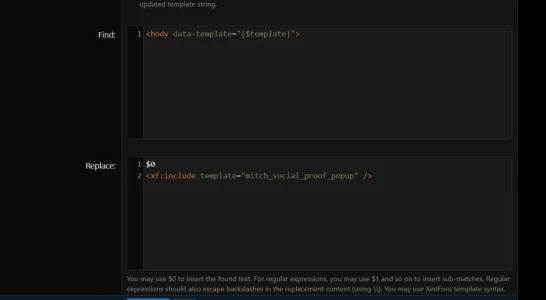
Thanks for the screenshot!
That template modification is correct, but the Find value is very theme-sensitive. Some custom styles change the <body> tag, which prevents the modification from matching.

I’ll update the addon to use a more flexible regex so it works on all themes automatically. Thanks for pointing it out!
 
Back
Top Bottom