[XB] Text to Speech

[XB] Text to Speech [Paid] 1.0.0

No permission to buy ($15.00)

Painbaker

Well-known member
Painbaker submitted a new resource:

[XB] Text to Speech - Adds text-to-speech functionality using the Web Speech API

Adds text-to-speech functionality using the Web Speech API.
Works in modern browsers that support the Web Speech API, such as Chrome and Firefox.

Text To Speech allows users to consume forum content in audio form instead of reading. This is useful for long discussions, background listening, and situations where reading is inconvenient or impossible.

Features​

  • 🔊 Voice Controls: Change voice, volume, pitch, and speech rate. Settings are saved in cookies...

Read more about this resource...
 
I bought it to try it, but it doesn't seem to work on Firefox/Opera/Chrome on Android. Is there something the user needs to do to enable it on Android? Or are these all Webview based and incompatible? It works on desktop and on Samsung android browser, but my main use case is for the most popular browsers on mobile.

The icon in posts is quite small and hard to hit on mobile. I'd like people with some sight impairment to be able to easily hit it.

When it works its really nice and useful. I'd love to be able to listen to reports, tickets, UBS comments.
Most voices sound a bit synthetic. If its possible to add some more natural voices then that would be nice.
 
Last edited:
Its too bad that the icons / links for the function display on browsers were it does not function. Even though this functionality does not seem to function on most browsers, it would still be nice to offer the functionality on those. But adding malfunctioning icons and links just seems buggy and it seems better to disable it.
 
Does this work with @Bob 's addons?
When it works its really nice and useful. I'd love to be able to listen to reports, tickets, UBS comments.
I'll take a look into it.

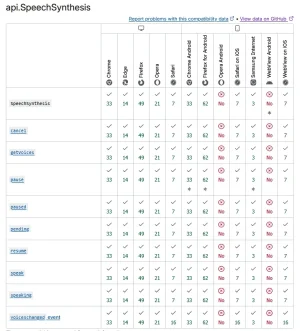
I bought it to try it, but it doesn't seem to work on Firefox/Opera/Chrome on Android. Is there something the user needs to do to enable it on Android? Or are these all Webview based and incompatible? It works on desktop and on Samsung android browser, but my main use case is for the most popular browsers on mobile.

It depends on OS and browser version. According to Mozilla docs, it's:


1770833557843.webp


The icon in posts is quite small and hard to hit on mobile. I'd like people with some sight impairment to be able to easily hit it.

This can be changed in the style settings:

1770833518296.webp

Most voices sound a bit synthetic. If its possible to add some more natural voices then that would be nice.

This add-on supports only the Web Speech API.

Using external TTS services would add significant complexity, including the need for a proxy layer. Since most of these services charge per usage, enabling them for guests would likely be too costly.
 
It depends on OS and browser version. According to Mozilla docs, it's:
Weird. That means it should work on Chrome/Firefox on android. Can this be a style compatibility issue? I'm using PixelExit XenBase / Nova style.

Would it be possible to hide the functionality on Opera Android/Webview?
This can be changed in the style settings:
icon size setting is not there:
style-properties/group&group=pb_texttospeech
Is this only available in development mode and needs to be made available in normal made?
 
Last edited:
Weird. That means it should work on Chrome/Firefox on android. Can this be a style compatibility issue? I'm using PixelExit XenBase / Nova style.

I don't think it's a style conflict.
Make sure that webspeech api is supported by your browser: https://leaonline.github.io/easy-speech/
There is a detailed debug log below.

Would it be possible to hide the functionality on Opera Android/Webview?
I will add it in the next update.

con size setting is not there:
style-properties/group&group=pb_texttospeech
Is this only available in development mode and needs to be made available in normal made?
Sorry, this was added in a newer version that has not yet been published.
Until then, you can use this in Extra.less:

Code:
.actionBar-action--speech:before
{
    font-size: 15px;
}

.actionBar-action--speechPause:before
{
    font-size: 15px;
}

.actionBar-action--speechResume:before
{
    font-size: 15px;
}
 
Back
Top Bottom