XF 2.3 What claude.md instructions do you use for styling?

Alpha1

Well-known member
Licensed customer
I'm using Claude Code + Playwrite for styling on my staging site. While Im getting good results, its like working with a developer with dementia. It keeps forgetting and even switches from Playwrite to Chrome without mentioning. it goes from great to bad.
CC does not seem to understand much of the styling system. Instead of changing style properties, color palette, etc I have a massive extra.less file.
I know having a good md file is the key to success with CC.
So if anyone has suggestions on what to add to the md file or if additional tools are advisable, then that would be most welcome.
 
I'm using Claude Code + Playwrite for styling on my staging site. While Im getting good results, its like working with a developer with dementia. It keeps forgetting and even switches from Playwrite to Chrome without mentioning. it goes from great to bad.
CC does not seem to understand much of the styling system. Instead of changing style properties, color palette, etc I have a massive extra.less file.
I know having a good md file is the key to success with CC.
So if anyone has suggestions on what to add to the md file or if additional tools are advisable, then that would be most welcome.
Are you using Claude Project or just using the chat?
 
Good point. I did setup a XF styling project and a folder for the project. I added an md file, XF2.3.10, my style and some other stuff to the folder.
I had a previous chat with Claude (not code) about XF styling and added that to the project.
But something went wrong there, as the chat convo does not list the project.
And Claude CoWork created new folders for projects.
I don't see how to add the Claude Code chat to a project.
 
Good point. I did setup a XF styling project and a folder for the project. I added an md file, XF2.3.10, my style and some other stuff to the folder.
I had a previous chat with Claude (not code) about XF styling and added that to the project.
But something went wrong there, as the chat convo does not list the project.
And Claude CoWork created new folders for projects.
I don't see how to add the Claude Code chat to a project.
Clicking the + and then add to project. Choose project.
 
Some of us are total noobs when it comes to coding; it's all about the vibes.

Here goes nothing... 😂


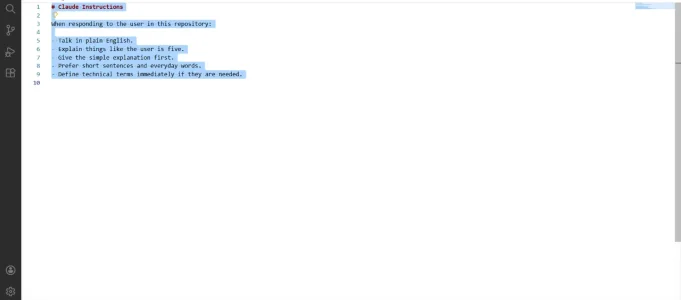
Markdown (GitHub flavored):
# Claude Instructions

When responding to the user in this repository:

- Talk in plain English.
- Explain things like the user is five.
- Give the simple explanation first.
- Prefer short sentences and everyday words.
- Define technical terms immediately if they are needed.
 

Attachments

  • Claude.MD.webp
    Claude.MD.webp
    14.2 KB · Views: 10
For styling you'll really need to have a robust CLAUDE/AGENTS.md file in my honest opinion (have had 3 classes taught by Anthropic at the new job so far for our upcoming AI usaged based hackathon) and this has really been honed in on from Anthropic themselves.

You really need to be verbose and YOU need to explain and write short requirements (really do write these yourself never let an llm write and assume your requirements, even if it's asking you questions it's still not doing that everywhere for that feature/project/task).

Research (Tell AI to find sources of truth; in the code, in docs, in outside resources)
Plan. Also often tell it to cut scope and simplify
Implement

For smallish tasks I'd just research => implement. For tiny tasks I'd just yell at it to implement

If you're wanting this to be so it uses palletes and style properties instead of using custom css and template modifications you will need to explain that in detail in your agent memory files so that it does it every single time when a task is asked. Otherwise, even in the same exact context session, if you give another task to do it will default to your memory files which don't have the instructions to use Playwright and go back to figuring out its own way to accomplish what you want it to do.
 
For styling you'll really need to have a robust CLAUDE/AGENTS.md file in my honest opinion (have had 3 classes taught by Anthropic at the new job so far for our upcoming AI usaged based hackathon) and this has really been honed in on from Anthropic themselves.

You really need to be verbose and YOU need to explain and write short requirements (really do write these yourself never let an llm write and assume your requirements, even if it's asking you questions it's still not doing that everywhere for that feature/project/task).

Research (Tell AI to find sources of truth; in the code, in docs, in outside resources)
Plan. Also often tell it to cut scope and simplify
Implement

For smallish tasks I'd just research => implement. For tiny tasks I'd just yell at it to implement

If you're wanting this to be so it uses palletes and style properties instead of using custom css and template modifications you will need to explain that in detail in your agent memory files so that it does it every single time when a task is asked. Otherwise, even in the same exact context session, if you give another task to do it will default to your memory files which don't have the instructions to use Playwright and go back to figuring out its own way to accomplish what you want it to do.

By "sources of truth," do you mean bugs, code duplication, security, or regressions?

Help a friend, please.
 
By "sources of truth," do you mean bugs, code duplication, or regressions?

Help a friend, please.
LLM's are made to always make the user happy in terms of that it doesn't want to fail at your question/task so it will always bring something back an answer or a "fix" or info, aka hallucinations.

Sources of truth here means it needs to show you where what it wants to do to implement your task actually works in either your current code base, in docs online or your own docs, or again outside resources like stackoverflow or blog posts or literally anything to where it has to make sure it's correct in what it is telling you.
 
Back
Top Bottom