Due to the length of time since the previous release, and some of the more complex issues that we have resolved since, we have decided to pilot a new approach to releases.
With that in mind, we have just released a preview version of XenForo 2.3.8! The intention behind release previews is to essentially do a "soft" release, similar to beta releases for major releases, and let it run in the wild for up to a week.
At this point, we will not be making any additional changes to XenForo 2.3.8 outside of resolving issues that may get reported to ensure stability ahead of a stable release next week.
We feel that this version should be ready for production; the majority of the changes have been running here without issue, and there will not usually be breaking changes as this is a third point release.
That being said, we do advise caution. If you run into any issues, you may have to revert to a previous backup, await details of a patch that may be provided if applicable, or, wait until the stable release next week.
If you are happy to help us test XenForo 2.3.8, this would be a huge help to us and your fellow customers and ensure a smoother release for everyone next week.
Next week's release will be re-released under a new version string/ID irrespective of there being changes between now and then. So if you upgrade now, you will also have to upgrade again next week.
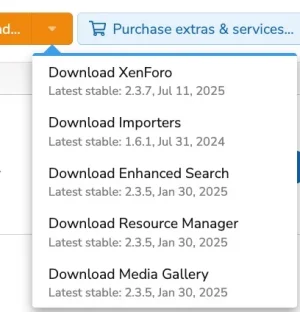
To upgrade, log in to the Account area and if your license is current you should find "2.3.8 Preview" in the drop down list. Alternatively, to use one-click upgrade, you will have to uncheck the advanced option "Only check for stable upgrades" under Options > Basic options and then visit Tools > Check for upgrades before the download is visible.
Due to this bug if you are already running XenForo 2.3.7 and you install 2.3.8 using one-click upgrade your install CSS will once again be a rather fetching purple hue. The correct CSS will display after the upgrade is complete (subject to browser caching).
This Preview release will not be rolled out to Cloud customers or the demo system until next week.
If this preview period is successful, we may provide early access for all releases going forwards.
A full change log will be posted next week. Until then, have a great weekend!
With that in mind, we have just released a preview version of XenForo 2.3.8! The intention behind release previews is to essentially do a "soft" release, similar to beta releases for major releases, and let it run in the wild for up to a week.
At this point, we will not be making any additional changes to XenForo 2.3.8 outside of resolving issues that may get reported to ensure stability ahead of a stable release next week.
We feel that this version should be ready for production; the majority of the changes have been running here without issue, and there will not usually be breaking changes as this is a third point release.
That being said, we do advise caution. If you run into any issues, you may have to revert to a previous backup, await details of a patch that may be provided if applicable, or, wait until the stable release next week.
If you are happy to help us test XenForo 2.3.8, this would be a huge help to us and your fellow customers and ensure a smoother release for everyone next week.
Next week's release will be re-released under a new version string/ID irrespective of there being changes between now and then. So if you upgrade now, you will also have to upgrade again next week.
To upgrade, log in to the Account area and if your license is current you should find "2.3.8 Preview" in the drop down list. Alternatively, to use one-click upgrade, you will have to uncheck the advanced option "Only check for stable upgrades" under Options > Basic options and then visit Tools > Check for upgrades before the download is visible.
Due to this bug if you are already running XenForo 2.3.7 and you install 2.3.8 using one-click upgrade your install CSS will once again be a rather fetching purple hue. The correct CSS will display after the upgrade is complete (subject to browser caching).
This Preview release will not be rolled out to Cloud customers or the demo system until next week.
If this preview period is successful, we may provide early access for all releases going forwards.
A full change log will be posted next week. Until then, have a great weekend!