
You are using an out of date browser. It may not display this or other websites correctly.
You should upgrade or use an alternative browser.
You should upgrade or use an alternative browser.
Too many bots from China
- Thread starter new_view
- Start date
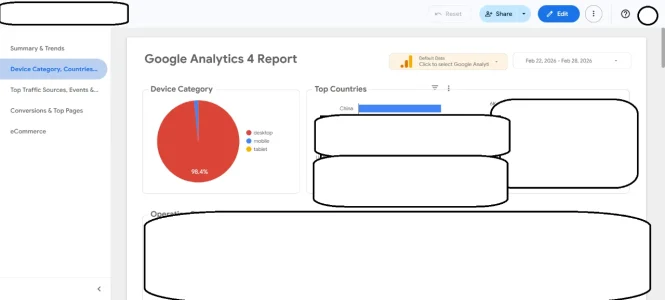

Yes, this is fairly common.
If your site doesn't serve a Chinese audience then it would be recommended to just ban the entire country. If you use Cloudflare (even the free version) this can be accomplished in a couple minutes. If you don't use Cloudflare then there will be more work involved.
With the ban in place it will stop a large percentage of these hits, but not all, as there are always ways to get around something.
If your site doesn't serve a Chinese audience then it would be recommended to just ban the entire country. If you use Cloudflare (even the free version) this can be accomplished in a couple minutes. If you don't use Cloudflare then there will be more work involved.
With the ban in place it will stop a large percentage of these hits, but not all, as there are always ways to get around something.
If you had looked around in the forum before posting the thread you had no doubt reconized that this is quite a common issue, comes in waves, countries change and also, if the traffic shows up in Google Analytics or not. The most active thread around the topic is this:Is anyone experiencing a huge amount of views from China on GA4?

I have a small forum, usually a few hundred guests at most. The last days the number of guests have been unusually high, around 3000 and climbing. We now have over 4800 guests. That's not normal. Many "Viewing unknown page" or "Latest content", with a warning sign. IP addresses are from all corners of the world. Many from south America, Brazil mostly. Also saw quite a number from Vietnam of all places, but everywhere else too.
We're on Cloud and I don't know what to do. Could we be under attack? We have been in the past, a few times I think. For reasons I cannot possibly fathom; we're a...
We're on Cloud and I don't know what to do. Could we be under attack? We have been in the past, a few times I think. For reasons I cannot possibly fathom; we're a...
- Levina
- bot swarms guests
- Replies: 372
- Forum: Forum management


If you're running through WHM you have the option of banning countries through CSF.
Log in to WHM as root.
Navigate to Plugins -> ConfigServer Security & Firewall.
Click Firewall Configuration.
Find the Country Code Lists and Settings section:
CC_ALLOW_FILTER: Enter the 2-letter ISO country codes you want to allow (e.g.US,CA). All other countries will be blocked.
CC_DENY: Enter the 2-letter ISO country codes you want to block (e.g.CN,RU).
Click Change and restart the firewall (csf -r) to apply changes.
Log in to WHM as root.
Navigate to Plugins -> ConfigServer Security & Firewall.
Click Firewall Configuration.
Find the Country Code Lists and Settings section:
CC_ALLOW_FILTER: Enter the 2-letter ISO country codes you want to allow (e.g.US,CA). All other countries will be blocked.
CC_DENY: Enter the 2-letter ISO country codes you want to block (e.g.CN,RU).
Click Change and restart the firewall (csf -r) to apply changes.
If you had looked around in the forum before posting the thread you had no doubt reconized that this is quite a common issue, comes in waves, countries change and also, if the traffic shows up in Google Analytics or not. The most active thread around the topic is this:
I have a small forum, usually a few hundred guests at most. The last days the number of guests have been unusually high, around 3000 and climbing. We now have over 4800 guests. That's not normal. Many "Viewing unknown page" or "Latest content", with a warning sign. IP addresses are from all corners of the world. Many from south America, Brazil mostly. Also saw quite a number from Vietnam of all places, but everywhere else too.
We're on Cloud and I don't know what to do. Could we be under attack? We have been in the past, a few times I think. For reasons I cannot possibly fathom; we're a...
- Levina
- bot swarms guests
- Replies: 372
- Forum: Forum management
Cool, got it.
If you're running through WHM you have the option of banning countries through CSF.
Log in to WHM as root.
Navigate to Plugins -> ConfigServer Security & Firewall.
Click Firewall Configuration.
Find the Country Code Lists and Settings section:
CC_ALLOW_FILTER: Enter the 2-letter ISO country codes you want to allow (e.g.US,CA). All other countries will be blocked.
CC_DENY: Enter the 2-letter ISO country codes you want to block (e.g.CN,RU).
Click Change and restart the firewall (csf -r) to apply changes.
I kinda don't wanna ban all traffic from China.


Might have to block Singapore, too. I find a lot of the Chinese bots hitting my site are coming from data centers there that belong to or host Chinese companies (e.g. Huawei is one I know comes from Singapore).
I concur; in fact, Singapore was a contender in terms of bots.

That is ibou, a search engine:
Given their mission statement
I would not call them a "bad bot". Also, it does not hide and follows robots.txt.

Yeah, Cloudflare is the way to go here. Even on the free tier, you can set up a WAF rule that challenges traffic from specific countries instead of outright blocking them -- that way legitimate visitors from China can still get through a CAPTCHA, but the bots give up.
On my forum I also turned on Cloudflare's "Bot Fight Mode" (free) and their AI bot blocking under Security > Settings. Killed a ton of scraper traffic overnight without touching real users.
On my forum I also turned on Cloudflare's "Bot Fight Mode" (free) and their AI bot blocking under Security > Settings. Killed a ton of scraper traffic overnight without touching real users.
Given what has been written in the other thread about the experiences with cloudflares free tier vs. residential proxies and what the providers of resident proxies write about it ("no problem for us") I do have some doubts.but the bots give up.
Did you read the extensive thread that is linked further up? There is a ton of information about the bot topic and various strategies to deal with them in it.
That's a good point. My forum is fairly low volume so it's worked well for me so far. I have not delved into the other thread yet.

Yes and No. If you change your server to only accept Cloudflare IP's, forcing everything through CF if it wants anything at your server (apart from a handful of ports you may assign to a whitelisted IP), then yes, CF is the way to go, even the free tier. If not, then there are bots bypassing CF and targeting your server IP directly, basically a DDOS attack at your server even though you have CF in place.Yeah, Cloudflare is the way to go here. Even on the free tier, you can set up a WAF rule that challenges traffic from specific countries instead of outright blocking them -- that way legitimate visitors from China can still get through a CAPTCHA, but the bots give up.
Saying all that, CF still provides probably the most robust protection and solutions for every website today, and everyone should use it regardless of direct IP attack, because that is the minority, and the majority will benefit from CF.
Similar threads
- Replies
- 10
- Views
- 716