Talmyric Avatar Recovery

Talmyric Avatar Recovery Beta 4

No permission to download

fords8

Well-known member
Licensed customer
fords8 submitted a new resource:

Talmyric Avatar Recovery - Restore animated GIF avatars after a forum migration or a change in image processor.

This did recover a few on one of my live forums. After running it and reopening the forum, the avatars were working as they should.

Be sure to backup!

Sometimes an avatar animates when opened directly from a member’s profile, while the smaller versions beside posts appear static. If XenForo still has an animated GIF original, Avatar Recovery can rebuild the affected sizes without members uploading their avatars again.

Features
  • AdminCP...

Read more about this resource...
 
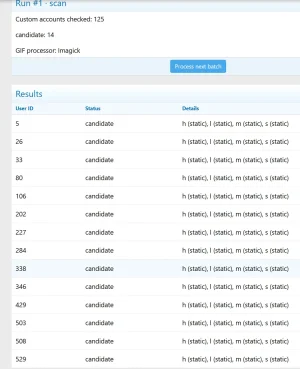
The process only handles 25 items and then stops.
I have to click "Process next batch" every time to continue.

Is this how it's supposed to work?

1794942351798.webp


"Close the board, approve the rebuild, and process the repair batches."
What does this mean?
Why do I need to close the forum? What exactly is supposed to happen, and when? I can't see a Recovery button anywhere.

I think the user expects to see a "Recovery" button below the list of potential recovery candidates.
 
The process only handles 25 items and then stops.
I have to click "Process next batch" every time to continue.

Is this how it's supposed to work?
Yes. This could change down the road.

You have to close the board to process/recover to show up.

From the FAQ!
Why must I close the board before rebuilding?

Closing the board reduces the chance of members changing avatars while files are being rebuilt. Pause administrative avatar edits, imports, and other avatar rebuilds during the repair.

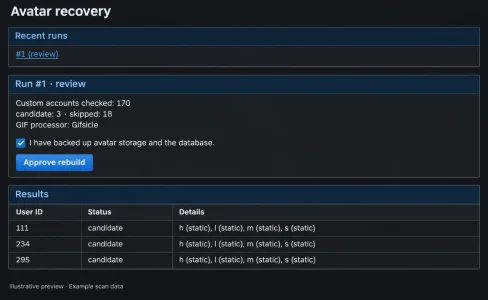
EDIT: This should help. What it looks like when it is set to recover.
Avatar-Recovery-Ready-Preview.webp
 
Last edited:
fords8 updated Talmyric Avatar Recovery with a new update entry:

This update makes scanning and recovery easier to run on larger forums.

This update makes scanning and recovery easier to run on larger forums.

  • Automatic batch processing — Start a scan once and let it continue to the review stage. After approval, recovery batches continue automatically.
  • Larger scan batches — Check up to 250 accounts per request, with a time limit that may end a batch earlier.
  • Five-second pause — A short delay between requests reduces bursts on shared hosting.
  • Pause and resume — Pause...

Read the rest of this update entry...
 
Back
Top Bottom