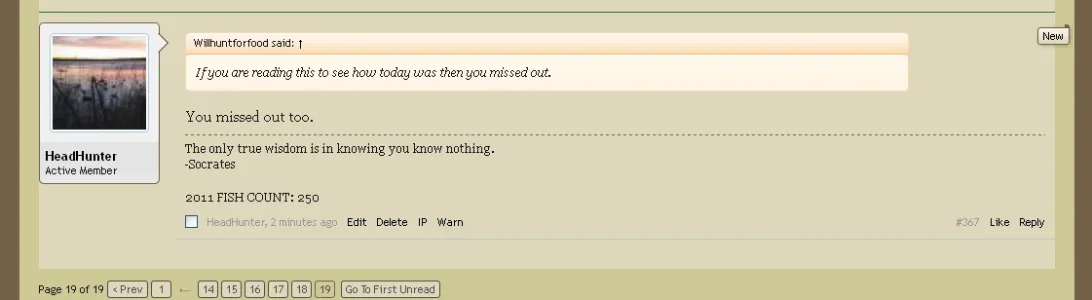
Cam2 Member Licensed customer Oct 30, 2011 #1 Not sure how to do this. I would like to add padding to the left side of the avatar area. Will this also close the gap where the new post flag is located on the left? Thanks in advance. Scott
Not sure how to do this. I would like to add padding to the left side of the avatar area. Will this also close the gap where the new post flag is located on the left? Thanks in advance. Scott
P Paul B XenForo moderator Staff member Licensed customer Oct 30, 2011 #2 Add this to EXTRA.css: Code: .messageList .message { padding-left: 10px; } Change the padding to suit. Upvote 0 Downvote
Add this to EXTRA.css: Code: .messageList .message { padding-left: 10px; } Change the padding to suit.
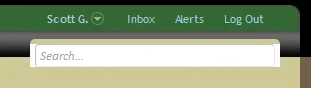
Cam2 Member Licensed customer Oct 31, 2011 #4 Couple of more questions. How do I take care of the white spaces on each side of the search box? How do I take care of the space behind the new wrapper? Thanks. Upvote 0 Downvote
Couple of more questions. How do I take care of the white spaces on each side of the search box? How do I take care of the space behind the new wrapper? Thanks.
Cam2 Member Licensed customer Nov 3, 2011 #5 Anyone have any suggestions on the above? Thanks. Scott Upvote 0 Downvote
P Paul B XenForo moderator Staff member Licensed customer Nov 3, 2011 #6 Try #QuickSearch .formPopup in EXTRA,css for the background colour. For the new indicator, try .message .newIndicator and change the margin-right value to something like -5px. Upvote 0 Downvote
Try #QuickSearch .formPopup in EXTRA,css for the background colour. For the new indicator, try .message .newIndicator and change the margin-right value to something like -5px.
Cam2 Member Licensed customer Dec 28, 2011 #7 I'm not sure which part of the CSS needs to be changed. Can you be a bit more specific? Thanks in advance. Upvote 0 Downvote
I'm not sure which part of the CSS needs to be changed. Can you be a bit more specific? Thanks in advance.
P Paul B XenForo moderator Staff member Licensed customer Dec 29, 2011 #8 Code: #QuickSearch .formPopup { background-color: red; } .message .newIndicator { margin-right: -5px; } Upvote 0 Downvote
Code: #QuickSearch .formPopup { background-color: red; } .message .newIndicator { margin-right: -5px; }