Phil Active member Licensed customer Aug 30, 2015 #1 Basic question.... Lost in the CP I can´t find the option anymore...... Thanks.
Phil Active member Licensed customer Aug 30, 2015 #3 Thank you, all is set to white already....... Upvote 0 Downvote
A Amaury Well-known member Aug 30, 2015 #4 What are you wanting to change, exactly? Can you provide a link to your forum? Upvote 0 Downvote
Phil Active member Licensed customer Aug 30, 2015 #5 The light blue background color.... GentlemenSimRacers / GSR Thank you ... Upvote 0 Downvote
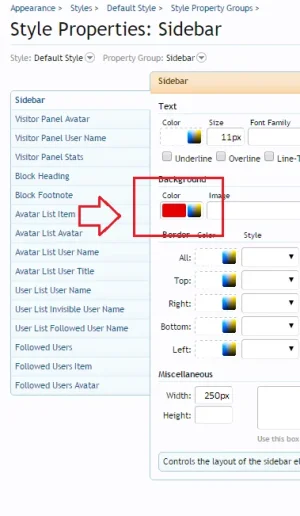
A Amaury Well-known member Aug 30, 2015 #6 Then yes, Style Properties > Sidebar. By default it's transparent and inherits from the Secondary Content style property under Building Blocks. You'll need to give it a background. Upvote 0 Downvote
Then yes, Style Properties > Sidebar. By default it's transparent and inherits from the Secondary Content style property under Building Blocks. You'll need to give it a background.
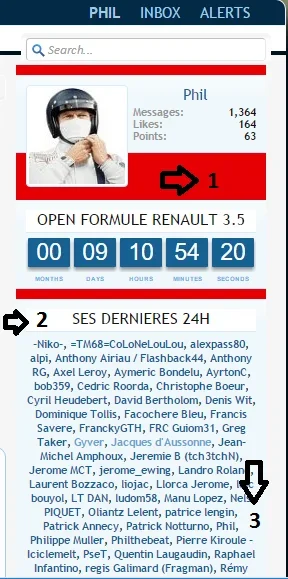
Phil Active member Licensed customer Aug 31, 2015 #7 Thanks, so this what we´ve got: The red color is for the number 1 Where should i go in the CP to change the color for the number 2 (white) and 3 (light blue) Thanks. Upvote 0 Downvote
Thanks, so this what we´ve got: The red color is for the number 1 Where should i go in the CP to change the color for the number 2 (white) and 3 (light blue) Thanks.
Russ Well-known member Licensed customer Sep 1, 2015 #9 Phil said: Hello , no suggestions ? Click to expand... Sidebar blocks inherit secondary content by default, this in extra.css should cover you Code: .sidebar .secondaryContent { background-color: #f4c3c3; } (of course change to your own preference of color ) Upvote 0 Downvote
Phil said: Hello , no suggestions ? Click to expand... Sidebar blocks inherit secondary content by default, this in extra.css should cover you Code: .sidebar .secondaryContent { background-color: #f4c3c3; } (of course change to your own preference of color )
Phil Active member Licensed customer Sep 1, 2015 #10 Russ said: Sidebar blocks inherit secondary content by default, this in extra.css should cover you Code: .sidebar .secondaryContent { background-color: #f4c3c3; } (of course change to your own preference of color ) View attachment 115796 Click to expand... Thank you ..I try that Upvote 0 Downvote
Russ said: Sidebar blocks inherit secondary content by default, this in extra.css should cover you Code: .sidebar .secondaryContent { background-color: #f4c3c3; } (of course change to your own preference of color ) View attachment 115796 Click to expand... Thank you ..I try that
Phil Active member Licensed customer Sep 1, 2015 #11 Okay, already back ........ Is that at this place: Appearance>Default Style>Sidebar Or in templates? Upvote 0 Downvote
Russ Well-known member Licensed customer Sep 1, 2015 #12 Appearance -> Templates -> EXTRA.CSS should be where most of your custom CSS goes, including what I posted above. Upvote 0 Downvote
Appearance -> Templates -> EXTRA.CSS should be where most of your custom CSS goes, including what I posted above.