Resource icon

SEO Audit 1.0.1

No permission to download

qubn

New member
Licensed customer
qubn submitted a new resource:

SEO Audit - Comprehensive SEO auditing dashboard with auto-fix for XenForo

SEO Audit​

A comprehensive SEO auditing dashboard for XenForo administrators. Scan your forum for SEO issues, review detailed reports with severity grades, and auto-fix common problems, all from within your Admin CP.

Overview​

SEO Audit analyzes your forum across five categories, configuration, schema markup, meta tags, content quality, and link integrity, producing an overall SEO score with a letter grade (A through F). Issues are categorized by...

Read more about this resource...
 
What does auto fix do? How does it do it -- meaning, does it add a change to the rendering on the fly? does it update the database in some fashion? does it change templates?
What service does it use to determine scores? is there an api key needed?
 
What does auto fix do? How does it do it -- meaning, does it add a change to the rendering on the fly? does it update the database in some fashion? does it change templates?
What service does it use to determine scores? is there an api key needed?
Auto-fix covers three things: missing JSON-LD structured data, missing meta descriptions, and missing OG image tags.

It doesn't touch the database or edit any templates. It's all done on the fly at render time. There's a template modification on PAGE_CONTAINER that hooks in callbacks before </head>. When a page loads, it figures out what kind of page it is (forum, category, page, homepage), checks what's missing, and injects the right tags into the HTML output. It's all in memory, nothing gets saved anywhere. If you turn off an option in AdminCP it stops immediately, turn it back on and it's back. No rebuilds or cache clearing needed.

Breaking it down:
  • JSON-LD - adds schema.org structured data so Google can do rich results, breadcrumbs, etc. You can toggle it per page type.
  • Meta descriptions - if a forum or page doesn't have a description set, it generates one. Forums get something like "Browse [Forum Title] - [X] discussions on [Site Name]". Pages get the first ~160 chars of their content.
  • OG image - if there's no og:image tag already, it drops in your site logo so links shared on Discord/Facebook/Twitter don't show a blank preview.

For scoring, no external service, no API key, nothing like that. It just queries your own XenForo database, checks your content against a set of SEO rules, and flags issues. The score itself is pretty straightforward: you start at 100 and lose 10 points per critical issue, 3 per warning, 1 per info. It's basically a way to track whether things are getting better or worse over time, not some kind of Google ranking predictor.

All of this is still relevant, JSON-LD has honestly gotten more important with Google leaning into it for AI overviews and rich results. Meta descriptions still drive click-through rates in search results. OG images are table stakes for social sharing. None of it has been deprecated or made obsolete.

As far as what it actually does for you in practice, it's not going to transform your rankings. What it does is bring your forum up to baseline. Without these tags, your pages are missing standard stuff that Google and social platforms expect to find. The JSON-LD won't magically boost you, but it makes you eligible for rich results and enhanced listings, without it you're just not in the running for those. Meta descriptions don't directly affect ranking (Google has said this), but they affect whether someone clicks your result versus the one above or below it, a real description vs whatever Google auto-generates from your page can make a noticeable difference in click-through rate. The OG image has zero effect on search rankings, but it's the difference between your links looking legitimate or looking like spam when shared on Discord or social media.

So it helps, but in a "fixing what's broken" way, not a "secret SEO weapon" way. Most XenForo sites are shipping pages with none of this filled in, this just makes sure yours aren't.

 
Getting started correction or i have an error:
  1. After installation, go to Admin CP > SEO Audit > Dashboard
should be
  1. After installation, go to Admin CP > Tools -> SEO Audit
?
1773251789209.webp

I don't have a main SEO audit menu item, nor dashboard link under it.
 
So i ran a scan and have a report.

Now what? is it automatically updating these findings on the fly?

How can i validate the 1 missing forum description and to see what it turned it in to?


1773253532552.webp
 
Ok, i exported the data to csv.
found some more useful details in there.

example:
1773254072611.webp

So i have the flags enabled to add the json ld on the page:

(another issue, the last scheduled time stamp doesn't update the run that just finished)

1773254176396.webp

"Requires Page types to be selected below" doesn't exist. that's the end f the options.


So i go to that thread, and i see no json-ld added in source at all.

1773254292404.webp


so, something isn't working.
 
Ok, i exported the data to csv.
found some more useful details in there.

example:
View attachment 334952

So i have the flags enabled to add the json ld on the page:

(another issue, the last scheduled time stamp doesn't update the run that just finished)

View attachment 334953

"Requires Page types to be selected below" doesn't exist. that's the end f the options.


So i go to that thread, and i see no json-ld added in source at all.

View attachment 334954


so, something isn't working.

Hey @briansol, I really appreciate the feedback, you caught a few things.

The nav path is wrong in the listing, my bad. It's Admin CP > Tools > SEO Audit. I have fixed the description.

For your second post, the scan itself is just detection, it doesn't change anything on your site. It finds problems and reports them. To actually fix stuff:
  • When you open a report, each issue has a "How to fix" note explaining what to do. Issues that have a specific AdminCP fix (configuration, forum descriptions, style properties) also have a "Fix it" button that links directly to the relevant page, so for the missing forum description, it takes you straight to the node edit page. Content issues like thin threads or short meta descriptions don't have a "Fix it" button since you'd fix those by editing the thread/post directly.
  • For bulk/automatic fixes, go to Admin CP > Setup > Options > SEO Audit (scroll past the separator to the advanced section), or go directly to admin.php?seo-audit/auto-fix in your admin panel. That's where you can toggle on auto-fix for JSON-LD, meta descriptions, and OG tags. These get injected at render time, nothing gets written to the DB, so you can flip them on/off freely.

On the JSON-LD, the auto-fix covers forums, categories, pages, and the homepage. It doesn't do threads, because XF core already outputs DiscussionForumPosting structured data on thread pages (as microdata, which Google reads the same way). The addon fills in the page types that XF doesn't cover. The listing description was misleading about the schema types though, I have corrected that. The actual types are CollectionPage (forums/categories), WebPage (pages), and WebSite + Organization (homepage).

For the "requires page types to be selected below", you're right, that was a bug. The page type checkboxes weren't rendering on the Options page. Fixed in v1.0.1, after updating you'll see the four checkboxes (forums, categories, pages, homepage) right below the JSON-LD toggle on the Options page. There's also a dedicated Auto-Fix page at admin.php?seo-audit/auto-fix with a cleaner layout for configuring all the auto-fix options.

The scheduled timestamp, that one only tracks cron-triggered scans, not manual ones. Your manual scans show up as reports on the dashboard with their own dates. I agree it's confusing to have that visible as a raw number, I'll clean that up.

Also putting thread-level JSON-LD on the list for a future update, XF covers it via microdata already but having it in JSON-LD too is reasonable.

Let me know if anything else comes up.
 
Last edited:
Hey @briansol, I really appreciate the feedback, you caught a few things.

The nav path is wrong in the listing, my bad. It's Admin CP > Tools > SEO Audit. I have fixed the description.
Thanks!


For your second post, the scan itself is just detection, it doesn't change anything on your site. It finds problems and reports them. To actually fix stuff:
  • When you open a report,
I don't know how to open a report. Where is this done? There's nothing to open.
  • each issue has a "Fix it" button that links directly to the AdminCP page where you'd fix that specific thing.
I don't see this anywhere. How do i get here?

  • So for the missing forum description, the Fix it button takes you straight to the node edit page where you can add it. There's also a "How to fix" note on each issue explaining what to do.
I only see howto fix.
1773259312541.webp


  • For bulk/automatic fixes, go to Admin CP > Setup > Options > SEO Audit (scroll past the separator to the advanced section), or go directly to admin.php?seo-audit/auto-fix in your admin panel. That's where you can toggle on auto-fix for JSON-LD, meta descriptions, and OG tags. These get injected at render time, nothing gets written to the DB, so you can flip them on/off freely.
I have auto-fix enabled. but again, i don't know what is getting fixed as there's no visibility into it.

On the JSON-LD, the auto-fix covers forums, categories, pages, and the homepage. It doesn't do threads, because XF core already outputs DiscussionForumPosting structured data on thread pages (as microdata, which Google reads the same way). The addon fills in the page types that XF doesn't cover. The listing description was misleading about the schema types though, I have corrected that. The actual types are CollectionPage (forums/categories), WebPage (pages), and WebSite + Organization (homepage).
The FAQ link above is a forum category of my site.
1773259469384.webp

For the "requires page types to be selected below", you're right, that was a bug. The page type checkboxes weren't rendering on the Options page. Fixed in v1.0.1, after updating you'll see the four checkboxes (forums, categories, pages, homepage) right below the JSON-LD toggle on the Options page. There's also a dedicated Auto-Fix page at admin.php?seo-audit/auto-fix with a cleaner layout for configuring all the auto-fix options.
ok, let me run the new package and i'll report back.

The scheduled timestamp, that one only tracks cron-triggered scans, not manual ones. Your manual scans show up as reports on the dashboard with their own dates. I agree it's confusing to have that visible as a raw number, I'll clean that up.
thanks, that helps.

Also putting thread-level JSON-LD on the list for a future update, XF covers it via microdata already but having it in JSON-LD too is reasonable.

Let me know if anything else comes up.
 
Thanks!


I don't know how to open a report. Where is this done? There's nothing to open.

I don't see this anywhere. How do i get here?


I only see howto fix.
View attachment 334958


I have auto-fix enabled. but again, i don't know what is getting fixed as there's no visibility into it.


The FAQ link above is a forum category of my site.
View attachment 334959


ok, let me run the new package and i'll report back.


thanks, that helps.
Opening a report: After your scan finishes, go to Admin CP > Tools > SEO Audit. You'll see a "Latest Scan Summary" section at the top with a blue "View report" link right below it. There's also a "Scan History" table further down the page where every past scan has its own "View report" link. Click either one to see the full issue list with details.

"Fix it" button: The "Fix it" button only appears on issues where there's a specific AdminCP page to send you to, like configuration issues (takes you to Setup > Options) or forum description issues (takes you to the node edit page). For content issues like thin threads or short meta descriptions, there's no single admin page to fix them, you'd edit the thread/post directly on the frontend. That's why those only show the "How to fix" text with instructions instead. The button isn't missing, it just doesn't apply to every issue type.

Auto-fix visibility: You're right, there's no visibility into what's being auto-fixed right now. The auto-fixes inject markup at page render time, JSON-LD, meta descriptions, OG tags, but there's no log showing which pages got enhanced. Best way to verify right now: enable the auto-fixes, then run a new scan. The issue count should drop for the categories you enabled (e.g., enabling auto meta descriptions should reduce "Forum No Meta Description" issues). I'll add an auto-fix activity indicator to the dashboard in a future update.

FAQ link: Since your FAQ is set up as a forum category, yes, the JSON-LD auto-fix covers forums and categories (injects CollectionPage structured data). Enabling JSON-LD auto-injection would cover that page automatically.

Let me know how v1.0.1 goes after you install it, the checkbox fix should be the main thing you notice.
 
Alright, now we're cooking with 1.0.1.

Audit re-running. It's timed out a few times. a CLI version of this would be helpful.

Adjusted the settings for on the fly fixes which is now working.

Seeing the json on that category correctly.
1773261681280.webp
 
Alright, now we're cooking with 1.0.1.

Audit re-running. It's timed out a few times. a CLI version of this would be helpful.

Adjusted the settings for on the fly fixes which is now working.

Seeing the json on that category correctly.
View attachment 334960
Glad to hear that. I'll take a look at the time out issue and the CLI version. I'll get back to you!
 
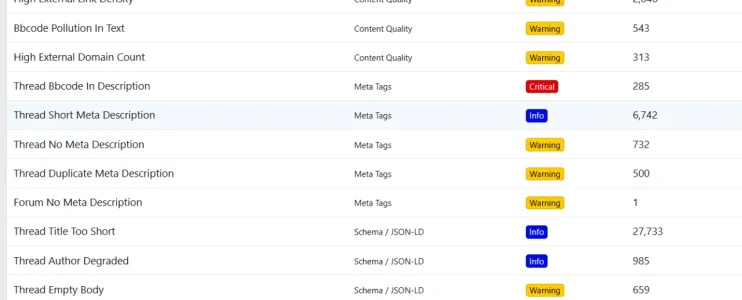
ok, scan complete, see the report link now.

1773263220048.webp


still nothing to fix... / no link to fix

all my errors are content quality. is that why?

these don't show up as fixable anywhere

1773263298632.webp
 
Back
Top Bottom