ŽivaAkcija Well-known member Licensed customer Jun 27, 2018 #1 Hi, any tutorial how to add rounded avatar in default style? Avatar border radius whar code goes inside or code goes inside extra less?
Hi, any tutorial how to add rounded avatar in default style? Avatar border radius whar code goes inside or code goes inside extra less?
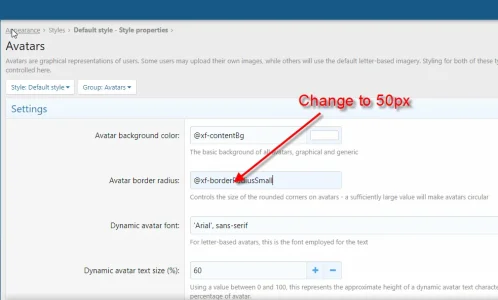
domfootwear Member Licensed customer Jun 27, 2018 #2 ŽivaAkcija said: Hi, any tutorial how to add rounded avatar in default style? Avatar border radius whar code goes inside or code goes inside extra less? Click to expand... You can try as below: Upvote 0 Downvote
ŽivaAkcija said: Hi, any tutorial how to add rounded avatar in default style? Avatar border radius whar code goes inside or code goes inside extra less? Click to expand... You can try as below:
ŽivaAkcija Well-known member Licensed customer Jun 27, 2018 #3 if add 50% that broke entire thread/post page Upvote 0 Downvote
domfootwear Member Licensed customer Jun 27, 2018 #4 ŽivaAkcija said: if add 50% that broke entire thread/post page Click to expand... You should try to add 50px instead of 50% Upvote 0 Downvote
ŽivaAkcija said: if add 50% that broke entire thread/post page Click to expand... You should try to add 50px instead of 50%
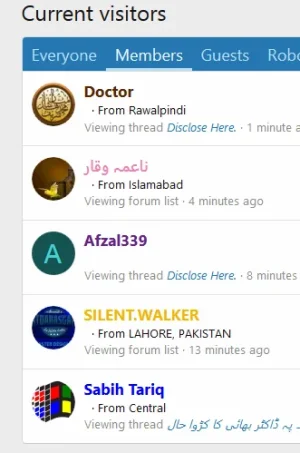
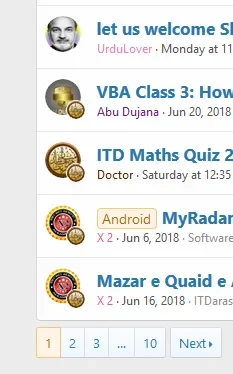
domfootwear Member Licensed customer Jun 27, 2018 #6 I could change it To view this content we will need your consent to set third party cookies. For more detailed information, see our cookies page. Accept third party cookies Please see our site at https://www.giaiphapexcel.com/diendan/threads/copy-sheet-trong-file-thành-file-riêng-biệt.135732/ Upvote 0 Downvote
I could change it To view this content we will need your consent to set third party cookies. For more detailed information, see our cookies page. Accept third party cookies Please see our site at https://www.giaiphapexcel.com/diendan/threads/copy-sheet-trong-file-thành-file-riêng-biệt.135732/
Mian Shahid Well-known member Licensed customer Jun 28, 2018 #8 Now, any idea to place embossed circle around avatar? Upvote 0 Downvote
KSA Well-known member Licensed customer Jun 29, 2018 #9 Mian Shahid said: Now, any idea to place embossed circle around avatar? Click to expand... add this code to EXTRA.less template Code: .avatar { border: solid 2px; } If you want to change the color of the circle add this within the code Code: border-color: yourcolor; Upvote 0 Downvote
Mian Shahid said: Now, any idea to place embossed circle around avatar? Click to expand... add this code to EXTRA.less template Code: .avatar { border: solid 2px; } If you want to change the color of the circle add this within the code Code: border-color: yourcolor;
maszd Well-known member Licensed customer Jul 3, 2018 #10 Hi, i was changed this but how to move online indicator inside avatar? thanks. Upvote 0 Downvote
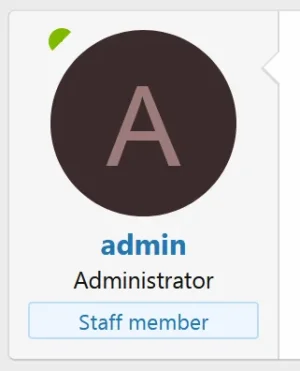
Russ Well-known member Licensed customer Jul 4, 2018 #11 maszd said: Hi, i was changed this but how to move online indicator inside avatar? View attachment 179042 thanks. Click to expand... You can add this to extra.less, adjust to your liking: Code: .block .message-avatar-wrapper .message-avatar-online { top: 8px; left: 8px; } Upvote 0 Downvote
maszd said: Hi, i was changed this but how to move online indicator inside avatar? View attachment 179042 thanks. Click to expand... You can add this to extra.less, adjust to your liking: Code: .block .message-avatar-wrapper .message-avatar-online { top: 8px; left: 8px; }
domfootwear Member Licensed customer Jul 9, 2018 #12 Russ said: You can add this to extra.less, adjust to your liking: Code: .block .message-avatar-wrapper .message-avatar-online { top: 8px; left: 8px; } Click to expand... I think you should change from 8px to 2px. Because If you use mobile web application, the avatar-online position is not correct. Upvote 0 Downvote
Russ said: You can add this to extra.less, adjust to your liking: Code: .block .message-avatar-wrapper .message-avatar-online { top: 8px; left: 8px; } Click to expand... I think you should change from 8px to 2px. Because If you use mobile web application, the avatar-online position is not correct.