remove the display of ads in certain templates.

sadmidou

Member
Licensed customer
Hello

I would like to prevent ads from appearing on certain templates, specifically the login template.I tried to do this using Xenforo's options, but I can't select the templates.Does anyone have any ideas on how to do this? Thanks in advance.

ads.webp
 
Many advertisers require ads to only be displayed on substantial, and original content pages. Check with your advertiser to know their specific policy for ad placements. Breaking an advertiser's policy, can result in bans, which some are quick to do, if you are lucky it will only be temporary but not in all cases. That being said depending on your advertiser you likely should not be placing ads on a lot more XenForo templates.

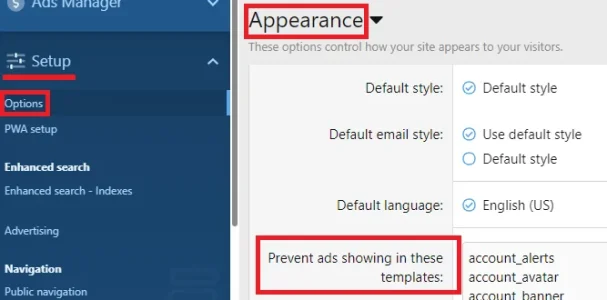
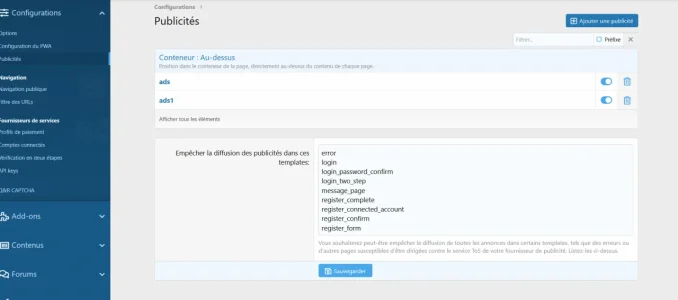
Setting is under Admin Control Panel -> Setup -> Options -> Appearance -> "Prevent ads showing in these templates"

For example if you are using Google Adsense your list should look something like:

Code:
account_alerts
account_avatar
account_banner
account_bookmarks
account_connected
account_connected_associate
account_details
account_email
account_following
account_ignored
account_preferences
account_privacy
account_reactions
account_security
account_signature
account_upgrades
account_upgrades_purchase
account_username
approval_queue
contact_form
conversation_add
conversation_edit
conversation_invite
conversation_leave
conversation_list
conversation_reply
conversation_view
error
find_threads_list
forum_post_thread
help_index
help_page
login
login_password_confirm
login_two_step
lost_password
lost_password_confirm
member_about
member_recent_content
member_view
message_page
news_feed
notice_dismiss
online_list
reaction_list
register_complete
register_confirm
register_connected_account
register_form
report_list
search_form
search_results
watched_forums_list
watched_threads_list
whats_new_profile_posts

If you are using XenForo Media Gallery add these:
Code:
xfmg_category_add
xfmg_media_edit_image
xfmg_watched_albums
xfmg_watched_categories
xfmg_watched_media

If you are using XenForo Resource Manager add these:
Code:
xfrm_category_add_resource
xfrm_resource_edit
xfrm_watched_categories
xfrm_watched_resources
 
Back
Top Bottom