Just getting started. We're a wanna be educational forum. Well, I want the site to be educational, but my friend just likes to see himself type. I call him an 80 ton ego. He is eloquent and entertaining, but that's not the crowd (I'M) looking for.
At the moment we have several categories regarding different aspects of things that need to be addressed, but nothing resembling a syllabus.
It's not planned at all. We think of something we want to address, and post it. Then we post something else and it goes to the top.
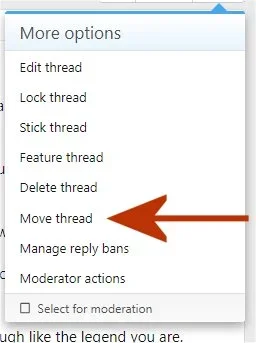
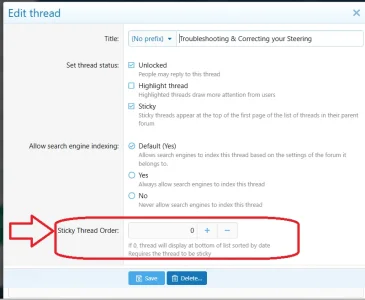
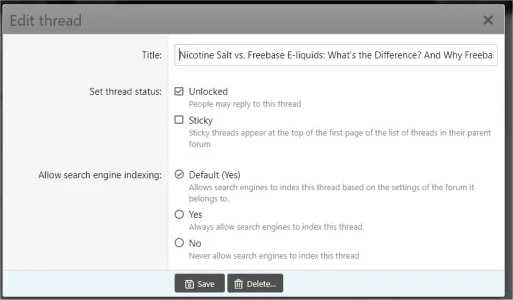
There needs to be an order to the forums and threads. We need to be able to pin or stick a thread as number one, two or three... etc. We'll ALWAYS think of something else that needs to be addressed, so we need to be able to add a new thread and move it down so that it's in a cohesive order, and then pin it.
Remember, I'm a classic antique whose lights are going dim, so please keep it KISS. Keep it Simple for the Stupid
At the moment we have several categories regarding different aspects of things that need to be addressed, but nothing resembling a syllabus.
It's not planned at all. We think of something we want to address, and post it. Then we post something else and it goes to the top.
There needs to be an order to the forums and threads. We need to be able to pin or stick a thread as number one, two or three... etc. We'll ALWAYS think of something else that needs to be addressed, so we need to be able to add a new thread and move it down so that it's in a cohesive order, and then pin it.
Remember, I'm a classic antique whose lights are going dim, so please keep it KISS. Keep it Simple for the Stupid
Last edited: